November 12, 2026
Creating a Workflow for Product Lines
Creating a workflow means named roles, triggers, templates, QA and iteration for fashion, beauty, jewelry and home lines, with Sprello beside PLM.
Three colorways sit in a folder, two of them named final_v3, and the line sheet is due Friday. The sketch that started the set is in a PDF, the approvals are in a chat thread, and nobody can say with confidence which version the buyer saw last week.
Creating a workflow means writing one repeatable path from a product-visual decision to a buyer-ready assortment, with a named owner, a trigger, a saved template, a quality gate and a rule for when the path changes. Sprello, our product, covers the visual layer of that path: AI for product development and merchandising, from product concept to buyer-ready collection.
Published 12 November 2026.
A process map describes work. A workflow runs it and reports back. The gap shows up the first time someone leaves the team, or the first time a buyer asks which material a render was built from.
How Do You Create a Workflow, Step by Step
A sketch is ready, but the team still needs to decide who turns it into a visual, who approves it, and what happens when a colorway misses the brief. An operating card makes those decisions visible before the first run.
| Element | What to write | Example for one style |
|---|---|---|
| Trigger | Event that starts the run | Sketch, CAD, material or reference is ready |
| Roles | Named owner of each handoff | Designer, merchant, exception approver |
| Template | Saved steps reused on the next style | Colorway and product-visual sequence |
| QA gate | Checks before a visual is accepted | SKU accuracy, brand rules, rights, channel crop |
| Iteration | How the next version changes | Log the failed check and edit that step |
The card is not a process map or an all-AI handoff. It is an operating card with a measurement layer and a named person who has authority to approve or stop the work. Keep it focused on visual production and merchandising; technical product records stay in their designated systems.
Seven Steps That Survive a Season
- Choose one category, one season and one channel. A pilot spanning knitwear, jewelry and several regions makes it difficult to tell whether the workflow helped or the rules differed. Keep the scope narrow enough to compare like with like.
- Write the current path from observed work. Record what happens, including rework, waiting and decisions made in chat. The product design process can include loops that a tidy process map misses.
- Fit the card to the existing calendar. Development timelines vary by operating model. Record the actual review windows and handoffs for the pilot, then set a workflow that fits them. A card that ignores the team's calendar is unlikely to be used consistently.
- Fill the five fields with names, not just job titles. Name the person who owns each handoff and the person allowed to stop a style. Define the saved sequence and the checks it must pass.
- Give every step an input, an output, an owner and a pass rule. Preserve the relationship between the concept, CAD, materials and resulting visuals. A buyer-facing visual should be traceable to the product details that informed it.
- Set the quality gate before catalog and line-sheet use. Check the visual before it reaches the shared product catalog or buyer-facing materials. Selected visuals and product details can then flow from the catalog into line sheets and buyer assortments.
- Pilot with one controlled group, then compare results. Choose a baseline measure, such as the time from a ready input to an approved visual, and use the same measure during the pilot. If a step fails, adjust that step rather than rebuilding the entire workflow.
Where the Visual Layer Ends
The workflow covers the visual and merchandising layer. Pattern making, bills of materials, tech packs, demand forecasting and open-to-buy remain with the systems and owners responsible for them. Keeping that boundary clear prevents a visual workflow from becoming a duplicate product-record system.
Practical rule: tie one approved visual set to one catalog style, with a clear version.
Sprello's visual canvas connects AI models, lets teams adjust parameters, and shows how inputs become outputs. It can take in sketches, CAD files, materials and references to create and refine product visuals. Once the canvas workflow meets the team's standards, it can be saved and run again for the next style. Approved visuals and product details can then flow from the shared catalog into line sheets and buyer assortments. The card defines who checks the work and what “approved” means; the technical product record stays in its designated system.
Which System Should Hold the Line
A product-development lead may use a sketch to start a visual workflow, but the technical record still belongs in PLM. The key is to assign each system a clear job and owner. A visual workflow is an operating card: it records the inputs, steps, outputs, measurement criteria, and the person responsible for approval. It covers visual production and merchandising, not the full product-development process.
Sprello is an AI workflow canvas for fashion, beauty, and lifestyle brands. Teams connect AI models, adjust parameters, and see how sketches, CAD files, materials, and references become product visuals. A canvas workflow can be saved and run again on the next style. Selected product details and visuals can flow from the shared catalog into line sheets and buyer assortments. The technical product record remains in PLM; planning and financial decisions stay in the systems responsible for them.
The table separates those responsibilities. A context diagram walkthrough can help teams make inputs, steps, and outputs visible before building a workflow.
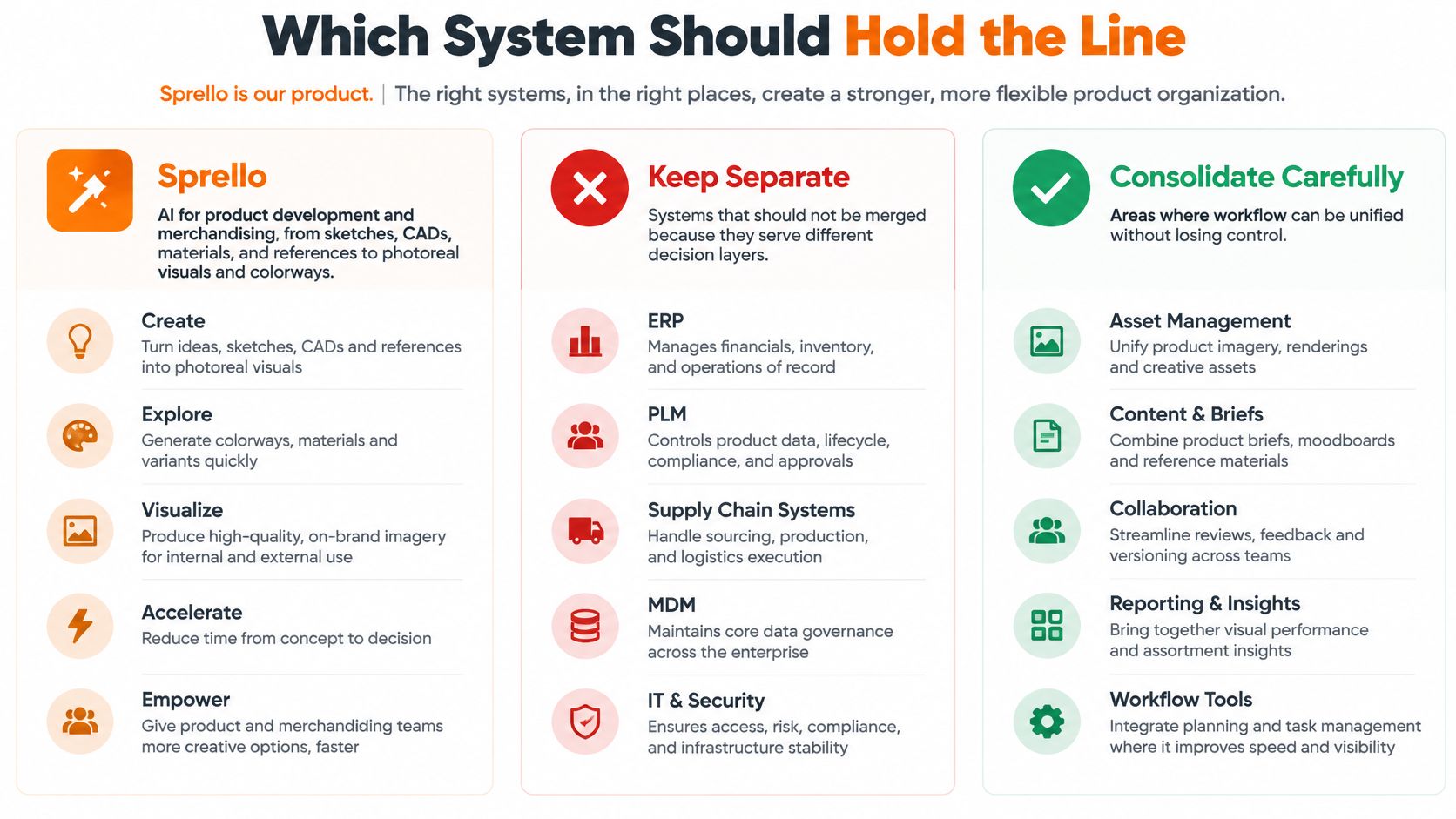
| Category | Best used for | Leave to other systems | How teams obtain it |
|---|---|---|---|
| Sprello | Visual workflows that turn sketches, CAD files, materials, and references into product visuals; shared catalog; selected visuals and details for line sheets and buyer assortments | Tech packs, bills of materials, pattern making, demand forecasting, and open-to-buy | A walkthrough tailored to the team's workflow, after sharing catalog size and use case |
| PLM | Technical product records, specifications, tech packs, and bills of materials | Visual exploration and buyer assortments | Existing product-development system |
| Merchandise planning | Demand and financial line plans, including open-to-buy | Creative production and product visuals | Existing planning system |
| Generic BPM or automation | Task routing, approvals, and service levels | Product visuals and assortment visualization | Existing process platform |
| Digital asset management | Storage and reuse of finished files | Creating and refining product visuals | Existing asset library |
What Not to Consolidate
PLM holds the technical truth of a style: construction details, measurements, and bills of materials. Keep those records there. Visual exploration has different inputs and outputs, so placing it inside a technical record can blur ownership and make review harder.
Merchandise-planning systems handle demand and open-to-buy. They inform decisions about the assortment; they do not need to determine how a product looks.
Generic BPM tools route tasks and approvals. A visual workflow, by contrast, connects models and parameters to product inputs and outputs. A digital asset library stores finished files, while a canvas workflow creates and refines visuals from sketches, CAD files, materials, and references.
The Controls a Visual Layer Has to Pass
Enterprise reviews should establish how access and data handling work for the team's use case. Sprello states that designs, sketches, and brand IP are encrypted at rest and in transit, with strict data isolation between workspaces. Discuss the team's requirements and workflow in the demo.
Use Sprello when the work is visual coordination and buyer-ready presentation. Keep technical product records and financial planning in the systems that own them.
Which Decisions Stay With a Person
A beauty launch can go off course when an AI step changes a product claim. A jewelry visual can cause confusion if a rendered metal tone looks like a confirmed specification. Assign a person to approve decisions that affect what a product promises or how a customer will understand it.
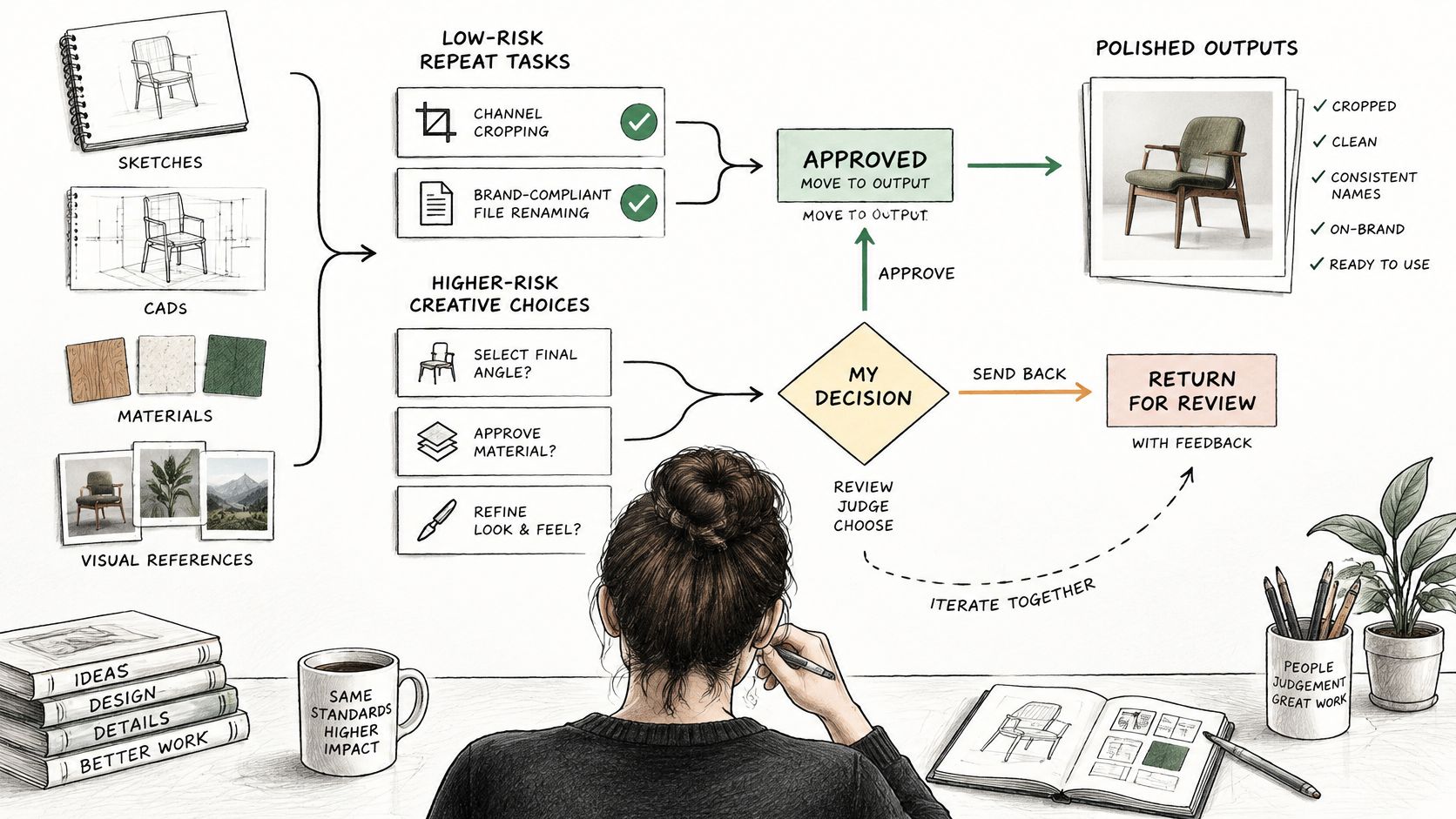
Sort Steps by the Cost of Being Wrong
Repeatable production tasks can run automatically once the visual is approved. That includes channel crops and resizes, file naming that follows the brand convention, and copying metadata from the catalog style.
Keep higher-impact decisions with a named approver:
- Product claims on a beauty item, especially language that could be read as a health or efficacy statement.
- Cultural and regional representation, where a gesture, color, or styling choice may carry meaning the source brief does not capture.
- Jewelry details that could be mistaken for specifications, such as metal, finish, or stone appearance.
- Language a buyer could read as a promise, including delivery windows or exclusivity.
What an AI Visual Must Show Before Review
Put the source sketch or CAD, the material or reference, the requested colorway, and the workflow version together on the approval screen. That record helps the reviewer identify whether an issue came from the input, the instructions, or a later workflow edit.
In its 2025 enterprise automation benchmark, Jitterbit reported that 71% of surveyed enterprise IT leaders lacked a unified platform for integrations, while 36% named compliance as a major constraint on full deployment. For a visual workflow, keep an audit note and a clear route for returning an output for revision.
Write the exception path in one line: name who gets notified, how long they have to respond, and what happens to the style if they decline. Until the approver accepts the visual, keep it out of the line sheet and buyer assortment. If ownership is unclear, map the handoffs on a swim lane chart and assign each decision to a person.
Automate the repeat, keep approval of the promise with a person.
How Do You Prove the Workflow Worked
A beauty launch can move faster and still fail if the buyer rejects the visuals or a region was left out of review. Before the pilot starts, record the baseline for the same category. The workflow card needs a measurement layer: cycle time, approval quality, and exceptions that have a named owner.
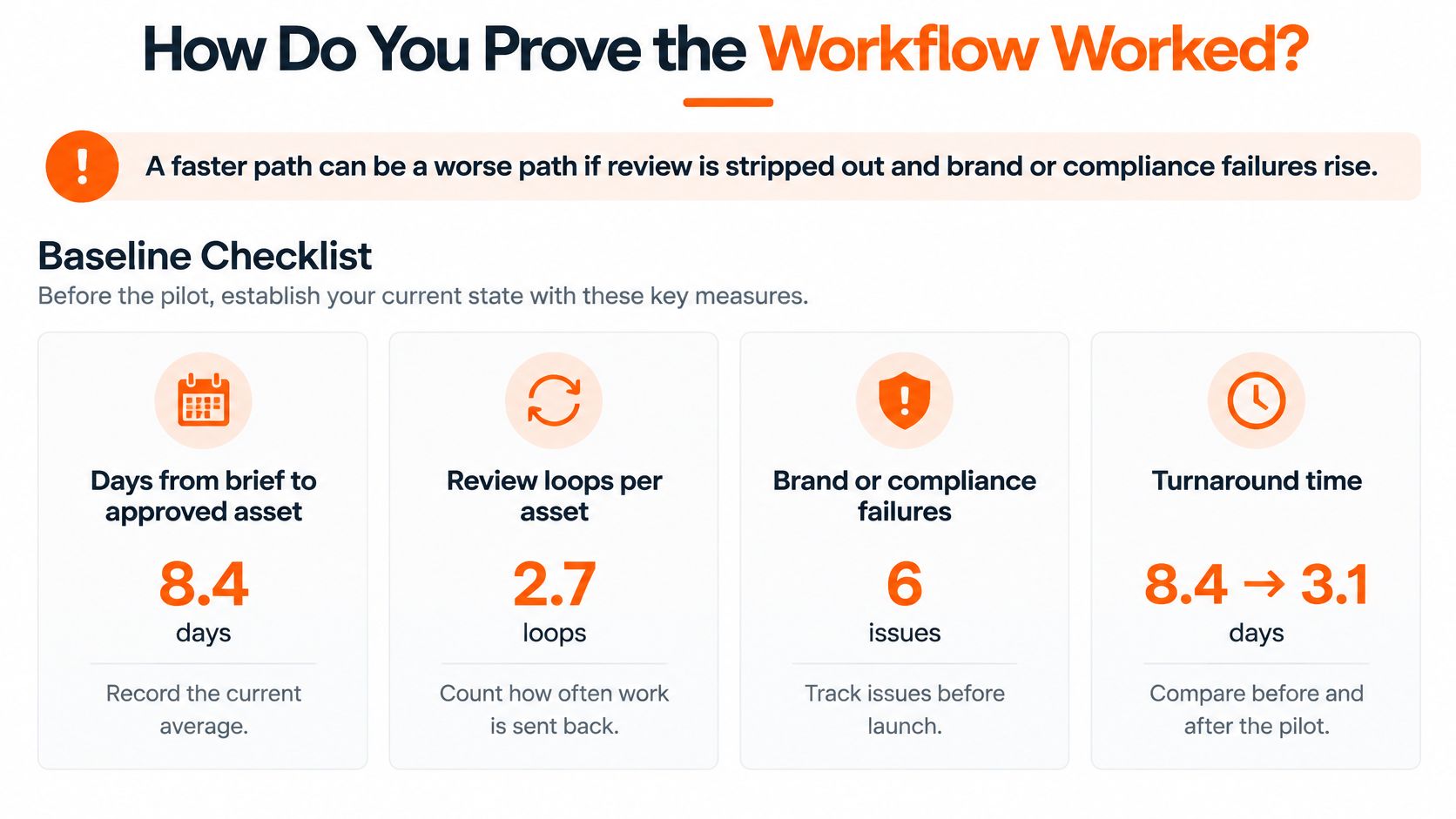
| Metric | Baseline to capture | What improvement looks like |
|---|---|---|
| Brief to approved visual | Days from trigger to signed visual | Fewer days with no rise in rejections |
| Prototype to market sample | Weeks from prototype to market sample | A shorter cycle without skipping fit review |
| Market samples commissioned | Count per season | Fewer samples when virtual review resolves visual or merchandising questions |
| First-pass approval | Share accepted without rework | A higher share, not only a faster clock |
| Exception rate | Share leaving the standard path | Exceptions are visible, named, and not hidden in side chats |
Read the Sample Rows Honestly
Fewer samples is not the same as skipping fit. A 2026 study of intimate-apparel new-product development reported that all participants agreed 3D CAD reduced sample lead times, with nine of 13 strongly agreeing. Participants gave examples of two to three weeks saved per virtual round, while noting that typical intimate-apparel development can still run two to eight months (3D body tech paper). The reported savings came from less sample preparation, shipping, patternmaking, material development, and size-set review, not from abandoning fit checks.
For a visual and merchandising workflow, sample efficiency is a goal to test, not a guaranteed result. Track whether digital review helps the team resolve color, material, or presentation questions before deciding which physical samples are still needed.
Measurement matters beyond the sample count. A cited BPM benchmark reports that 69% of organizations had documented repeatable processes, but only 4% measured and managed them (BPM statistics). A documented process without measures gives the team little basis for deciding what to change.
Speed and Readiness Are Two Scores
Workflow research typically evaluates these systems on three dimensions: time, cost, and quality (BPM workflow analysis). A pilot that improves one while damaging another has not worked.
Track SKU accuracy, regional crop, rights clearance, and rejection rate alongside cycle time. Compare baseline and pilot within the same category before adding a region or channel. The workflow card should name who reviews each measure and who can approve a change to the visual or merchandising path. If the clock improves but rejections rise, the workflow has failed its quality gate.
Scale only when cycle time and first-pass quality move in the same direction.
What Should You Settle Before You Scale
Before expanding a pilot, settle how its visual and merchandising work will vary by category, who approves exceptions, and what evidence earns a pass. The workflow is an operating card for that layer, not a replacement for the systems and decisions around product development.
Can one workflow serve fashion, beauty, jewelry and home? Use the same principles, but save category-specific canvas workflows. Sprello lets teams connect AI models, adjust parameters, and see how sketches, CAD files, materials and references become product visuals. Jewelry workflows can create detail-grade renders and lifestyle context; home workflows can support room staging, seasonal refreshes and style variations without a reshoot. Apparel teams can explore colorways and material directions before making another physical sample. A saved canvas workflow can be run again on the next style.
Does this replace PLM or identity management? No. Keep product records, development status and identity management in the systems your team already uses. Every style can live in Sprello's shared product catalog with its details and created visuals, and selected details and visuals can flow from there into line sheets and buyer assortments. For security review, request each vendor's written documentation and confirm its controls directly before signing. Sprello states that designs, sketches and brand IP are encrypted at rest and in transit, with strict data isolation between workspaces.
How large should the first pilot be? Start with one category, one season and one channel, while holding brand rules steady. Name the workflow owner, the visual approver and the person authorized to change the gate. That makes it easier to tell whether a result came from the workflow or from a change in creative direction.
What happens when a colorway fails the gate? Keep it out of the line sheet until the authorized reviewer resolves the failed check. If one workflow step is wrong, fix that step rather than regenerating everything. Record the decision on the operating card so the next run follows the corrected standard.
How do buyers see different assortments? Once visuals and product details are approved, selected catalog content can flow into line sheets and buyer assortments. The workflow governs the visual and merchandising handoff; product development records remain in PLM.
Frequently Asked Questions
How long does creating a workflow take?
Long enough to watch one full cycle of real work and short enough that the season doesn't change underneath you. In practice that means observing a single category through brief, visual, review and line sheet, writing the card in the same stretch, and piloting on the next drop. The document is fast. The observation is the part teams rush.
Should you automate steps before redesigning them?
Automation is the most common first move and often the wrong one when the path itself is the problem. Deloitte's 2025 global process-mining survey reports that organizations most commonly pursue automation (57%), process redesign (46%) and process-specific training (39%), and the benefits they report are greater process transparency (61%), process optimization (49%) and reduced throughput time (46%). Automating a queue you never examined just moves the queue.
What does a workflow owner do each week?
Three things: review the exceptions that left the standard path, read the failed checks on the gate, and approve or reject changes to the template. Ten minutes on each, done weekly, beats a quarterly review where nobody remembers why step six exists.
How many workflows should a brand run at once?
Fewer than the number of categories you sell into. Start with one live sequence per category-season pair and keep the count low enough that every one has an owner who can answer questions about it without checking.
What breaks first when a workflow scales?
Naming and version drift. A template gets edited mid-season to fix one style, the change isn't recorded, and three weeks later nobody can reproduce the render a buyer approved. Version the template the way you version a colorway, and a bad step can be fixed without rebuilding the whole sequence.
Book the Demo With Your Pilot Card
A demo is most useful when it starts with a real category and season. Bring the operating card for one category and the baseline scorecard for one season, so the walkthrough can focus on your workflow rather than a general product tour. Sprello tailors sales demos to the team's workflows after you share your catalog size and use case.
Unclear return on investment can stall a pilot. A written card and a baseline give the team a concrete way to judge whether the workflow is worth scaling.
Enterprise customers receive hands-on onboarding, workflow setup, and training sessions customized to their production needs. Once a workflow meets your standards, it can run at scale across ten, fifty, or a hundred variations, with the quality decisions built in.
Keep the scope clear: Sprello supports the visual and merchandising layer, while your existing systems remain the source of truth for other product-development work. Bring one category, one season, and the five-line card to the demo.
Sprello is an AI workflow canvas for fashion, beauty, and lifestyle brands. It takes sketches, CAD files, materials, and references to create and refine product visuals, then connects selected visuals and product details to a shared catalog, line sheets, and buyer assortments. If you have written the card for one category and recorded the baseline for one season, you have a practical starting point for assessing the visual workflow. Book a demo with Sprello to walk through your team's workflow on the canvas.
Related
More to explore
Fresh reads

What Is a Digital Asset Management System? a Brand Guide
What is a digital asset management system? A plain guide to core features, versioning, metadata and governance for fashion and beauty brand teams.

Product Photography Style Guide: Specs, Shots and Rules
Build a product photography style guide with shot types, file specs, lighting rules, AI disclosure and channel alt text for fashion, beauty and home brands.
What Is an Agentic Workflow? a Guide for Brands
What is an agentic workflow? It is a goal-driven AI process that plans steps, uses tools and escalates to people. See how it applies to merchandising.