November 11, 2026
What Is a Digital Asset Management System? a Brand Guide
What is a digital asset management system? A plain guide to core features, versioning, metadata and governance for fashion and beauty brand teams.
You're preparing a line sheet. Someone asks for the final image of a style in its second colorway, and three people send three different files. One is cropped for e-commerce, one still carries an old shade name, and one may not be approved for the market you're selling into.
A digital asset management system stores, describes, versions, governs and distributes those files with metadata and permissions rather than folders. Approval, rights and version history travel with the file. Metadata ownership and approval rules decide whether the library works: who can mark a file final, which market it is cleared for, and which version is current. Judgement about the colorway still sits with the merchandiser.
Fashion, beauty, jewelry and home teams often produce those visuals in Sprello before an approved file needs a governed home. Its canvas takes sketches, CAD files, materials and references and uses them to create and refine product visuals.
What Is a Digital Asset Management System?
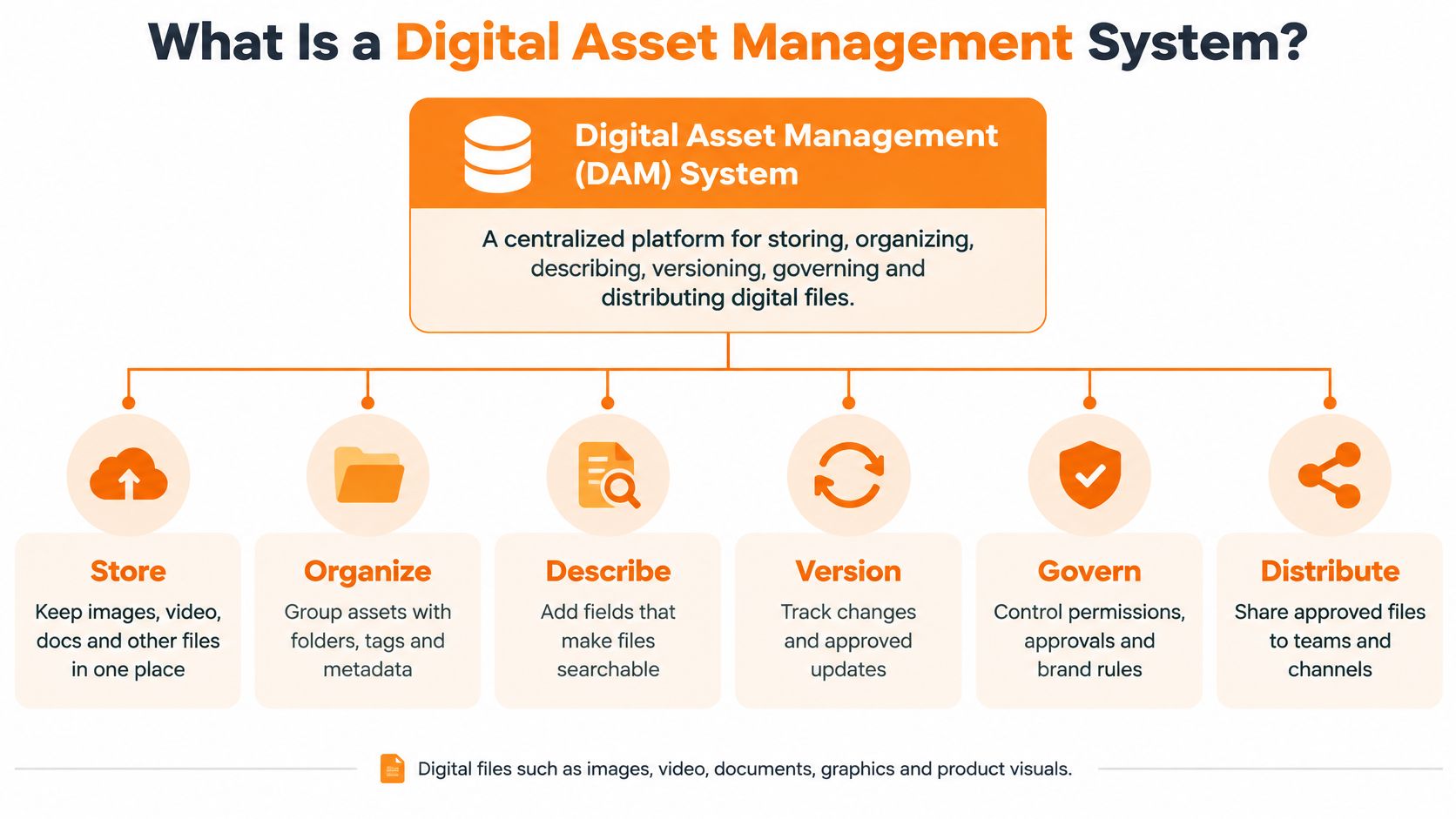
A digital asset management (DAM) system is a centralized platform that stores images, videos, documents, design files and brand guidelines, then governs how those files are described, versioned and released. Structured metadata, taxonomy, search, permissions, rights, rendition management and controlled distribution sit on top of the files. A merchandiser should be able to see which file is approved, for which market, and who owns that record.
A shared drive works like a filing cabinet with labels only on the drawers. A DAM works like a catalog: every item carries its SKU, colorway, season, market, approval status and expiry date. Search uses those fields. You do not need the original filename, the person who saved it, or the folder they preferred.
Scale shows why that catalog structure matters. The Library of Congress digital collections FAQ reported that it managed 21 petabytes of digital collection content comprising 914 million unique files in 2022. A fashion or beauty catalog is smaller. The failure mode is the same. As formats multiply, folder names stop supporting discovery, provenance, access control and preservation.
What This Looks Like for a Brand Team
In day-to-day use, the DAM ties a style to its product photography, campaign deliverables, regional adaptations and seasonal archive. A merchandiser pulls the approved image for a buyer meeting. E-commerce takes the right rendition without asking creative for another export. That only works if a named owner maintains the metadata and a clear rule decides who may mark a file approved. Optional colorway and market fields, or an approval checkbox anyone can tick, fill the library with files nobody will trust.
I would weigh that governance cost before storage capacity. Required fields slow the first upload. Loose rules cost more later, when several renditions of one shade exist and none is clearly cleared for the channel. Font Checker Pro explains asset libraries as one way to contrast a controlled library with loose file storage.
If your team can find the approved version of a product image in under a minute without asking someone, the system is doing its job.
How a DAM Organizes Files With Metadata and Versions
A DAM works in three layers. Metadata describes the asset, taxonomy keeps that description consistent, and lifecycle rules decide what happens to it over time. If any layer is weak, search becomes guesswork and people return to email attachments and desktop folders.
Metadata Does the Searching
Each asset carries machine-readable fields such as asset type, owner, origin, rights, intended use, region, channel and lifecycle state. A NIST guide to managed asset lifecycles describes lifecycle phases such as identify, use, maintain and dispose, and stresses metadata about an asset's origin, nature, purpose and quality. Search then works on attributes, not filenames or folder memory.
Take a summer shell top in three colorways. Each render is linked to the style number, SKU, colorway name, season, market and approved date. A merchandiser filters for Summer, wholesale, and approved, and gets the three current visuals. She doesn't open files called final_v7 or NEW_shelltop to work out which one is safe.
Taxonomy Keeps Tags Usable
Taxonomy is the controlled vocabulary behind those fields. Seasons, categories, markets and channels come from fixed lists, not free text. That matters because free-text tags drift quickly. One person writes SS, another writes Spring Summer, and a third adds the year in a different place. Within months, the same concept has five labels and filters stop returning complete results.
I'd keep the field list short at first. Require the fields people filter on, such as SKU, colorway, season, market, channel and approval status. Optional fields can hold campaign names or photographer credits. A long form at upload encourages blank fields and rushed guesses.
Lifecycle and Versions Prevent Silent Errors
When that shell top changes, the new colorway render becomes the current version and the older one is retired, not deleted. The history stays visible, so a team can see what changed and when. A structured digital asset workflow matters more than storage capacity. The asset moves from ingestion to approval, publication and retirement under rules people can inspect.
Before migration, make four setup decisions and write them down. You need a controlled taxonomy, required metadata fields, naming conventions, and named owners for each field. Validation rules should reject an upload that's missing a SKU or rights date, rather than letting someone fix it later.
Practical rule: Assign a maintenance owner for the taxonomy from day one. Without one, metadata decays and search precision falls, even if the software is sound.
Core Features to Check in a DAM System
Feature lists look similar across vendors, so judge each feature by what you'd verify in a demo with your own files. Bring a live category, including a style with several colorways, a campaign video and a packaging PDF. Ask the vendor to ingest, tag, approve and distribute those assets while you watch.
| Feature | What It Does | What to Verify |
|---|---|---|
| Ingestion and storage | Accepts images, video, PDFs, design and 3D files in one repository | Supported file types and bulk upload |
| Metadata and taxonomy | Tags assets by SKU, colorway, season and market | Required fields and a controlled vocabulary |
| Search and filters | Finds assets by attributes rather than filenames | Search on metadata fields and saved searches |
| Versioning | Keeps one approved version and its revision history | Revision history and visual comparison between versions |
| Permissions and roles | Limits who can upload, approve, publish or retire | Role-based access and SSO/SAML support |
| Rights and expiry | Records usage rights and licence end dates | Expiry alerts and rights fields per market |
| Renditions and distribution | Generates channel formats and shareable links | Presets for web, print and marketplace formats |
| Audit logs | Records who changed or used an asset | Exportable activity logs |
Permissions Deserve a Closer Look
Access control decides whether governance survives contact with a busy season. Role-based or attribute-based access control evaluates attributes connected to the user, the asset, the operation and sometimes the environment against defined rules. NIST guidance on attribute-based access control describes this as a formal policy decision involving subject and object attributes, requested operations and allowable combinations, and notes that identity attributes can be supplied through federated identity or single sign-on.
In brand operations, that means a design team can upload working visuals while only designated users approve finals or release buyer-facing assortments. Access can also split by account, channel, region or asset type. With SSO/SAML, access follows your team directory when people join or leave, which reduces orphaned accounts. We're clear about our own controls here, including role-based access, SSO/SAML and zero training on customer data. Ask any DAM vendor for the same plain answers.
Don't accept a permissions slide as proof. In the demo, log in as a contributor and try to publish. Then log in as an external partner and check whether unapproved colorways, expired assets and other accounts' materials stay hidden.
Why Brand Teams Rely on Versioning and Governance
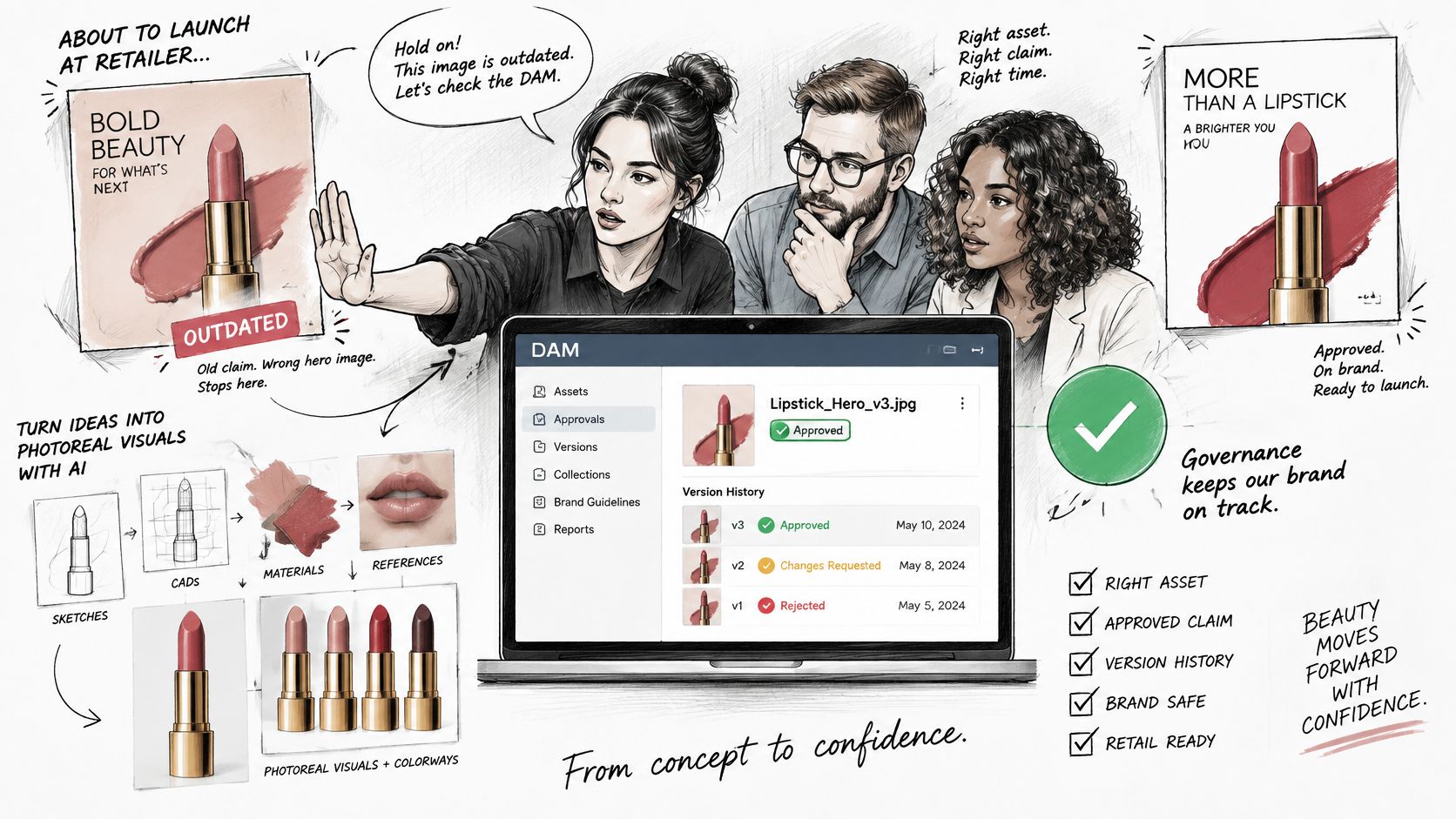
Say a lipstick claim changes after legal review, but the old hero image is already in a retailer's folder. The retailer publishes it, your team spots the error after customers do, and everyone spends the day tracing which file went where. Versioning and governance are meant to stop that sequence before distribution.
The image below shows the collaborative approval moment that should happen inside the system, not in a side conversation.
Provenance Is the Record Behind the File
A production-grade DAM keeps provenance, version control, permissions and chain-of-custody evidence. A NIST publication on data provenance defines provenance as the documented history of where, when, how and by whom an asset was generated, acquired or processed, including subsequent alterations. That record supports practical controls. Auditable version histories reduce the risk that an outdated logo, unapproved product claim, incorrect regional image or expired licensed asset reaches a customer-facing channel.
For each asset, the system should retain identifiers, parent-child links between masters and derivatives, transformations, timestamps, actors, rights metadata and disposition events. If a marketplace crop came from a master product photo, you should be able to trace it back. If legal retires the master, you should see which derivatives need attention. This discipline also supports brand consistency across channels, because teams stop treating local copies as truth.
A Lifecycle Pipeline Makes Approval Visible
A useful pipeline has clear stages. New files pass metadata validation, then legal review where claims or licences are involved, then brand approval, then rendition generation and channel delivery. Each stage has an owner and a visible state. An asset stuck in legal for a week is a workflow problem you can measure, not a mystery in someone's inbox.
The video below is worth watching with that pipeline in mind, especially the handoffs between review and release.
The payoff is safer reuse across SKUs and markets, faster audits, and visible bottlenecks in review. None of it works without people. Every asset type needs a named owner who decides what the asset means, whether it's approved, and when it should be retired.
Where DAM Sits Beside Your Creative and Product Tools
A colorway is approved in design on Tuesday. By Friday, three teams have three files, and nobody can say which one a retailer is allowed to use. That gap is where a DAM earns its place: not as another folder, but as the system that records who owns the metadata, who may approve a file, and which version is cleared for a channel.
Product concepts and sketches start in product development. Teams produce visuals and colorways, review them, and approve the outputs. Approved files then move into the DAM, which stores them with metadata and version history before they go to e-commerce, retailers, marketplaces, and regional teams.
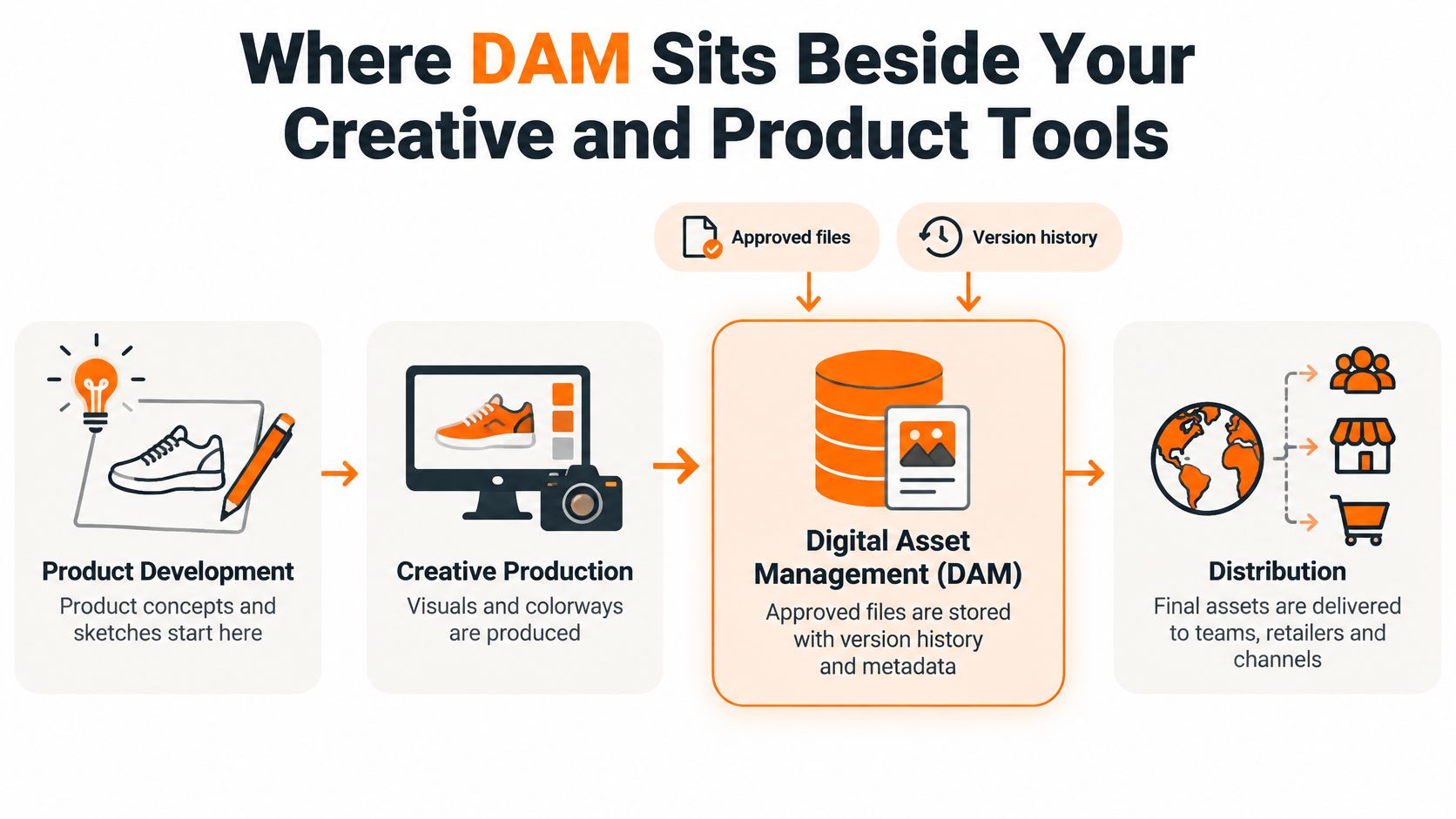
Teams get into trouble when they expect one system to own every job. A DAM should not hold your product engineering data, and a PLM should not be your public image library. The boundaries below are the ones that matter in day-to-day handoffs.
| System | Main Job | Where It Fits |
|---|---|---|
| Shared drive | Stores files in folders | Fine for small teams; no metadata, versioning or approval trail |
| Digital asset management (DAM) | Stores, governs and distributes approved digital files | System of record for final images, videos and brand templates |
| Product information management (PIM) | Holds structured product data such as attributes and descriptions | Feeds e-commerce and marketplace listings |
| Product lifecycle management (PLM) | Manages tech packs, bills of materials, specifications and sample approvals | Owns product engineering data |
| Sprello | AI workflow canvas for fashion, beauty, and lifestyle: product visuals from sketches, CAD, materials, and references, plus a shared catalog, line sheets, line review, and assortments | Creative and merchandising layer that feeds approved visuals into the DAM |
The Handoff That Matters
Sprello is an AI workflow canvas for fashion, beauty, and lifestyle brands. On the canvas, sketches, CAD files, materials, and references are used to create and refine product visuals, including detail-grade renders and lifestyle context for jewelry and accessories. Every style lives in one shared product catalog, with its details and the visuals created for it, alongside line sheets, line review, and assortments.
That creative layer still needs a governed destination for approved outputs. If an external corporate video production company supplies campaign film, the final approved cuts belong in the DAM with rights and market fields attached. Your product catalog management can stay focused on styles and assortments, while the DAM controls the final files, their owners, and the approval state.
I'd put that handoff on one page before buying anything. Name who sets the metadata, who signs off, and the moment a working visual becomes an approved asset. If nobody can say that, the tool choice is premature.
Common Misconceptions and Limits of DAM
The most common misconception is that a DAM is just a bigger shared drive. Storage and sharing are the visible parts, but the value comes from metadata standards, ownership, approval rules, rights management, version control, integrations and adoption. Test your current library by picking one product image. Can you see its SKU, colorway, market, language, season, channel, usage rights, approval status and expiry date without opening the file or asking its creator? If not, you have file storage, not asset management.
A DAM also won't fix a messy process by itself. Adobe's analysis of why DAM systems fail points to weak governance, inconsistent metadata, low adoption and disconnected workflows as common reasons organizations don't realize value from DAM investments. That matches the practical risk for fashion and beauty teams. If nobody owns the taxonomy, product imagery collects conflicting tags. If approval happens in chat, the DAM becomes a tidy archive of uncertain files.
AI Does Not Remove the Approval Problem
Adding AI doesn't automatically make a DAM more valuable. A 2026 survey reported by G2 found that 6 in 10 vendors identified trust gaps, integration limitations or resistance to automation as major barriers to scaling AI-driven DAM. AI can also multiply near-duplicates and introduce incorrect product details.
Use a stricter test. A discoverable AI image is easy to find. A production-ready one also has clean metadata, verified product attributes, brand and legal checks, human review for high-risk outputs, and a recorded provenance trail. The question many introductions leave open is, "Who is responsible for deciding what an asset means, whether it is approved, and when it should be retired?" Answering it is an information-governance and workflow-design task, not a software setting.
Confirm Governance Owners Before You Buy a DAM
Settle five decisions before you score vendors. They'll tell you whether a system fits your operating model or only demos well.
- Assign field owners: Name one owner for each metadata field, including SKU, colorway, season and market.
- Write approval paths: Document who signs off each asset type, such as product photos, campaign video and packaging files.
- Define retirement rules: State who can retire an asset and what triggers it, such as an expired licence or changed product claim.
- Map adjacent systems: List PLM, PIM, planning and e-commerce connections, and note which system owns each data type.
- Set early measures: Track two outcomes in the first 90 days, such as time-to-approval and duplicate production, with a baseline taken now.
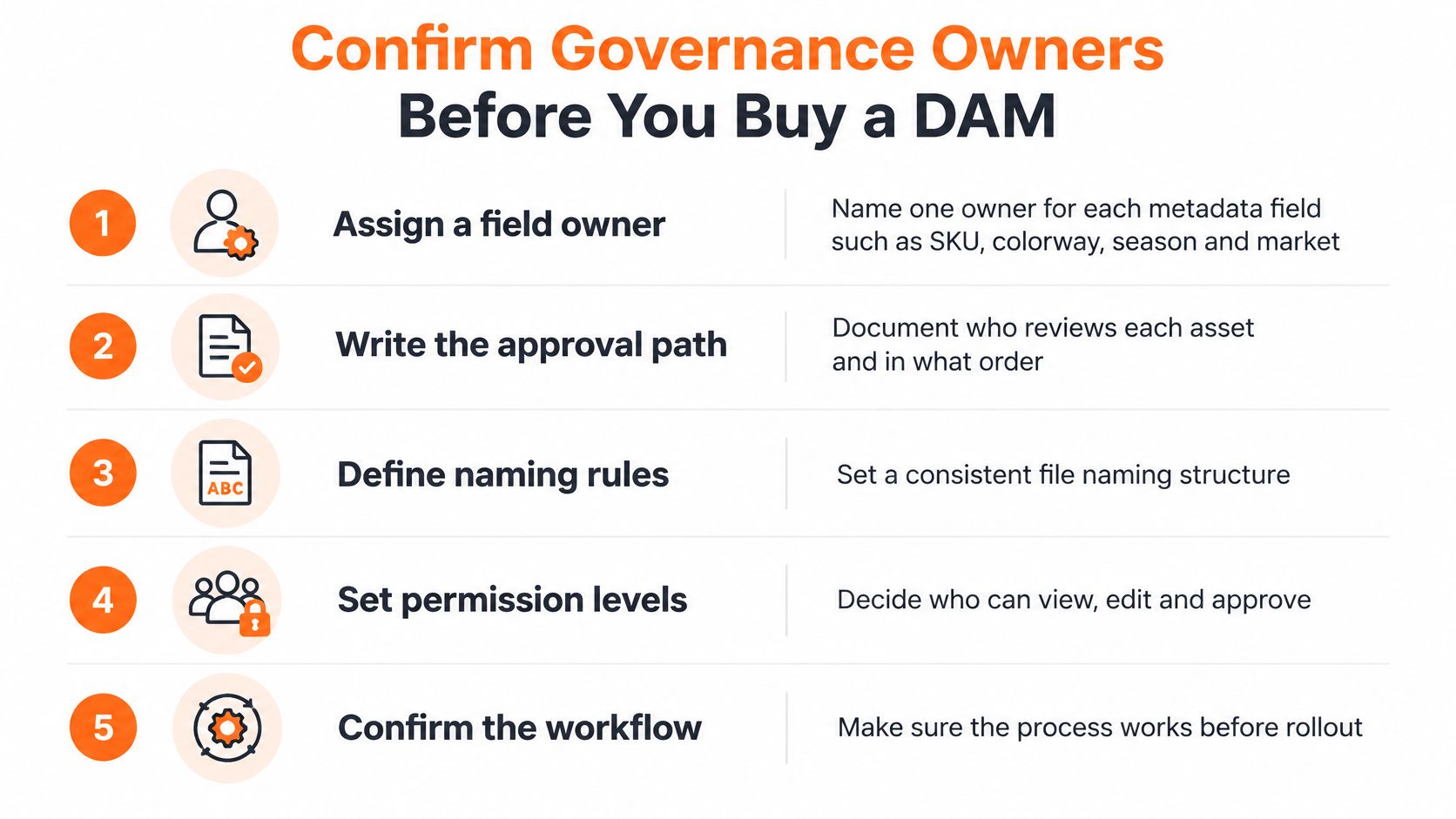
Then test the checklist in a demo. Ask the vendor to work on one of your own product categories rather than a generic library. Bring your catalog size and main use case so the walkthrough reflects your real workflow. Score vendors on owner roles, approval paths and integrations, not on feature lists alone. Our demos follow that approach. We set up a walkthrough aligned with your workflows after you share your catalog size and use case, and we can show the catalog, Canvas, line sheets and assortments on one of your own categories.
Frequently Asked Questions About DAM Systems
Is a DAM the Same as Cloud Storage
No. Cloud storage holds files. A DAM adds metadata, permissions, rights, renditions, version history and distribution control. If approval status and expiry don't travel with the asset, you're still relying on filenames and memory.
Do Small Brands Need a DAM
Not always. A shared drive can work while a small team handles few files, markets and channels. Once versions multiply and external partners need access, missing metadata and approval trails become costly. I'd consider a DAM when people regularly ask which file is current.
Who Owns a DAM
A named governance owner should run the system, with field owners for metadata and approvers for each asset type. IT can manage access and security, but merchandising, creative and brand teams need to own meaning, approval and retirement. Shared ownership without named decisions usually means no ownership.
Can AI-Generated Images Go Straight Into a DAM
They can be stored and found, but production use needs more. Check product attributes, shade or material accuracy, brand rules, legal claims and usage rights first. Keep a provenance record for the approved version, including its market and channel permissions.
What Security Features Should a DAM Have
Look for SOC 2, SSO/SAML, role-based access and a written policy of zero training on customer data. Sprello is SOC 2 compliant and supports single sign-on through SSO/SAML with your identity provider, so access follows your directory when people join or leave. It works alongside a DAM as AI for product development & merchandising, from product concept to buyer-ready collection.
If your approved product visuals are hard to trace, start by fixing ownership and approvals, then choose the DAM that supports them. To see how product visuals, a shared catalog, line review and buyer assortments work before final files reach your DAM, book a demo with Sprello at sprello.ai.
Related
More to explore
Fresh reads

Product Photography Style Guide: Specs, Shots and Rules
Build a product photography style guide with shot types, file specs, lighting rules, AI disclosure and channel alt text for fashion, beauty and home brands.
What Is an Agentic Workflow? a Guide for Brands
What is an agentic workflow? It is a goal-driven AI process that plans steps, uses tools and escalates to people. See how it applies to merchandising.
Product Design Process: Stages and Handoffs Explained
The product design process explained for fashion, beauty and home brands: stages, handoffs, approval gates and scalable workflow patterns for multi-SKU teams.