November 10, 2026
Product Photography Style Guide: Specs, Shots and Rules
Build a product photography style guide with shot types, file specs, lighting rules, AI disclosure and channel alt text for fashion, beauty and home brands.

In 2024, 91.53% of processed e-commerce product images carried no shadow at all, according to the Pixelz e-commerce visual trends whitepaper. The look of catalog photography is settled. What a product photography style guide has to settle now is everything around that look: which shots every SKU must carry, the exact file specifications, the naming and approval record, when AI imagery is allowed, and how one approved master survives every channel and every screen reader.
Published 10 November 2026.
Most published guides are strong on backgrounds, frame filling and retouching, and thin on the three decisions that hold a catalog together. An evidence-based policy for AI imagery is usually missing. So is a rule set that keeps product meaning intact when a master is cropped for a marketplace or a mobile card. Alt text gets treated as an SEO afterthought instead of structured product data. A photographer can follow a handsome visual guide and still ship a listing that hides the strap, misstates the shade, or gives a screen-reader user nothing to buy on.
At Sprello we treat the guide as operating data rather than a PDF. Each style sits in one shared product catalog with its details and the visuals created for it, so a written rule and a live asset can be checked against each other. Work through the standard in this order: required shots, technical specs, lighting by material, naming and metadata, AI policy, channel rules, alt text, tooling. Before you write a single new rule, audit what the catalog already holds against the shot list. The gap you find is the actual brief.
What a Product Photography Style Guide Must Define
Image coverage is a usability requirement before it is a styling preference. Baymard Institute's large-scale e-commerce usability testing found that 56% of participants began exploring product images immediately after arriving on a product page, before reading the title, description or any other content, and 42% tried to work out a product's physical size from its images, as reported in Baymard's study of in-scale product images. The same benchmark found 28% of sites offered no in-scale image at all.
That ordering changes what the document is for. A guide that fixes the background but leaves the number of views to the photographer's judgement has solved the easy half.
Baymard also observed that isolated cut-outs are often insufficient for apparel, accessories and cosmetics, where human-model imagery is what lets a shopper judge fit, length and how a piece wears. So the mandatory set has to be defined per category, not per brand mood: front, back, side, detail, in-scale, and on-model or in-use where fit matters, plus consistent framing, camera distance, lighting, background and crop rules so views stay comparable across colourways, sizes, seasons and regional storefronts.
Practical rule: if a SKU has no in-scale view, the copy is doing work the photograph should be doing. Fix the photo, then shorten the paragraph.
Where most guides fall short is coverage enforcement. They list a five-to-seven image set, then leave compliance to whoever happens to be shooting. Write the requirement as a gate instead: a style cannot move to published until every role its category demands exists as an approved asset.
Start with the audit. Pull one category, list every SKU, and mark which shot roles each one has. You will find a long tail of styles with a hero image and nothing else, and a handful of over-shot hero products nobody asked about. That list, not a blank template, is what tells you which rules to write first.
Which Shot Types and Lighting Rules Does Each SKU Need?
| Shot type | Purpose | Framing rule | Required for |
|---|---|---|---|
| Primary hero | Identify the product at a glance | Solid white or light-neutral background, front or three-quarter view, full silhouette | All SKUs |
| Front and back | Show construction and placement of details | Same camera height and distance as the hero | All apparel, bags and packaged beauty |
| Side or three-quarter | Show profile, depth and volume | Same lighting direction as the hero | Apparel, footwear, bags and furniture |
| Top view | Show footprint, layout and surface | Same distance and crop logic | Home and lifestyle, flatware and bundles |
| Spin set (five or more views) | Show dimensions and proportions | Front, back, left, right and top, one item per image, same shoot | Bags, footwear and home goods with spin |
| Detail | Show materials, finishes, seams, labels and texture | Close crop at zoom-ready resolution | Jewelry, hardware, textiles and beauty textures |
| In-scale or context | Show size against a known reference | Hand, ruler or known object in frame | Jewelry, accessories, cosmetics and home |
| On-model or in use | Show fit, length and appearance when worn or used | Consistent model framing across the shoot | Apparel and accessories where fit matters |
| Lifestyle | Show mood and use context | Clearly labeled as a secondary role | Campaign and editorial use only |
The hero shot carries six rules, and they should be identical on every SKU in a category:
- Background: solid white or light neutral, no gradient, no texture, no prop.
- Angle: front or three-quarter, locked per category.
- Silhouette: complete, with no cropped edges and clearance on all four sides.
- Focus: sharp across the product, checked at 100% zoom rather than on the camera screen.
- Frame fill: the product occupying roughly 75 to 90 percent of the frame, per Google's Merchant Center image guidance.
- Overlays: no text, watermarks, borders or unrelated graphics.
Write each of those as a machine-checkable criterion (background uniformity, object occupancy, edge clearance, focus, correct SKU and colourway, no overlays) so preflight can reject a file before anyone exports it to a channel. For dimensional products, consistent multi-angle capture beats creative variation. Google's product-spin guidance asks for at least five high-resolution views, front, back, left, right and top, shot in one session with one item per image, as set out in Google's image and spin specifications.
Lighting by material, not by mood
Light has one job: reveal material and construction without glare, in one direction, with one shadow treatment across the range. Set the setup per material family rather than per shoot.
- Metal and jewelry: one large diffused source, with hot spots watched on polished surfaces and hardware.
- Glass: backlight plus a white reflector, watching for ghost reflections of the room.
- Matte beauty packaging: even overhead softbox with a fill card, watching for colour shift on the component.
- Knitwear and woven textiles: low-angle side light to pick up stitch and weave, watching for texture that reads flat and dead.
- Leather and hard goods: 45-degree key, watching for hard shadows falling across hardware.
- Ceramics and home glass: gradient sweep behind the product, watching for banding.
Shoot one reference SKU per material against the approved colour swatch before that setup covers the range. A lighting recipe that looks right on a black tote can misread completely on a black technical shell.
Technical Specs for Master Files and Derivatives
| Specification | Master asset | Channel derivative | Reason |
|---|---|---|---|
| Pixel size | 1500 x 1500 px or larger where possible | Resized from the master, never upscaled | Keeps detail for zoom and marketplace minimums |
| Submission limits | Up to 64 megapixels and 16 MB for submitted images | Compressed to each channel's own limit | Avoids rejected uploads |
| Background | Solid white or light neutral | Same background, no added graphics | Consistent product comparison |
| Colour profile | Adobe RGB or ProPhoto RGB working file, colour-checker frame in the first capture | sRGB for web channels | Predictable colour across screens |
| File format | TIFF or PSD, 16-bit, working file plus a flattened archive copy | JPEG or WebP at the channel's quality setting | Keeps archive and channel files distinct |
| Sharpening | Minimal | Applied only at final export | Avoids halos that read as defects |
| Compression | None on the archived master | Lossy compression limited to derivatives | Preserves fabric weave, shade and finish |
| Zoom readiness | Highest practical resolution for detail shots | Thumbnail sizes only, zoom loads the master | Lets shoppers inspect materials |
Resolution is a commercial control, not a production preference. Baymard's benchmark found that 25% of e-commerce sites served product images insufficient for users' visual exploration and assessment. Within that group, low-resolution imagery was an issue at 14% of sites and insufficient zoom at 11%, and low-quality or inadequately zoomable images caused product abandonment during testing, per Baymard's research on image resolution and zoom.
The derivative rule is what keeps those numbers out of your catalog. Generate every thumbnail, marketplace file and social crop from the high-resolution master. Never enlarge a small file, never recycle a compressed marketplace asset as a new source, and keep one archived master per colourway so nobody re-shoots a shade the brand already approved.
Practical rule: compression limits belong in the derivative column only. The moment a master carries a lossy setting, every future crop inherits it.
One cell in that table is a decision, not a default. The archive format should be confirmed against your DAM policy before it goes into the standard, because a switch later means re-exporting history. Until it's signed off, treat TIFF or PSD as the working assumption and mark it for confirmation.
How to Name Assets and Record Approval Metadata
The naming pattern I'd put in the standard is brand_code_SKU_colourwaycode_viewrole_version, all lowercase, underscores only. So a black front view at its third approved iteration reads acme_10428_blk_front_v03.jpg. View roles stay short and fixed: front, back, side, top, detail, scale, model, life. Each filename maps to exactly one sellable variant, and the pattern is the same from Seoul to Columbus. A longer treatment of the pattern and its edge cases lives in these product naming convention practices.
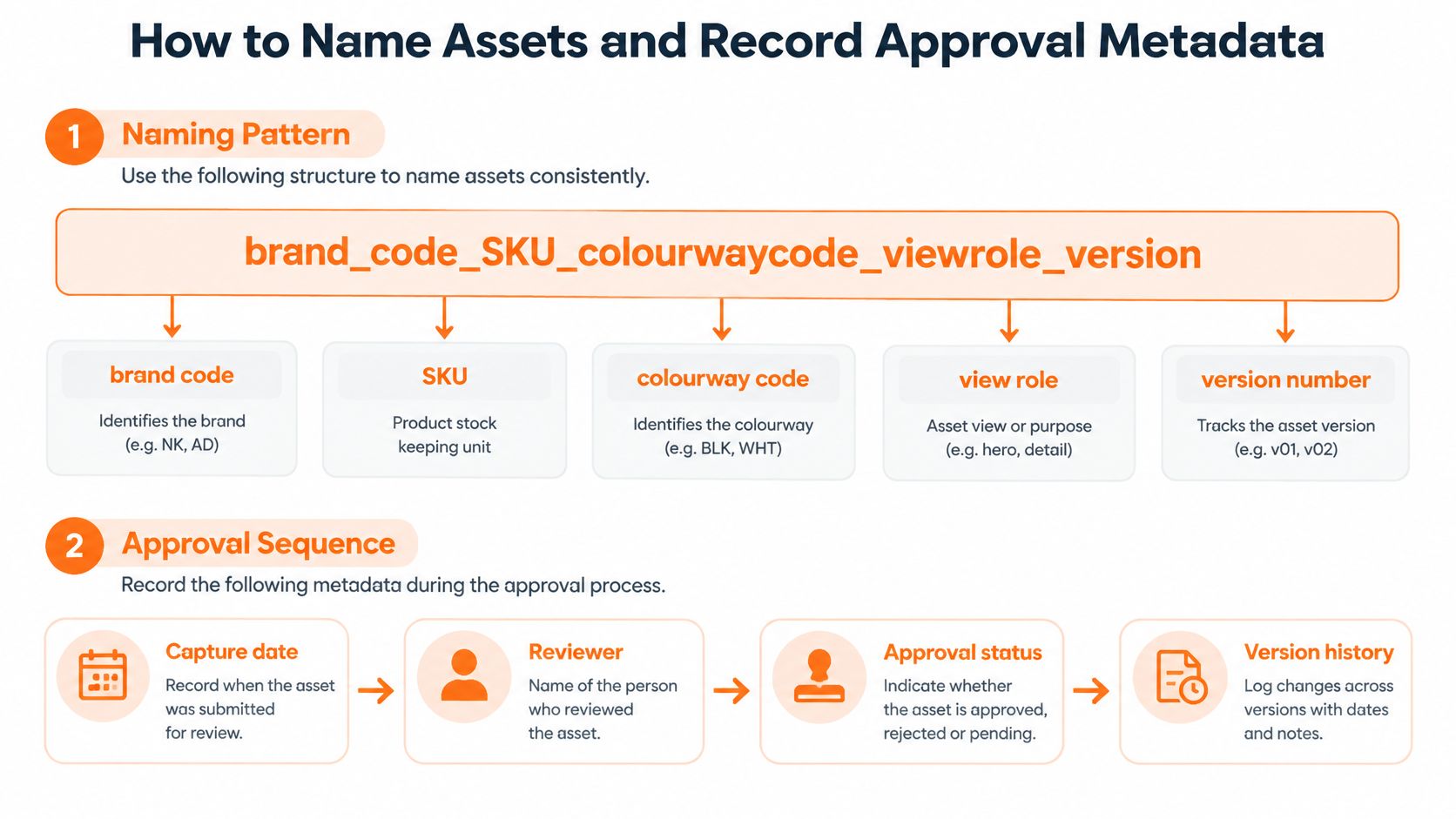
Metadata is recorded per asset, not per shoot. The fields that earn their place: SKU, colourway, material, lens, aperture, shutter speed, white-balance target, light setup, background specification, retouching status and approval state. Each one answers a question someone will ask later. The camera and light fields let a reviewer reproduce a shot six months on. The retouching status is what confirms a cleaned-up file still matches the variant on the shelf.
Approval runs in order: captured, culled, retouched, colour checked, approved, published. Only approved assets reach channel exports, and the state travels with the file rather than sitting in a spreadsheet beside it.
A catalog view of which products have approved visuals and which still need them turns this from bookkeeping into planning.
That view is the one page merchandising and creative can argue over productively. A superseded version gets marked archived, keeps its metadata record, and is never overwritten. Ten years of history costs nothing; a re-shoot because nobody remembers the light setup does.
Which Images Can Be AI-Generated?
| Asset role | Photography required | AI generation allowed | Provenance recorded |
|---|---|---|---|
| Primary hero image | Yes | No | Yes |
| Colour-critical products | Yes | No | Yes |
| Fit-sensitive apparel on-model | Yes | No | Yes |
| Beauty shade representation | Yes | No | Yes |
| Regulated claim imagery | Yes | No | Yes |
| Mood boards and concepts | Not required | Yes, for internal use | Yes |
| Secondary editorial variants | Recommended | Yes, after human review | Yes |
The evidence on shopper reaction is sharper than many expect. U.S. research covering 2,273 online shoppers found that 60% would feel less confident buying a product if they knew its images were AI-generated, and 17% said they would not feel confident enough to buy at all, as reported in coverage of the AI product photography study. A fashion e-commerce experiment found that visible AI-origin labels significantly reduced perceived product quality, even though trust and purchase intention did not shift by a statistically significant margin.
The part worth sitting with is the second half: unlabelled AI and photographic images showed no statistically significant evaluation difference in that experiment, while disclosure itself carried the quality penalty. Synthetic imagery isn't automatically harmful. Disclosure is expensive. That's an argument for classifying by risk rather than for banning or deploying wholesale.
So the policy is set per asset role: truth-bearing images stay photographic, and editorial surfaces can use generation once a person has checked them.
Name the reviewer. A specific person, per category, checks each AI-derived image against the physical product before it moves to approved: trims, hardware, stitch count, shade, print scale. "Looks right" isn't a review, and a generated buckle that sits two centimetres off becomes a return.
Keep an internal provenance log for every AI-derived asset: the tool used, source references, date and reviewer, even where consumer-facing disclosure rules are still unsettled. For teams comparing synthetic and photographic workflows, this guide to AI-generated model photos covers where each earns its place. Sprello's commitment is that customer designs, sketches and uploads are never used to train our models or anyone else's.
How Do You Adapt One Master Set Across Channels?
One approved master set, adapted per channel, beats a separate shoot per destination every time. The differences are mechanical:
- Desktop product page: zoom enabled, detail shots served at full resolution, and a check that zoom reaches the material.
- Mobile product page: pinch and double-tap zoom both supported, a higher-resolution image loaded when zoom begins, tested on a real handset.
- Marketplaces: cropped to platform rules inside the protected zones, with straps, sleeves and shade cues verified after the crop.
- Wholesale line sheets: approved hero and detail images pulled to variant codes, with the variant checked against the sheet.
- Regional storefronts: local copy and alt text, same product meaning, included accessories still visible.
- Social placements: cropped to the placement ratio inside the protected zone, with the product still whole in frame.
Semantic consistency is the risk most guides never name. A crop can keep the photo polished while removing a strap, sleeve, shade cue, scale reference or included accessory, which is the gap Emulent's guide to e-commerce product photography identifies: most published advice answers what the image should look like, not how one visual system survives every channel, market and accessibility requirement.
Define protected zones per category and check them after every crop. A bag with a visible shoulder strap cropped square for a marketplace must keep the strap and handle inside the frame. Miss that and the listing hides the feature that identifies the product.
Mobile zoom deserves its own line in the standard. Baymard observed that users rely on both pinch and double-tap because there's no universal convention for mobile image zoom, and recommends loading a higher-resolution image when zooming begins and showing a temporary indication that zoom is available on page load, per Baymard's mobile image gesture research. That belongs in a photography document, because framing and file weight decide whether the behaviour works.
Sign-off is not a desktop approval. Put a real-device review on phones and a pass with assistive technology before launch, or the first person to meet your catalog on a train will be the one to find the failure.
How Should Alt Text Be Written for Each Image Purpose?
Text alternatives split by purpose, not by template. The W3C Web Accessibility Initiative image tutorial sets the categories clearly, and each one gets a different rule in the style guide:
- Informative product photos: a short alternative carrying the essential information, including the variant. "Navy wool-blend cardigan, front view, ribbed cuffs."
- Decorative images: a null alternative,
alt="", so a screen reader skips them. The background texture behind a banner is decorative. - Functional images used as links or buttons: describe the action, not the picture. "View size guide."
- Complex images such as size charts or fit diagrams: a full text equivalent on the page, not a longer alt string.
- Images that contain text: repeat the same words in the alternative. "Packaging label reading Hydrating serum 30 ml."
Ownership is the part that fails. Assign alt text to a named content owner and require it at the approval step, so it's written next to the product rather than reconstructed after launch by someone reading a spreadsheet.
Then standardise the product variant line: product type, colour, key material, visible feature, view. Keep it to one sentence, and use it to state the limits that change a purchase: visible damage on a sample, what's included in the box, how a colourway differs from its sibling. Those sentences prevent returns in a way that keyword-stuffed alternatives never will.
Two checks close it out. Confirm every approved image in the catalog has alt text tied to the right variant, and run a screen-reader pass on mobile and desktop before publishing. Reviewing on a phone with the reader on is uncomfortable the first time and obvious afterwards.
Which Tools Enforce a Style Guide at Scale?
| Tool category | What it handles | Where it stops | Best fit |
|---|---|---|---|
| Sprello (our product) | AI visuals from sketches, CAD, materials and references; shared catalog showing which products have approved visuals; line sheets; buyer assortments; saved workflows | Complements PLM and planning suites; does not do tech packs, BOMs, pattern making, demand forecasting or open-to-buy | Teams producing visuals and line sheets across many SKUs and accounts |
| PLM suites | Product data, specifications, tech packs, BOMs and sample workflows | Visual creation and buyer-facing visuals vary by vendor | Teams that need a product system of record |
| Digital asset management | Storing, versioning and tagging approved masters | Does not create images; shot rules depend on configuration | Large libraries with many channels |
| Photo editing software | Retouching, colour correction and derivative export | Manual, file by file, with no catalog-wide enforcement | Small teams and one-off retouching |
| Studio or production agency | Original photography and on-model shoots | Schedule depends on the production calendar | Hero shoots, on-model and campaign work |
Sprello is our product, so weigh that row with the bias in mind. The catalog holds every style with its details and the visuals created for it, and it shows which products have approved visuals and which still need them. The canvas takes in sketches, CAD files, materials and references and uses them to create and refine product visuals. Colourways and material directions can be explored before the next physical sample is cut, and a canvas workflow can be saved and run again on the next style. Selected visuals and product details flow into line sheets showing style or variant codes, material, wholesale price and retail price, built for accounts across North America, Europe, department stores, specialty boutiques, flagship stores and own retail. Each buyer's assortment starts from the same product information, and the mix can be reviewed as a whole.
The other categories do their own jobs. PLM holds the technical truth of the product. A DAM versions and tags approved masters. Editing software is where retouching still happens, one file at a time. A studio produces the original photography on a calendar you don't control. Most enterprise teams run three or four of these side by side, and the style guide is the contract between them. If asset versioning across channels is the bottleneck, this piece on creative asset management software covers the mechanics.
Here is the part the comparison table hides. No tool enforces a rule nobody wrote into a workflow. Asset naming conventions, approval metadata, alt text and AI provenance survive only where the system blocks sign-off until the field is filled, or where the workflow that generated the image carries the record with it. A catalog that tracks approved versus missing visuals is doing enforcement work; a folder of approved files is not.
Choose by writing down which shot roles and channel outputs each tool must enforce, then test the shortlist on one product category before committing. A trial that runs on your worst category tells you more than a demo on someone's best one.
What Do Teams Ask About Product Photography Style Guides?
How many shots does each SKU need? It depends on the category, and the shot table sets each role: hero for all SKUs, front and back for apparel and packaged beauty, detail for jewelry and textures, in-scale for cosmetics and home. Dimensional products such as bags, footwear and furniture also need a spin set of five or more views.
Can AI images replace photography? Only on the surfaces listed in the AI policy table, which means mood boards and internal concepts freely, and secondary editorial variants after a named reviewer signs off. Hero images, colour-critical products, fit-sensitive on-model shots, beauty shade representation and regulated claims stay photographic.
Do shoppers need AI disclosure? Consumer-facing rules vary by market and are still moving. Record provenance internally for every AI-derived asset regardless, with tool, references, date and reviewer, so a disclosure decision can be made later without rebuilding the record.
What master resolution is required? The specification table sets the master and derivative values, from pixel size through to zoom readiness. Where a value hasn't been confirmed against your DAM policy, mark it for confirmation rather than guessing it into the standard.
Does a style guide replace PLM? No. The style guide governs visuals, approvals and channel adaptations. PLM keeps the technical product data. The two agree on the SKU and the variant, and that agreement is what stops a wrong-colour asset reaching a right-colour listing.
How Do You Apply This Guide to Your Catalog?
Start with one category that carries the widest variant spread: a core apparel style with six colorways, a jewelry family with metal and stone options, or a beauty line with shade families. Apply the shot table, then the channel rules, then the AI policy. Audit the existing catalog against those three layers. The gaps usually cluster: missing detail views, out-of-scale jewelry, hero images that no longer match the current colorway, alt text written for the old channel. Write each gap into the SKU record as a required asset.
Then run the catalog view. A usable catalog shows which products have approved visuals and which still need them, so the rollout becomes a list of missing approvals instead of a folder hunt. Save the first workflow in the canvas and run it on the next style. That is how the guide becomes repeatable. Keep the same product record feeding line sheets and buyer assortments, so a buyer sees the approved image, style code, material, wholesale price and retail price against the same SKU.
The demo at Sprello is a walkthrough built around your team's workflows. You share your catalog size and use case first, and the session shows the catalog, canvas, line sheets and buyer assortments on one of your own product categories. Book the walkthrough through Sprello.
Related
More to explore
Fresh reads
What Is an Agentic Workflow? a Guide for Brands
What is an agentic workflow? It is a goal-driven AI process that plans steps, uses tools and escalates to people. See how it applies to merchandising.
Product Design Process: Stages and Handoffs Explained
The product design process explained for fashion, beauty and home brands: stages, handoffs, approval gates and scalable workflow patterns for multi-SKU teams.
How to Make a Lookbook: Step-by-Step Production Guide
Learn how to make a lookbook in six steps: shot lists, page layouts, image specs, line sheet fields and the SKU data that keeps it accurate.