October 29, 2026
What Is a Context Diagram? Notation, Examples and Uses
Learn what is a context diagram: its system boundary, external entities and labeled flows, notation rules, and a fashion product-development example.
A context diagram is the highest-level view of a system, showing the whole system as one process and the external people, organizations, devices or systems that exchange information with it. For a platform such as Sprello, it establishes which product-development activities belong inside the system and which teams and services remain outside.
Your merchandising team has an approved assortment brief, design has revised the visuals, and e-commerce needs product content. Yet nobody agrees who owns the final SKU attributes or who can approve a regional change. Drawing the boundary before choosing tools helps settle those responsibilities without turning the discussion into a debate about software features.
Published October 29, 2026
What Is a Context Diagram in Plain Terms
For fashion, beauty, jewelry or home, the central process can be an AI creative-workflow platform such as Sprello. Sketches, CADs, materials and references become visuals and colorways that move through a shared catalog, line review, wholesale line sheets and separate buyer assortments. Merchandising, design, regional teams and commerce remain external participants when the platform itself is the system being modeled.
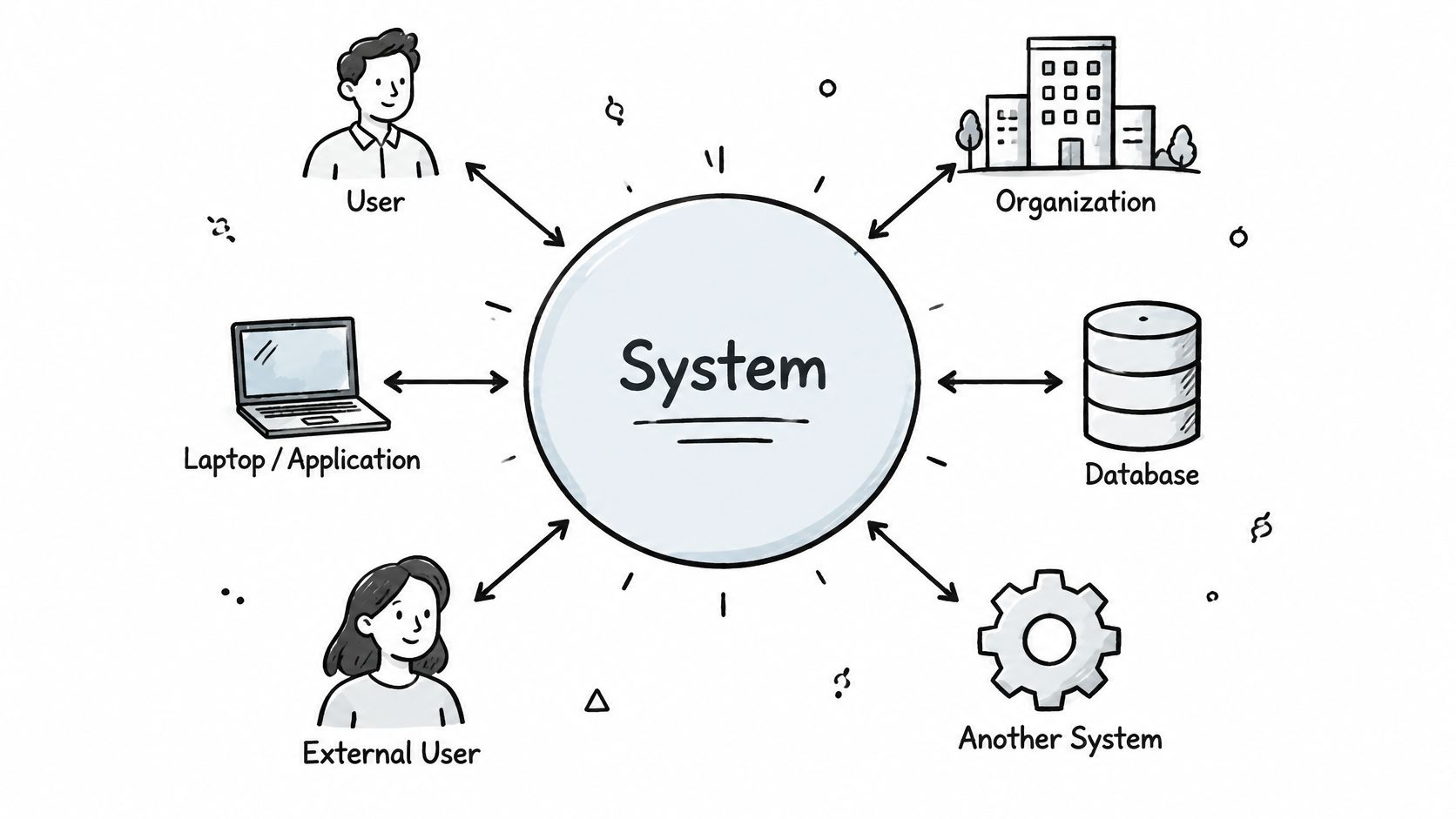
Think of a store site plan. It shows the building outline, entrances, supplier delivery door and customer access, but not the shelving, stock rooms or wiring behind the till. A context diagram makes a similar choice: show the interfaces, hide the internal workings.
The illustration shows that outside-in perspective.
The ISO/IEC/IEEE 24765 glossary distinguishes a context diagram from the broader data-flow diagram, which can represent sources, destinations, storage and processes. That distinction matters: databases, internal subprocesses and transformation logic don't belong in this overview.
A context diagram is a boundary map showing a system, its external participants and the information they exchange.
A line-review workflow, for example, can appear as a single central shape surrounded by merchandising, design, buyers and the e-commerce team. Detailed process decomposition comes afterward.
Use a straightforward completeness test: anyone outside the system who sends or receives material information belongs on the drawing. Their seniority, department or frequency of use doesn't determine whether they're included.
Components and Notation Every Context Diagram Uses
Context diagram components and notation
| Component | Standard notation | What it represents | Rule at context level |
|---|---|---|---|
| System (process 0) | Single circle or rounded box, numbered 0 | The entire system under analysis | Only one process; no subprocesses shown |
| External entity | Rectangle labeled with a noun | A person, organization, device or system outside the boundary | At least one input or output with the system |
| Data flow | Labeled arrow | Information moving between an entity and the system | One direction, no loops or splits, noun-phrase label |
| Data store | Open-ended rectangle | Stored data | Omitted at context level |
| System boundary | Implied by the entities placed around process 0 | What is inside and outside the scope | Everything controlled within the agreed system scope sits inside |
The central shape names the system, not a department's task list. Choose a stable business label such as Seasonal line-review platform rather than a loose label such as Product work.
External rectangles name distinct sources or recipients. Merchandising team and Product-information system deserve separate entities because people approving an assortment and software supplying canonical attributes have different responsibilities.
How should arrows be labeled?
An arrow describes an information object, not an instruction to execute a step. Replace Update with Revised SKU attributes, Send with Approved line sheet, and Data with Regional labeling requirements. If a label could describe almost any exchange in the business, make it more specific.
Yourdon-DeMarco notation uses circles for processes; Gane-Sarson uses rounded rectangles. Pick a notation and stay consistent rather than mixing shapes to imply distinctions that nobody has defined.
Which flow rules should reviewers enforce?
The University of Kentucky's systems-analysis guidance sets the input, output and labeling rules; IBM's data-flow guidance also rules out direct entity-to-store exchanges and recommends avoiding crossing flows.
- Include incoming and outgoing information. The system needs at least one input from an external entity and at least one output to an external entity.
- Use one direction per arrow. Draw separate arrows when information travels both ways.
- Avoid loops and splits. Give distinct exchanges their own paths so recipients and meanings stay clear.
- Write noun-phrase labels. Approved SKU brief, localized asset and buyer feedback describe what moves.
- Don't send information straight to a store. External entities exchange information with the system process; internal storage isn't shown here.
A reviewer should be able to identify the sender, recipient and business meaning of every exchange without a narrated explanation. If they can't, fix the labels before polishing the layout.
How Context Diagrams Differ From Data Flow and System Diagrams
Context diagram compared with related diagram types
| Diagram | What it shows | Data stores | Best used for |
|---|---|---|---|
| Context diagram | One process, external entities and major flows | No | Setting scope and interfaces before detailed design |
| Data flow diagram, level 1 and below | Subprocesses, data stores and the flows between them | Yes | Showing how data is transformed inside the system |
| System architecture diagram | Components, servers, APIs and deployment | Included when relevant to the architecture | Planning build, hosting and integration |
| Flowchart | Steps and decisions in sequence | No dedicated data-store model | Describing control logic in a procedure |
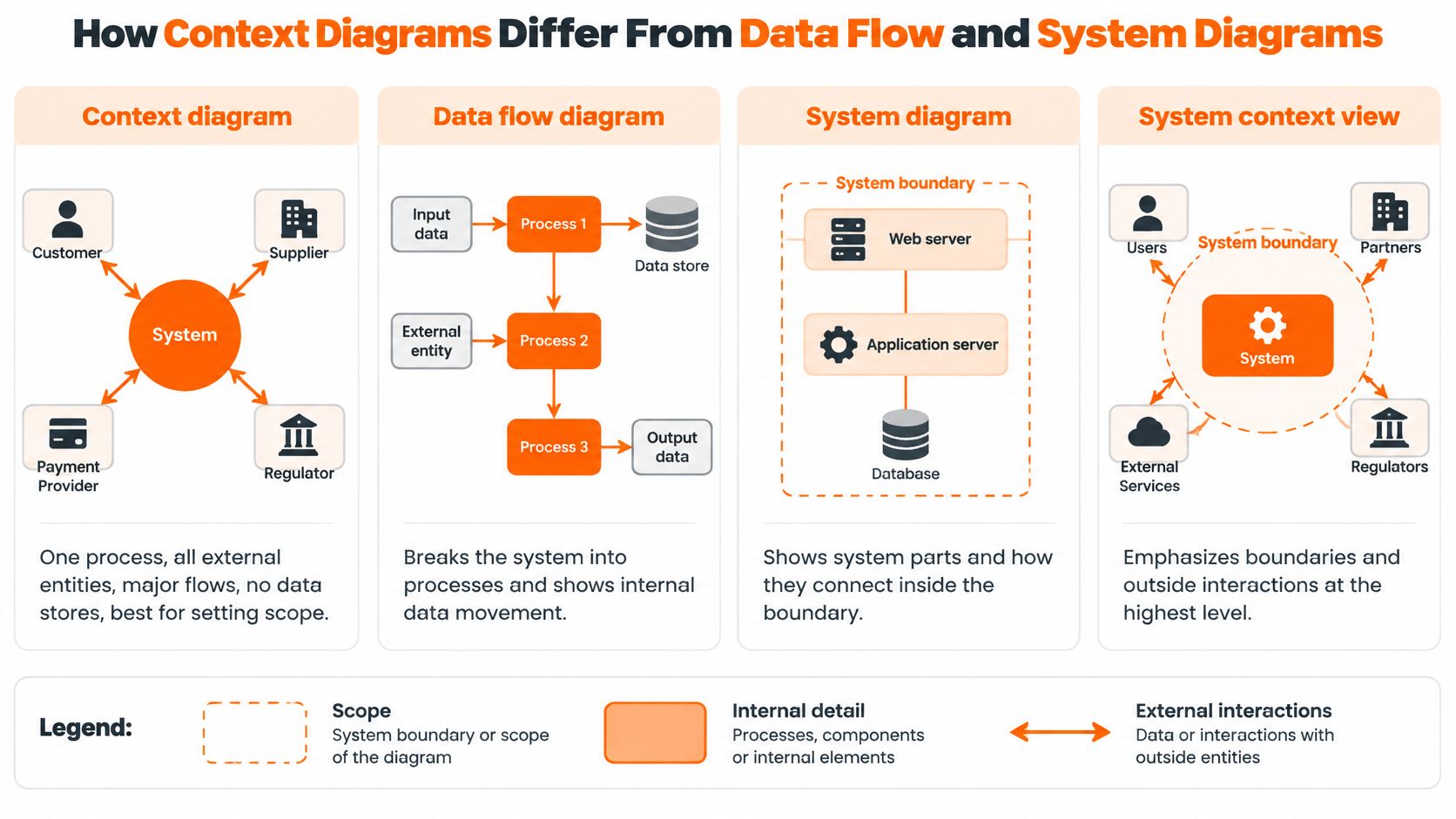
A context diagram answers what crosses the boundary. A detailed data-flow diagram explains how information moves and changes inside it, while an architecture diagram explains what the system is built from. A flowchart answers what happens next, including decisions and alternative paths.
The comparison below also includes a system context view, a broader label often used for a highest-level picture of outside interactions.
Agree on diagram names before drawing
The University of Toronto's data-flow rules specify a context diagram with one process labeled 0, all external entities and no data stores. Standard teaching commonly calls this DFD Level 0, with Level 1 providing the first decomposition. Some teams call that decomposition Level 0 instead, so record your convention before anyone draws.
Start with scope, then decompose only when an exchange needs explaining. If the problem is approval sequencing rather than scope, a guide to creating a flowchart is a better next step than adding decision diamonds to the context diagram.
For a walkthrough alongside the comparison, use the video below.
Migration introduces another distinction: showing an interface doesn't explain how existing records will move into it. When replacing a catalog or product-information system, Kagool's resource on de-risking your data migration process is a useful companion to the boundary discussion, not a substitute for it.
Why Teams Draw a Context Diagram Before Detailed Design
The strongest reason to draw a context diagram is scope and interface control, not presentation. A neat diagram isn't useful if merchandising assumes the product-information system supplies approved attributes while design expects someone to enter them manually.
NASA's systems-engineering handbook treats system context as a representation of scope, boundaries, users and external system elements. In practical terms, keep the system and its boundary, neighboring actors or systems, and their logical interfaces visible together.
Turn an arrow into an accountable requirement
Consider a final-asset handoff. Naming the DAM as a recipient prompts questions about who approves the asset, which metadata accompanies it and who handles rejection. Naming regional requirements as an input exposes whether regional teams supply constraints or merely review finished work.
Trace each named exchange through its supporting documentation:
- Requirement: Define what the recipient must receive and why.
- Interface contract or file schema: Specify fields, formats and validation.
- Access control: Identify who can submit, change or approve information.
- Acceptance test: Describe evidence that the handoff works.
A requirement document template gives those decisions a home beyond the diagram. Keep the arrow label concise; put field-level detail in the requirement.
Keep the promise narrow
The technique grew out of structured analysis in the late 1970s and early 1980s, with Gane-Sarson dated to 1979 in the history of structured analysis. Its continued usefulness comes from separating scope decisions from implementation decisions.
Practical rule: Approve the exchange before debating how to build it.
A context diagram doesn't specify latency, authentication, storage technology, model selection or transformation logic. Those decisions need lower-level models. Merchandisers and design leads can therefore validate business scope without having to settle the technical architecture.
Where to Draw the Boundary in Shared Workflows
Say a campaign-production system receives assortment data from merchandising, sends briefs to creative teams, uses an external generation or storage service, and delivers approved assets to e-commerce. Calling every participant a user hides dependencies. Pulling every connected tool inside the central process makes the scope misleading.
Atlassian's context-diagram guide frames the diagram around the central system, external entities and their exchanges. The harder practitioner decision is determining what the system controls, especially when several teams contribute to the same output.
Use ownership, editing rights and control
Apply these tests in order:
- Who owns the step? Name the role responsible for its outcome, not just the person who clicks a button.
- Who can change the data? Distinguish authoritative changes from temporary edits or proposed revisions.
- Does the system control the underlying process? A service call doesn't make a supplier's operation part of your platform.
Generating visuals from briefs can remain inside the central process when that's part of the platform's responsibility. A third-party generation service still sits outside, with requests and returned visuals crossing the boundary. Internal orchestration and external execution aren't the same thing.
Settle each participant's placement
Merchandising stays outside as the supplier of SKU attributes. Regional teams supply localization rules, while the product-information system remains the external authority for canonical SKU data. An administrator is external too: role assignments and access-change requests enter the system even though the administrator works for your company.
Place an external storage service and the receiving e-commerce platform outside. Include regulatory bodies, upstream reference-data providers and downstream consumers when they exchange material information directly with the system. Don't add an entity solely because it influences the business indirectly.
A useful parallel comes from HR and payroll, where employee records and payment responsibilities cross organizational and software boundaries. The HR Management 365 payroll integration guide offers a separate domain in which to examine handoff ownership without confusing connected systems with a single controlled process.
Simplicity means hiding internal steps, not deleting external dependencies.
Label exchanges with business objects such as Approved SKU brief, Localized asset or Channel metadata. Record unresolved ownership beside the diagram, with a named person responsible for settling it before detailed design begins.
A Fashion Product-Development Workflow
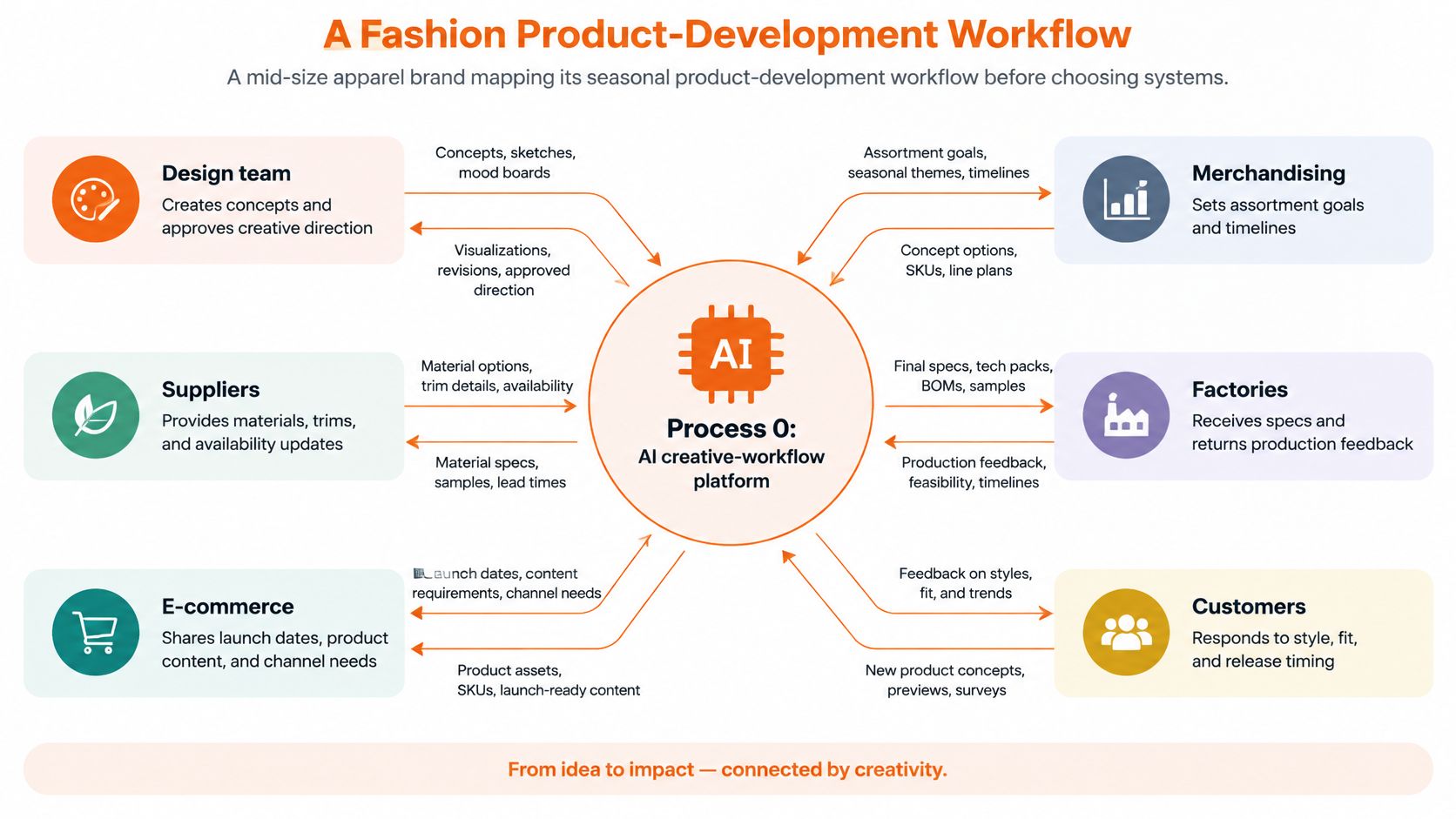
Say a mid-size apparel brand is mapping its seasonal workflow before choosing systems. The team places an AI creative-workflow platform at the center, then names merchandising, design, brand governance, regional teams, buyers, e-commerce and the product-information or asset system around it.
Merchandising supplies the approved SKU brief. Brand governance contributes style rules, and regional teams provide localization requirements. The platform returns assortment views for buyer review, approved visuals and references for design, and campaign assets for e-commerce.
The concept map illustrates a broader candidate scope, including factory, supplier and customer exchanges. Include those participants only when the workflow you're analyzing exchanges information with them.
Follow the brief through the handoffs
The University of Cape Town's systems-analysis guidance recommends identifying external entities by finding the sources and recipients of information, then connecting their flows. That approach keeps the exercise grounded in actual handoffs rather than the organizational chart.
Flows in a fashion product-development context diagram
| Flow label | Between | Direction | Example object |
|---|---|---|---|
| Approved SKU brief | Merchandising and the platform | Into the system | Season, category, price tier, SKU attributes |
| Style and brand rules | Brand governance and the platform | Into the system | Silhouette rules, naming conventions, palette |
| Regional requirements | Regional teams and the platform | Into the system | Localization, sizing, compliance labels |
| Assortment view | The platform and buyers | Out of the system | Colorways and size runs for line review |
| Production dossier | The platform and design | Out of the system | Materials, references and approved visuals |
| Approved campaign asset | The platform and e-commerce | Out of the system | Final images with channel metadata |
Here, production dossier means a handoff bundle of references and approved visuals, not a technical manufacturing specification. The table describes a hypothetical workflow's required exchanges, not a promise that any particular product supplies every output.
Resolve the disputed source of truth
During review, design says its working file contains the latest SKU attributes, while merchandising identifies the product-information system as authoritative. The team assigns canonical attribute ownership to the product-information owner and treats design's revisions as proposed changes. That decision belongs before interface design, not after conflicting records appear.
For Sprello, draw exchanges involving Canvas outputs, shared catalog information, line-review feedback, wholesale line sheets and buyer assortments per account or channel separately when they cross the agreed boundary. Don't draw internal modules as external entities merely to show features.
Subprocesses, internal data stores, model choice and PLM records remain outside this drawing's detail. A production workflow example can help develop the operational sequence after the team has settled responsibility for these handoffs.
Confirm the Boundary Before You Choose a Tool
Before choosing software, settle who owns each exchange. If merchandising and design both expect to approve a catalog update, the diagram should show that responsibility clearly rather than leaving it to interface design.
Use this checklist:
- Assign entity owners. Name a business or system owner for every external participant, and have that person validate its exchanges.
- Check flow labels. Name specific information objects, not actions or vague terms.
- Describe the central process in one sentence. If it combines unrelated responsibilities, narrow the proposed boundary.
- Trace each exchange. Identify who owns the requirement or interface and who handles failures.
- List exclusions and reasons. State what the proposed system will not own so procurement does not expand its scope by assumption.
Get agreement on these points before signing off on the tool. A drawing application can document the workflow without operating it. A product platform can support selected handoffs without becoming the authority for every record.
Match the tool to the responsibility
This comparison focuses on what each tool category owns, rather than treating the options as interchangeable.
Tool categories against the boundary checklist
| Tool type | What it covers | What it does not cover |
|---|---|---|
| General diagramming tools | Drawing context diagrams and data flow diagrams in standard notation | Operating shared product data, AI visuals or buyer-assortment workflows |
| PLM suites | Tech packs, BOMs and product records; pattern-making through dedicated capabilities or connected tools | The full AI visual and buyer-assortment workflow. Sprello complements these suites |
| Planning suites | Demand forecasting and open-to-buy | Product visualization and creative handoffs. Use alongside tools that support those responsibilities |
| Sprello | AI-assisted product visuals from sketches, CADs, materials and references; shared catalog, line review, wholesale line sheets and buyer assortments by account or channel | Tech packs, BOMs, pattern making, demand forecasting and open-to-buy |
Sprello is an AI workflow canvas for fashion, beauty and lifestyle brands. Its workflows support product concepting, assortment visualization, campaign production and catalog-scale content creation, with brand guidance and repeatable handoffs across teams.
Check operational fit as well as features
A feature list does not settle ownership. Decide which system remains authoritative for technical product definition and financial planning, then show only the exchanges that cross the agreed boundary.
Sprello complements PLM and planning suites; it does not replace them. Its focus is production-ready creative workflows that help teams coordinate work across SKUs, channels, regions and seasons.
Common Questions About Context Diagrams
Is a context diagram the same as a Level 0 data-flow diagram?
In usual structured-analysis teaching, yes. It presents the whole system as the central process, with external entities and no internal stores. Some organizations use the level names differently, so put the convention in the diagram's legend rather than assuming everyone shares it.
The important distinction is between the scope view and its decomposition. Renaming a detailed process map doesn't make it a context diagram.
How do Yourdon-DeMarco and Gane-Sarson differ on the page?
Yourdon-DeMarco uses a circle for the process, while Gane-Sarson uses a rounded rectangle. External entity rectangles and labeled directional arrows serve the same purpose in both.
Choose the notation your reviewers recognize. Consistency matters more than decorative styling, and neither method calls for showing internal storage in this view.
Why are data stores left off?
The question is what crosses the system boundary, not how the system persists information. Adding internal databases can make an early scope review look more technically settled than it really is.
An independently controlled product-information or asset system can still appear as an external entity. That represents an outside dependency, not a diagram of its database structure.
Does the same approach work for beauty, jewelry and home?
Yes. Keep the workflow as the central system and identify the brand, merchandising, regional, buyer, commerce and reference-system exchanges relevant to that category.
Change the information objects to match the work, such as finish references, packaging attributes, or material options. Change an entity's placement only when the system of interest changes, not just because the product category is different.
Sprello, our product, connects AI product visuals with a shared catalog, line review, wholesale line sheets and separate buyer assortments, while complementing PLM and planning suites. Visit Sprello to book a demo and assess how those capabilities fit the ownership boundaries you've mapped.
Related
More to explore
Fresh reads

Bulletin Boards Online Compared for Brand Teams in 2026
Compare bulletin boards online for creative ops, remote review, and merchandising planning, with features, plan limits, and best uses for brand teams.
Requirement Document Template: 10 Picks for Fashion Teams
Compare 10 requirement document template options for PRDs and BRDs, with fit notes for fashion, beauty, jewelry, and home brand merchandising and design teams.

Analogous Color Scheme: How to Build One for Fashion
An analogous color scheme uses three to five neighboring hues in a 30 to 60 degree arc. Learn to build, test and apply one across SKUs and channels.