November 9, 2026
What Is an Agentic Workflow? a Guide for Brands
What is an agentic workflow? It is a goal-driven AI process that plans steps, uses tools and escalates to people. See how it applies to merchandising.
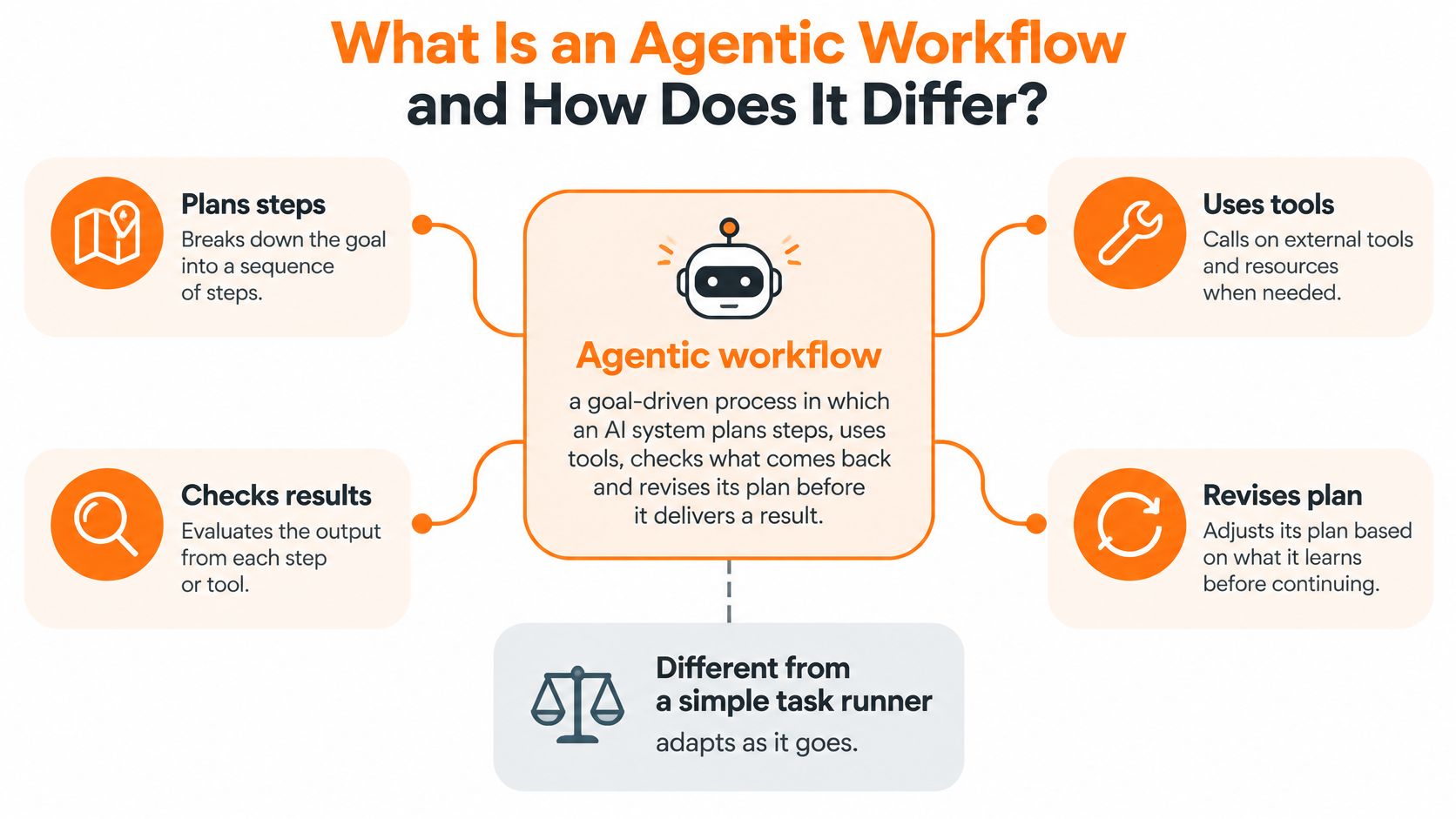
An agentic workflow is a goal-driven process in which an AI system plans steps, uses tools, checks results and revises its plan, with bounded human oversight. Sprello applies that pattern where it fits, as AI for product development and merchandising, from product concept to buyer-ready collection.
The popular advice is to give an agent a goal and get out of its way. Don't. A useful workflow decides in advance where the agent may act, where it may only propose, and where it must stop. That boundary is the design work, not an afterthought.
Published on May 12, 2026
What Is an Agentic Workflow and How Does It Differ?
Scripted automation works like a train on fixed rails: it follows the track or it stops. An agentic workflow works like a dispatcher who reads traffic, reroutes around a blockage and still obeys signal rules. The difference is the loop. The workflow plans steps, uses tools, checks what comes back and revises its plan before it delivers a result. The NIST Information Technology Laboratory program describes agents that can plan multi-step tasks, use tools and search databases, with visibility into tool usage, evidence and decision trails.
Three Approaches to Multi-Step AI Work Compared
Three rows below are categories. Sprello appears as a fourth because it is a product, not a category: an AI workflow canvas for product development and merchandising that follows the same pattern.
| Approach | Who picks the next step | Handles a mid-run change | Human checkpoint | Record of the run |
|---|---|---|---|---|
| Scripted automation | Fixed sequence set in advance by a developer | Stops or errors out | Set in advance at fixed points | Logs of each scripted run |
| Single-prompt AI | The user, one request at a time | Not applicable; a new prompt starts over | The user reviews the one output | Prompt history only |
| Agentic workflow | The agent, within set goals and permissions | Re-plans from intermediate results | Gates on high-impact actions | Inputs, tool calls, decisions and outputs |
| Sprello (AI for product development and merchandising) | AI-assisted canvas steps that the team designs and reviews | Team adjusts one step without regenerating the rest | Team chooses which visuals move into line sheets and buyer assortments | Canvas shows inputs, transformations and outputs |
Three confusions are worth clearing up. A chatbot with a plug-in answers one request at a time, while this work is planned as connected steps. An image generator run in a loop produces files, while here images sit inside catalog checks, approvals and exports. Full autonomy by default places no gates at all, while permissions and checkpoints are part of the setup from the start.
Read the checkpoint column as an autonomy map. On low-risk work, such as reading records from the product catalog or checking naming rules, the agent may act on its own. On brand-sensitive calls, such as which concept variants fit a seasonal brief, it proposes options and a person decides. On commercial or irreversible actions, such as moving visuals into line sheets and buyer assortments, it must stop and wait for approval. Drawing that map is the first design decision, because the same agent that can safely draft a colorway should not push it to buyers without a person signing off.
A seasonal capsule brief gets approved. The workflow reads the shared product catalog, creates concept variants, prepares channel assets, checks naming rules and routes exceptions for approval, recording each stage. In Sprello, that run happens on a canvas where the team connects AI models and watches inputs become outputs, and visuals reach wholesale line sheets and buyer assortments only after the team selects them. Teams weighing a wider rollout can compare this pattern with a governed enterprise AI agent pilot and with a plain explanation of workflow orchestration.
Apply this test to your own process. Does the next step depend on the result of the last one? If yes, you are designing a workflow. If no, a prompt or a script may be enough.
How an Agentic Workflow Runs, Step by Step
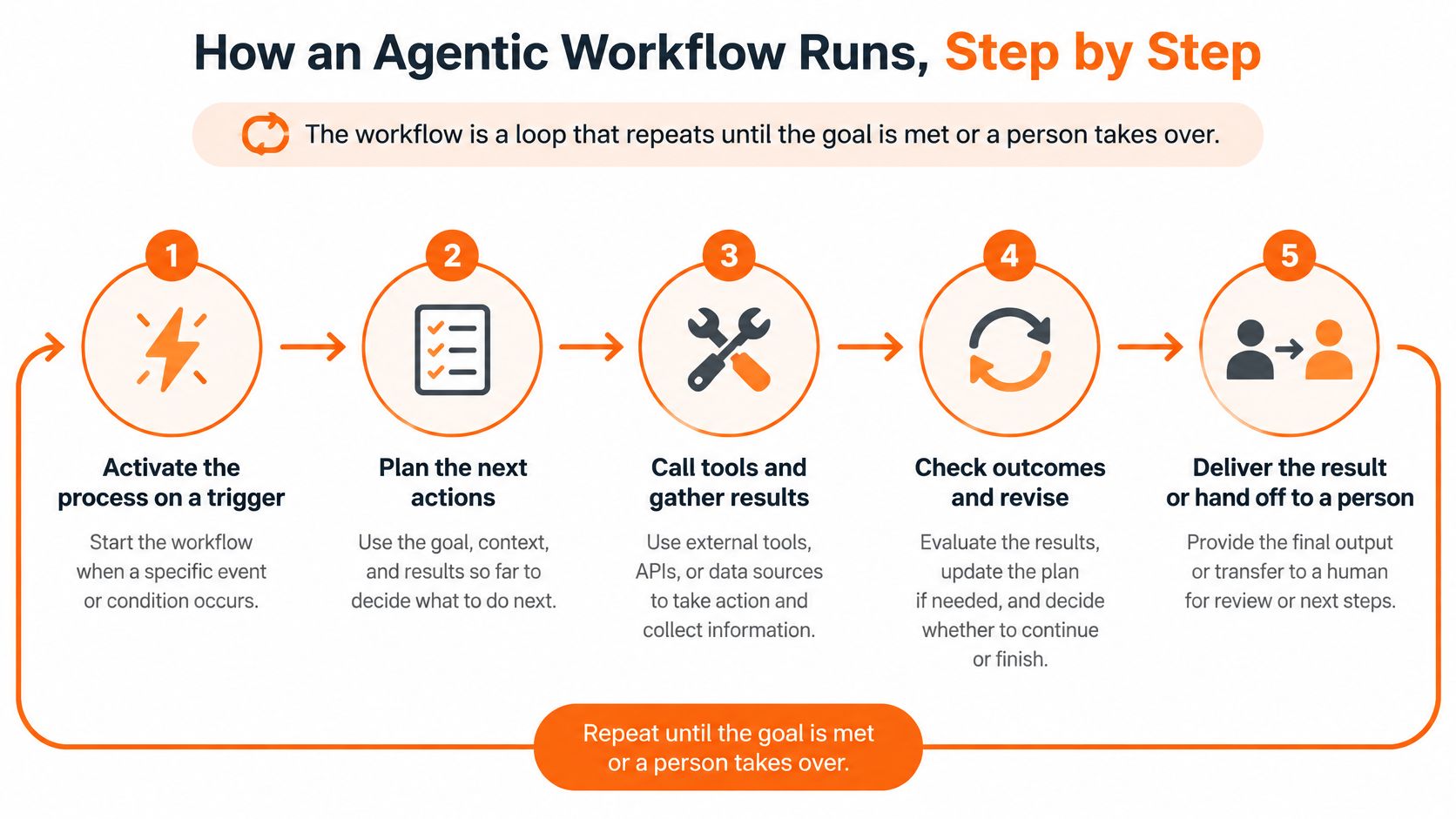
A run works like a sample room with a marked counter: work moves station to station, each station has a ticket, and some doors stay locked unless a named person opens them. Google Cloud on agentic workflows describes a control pattern that moves from activation and delegation through context, reasoning, validation, permission checks, approval, execution, observation and provenance. In merchandising, that pattern lets concepts, visuals, catalog records and buyer outputs stay connected while commercial authority remains assigned.
Before the first step, draw the autonomy map. Mark each decision as propose, act, or stop. Proposing fits reference matching, colorway options and draft copy. Acting fits bounded moves such as creating a draft asset in a workspace or renaming a file to the approved rule. Stopping fits brand-sensitive, commercial or irreversible moves: changing an assortment, overwriting a product record, publishing buyer material or deleting prior versions.
The Nine-Step Run
- Activate the process. Start from a trigger such as an approved seasonal brief, so the run has an owner and a reason. A loose chat request gives the system motion without a source.
- Delegate bounded tasks. Give each agent or tool one defined input and output, such as pulling SKU records or creating colorway options. One agent holding the whole collection will drift past the brief.
- Construct context. Pull SKU records, brand rules and reference images before reasoning starts. Missing context gets replaced with plausible guesses that look confident.
- Let the agent reason. It proposes the next action from that context, for example which references match a material direction. Treat the answer as a proposal until checks pass.
- Validate and check permissions. Test the proposal against schema, naming and asset rules, then confirm the agent may do it. A small naming error that passes here can reach every channel.
- Route for human approval. Send high-impact actions to a named person, such as a merchandising lead for an assortment change. Approval after execution is cleanup.
- Execute through controlled tools only. Run the approved action through the catalog, image model or export tool named in the step. Direct writes to commercial records belong outside agent reach.
- Observe the result. Compare the output with the expected result. On failure, retry within a set limit or escalate; an open loop can spend the afternoon producing confident waste.
- Record provenance. Log inputs, tool calls, asset versions and the approval. Without that record, next season has output and no way to reproduce it.
A healthy run leaves a logged result at every stage. A reviewer can pick any visual, line sheet line or assortment page and trace it to the brief, the source records and the approver. The standard is output with history attached, so speed stays high and accountability stays legible.
Core Components of an Agentic Workflow
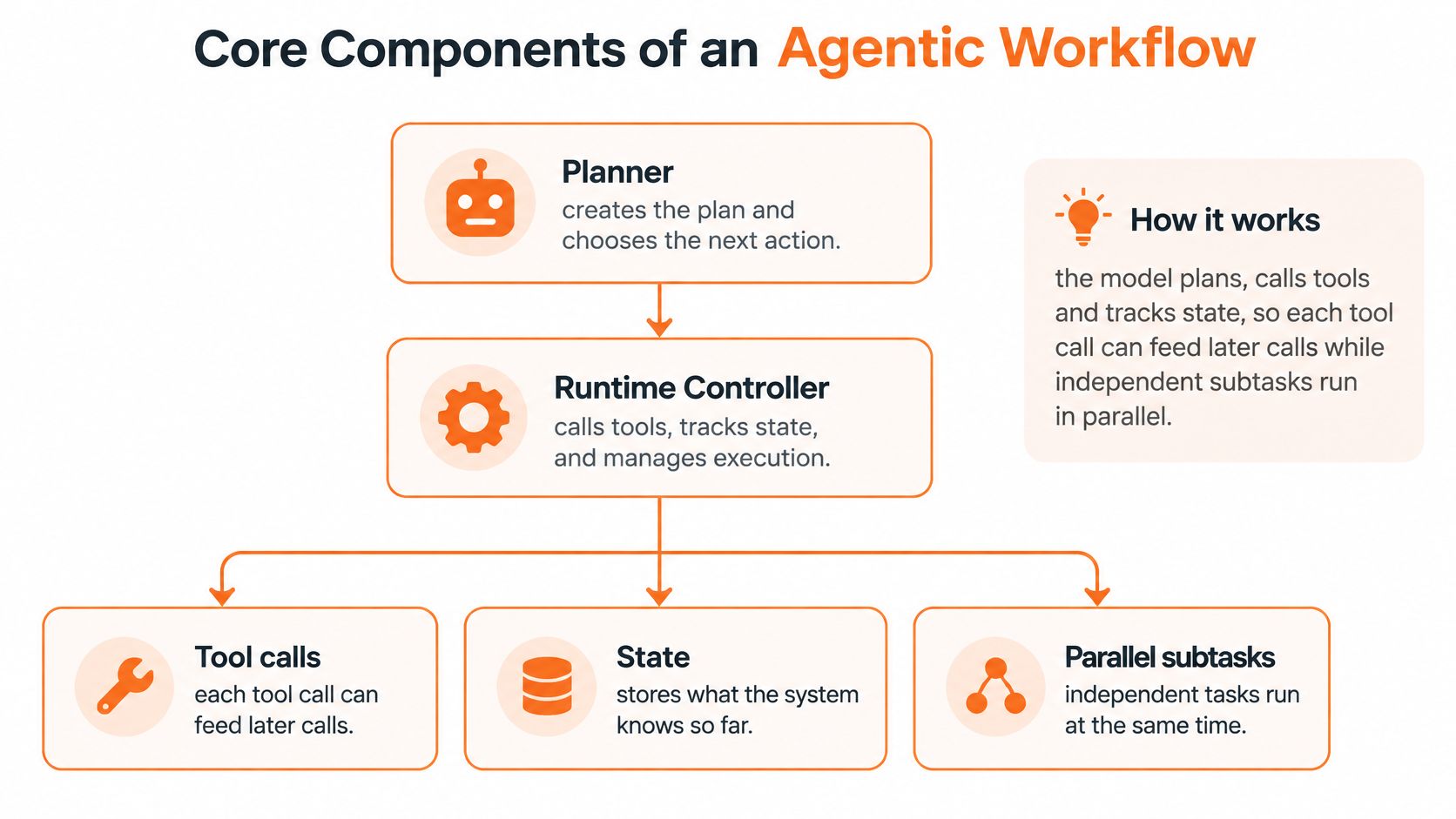
Start with the role of the model. In an agentic workflow it acts as both planner and runtime controller. It plans, calls tools and tracks state, so one tool call can feed the next while independent subtasks run in parallel.
The IBM Research overview of AI agent benchmarks identifies planning, tool calling, and multi-step or nested API execution as core agent capabilities. Benchmarks such as PlanBench, MINT, ACPBench and NESTFUL therefore test sequencing and dependency handling, not only answer quality.
A Production Chain
A merchandising chain might run like this. Assortment data comes first, then SKU-level concept variants, then channel-specific asset generation, then brand-policy checks, then approval and export. Each stage hands a defined result to the next, so a failed brand check does not become a buyer asset unnoticed.
A directed-acyclic-graph layout helps because dependencies stay visible and auditable. Regional or channel variants can run at the same time because they don't depend on each other. Fixed-order work such as naming, resizing and final review stays deterministic, which means the same rule gives the same result every time.
Core Components and What Happens Without Each
| Component | Job in the workflow | Failure when missing |
|---|---|---|
| Objective and inputs | Defines the goal and approved sources such as the brief and SKU data | The agent works from guesses about scope |
| Planner | Splits the goal into ordered or parallel subtasks | Steps run in the wrong order or repeat |
| Tool layer | Calls catalog data, image models and other systems with defined inputs | The agent invents data it could have retrieved |
| State tracker | Holds intermediate results and asset versions | Repeat runs drift apart without explanation |
| Validators | Check schema, dimensions, naming and SKU or channel completeness | Faulty outputs spread silently to later stages |
| Escalation and approval | Routes exceptions and high-impact outputs to a named person | Brand-sensitive outputs ship without review |
| Audit log | Records plan revisions, tool calls, versions and results | The team cannot reproduce or explain an output |
Notice how the failures differ. A missing planner creates disorder. A missing validator creates confident-looking errors. A missing audit log doesn't break today's run, but it breaks your ability to repeat or defend it.
Rule of thumb: build one typed node per stage, each with explicit inputs, outputs, validation rules and handoff state.
If a stage can't describe those four things in plain language, it isn't ready to run without a person watching every output.
Where Should Autonomy Stop in a Workflow?
More autonomy isn't better by default. The design question is how work is divided between the agent, reviewers and deterministic software before the first run.
That caution fits adoption data. In a 2025 Capgemini survey of 1,100 leaders at organizations with more than $1 billion in revenue, 14% had implemented AI agents at partial or full scale and 23% were running pilots, yet 71% said they could not fully trust autonomous agents for enterprise use. That's not a reason to stop. It's a reason to be specific about trust.
A Selectively Agentic Approach
Let agents generate options, classify inputs and coordinate routine steps. Require approval for irreversible actions, brand-sensitive decisions and exceptions. Use plain rules for work that has one correct answer, such as file size or naming format. An agent shouldn't use judgment where a rule will do.
Autonomy Map for Merchandising and Creative Decisions
| Decision or action | What the agent may do | Required control |
|---|---|---|
| Generating colorway or material options | Generate and rank options | Team selects; nothing is approved automatically |
| Classifying incoming sketches and references | Tag, sort and route | Spot-check a sample from each batch |
| Resizing and naming assets to spec | Execute automatically | Deterministic rule check before export |
| Regional copy or creative adaptation | Draft variations for each region | Local reviewer approves each variant |
| Assortment changes or added SKUs | Propose changes only | Merchandising lead approves |
| Final campaign or channel release | Prepare the package only | Named approver signs off |
| Edits to commercial records such as price or minimum order | No write access | Owned by PLM; blocked for the agent |
Read the last row strictly. Commercial records stay with PLM, so the agent has no write access there. It may read an approved field for a line sheet, but it doesn't change price, minimum order or delivery terms.
Treat role-based permissions and the audit trail as design components from the start, not governance added after a problem. Role-based access controls in Sprello let the right people have the right access to accounts and data, which supports the same principle. A designer, a regional reviewer and a merchandising lead shouldn't hold identical approval rights just because they share a workflow.
Set the zone for every decision before you build the first step. Then revisit the zones after the first measured month of runs, using exception patterns rather than opinions. If reviewers approve a routine class of outputs every time, you may loosen that gate. If they keep catching the same brand error, tighten it and fix the rule.
How Agentic Workflows Work in Merchandising Pipelines
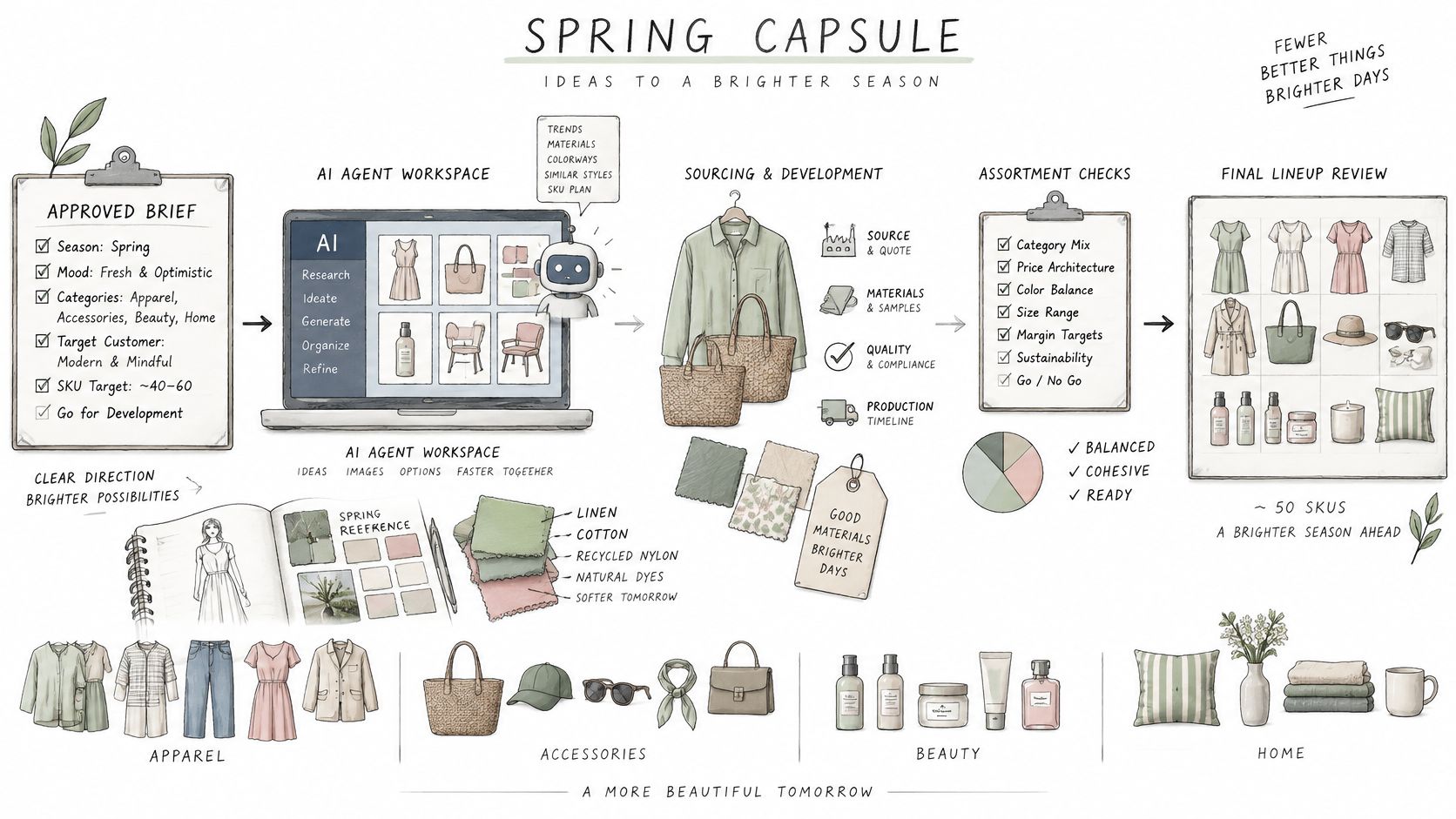
Say a brand is building a spring capsule of several dozen SKUs across apparel, accessories and a small beauty or home line. The team doesn't need a pile of disconnected images. It needs approved visuals attached to governed product records, then arranged differently for each buyer. Each stage below sits in one of three zones: the agent proposes, the agent executes, or the agent stops and waits for a person.
From Brief to Buyer Assortment
First, the brief is approved by people. It sets the season, categories, price architecture references and brand direction. The agent has no vote at this stage, because brand direction is a human call. It then pulls product records and brand rules from the shared catalog, so it works from current SKU data rather than last season's deck.
Next, it generates concept variants from sketches, CADs, materials and references. This is proposal work. Designers review those options and select directions before anything becomes an assortment commitment. That approval point matters because a convincing visual can make an unapproved style look decided.
The workflow then produces channel-specific assets from approved directions and runs brand, dimension and naming checks. Failures go back for correction or to a reviewer. They don't move forward because the rest of the batch passed.
Then people hold the line review and make selections. Only after that selection should the wholesale line sheet be assembled from structured fields. A guide to wholesale line sheets for fashion lists the collection or season, product image, SKU or style number, colorways, size range, fabric composition, wholesale price, suggested retail price, minimum order quantity, delivery window, and ordering terms. Those fields let buyers compare styles and place orders without guessing.
Finally, the team builds separate buyer assortments per account or channel from the same approved catalog. One buyer may see the full colorway range, another only the styles selected for that account. The visual and its product record stay linked through each version. As buyers increasingly delegate routine research and comparison, understanding delegated purchasing also helps teams keep those structured fields complete.
Where Sprello Fits
Sprello is AI for product development and merchandising, from product concept to buyer-ready collection. On its visual canvas, teams connect AI models, adjust parameters and see how inputs become outputs: sketches, CADs, materials and references become product visuals and colorways through saved workflows. Those outputs connect to one shared product catalog, line review, wholesale line sheets, and separate buyer assortments per account or channel, as our overview of an AI content workflow explains.
It supports fashion and apparel, beauty and cosmetics, jewelry and accessories, and home and lifestyle; for jewelry and accessories it produces detail-grade product renders and lifestyle context on demand. A saved canvas workflow can run again on the next style, and once it meets your standards it can run for ten, fifty, or a hundred variations with the quality decisions built in. If one step comes back wrong, you fix that step rather than regenerating everything.
Sprello complements PLM and planning suites; tech packs, BOMs, pattern making, demand forecasting and open-to-buy stay in the systems built for them. That boundary is the autonomy map applied at the platform level. The visual workflow proposes and produces, while the commercial systems of record stay authoritative.
The practical gain in a pipeline like this is faster, reviewable iteration before physical samples are ordered. Teams explore colorways and material directions with AI first, so the expensive loops happen on screen rather than in the sample room. The agent's role stays in proposing and producing; people still decide the assortment.
How Do You Know a Workflow Is Reliable?
One successful run isn't evidence. A workflow can pass on a clean brief, then fail when a field is missing, a reference is ambiguous, or a tool returns an unexpected result.
ReliabilityBench evaluated 1,280 episodes across scheduling, travel, customer support, and e-commerce. Its reported pass@1 fell from 96.9% under no perturbation to 88.1% at perturbation level 0.2, an 8.8-percentage-point decline. Small disturbances change outcomes, so repeated runs matter.
Reliability depends on tool correctness, state tracking, recovery logic and output verification, not only on choosing the right tool. A correct image model can't rescue a workflow that pulled the wrong SKU record and never checked it.
Machine-Checkable Contracts
Give each stage checks a system can apply without taste or debate. Use schema validation, allowed-value checks, asset dimensions, SKU and channel completeness, policy constraints and cross-source consistency. Add bounded retries, fallbacks and escalation for high-impact exceptions. Our guide to audit process steps sets out how to document those checks so another person can follow them.
Workflow-Level Measures to Track Before Scaling
| Metric | What it reveals | How to measure |
|---|---|---|
| Completion quality | Share of outputs that pass brand and spec checks | Review a fixed sample from every batch |
| Exception rate | Share of runs routed to a person | Count escalations by workflow stage |
| Human-review time | Minutes spent per approved asset | Timestamp each review step |
| Unauthorized-action rate | Actions taken outside granted permissions | Compare action logs with the permission map; target zero |
| Traceability | Share of outputs with a full input-to-output record | Audit a random set of outputs against the log |
| Repeat-run consistency | Variation when identical inputs run again | Re-run a reference brief and compare the results |
Use the scaling rule plainly. Autonomy handles routine volume. Deterministic gates and human review protect brand consistency and stop faulty outputs from spreading across SKUs, channels, regions and seasons.
Choose Your First Workflow Before You Scale It
Pick a first workflow with high volume, outputs that are easy to reverse, a clear validation rule, and a measurable baseline from today's process. Catalog-scale asset preparation or line-sheet assembly from approved fields fits well because every output can be checked against the product record before it leaves the team.
Postpone steps that write to commercial records, such as price or minimum order. Postpone campaign and channel release too, until the first workflow passes repeated checks.
Before the first run, name two controls. Set the autonomy zone for each decision, and record baseline measures such as review minutes per approved asset and exception rate. Without a baseline, you'll know the workflow feels faster but not where time moved.
Book a demo at sprello.ai for a walkthrough suited to your workflows after you share your catalog size and use case. Enterprise customers get hands-on onboarding, workflow setup, and training sessions aligned with their production needs. Then widen scope one stage at a time, only after the new stage holds its measures across repeated runs.
Answers to Common Questions About Agentic Workflows
Does an Agentic Workflow Replace PLM or Planning Software?
No. It works beside them. Tech packs, BOMs, pattern making, demand forecasting and open-to-buy stay in the systems built for them, while the workflow carries approved visuals and product details into one shared catalog, line review, line sheets and buyer assortments.
How Is Customer Data Protected?
Access is set by role-based access controls, so the right people have the right access to accounts and data. Designs, sketches and brand IP are encrypted at rest and in transit, with strict data isolation between every workspace.
Who Should Own the Workflow Inside a Brand?
Name one owner from merchandising, design or marketing operations. That owner maintains the autonomy map: where the agent may propose, where it may act, and where it must stop for brand-sensitive, commercial or irreversible decisions. Approvers are named for each stop, so exceptions do not wait for whoever happens to be online.
Can One Step Be Corrected Without Rerunning Everything?
Yes. If one step of a workflow is not right, you can fix that step without regenerating everything, then check only the outputs that depended on it.
Is the Result Always the Same?
No. A workflow earns scale after repeated runs meet the team's standard, with the quality decisions built into the steps rather than remade each time. When a run drifts, inspect the changed step and its gate before widening the autonomy zone.
If you're deciding where an agent may act and where your team must approve, Sprello can show that workflow on your own sketches, catalog and buyer assortments. Book a demo and bring one bounded use case, such as asset preparation or line-sheet assembly, so the steps, gates and records can be mapped with your team.
Related
More to explore
Fresh reads

Product Photography Style Guide: Specs, Shots and Rules
Build a product photography style guide with shot types, file specs, lighting rules, AI disclosure and channel alt text for fashion, beauty and home brands.
Product Design Process: Stages and Handoffs Explained
The product design process explained for fashion, beauty and home brands: stages, handoffs, approval gates and scalable workflow patterns for multi-SKU teams.
How to Make a Lookbook: Step-by-Step Production Guide
Learn how to make a lookbook in six steps: shot lists, page layouts, image specs, line sheet fields and the SKU data that keeps it accurate.