November 5, 2026
Creative Asset Management Software: A Practical Guide
Creative asset management software keeps product visuals, SKUs and approvals in one governed system. Compare it with DAM and PIM tools, and learn how to choose.

Creative asset management software stores, organizes, governs and distributes the product images, videos, sketches and metadata a brand relies on, so teams can find, approve and reuse them in one controlled place. Sprello fits where that work starts with product development and merchandising, connecting AI product visuals to one shared product catalog, line review, wholesale line sheets and separate buyer assortments per account or channel.
Published May 13, 2026.
You're likely living the problem already. A buyer asks for the latest colorway, design sends a file from a desktop folder, merchandising works from a line sheet built last week, and no one's certain which visual was approved for which region. The fix isn't a bigger folder. It's treating assets as a production system that joins product data, visual production and buyer outputs.
What Creative Asset Management Software Covers
Think of a well-run stockroom. Every box is tagged, you can see where it sits, and staff release it only to the right people. Creative asset management software does that work for images, video, sketches, CADs and the records attached to them.
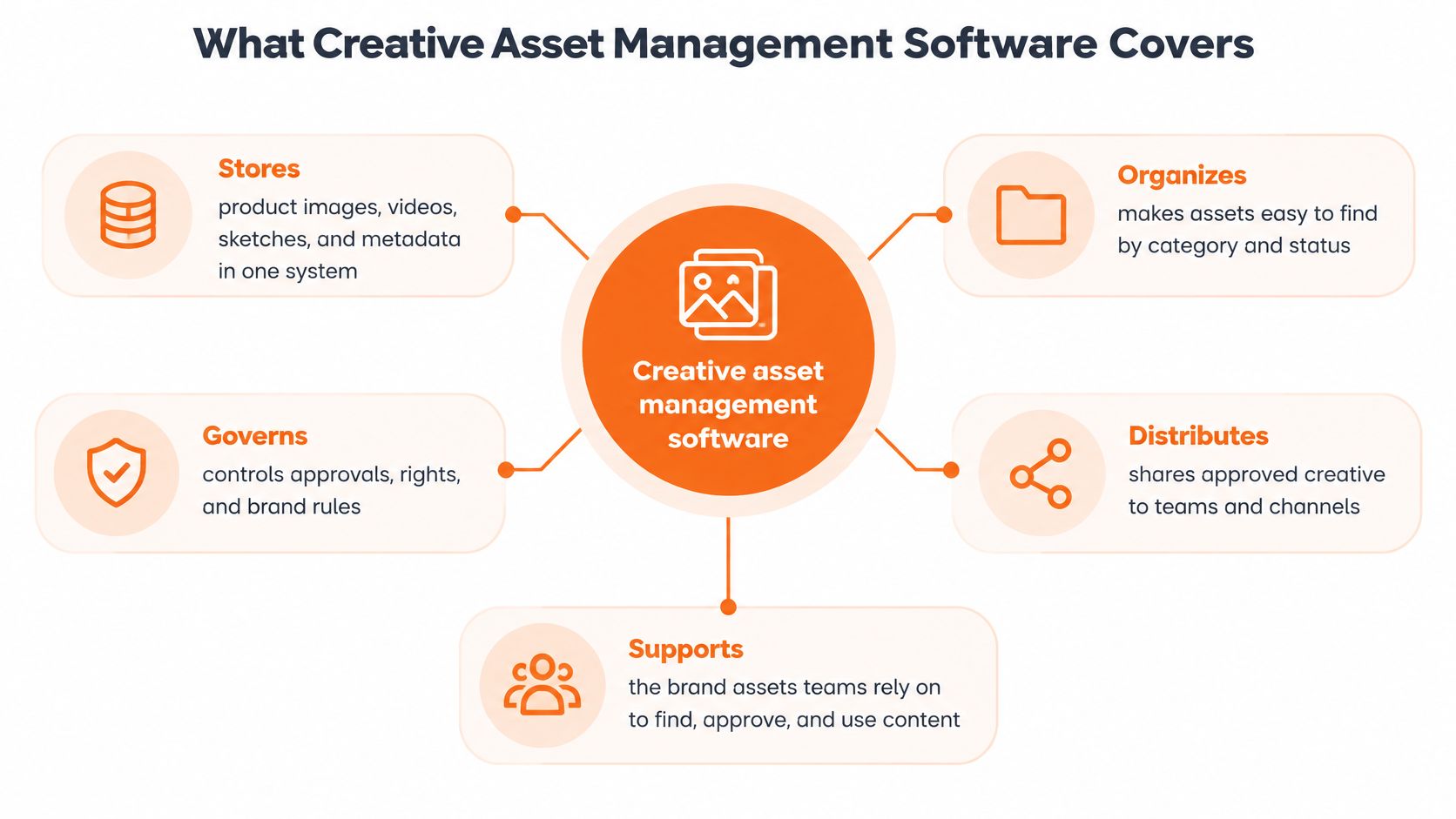
The four jobs
- Storage: Master files stay safe and versioned, so a corrected product shot replaces the old one instead of sitting beside it as "final_v3."
- Organization: Metadata such as SKU, season, colorway, channel and region means a search returns the right item, not forty near matches.
- Governance: The record shows who may use each file, where, and until when, which matters when talent or material rights expire.
- Distribution: Approved versions go to e-commerce, wholesale and social without someone re-exporting and re-naming them each time.
That scope has widened beyond marketing. MediaValet's 2024 DAM Trends Report, based on responses from nearly 400 organizations, reported that 33.3% of DAM users had expanded usage across their entire organization, including departments adjacent to marketing such as sales. It also found 60% of respondents had used DAM for more than two years in 2023, up from 53% the previous year.
For fashion, beauty and lifestyle teams, that shift is practical. Product development, merchandising and regional marketing can work from the same governed source instead of rebuilding assets per team.
If answering which approved version goes to the EU site this week takes more than a minute of searching, you've outgrown folders.
How It Differs From DAM, PIM and Workflow Tools
| Tool type | Core job | Typical users | Main limit |
|---|---|---|---|
| Creative asset management software (Sprello, our product) | AI product visuals, one shared catalog, line sheets and buyer assortments | Merchandising, design, product development | Complements PLM and planning suites; no tech packs, BOMs or open-to-buy |
| Digital asset management (DAM) | Governed master files, metadata, rights and distribution | Marketing and content operations | Often disconnected from planning and product data |
| Product information management (PIM) | Product attributes and specifications for channel feeds | E-commerce and merchandising teams | Holds product data, not creative production workflows |
| Product lifecycle management (PLM) | Tech packs, BOMs, samples, costing and approvals | Product development and sourcing | Limited support for campaign and visual asset production |
| Work-management tools | Tasks, schedules, capacity and handoffs | Project and creative leads | Does not store governed asset files |
A DAM governs master files and their rights. It's the right home for finished campaign imagery that many teams need to find, license and distribute without using an expired version.
A PIM holds product attributes for channel feeds, such as titles, materials, care details and prices. It keeps product data consistent across storefronts, but it doesn't produce or approve the visuals that sit beside that data. Our overview of product catalog management software explains where catalog records and channel data meet.
PLM holds specifications, samples and costing records. Keep it for tech packs, BOMs and the decisions tied to making the product correctly and at target cost.
Work-management tools track tasks, schedules and capacity. For a practical view of that side, Tuff's guide to managing design projects covers how design work gets planned and handed off. Those tools tell you who's doing what by when, but they don't govern the asset files themselves.
Where the gap sits
DAM platforms often sit apart from planning and creation, so teams export files and check versions by hand. Creative asset management software joins product data with visual production and buyer-ready outputs. Our platform complements PLM and planning suites and doesn't replace them. It doesn't handle tech packs, BOMs, pattern making, demand forecasting or open-to-buy.
Decision rule: Choose a DAM when the problem is finding and licensing files. Choose creative asset management software when the problem is producing and approving product visuals for each SKU and each buyer. Keep PLM for specifications and costing.
Use Cases for Fashion, Beauty, Jewelry and Home Brands
The need looks different by category, but the bottleneck is usually the same. Too many variants need consistent visuals, and too much time goes into recreating or hunting for them.
Fashion and apparel
A seasonal line creates many SKUs, each with colorway and size variants. One style may need e-commerce shots, wholesale imagery, social crops and regional edits, all tied to the correct colorway. The primary need is consistency across every SKU, colorway and region without rebuilding the campaign for each one.
We support editorial campaigns across every SKU, colorway, and region from a shared catalog. Designers can test a colorway direction once, save that workflow, and run it across the next styles instead of starting from a blank brief each time.
Beauty and cosmetics
Beauty catalogs depend on hero shots, shade accuracy, before-and-afters and ingredient storytelling. Visuals must match product claims, and a shade or pack change can make a large set of images unusable. The primary need is catalog depth with claim-safe, current imagery.
We support hero shots, before-and-afters, and ingredient storytelling at catalog depth. That helps merchandising and e-commerce teams keep pack, shade and claim visuals aligned as ranges change, rather than reshooting isolated products in separate batches.
Jewelry and accessories
Jewelry needs detail-grade close-ups that show stone, setting and finish, plus lifestyle context that shows scale on the body. Accessory assortments also need to align to core collections, so bags, belts or jewelry stories don't drift from the main line. The primary need is detail you can trust at close range, grouped with the collection it belongs to.
For this category, we support detail-grade product renders and lifestyle context, on demand. Merchandisers can review complementary pieces beside the core collection and spot gaps before a buy meeting, instead of discovering a missing metal finish in the line sheet.
Home and lifestyle
Home brands manage room scenes, seasonal refreshes and style variations across large catalogs. A sofa, rug or table lamp may need several settings and seasonal edits without a reshoot for every variation. The primary need is updating scenes at catalog scale while keeping proportions and materials believable.
We support room staging, seasonal refreshes, and style variations without a reshoot. Teams can refresh a setting for a new season and reuse the approved product record, rather than booking a studio because the backdrop changed.
When you don't need it
A single brand with a small catalog, one channel and no regional variation may be served well by a clean folder structure and a DAM. Don't buy a production system to solve a tidy storage problem.
Count SKUs, colorways, regions and channels per season. If reuse across them is the real bottleneck, the case for dedicated software is strong.
Benefits and Where Product Development Time Goes
When a colorway changes late, the delay may come from waiting for a visual approval, not from making the product. Separating those sources of lost time helps teams see what creative asset management can improve and what it cannot.
| Development stage | Typical duration | Where asset handoffs slow it |
|---|---|---|
| Concepting | 2–3 weeks | Sketches and references scattered across folders |
| Technical pack and first prototype | 3–4 weeks | Material and CAD images resent to each team |
| Sampling rounds | 4–6 weeks | Sample notes not matched to the current visual version |
| Production | 8–12 weeks | Marketing and line assets built after the line is final |
| Average total lead time | About 167 days | Product development is 104 days, about 62% of the total |
One published apparel-development plan allocates 2–3 weeks to concepting, 3–4 weeks to technical-pack preparation and the first prototype, 4–6 weeks to sampling rounds, and 8–12 weeks to production. The same source reports an average total lead time of about 167 days, with product development accounting for 104 days, or approximately 62%.
What software can and can't shorten
Software can shorten visual creation, review and version checks. It cannot shorten fabric sourcing, factory time or physical sampling. A vendor suggesting otherwise is overstating what asset software can do.
Sprello's canvas takes in sketches, CAD files, materials and references to create and refine product visuals. Teams can explore colorways and material directions with AI before making the next physical sample. That can clarify visual decisions; the effect on total development time depends on where delays occur.
A swim lane chart for mapping team handoffs can help clarify who owns each step before you automate it. If design, merchandising and marketing each maintain a different version of a style, software alone will not resolve the ownership problem.
Where your gain will come from
Separate visual-handoff delays from sourcing and factory delays. Measure your current sample count and visual approval time first. Those baselines show whether the main opportunity is fewer rounds of visual review or a different operational bottleneck.
How a Seasonal Line Moves From Concept to Buyer
Assortment complexity isn't just a merchandising choice. It's an operational load that shows up in samples, meetings and leftover stock.
A BoF-McKinsey survey reported that 61% of executives planned to reduce product-development SKUs, while 43% planned to reduce product-development lead times to avoid overstock. The report links complex assortments to unproductive SKU long tails, pressure on core products and bottlenecks in the system and stores.
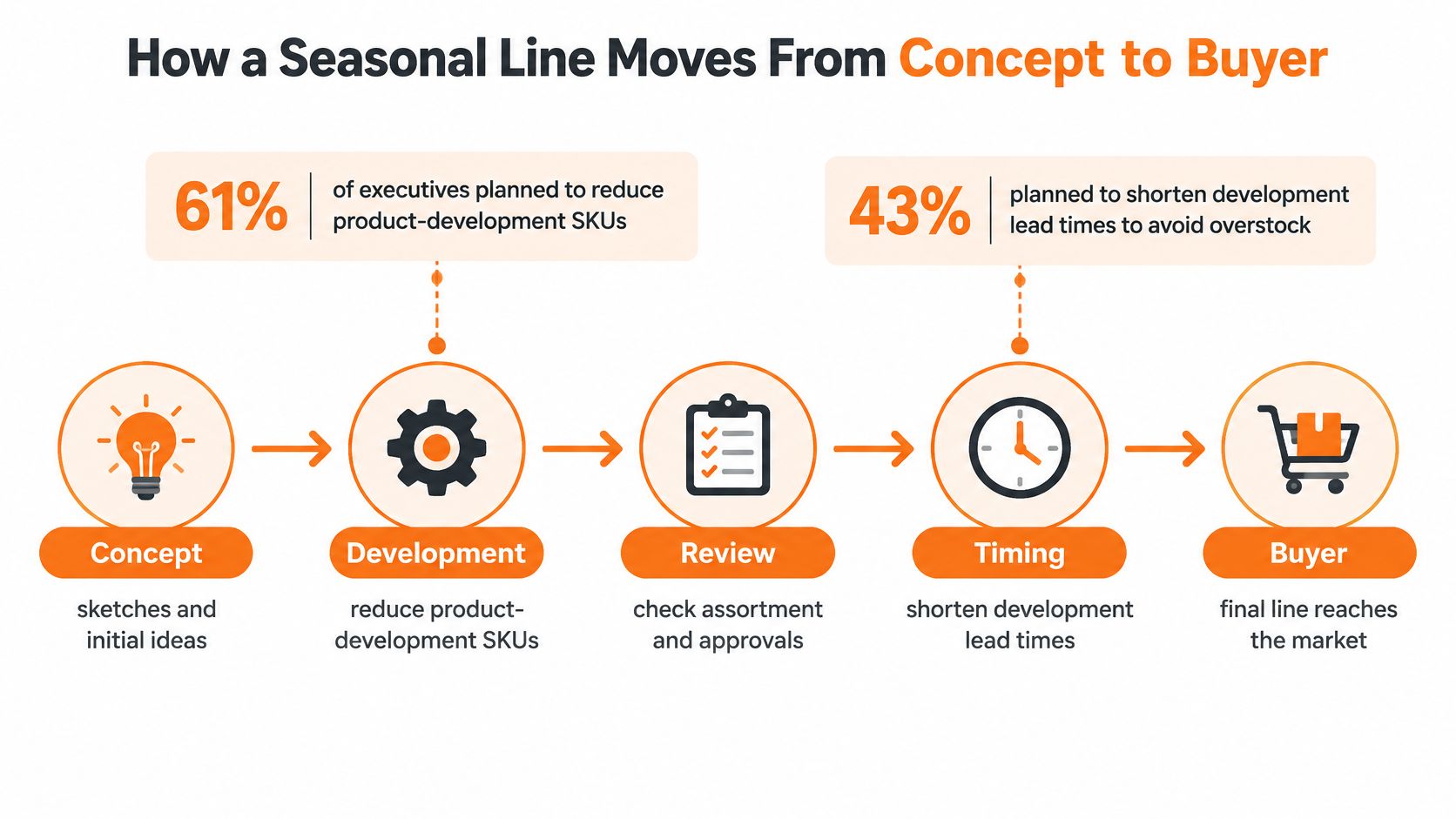
One line, step by step
- Create the style record. Every style lives in one shared product catalog, with its details and the visuals created for it. A shared record prevents duplicate SKUs and stops each team maintaining a private spreadsheet. Planning a season lineup from that record keeps the range visible as it grows.
- Load inputs to the canvas. Sketches, materials and references go in once, so visuals and colorway variants come from the same source. A saved workflow can run again on the next style, which keeps quality decisions consistent. Teams comparing production routes may also review faster AI fashion image production to understand where single-image generation ends and catalog workflows begin.
- Approve against brand rules. Catalog status stays visible, so gaps show before line review. Approvers see the exact visual tied to the exact style, not a loose file in a chat thread.
- Build line sheets. Selected visuals and product details flow from the catalog into line sheets and buyer assortments. Wholesale teams stop rebuilding presentations by copying images into decks.
- Build buyer assortments. Each buyer's assortment starts from the same product information, and the mix can be reviewed as a whole. Reviewing mixes together helps you catch overlap, missing price points and color stories that don't hold up per account.
Traceability is the point. You should be able to follow a buyer-facing image back to its source concept, SKU, crop, localization and approval.
That's one pattern, not a fixed process. Each team sets its own approval points and buyer groupings, and I'd keep those decisions with merchandising rather than letting a tool dictate them.
Core Features and How to Choose a Tool
A catalog can be searchable and still fail at production. The test is whether product records, visual approvals and buyer outputs stay connected as a range changes. Evaluate features by how well they support that chain.
The image below shows a working session where merchandising, design and marketing can agree on the metadata they need.
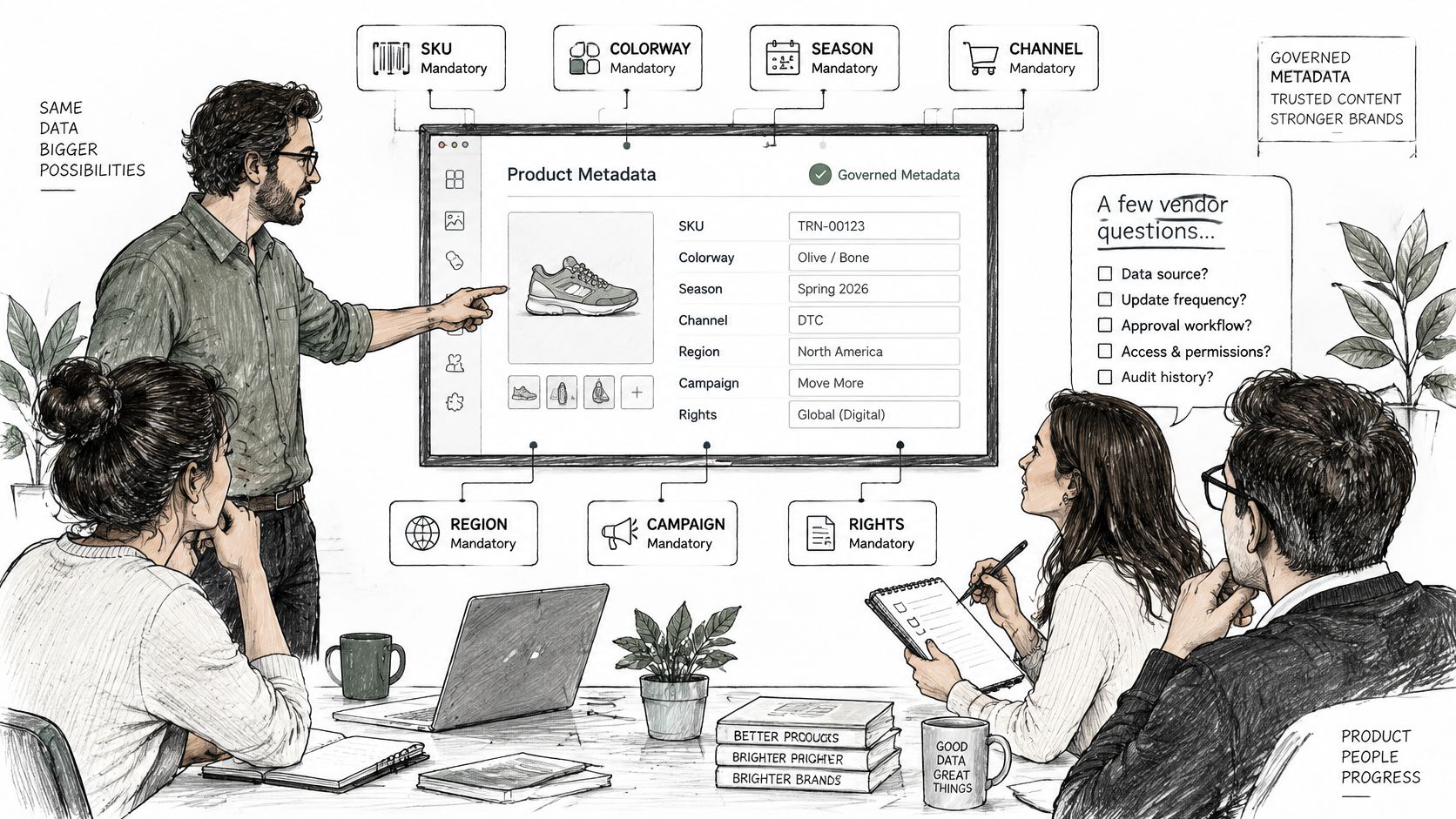
Questions to ask in the demo
Governed metadata: Ask which fields are required for SKU, colorway, season, channel, region, campaign, rights status and source lineage. Useful metadata usually covers descriptive fields such as product, campaign, category and region; administrative fields such as ownership, licensing, usage limits and expiry; technical fields such as format, resolution, color space and dimensions; and provenance fields such as origin, transformations and approvals. Ask what happens when a required field is missing.
Controlled vocabularies: Ask how searches handle terms such as “navy,” “dark blue” and “midnight.” Without agreed terms, search results split across labels and duplicate tagging increases. Ask who maintains the vocabulary and how changes affect existing records.
Search at your volume: Ask the vendor to benchmark p50, p95 and worst-case latency on a catalog similar in size to yours. An Adobe engineering report on a large DAM environment reported searches taking 6–10 seconds, with outliers exceeding 12 seconds, and described reducing metadata fields from 280 to 145 while introducing structured controlled vocabularies. Keep the core schema focused, adding fields only where a workflow needs them.
Access and data: Ask for SOC 2 status, SSO/SAML support, role-based access and written terms covering the use of your designs, sketches and uploads for model training. Sprello is SOC 2 compliant, offers role-based access controls for accounts and data, and does not use customer designs, sketches or uploads to train its models or anyone else's.
Provenance of generated variants: Ask whether each colorway or visual retains its source, transformation history and approval status. If a source is withdrawn or a license expires, the team needs a way to identify affected variations and stop using them.
Fit with existing systems: Confirm how the tool works alongside PLM and planning systems. Specify which system owns tech packs, bills of materials, costing and open-to-buy, and who maintains each record.
Proof on your products: Ask for a demonstration using one of your own product categories. Sprello's catalog shows which products have approved visuals and which still need them, so a useful demonstration can show that status against your range. Visual resources for ecommerce creatives can help teams brief test assets, but your own products provide the more relevant test.
The short video below shows the kind of workflow view to examine, especially how inputs become outputs.
Look for a live catalog status, the metadata attached to a product and the approval trail for its visual. A polished slide deck cannot show whether those records stay connected during routine work.
Score the demonstration against three practical checks: Can a merchandiser find the approved visual for a SKU and region quickly? Can design trace a generated variant to its source? Can wholesale prepare a buyer assortment without exporting files and rebuilding it by hand?
Questions Before You Book a Demo
Creative asset management software is not a DAM with a new label. These are the questions that settle most buying decisions.
Is creative asset management software the same as a DAM
No. It builds on governed storage, metadata and rights, but adds product visual production and buyer outputs such as line sheets and assortments. If you only need to store and license finished files, a DAM may be enough.
Do I still need PLM
Yes. PLM remains the home of tech packs, BOMs and costing, and creative asset management software complements PLM and planning suites. Replacing PLM with an asset tool would leave specification and sourcing decisions without a proper record.
Will my designs train AI models
No. Customers' designs, sketches, and uploads are never used to train our models or anyone else's models. Ask every vendor for that commitment in writing, along with SOC 2, SSO/SAML and role-based access.
What should a demo show
A demo can show the catalog, canvas, line sheets, and assortments on one of your own product categories. You should see how your metadata appears, how visual approvals are recorded, and how a buyer assortment gets built from the same product information.
Book a demo at sprello.ai when you're ready. We first ask for your catalog size and use case, then walk through one of your own categories.
Sprello is AI for product development and merchandising, taking teams from product concept to buyer-ready collection by connecting AI product visuals to a shared catalog, line sheets and buyer assortments. If your asset problem is really a production problem across SKUs, colorways, regions and channels, visit Sprello to book a demo on one of your own categories.
Related
More to explore
Fresh reads
Fashion Ecommerce Photography: Shot Lists, AI and Scale
Fashion ecommerce photography for catalog-scale brands: the shot list per SKU, AI model rules, size coverage and enterprise controls. Updated 2026.
AI Generated Model Photos: A Practical Guide for Brands
Learn what AI generated model photos are, how brands produce them, the QA checks, disclosure rules and when to pilot them across SKUs and channels.
8 Use Cases Examples for Product Merchandising Teams
Eight use cases examples from fashion, beauty, jewelry, and home teams: line planning, catalog photography, buyer line sheets, and regional content.