November 3, 2026
AI Generated Model Photos: A Practical Guide for Brands
Learn what AI generated model photos are, how brands produce them, the QA checks, disclosure rules and when to pilot them across SKUs and channels.
Can a model photo look real and still mislead a shopper about fit? AI generated model photos are synthetic images of a person wearing or presenting a product, built from sketches, flats, material swatches, or approved reference photos, and in Sprello they can connect to a shared product catalog so approved visuals move toward line review and buyer assortments. Generation is the fast part. Per-SKU quality control, disclosure, and provenance are where catalog-scale work succeeds or fails.
What Are AI Generated Model Photos and Where Do They Fit?
Published August 2026
AI generated model photos are synthetic on-model images created from product inputs such as sketches, CADs, materials, and references, rather than from a live fit session with a physical garment. Brands use them to show more SKUs, colorways, poses, and settings than a studio schedule allows, but there's no live fit evidence behind the image. A studio photo answers how a sample draped on a real body that day. A synthetic image answers how a product should look when merchandised, which is useful and narrower.
That distinction decides placement. Use synthetic models for colorway expansion, secondary views, styling stories, market variants, and early buyer materials where speed matters. Keep live shoots for fit-critical apparel hero images, technical outerwear, tailoring, denim fit claims, and any garment where drape, compression, or transparency drives returns. Jewelry and accessories need on-body crops plus close detail because scale and clasp placement sell the piece. Beauty needs skin tone and texture checks, while home and lifestyle often work with room scenes and a human presence only where scale needs explaining.
Production Methods for Model Imagery
| Method | What It Produces | Strength | Main Limit |
|---|---|---|---|
| Studio shoot with live model | Final on-model photos from a real fit session | Reliable fit and fabric behaviour | Cost and lead time for every SKU and market |
| AI-generated model | Synthetic person wearing the garment | Fast variations of pose, setting and styling | Identity drift and no live fit evidence |
| Paired-reference AI generation | Model image built from product photos or flats | Closer product detail to the real garment | Still needs SKU-level checks |
| Virtual try-on | Garment fitted onto a chosen body photo | Quick fit preview for a known body | Narrow output types that depend on pose and garment inputs |
| 3D render | Digital product or room image | Consistent geometry and lighting | Needs a 3D asset and offers less lifestyle context |
The commercial turning point came early. The AITrace record for Levi Strauss & Co. states that in March 2023 the company announced a partnership with Amsterdam-based Lalaland.ai to test virtual fashion models for its e-commerce site and app, designed to supplement conventional photography. That record also states Levi Strauss clarified on March 28, 2023, that the initiative should not be presented as a diversity strategy and that it did not intend to reduce live photo shoots or model bookings. Public evidence in that record doesn't confirm deployment at scale on live platforms.
That episode remains the right framing. Governance questions about disclosure, consent, representation, labor effects, and fit accuracy appeared at the start, not after the technology matured. Teams that distribute synthetic imagery through partners should also align labeling and approval rules with their ecommerce influencer marketing programs, so a creator post and a product page don't describe the same asset differently.
Matching rule: synthetic imagery expands coverage, it doesn't certify fit. Reserve live evidence for products where fit is the promise.
Quality Checks That Catch Wrong Garments and Drifting Models
A photorealistic image can still misrepresent a product. Convincing skin, lighting, and fabric shading may draw attention away from a shortened sleeve, a warped chest logo, or a changed body shape. In catalog production, per-SKU inspection, disclosure, and provenance are part of the work, not finishing touches.
The HF-VTON benchmark on arXiv reports an FID of 5.51 and KID of 0.024 on VITON-HD, compared with FID scores of 6.29 for LaDI-VTON and 6.76 for MV-VTON. These metrics describe image-level statistics across a dataset. They cannot confirm that an individual hoodie has the right drawcord, that its stripe meets at the side seam, or that the model's proportions stayed consistent. Pose representations such as DensePose and OpenPose, combined with geometric alignment, help position a garment on a body. They do not replace SKU-level review.
SKU-Level QA Checks for Model Photos
| Check | What Fails | How to Test | Route When Failing |
|---|---|---|---|
| Garment geometry | Wrong sleeve length or altered neckline | Compare against the flat or reference at the same angle | Back to the designer |
| Logo and print fidelity | Distorted, missing or shifted logo | Inspect brand marks at full size in crops | Brand team |
| Seams and texture | Missing stitching or smoothed fabric | Inspect seams and weave in close crops | Product or fit review |
| Identity consistency | Face or body drifts across outfits | Compare face and full-body embeddings to the locked reference | Review when deviation exceeds the agreed threshold |
| Pose and anatomy | Ghosting, malformed hands or limbs | Check hands, limbs and accessories by eye | Retouch or regenerate |
| Aggregate quality score | Realistic overall but wrong details | Use FID or KID as a batch-level signal only | Never used alone to pass a file |
Work through the checks for each SKU. Start with garment geometry, since retouching cannot make an incorrect neckline true to the product. Inspect logos and prints at full size, where distortion is easier to spot than in a thumbnail grid. Then check close crops of seams and texture. This is especially important for knitwear, lace, embroidery, and technical fabrics, where smoothing can change how shoppers judge quality and price position.
Identity Consistency Needs Its Own Protocol
Identity drift is different from poor photorealism. Lock one reference identity, create the pose-and-outfit matrix, and compare every output with that reference before publication. Identity checks commonly combine face similarity, person re-identification, and visual embedding comparisons alongside text-image alignment. A face-only score cannot establish that the full image is consistent.
Route large embedding deviations to human review. Check skin tone, body structure, hands, and accessories as well as the face. A face match can still pass an image where the body has changed. Across a catalog, small shifts in a model's appearance can make campaign imagery feel inconsistent to buyers, even when individual images look plausible.
Paired references are more useful than unconstrained prompts when exact product appearance matters. Provide the flat, print file, trim reference, and approved color standard, then judge the output against those inputs. Record the source references and the review decision for each SKU so teams can trace why an image was approved. Apply a clear release rule: an image passes only when every row clears for its product. Tailoring, branded prints, sheer fabrics, and embellished pieces should receive human review regardless of batch score.
How Do You Produce AI Model Photos Step by Step?
Production works when each step produces a checkable input for the next one. The common failure isn't a weak prompt. It's a missing reference, an unverified model identity, or an edit nobody logged.
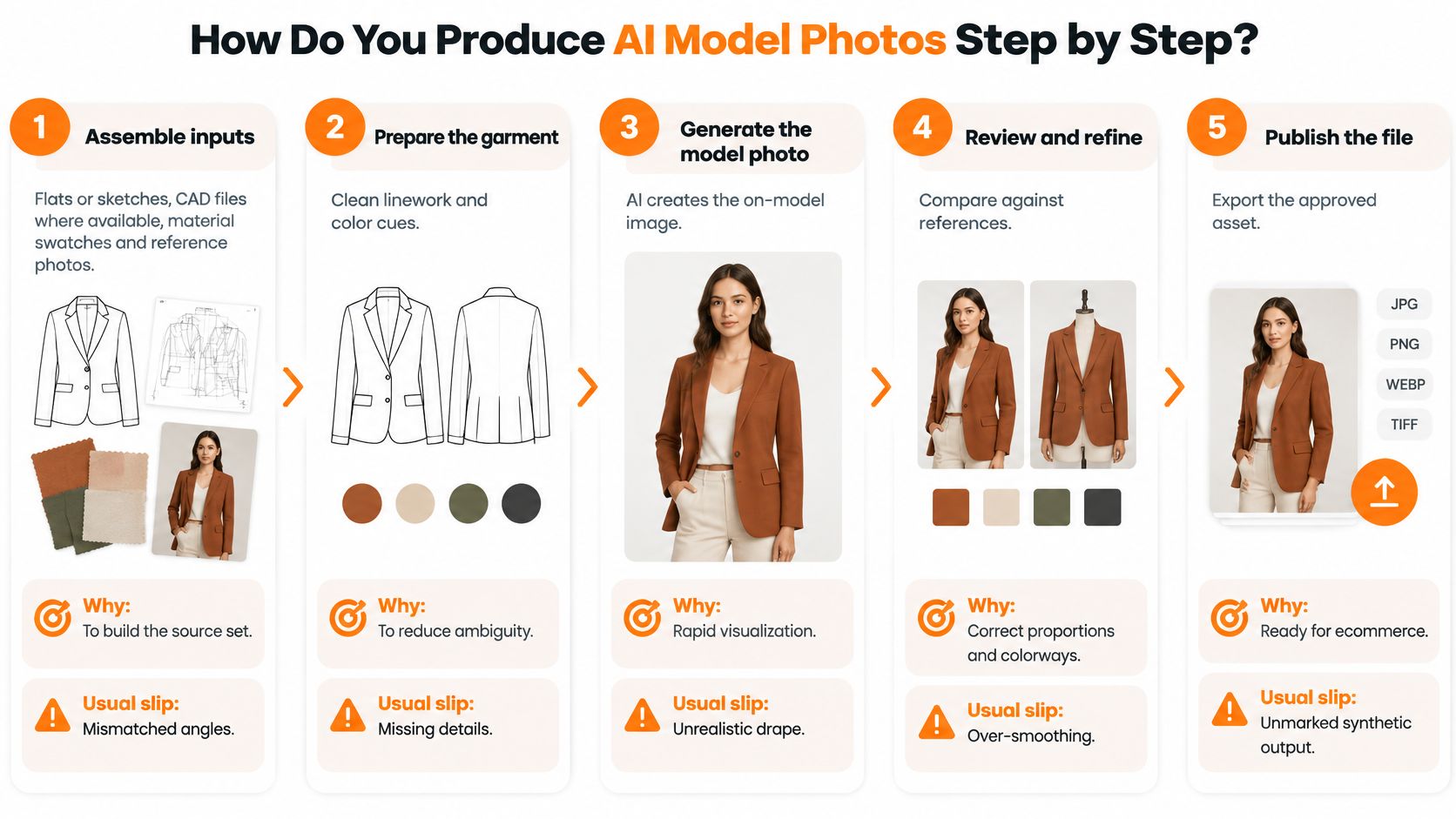
- Assemble inputs. Gather flats or sketches, CAD files where available, material swatches, trim references, and approved product photos at matched angles. Missing inputs cause most wrong garments, and a low-resolution flat reliably produces soft seams and invented stitching.
- Lock the model identity. Choose one reference model set covering face, body structure, skin tone, and hair, then keep it fixed across outfits, seasons, and markets. The usual slip is approving a strong single image and discovering later that no one saved the reference set that produced it.
- Build a pose and outfit matrix. List every combination the campaign needs, front, back, three-quarter, seated, detail crop, before generation starts. Planning the matrix prevents improvised poses that hide closures or distort garment length.
- Set background, lighting, and styling rules. Pull these from brand guidelines and write them into the workflow, along with file naming conventions that include SKU, colorway, view, and synthetic status. Inconsistent lighting across a category page makes accurate products look like different colors.
- Generate from paired references. Use product photos or flats as the reference pair whenever exact appearance matters, rather than relying on an unconstrained prompt. Generate enough variants to choose from, but don't confuse volume with coverage of the matrix.
From Draft Image to Published File
- Run every QA row. Apply the SKU-level checklist before a file moves to retouching, approval, or a channel folder. Reject at this stage, because a wrong garment that reaches retouching tends to get polished instead of corrected.
- Retouch in a logged step. Record who edited the file, what changed, and which version they started from, so any edit can be traced and rolled back. Unlogged cleanup is where logos get rebuilt incorrectly and skin tone drifts from the approved reference.
- Record provenance and disclosure status. Attach the source products, synthetic status, approver, and disclosure decision to each file while the team still remembers them. Retrofitting this record across a season of assets takes far longer than generation did.
- Approve and publish per channel. Export the sizes and crops each channel requires from the approved master, never from a resized copy someone saved locally. Confirm the published crop didn't cut a hem, a strap, or a disclosure label.
A saved canvas workflow makes this repeatable. As our product, Sprello is AI for product development & merchandising. From product concept to buyer-ready collection. Its Canvas turns sketches, CADs, materials, and references into photoreal visuals and colorways, with saved workflows teams can rerun on the next style. That structure fits naturally into a broader approach to ecommerce content production where the same approved visual serves several channels.
A finished file must show correct garment geometry, the same model as the locked reference, and a clear, undistorted logo. If any of those three fails, it isn't finished.
If one step of a workflow isn't right, you can fix that step without regenerating everything. That matters at catalog depth, because rerunning a full chain for a background change wastes review time and risks new errors in parts that already passed. Build the workflow once, audit it, then run it style after style.
How Shoppers Respond to AI Model Images and Disclosure
Realism isn't the same as acceptance. The Stylitics summary of a 2025 survey of 411 shoppers found that 71% could not distinguish real apparel images from AI-generated ones, while 76% still considered on-model photography the most useful format for buying decisions. Shoppers value the format and often can't identify the synthetic version. That combination is exactly why disclosure becomes a merchandising decision, not a footnote.
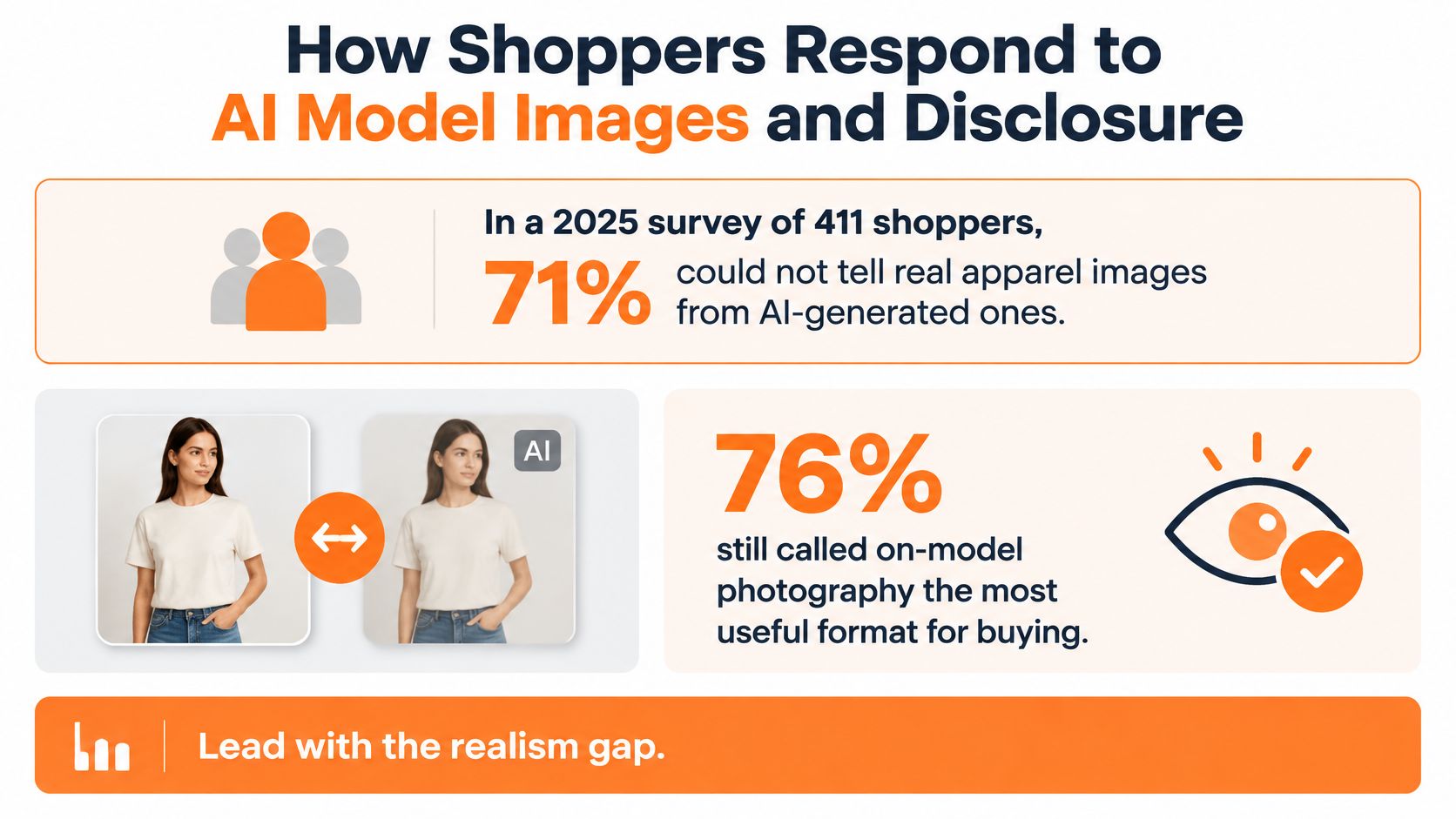
Disclosure changes how people shop. In that same survey, 59% wanted clear labeling when content was AI-generated, 37% said they would be more careful about sizing, another 37% said they would check the return policy, and 30% expected they might need to return the product. Reactions weren't uniformly hostile, since 60% of respondents reacted neutrally or positively after learning an image was AI-generated, while 31% reacted negatively.
The Evidence Contradicts Itself, So Test It
A separate data point points the same way on realism. A 2025 Clutch consumer survey found that 57% of respondents failed to identify AI-generated photos correctly when tested. Detection is unreliable, which removes the option of assuming shoppers will notice naturally.
Experimental results on disclosure are less settled. The IRJEMS experimental study on AI-generated fashion models found that consumers exposed to human models rated fashion presentations more favorably than those using AI-generated models, the disclosed-AI condition performed weakest, and the effect was stronger for high-involvement products. That source also notes another study found no overall trust or perceived-risk difference between human models, undisclosed AI models, and disclosed AI models, while disclosure made AI models seem less human-like and realistic. One 2025 eye-tracking study included only 120 participants, which is a thin base for a global labeling policy.
Don't resolve that contradiction with an opinion. Test label wording by category and channel, comparing AI-generated model, digitally created model, and AI-assisted imagery. Track click-through, conversion, returns, complaints, and perceived authenticity for each version. Use the results to decide where a sizing note and a returns link belong on the page, not whether to hide the synthetic status of the image.
What Are the Disclosure and Provenance Duties Under the EU AI Act?
Two different duties apply, and confusing them creates most compliance gaps. The visual below shows why labeling belongs in the production checklist rather than in a legal review at the end.
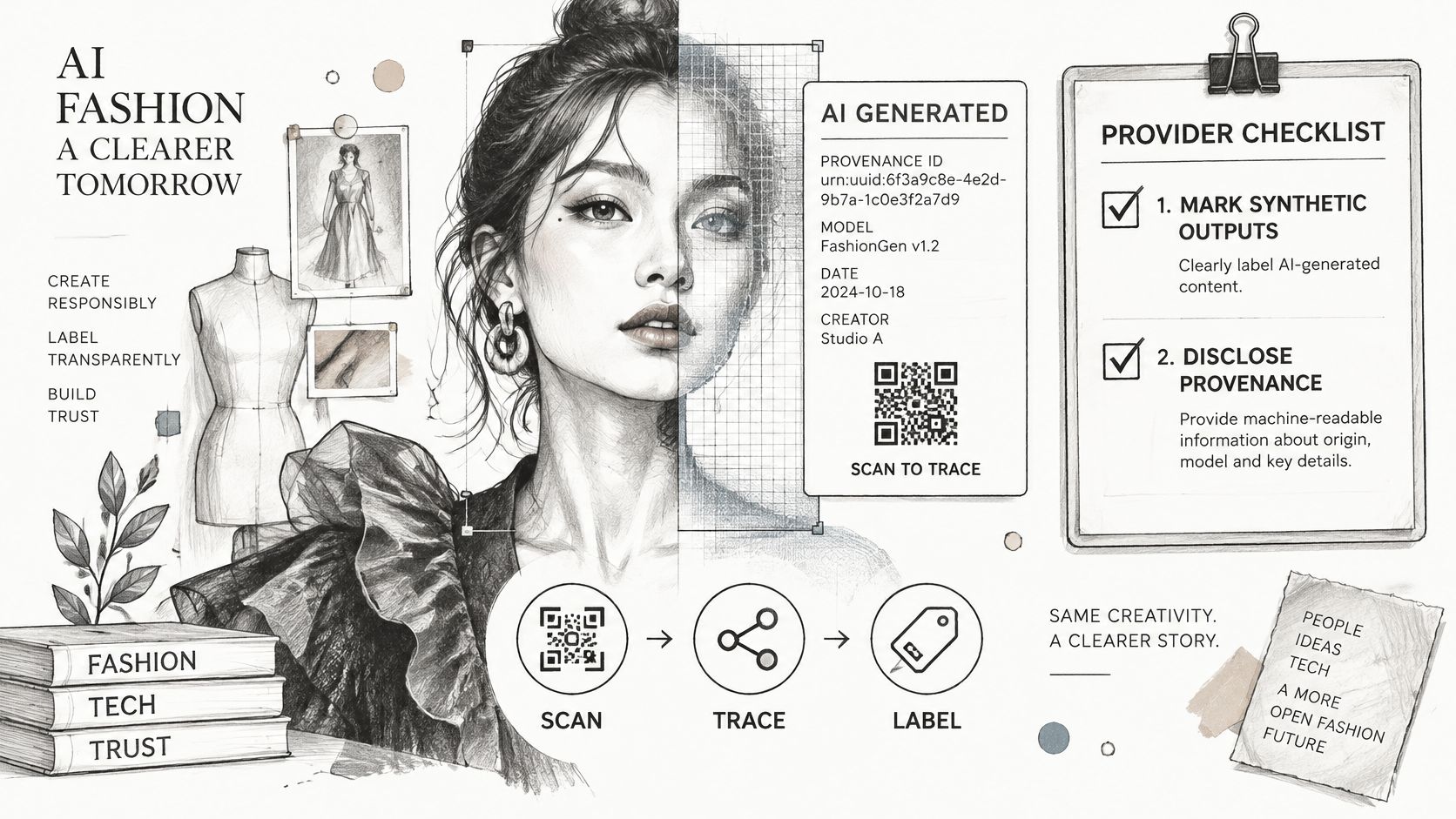
Under Article 50 of the EU AI Act, providers of systems that generate synthetic images must mark outputs in a machine-readable format so they can be detected as artificially generated or manipulated. That's a technical requirement on the tool provider. It doesn't, on its own, tell a shopper anything.
The brand publishing the image carries the second duty. The European Commission FAQ on Article 50 transparency obligations distinguishes the provider's technical marking duty from the deployer's public disclosure duty and describes disclosure as understandable and perceivable without special technical tools or a dedicated action. A hidden metadata-only approach therefore doesn't satisfy the public-facing requirement for qualifying content. The European Commission page on the code of practice for AI-generated content states that these Article 50 transparency obligations apply from 2 August 2026.
Current Practice Is Nowhere Near That Standard
The Modelia 2026 survey of 331 fashion professionals across 29 countries reported that 67% of organizations use AI-generated or AI-edited imagery, yet only 16% always disclose it and 46% never do. That survey also found 36% of companies either have nobody responsible for AI-content compliance or do not know who owns it, and half had never heard of C2PA, the standard for tamper-evident Content Credentials. The gap isn't image quality. It's ownership.
The short explainer below is a useful prompt for reviewing how your own approval chain handles synthetic assets.
Build an auditable record for each published file:
- Source products and references: the flats, photos, and swatches the image was generated from
- Prompts and human edits: what the system produced and what a person changed afterward
- Model identity or synthetic status: locked reference used, plus consent or license basis where a real likeness is involved
- Approver and disclosure decision: who signed off, which label applies, and in which markets
- Market restrictions: channels or regions where the asset can't run
Then test whether the machine-readable mark survives resizing, retouching, localization, and marketplace upload. Ask each platform how it treats metadata, because a mark stripped on upload leaves your record as the only evidence. On our side, zero training on customer data means customers' designs, sketches, and uploads are never used to train Sprello's models or anyone else's models, and you should confirm equivalent terms in your own contract with any provider. Name one person who signs off disclosure for each market before scaling, and confirm scope with legal counsel.
Which Tool Category Fits Your Model Photo Production
Sprello is our product, so use this comparison to identify the workflow that fits your catalog, then assess its hardest SKUs. A convincing single image is a low bar. Production depends on whether teams can create, review, approve, and deliver consistent visuals alongside the product details buyers need.
| Option | Does Well | Stops At | Fits |
|---|---|---|---|
| Sprello (our product) | Turns sketches, CAD files, materials, and references into AI product visuals tied to one shared catalog, line sheets, and buyer assortments | Teams still need to check each style's details and approve its visuals | Product visuals that need to move from concept into merchandising and buyer materials |
| General-purpose image generators | Concept images and mood boards | Product details, approvals, and catalog connections need separate handling | Early ideation and concept work |
| Virtual try-on specialists | Fitting a known garment onto a body image | Output types are narrower, and quality depends on pose and garment inputs | Single-garment previews |
| PLM and planning suites | Product and assortment planning work, such as tech packs, BOMs, sampling records, and open-to-buy | Whether they generate model imagery depends on the tool | Product and planning records |
| Studio and retouching services | Live shoots and fit-critical hero images | Production takes time and effort for each SKU and market | Hero images and fit-critical garments |
General-purpose image generators can help designers explore a mood, setting, or silhouette direction. They are less suited to catalog production when product details, approvals, and version control must stay connected to each style. Without those connections, teams have to manage the resulting files and review history separately. For a consumer-side view of virtual fitting expectations, see how shoppers try a new look online.
Virtual try-on specialists address a more specific need: showing a known garment on a body image. The narrower output and dependence on pose and garment inputs make them a different fit from tools intended to support a broader catalog workflow. PLM and planning suites serve product and planning needs, while studio and retouching services remain useful for fit-critical hero imagery. Choose according to the job: a model image does not replace the detailed review a fit-sensitive garment requires.
Sprello's visual canvas lets teams connect AI models, adjust parameters, and see how inputs become outputs. The workflow takes in sketches, CAD files, materials, and references to create and refine product visuals. Each style lives in one shared product catalog, with its details and created visuals; the catalog also indicates which products have approved visuals and which still need them. Selected visuals and product details can flow from there into line sheets and buyer assortments.
That link between image production and merchandising is the practical distinction. Teams can explore colorways and material directions with AI before making the next physical sample, then review the resulting visuals against the product details for each style. If a workflow step is wrong, teams can fix that step without regenerating everything. A canvas workflow can also be saved and run again on the next style, supporting repeatable production across an assortment.
For teams comparing creative systems, the broader overview of AI creative tools offers context on where generation workflows fit. A useful evaluation should still focus on the actual catalog handoff: whether the right product inputs produce usable visuals, whether approvals are clear, and whether approved assets reach the buyer materials that need them.
The operational cost sits in those checks, not just in generating an image. Review each SKU for garment accuracy, visual consistency, and approval status before its asset is used in a line sheet or buyer assortment. If a tool produces attractive images but leaves product details, approvals, and delivery disconnected, teams must carry that work elsewhere.
If a team needs one image, many tools can help. For catalog production, judge the workflow by how well it keeps each style's product details, visual approval, and buyer-facing materials connected.
How Should a Team Pilot Model Photos Before Scaling?
A pilot should test whether AI model photos can pass the checks required for a real product line, not just whether a tool can generate attractive images. Start with one product line in one market. A controlled test gives the team a chance to catch identity drift, disclosure gaps, and return issues before those problems reach a wider catalog.
- Choose a line with usable baseline data. Select enough SKUs to test the workflow, with historical returns that support comparison. Avoid both the most fit-sensitive category and a line too small to reveal recurring issues. Basic tees, stable-block knitwear, or accessories may provide clearer signals than trousers.
- Set release conditions before generation. Assign an owner for disclosure, require a provenance record for each file, and define a SKU-level QA checklist. Treat each as a release gate: no image should publish without approval.
- Test disclosure labels by category. Compare label options on product pages, then track click-through, conversion, returns, and complaints. Include customer service contacts in the review, since shopper confusion may surface there before it appears in conversion results.
- Compare production over a full season. Run a comparable line through the usual process and assess return rate, return reasons, complaints, and production cost per published SKU. A short test may miss seasonal fit issues or marketplace moderation problems.
- Expand only where results hold. Move to another category when the pilot meets its release conditions. Keep live shoots for lines where synthetic imagery does not meet the required standard; mixed production can be the right operating model.
What a Pilot Should Prove Before Budget Moves
Measure completed, publishable SKUs, not generated drafts. The catalog should distinguish products with approved visuals from those still waiting for them, while QA records why images were rejected. If a logo repeatedly loses fidelity on a particular supplier's files, identify and address that input issue before expanding the workflow.
Account for the work behind each approved image. Include review time, regeneration cycles, retouching, and provenance record keeping in production costs. Teams assessing earlier-stage concepts can use product concept testing to evaluate visuals before committing to physical samples. During the pilot, measure your own lead time and sample counts to establish what the workflow saves.
A Sprello demo can be adapted to the team's workflow after it shares its catalog size and use case. It can walk through the catalog, visual canvas, line sheets, and assortments using one of the team's product categories. Bring a category that is difficult to manage, so the walkthrough can focus on the checks and handoffs the pilot needs.
What Do Teams Still Ask About AI Model Photos?
Do AI Model Photos Need a Visible Label in the EU?
For qualifying content, the brand's disclosure must be perceivable without special tools and is separate from the provider's machine-readable mark. The Article 50 obligations apply from 2 August 2026. Ask legal counsel to confirm which rules and exceptions apply in your markets.
Do AI Model Photos Increase Returns?
Disclosure may affect how shoppers assess sizing and return policies, but that does not establish a general increase in actual returns. No single figure settles the question across categories. Compare return rates and reasons for return with a control line, and review whether complaints point to fit, product representation, or unclear labeling.
Can One Approved AI Model Be Reused Across SKUs?
Yes, provided identity stays consistent across product pages. Lock the reference identity, then check the face and full-body appearance across outfits and channels. Small differences can be easy to miss on one page and conspicuous across a collection, so make consistency review part of each SKU's release checks.
Do Marketplaces Require Disclosure?
Platform rules can differ from regulation and change independently. Check each marketplace and social channel before publishing, then record the applicable disclosure and provenance details with the asset. A label accepted on your own store may not meet a marketplace's requirements.
When Should a Pilot Move to Scale?
Scale when release conditions hold through a full season and return and complaint rates remain comparable to the control line. Expand only in categories where results support it; retain live shoots where they do not. A sales demo can walk through your catalog, canvas, line sheets, and buyer assortments using one of your product categories.
For a real catalog, quality control and provenance are part of the production work, not tasks to leave until after image generation. Sprello connects a visual canvas, where teams work with sketches, CAD files, materials, and references, to one shared product catalog and its product visuals. Selected visuals and product details can flow from the catalog into line sheets and buyer assortments. A demo is customized to the team's workflow after it shares its catalog size and use case. Visit Sprello to arrange a walkthrough and assess which products are suited to AI model imagery and which still call for a live shoot.
Related
More to explore
Fresh reads
8 Use Cases Examples for Product Merchandising Teams
Eight use cases examples from fashion, beauty, jewelry, and home teams: line planning, catalog photography, buyer line sheets, and regional content.
Swim Lane Chart Guide: Roles, Handoffs and Audits
Learn what a swim lane chart is, how merchandising and creative teams map roles and handoffs, and how to audit workflows. Includes a tool comparison.
How to Make a 4x6 Photo Template for Print
Build a 4x6 photo template at 1200×1800 px and 300 PPI, with bleed, a safe zone, and export settings for lab, inkjet, and retail print.