November 7, 2026
How to Make a Lookbook: Step-by-Step Production Guide
Learn how to make a lookbook in six steps: shot lists, page layouts, image specs, line sheet fields and the SKU data that keeps it accurate.
To make a lookbook, start with a complete product list, plan the images each style needs, then build a numbered visual sequence linked to accurate product information, not just attractive photographs. Sprello can connect product visuals and merchandising information, but the essential work is deciding what buyers need to see, compare and order before you design the pages.
Published 2026
What a Lookbook Is and Who Reads It
A lookbook is a structured merchandising and communication tool that presents a collection through styled images and identifiable products. It should communicate creative direction without making readers guess which items they're looking at.
The format grew out of fashion catalogue culture in the late 1980s and became recognizable in the early 1990s, according to SHOWstudio's history of the lookbook. Early versions were often inexpensive, spiral-bound booklets with a brand logo on the cover.
Buyers, editors and sales teams used those booklets to identify garments by look number. The useful lesson isn't the binding method. It's the reference system: someone discussing a jacket should be able to identify its accompanying trousers or shoes without describing the photograph.
Build for different readers
A modern lookbook starts with a cover and collection identity, followed by numbered looks in a deliberate sequence. Connect each look to garment or product names, colorways, materials, sizes and accessories.
Merchandisers check collection balance. Buyers and wholesale accounts assess assortment fit. Editors need clear identification, while e-commerce teams need assets they can connect to product pages.
The Powerhouse Collection's account of printed fashion lookbooks describes photography as a record of both creative vision and marketing strategy, alongside the shift toward digital communication. Plan for both reading conditions:
- Sequential viewing: The reader follows the collection's story from opening image to closing look.
- Rapid scanning: Someone encounters an isolated image through search, social media or a product page and still understands its collection context.
Draft test: Ask a buyer to find a specific style, colorway or accessory in under a minute. Treat that as an acceptance test, not an industry benchmark.
For beauty, jewelry and home collections, replace outfit logic with product groupings, finishes, scale and usage context. The requirement stays the same: readers need both inspiration and identification.
How to Plan the Shot List and Shoot Days
Sign off the coverage before booking the shoot. A photographer can solve lighting and composition problems on set, but they can't recover an absent sample or an unrecorded colorway.
Use the planning flow below to move from creative references to an executable capture list.
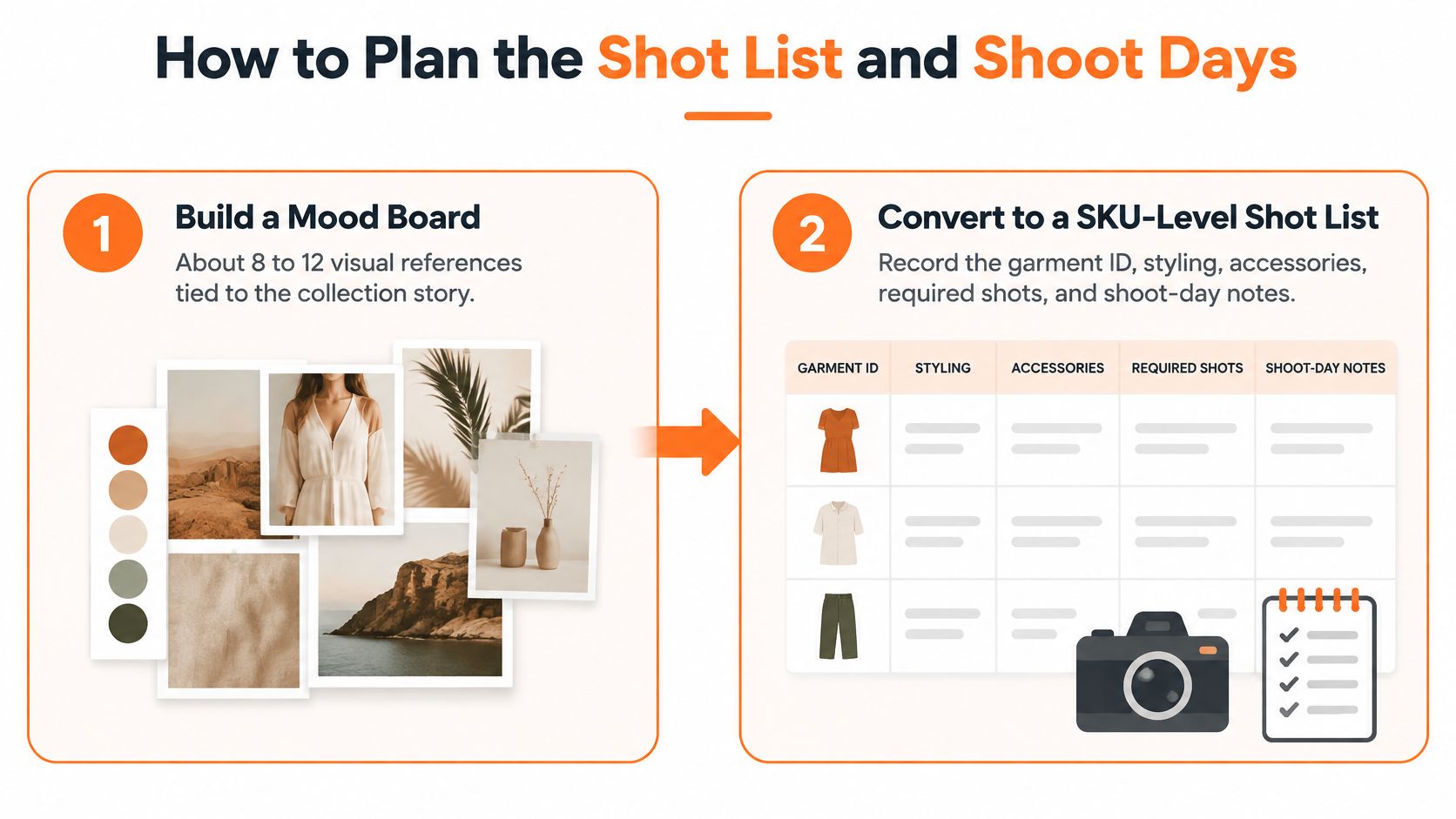
For a starting benchmark, Contcave's lookbook shoot-planning guide recommends approximately 8–12 mood-board references, reports 8–15 looks per shoot day and 4–6 frames per look, producing roughly 40–90 selectable images, and suggests 25–60 final images, or 60–100 for larger digital assortments. These are planning ranges, not a promise of throughput; complicated styling, reflective jewelry and room sets require different production allowances.
Build the mood board. Choose references that explain lighting, framing, styling and collection mood, rather than collecting unrelated images you like. Translate each reference into a production decision, using a storyboard workflow when the sequence needs explaining.
Convert the assortment into a SKU-level shot list. Record garment or product ID, styling, accessories, required front, back, three-quarter and detail views, hero status and intended channels. Add shoot-day notes for sample condition, preparation and any construction feature the photographer must show.
Group compatible setups. Schedule looks that share lighting, backdrop and styling requirements together to reduce reset time. Keep the editorial page sequence separate from the shooting order, because the most efficient capture order rarely tells the best collection story.
Set a realistic daily capacity. Use the studio benchmarks as a starting point, then reduce the target when changes involve hair, makeup, delicate fastening or substantial set dressing. Don't count repeated shutter releases as useful coverage; count distinct, selectable views.
Run a validation gate after capture. Confirm every required SKU and colorway appears, check model size and fit metadata, and compare color against approved references. Assign each selected image to its intended page, region and channel while the production team can still resolve omissions.
Curate a narrative, not a contact sheet. Alternate establishing looks, informative details and changes of pace without repeating the same pose. Larger assortments earn extra images through useful coverage, not through near-duplicates.
The common failure is a visually strong set of pages that omits sellable variants or can't support commerce. The shot list gets signed off before the shoot date, not reconstructed afterward.
How to Lay Out Pages and Export Final Files
Define trim size, grid, margins, bleed, type roles, caption rules, folios and export profiles before placing photographs. Test the system on a representative spread containing a hero image, a detail and the longest realistic product caption.
Use this layout checklist to make those decisions explicit.
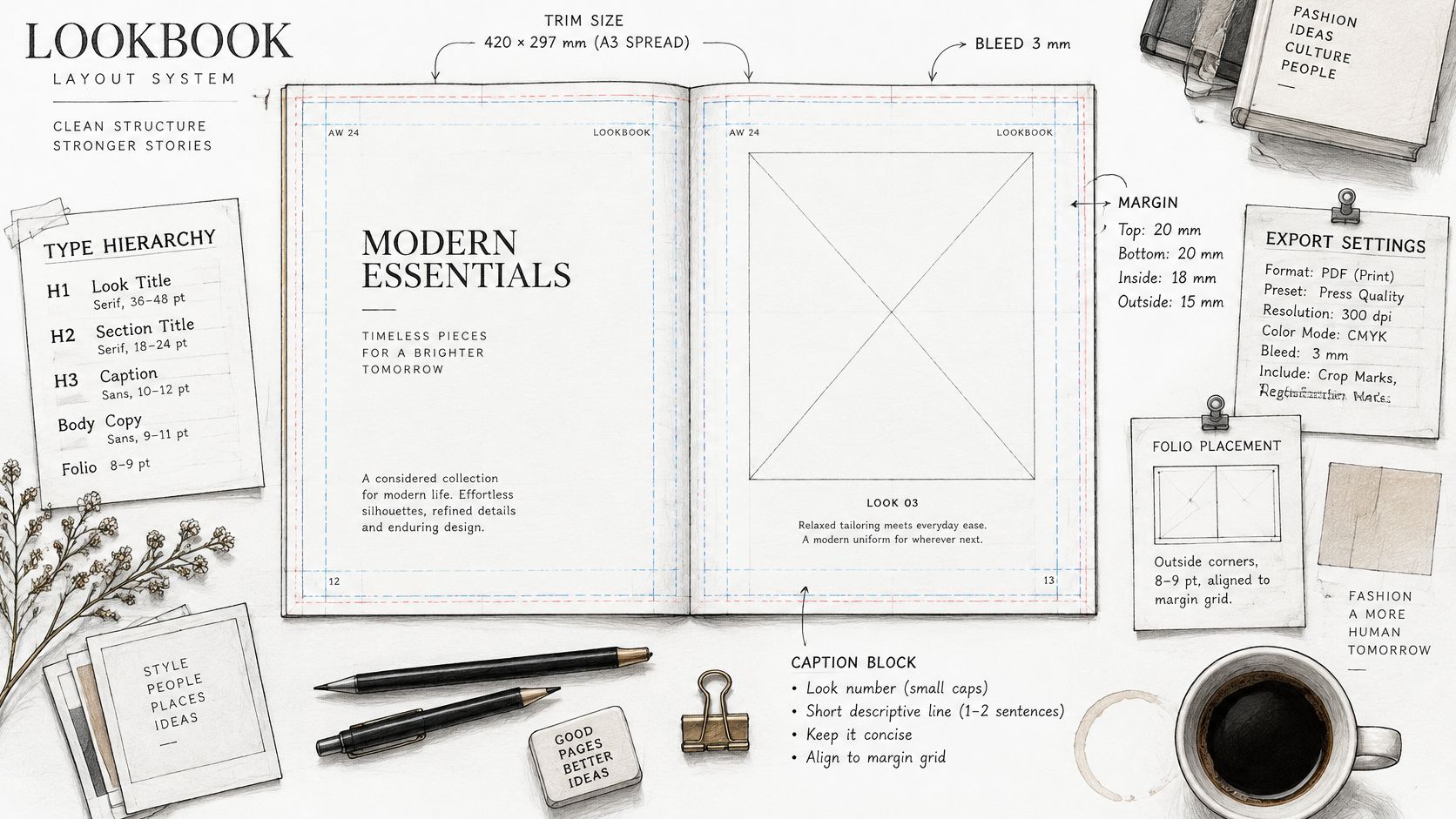
Scale the system only after that spread works. Reviewing lookbook examples can help you judge pacing, but don't borrow a layout whose captions can't accommodate your product information.
Shopify's fashion imagery guidance says 8–12 purposeful images can outperform 20 redundant ones, with coverage including front, back, side, close-up, fabric detail, on-model and motion views. Treat this as directional product-imagery guidance, not a requirement to place every view on every lookbook spread or a guaranteed conversion result.
Export specs by output
Retain high-resolution masters and generate separate delivery files. The Shaare Agency photography guide recommends 2,000 × 2,000 pixels minimum for product zoom and reports that WebP can reduce file size by approximately 25–35% at equivalent quality.
| Output | Size or format | Checks before release |
|---|---|---|
| Print PDF | Printer-specified resolution, bleed and color profile | Trim, bleed, color match to approved references |
| Web or PDF viewer | Web-optimized JPEG or WebP; the reported size reduction applies to WebP conversion | Legibility on mobile and at thumbnail size |
| Product page or zoom view | Master at the minimum dimensions above or larger | Clean background, framing and crop rules |
Keep aspect ratios, typography, product identifiers and naming consistent. Use approved crop variants for different channels rather than forcing the same crop into every placement.
If you're assembling approved image pages without a layout application, PDFWix explains how to convert JPG and PNG images to PDF. Check the resulting file for searchable product information and working navigation before treating it as buyer-ready.
The following video provides an additional visual reference.
Finish with a documented QA pass:
- Inspect full-size pages: Check sharpness, product color, captions and SKU labels.
- Inspect reduced views: Check thumbnail sequence, mobile readability and page order.
- Test destinations: Open every product link and scan every QR code.
- Approve print separately: Confirm the printer's resolution, bleed and color requirements.
How to Link Every Look to Purchasable SKUs
A discontinued SKU that remains linked is more damaging than an awkward page break. It sends a buyer toward something they can't order and leaves sales or customer service to explain the mismatch.
PrintingCenterUSA's lookbook guide recommends product information and links alongside the visual presentation. For enterprise distribution, extend that principle into a source-of-truth assortment table, rather than maintaining links independently inside design files.
Data model linking each look to purchasable SKUs
| Field | What it links | Check before release |
|---|---|---|
| Look ID | Image sequence within the lookbook | Unique per look and identical across every format |
| Product ID | Style across seasons and channels | Stable and never reused for another style |
| SKU and colorway | Purchasable variant visible in the image | Active and not discontinued |
| Image file name | Image where the variant appears | Matches the look ID and version |
| Market URL | Regional product page for the variant | Live, with correct price and availability |
| Version and date | Release record for the file | Recorded on every file |
Create a separate mapping entry for every visible garment, accessory or product variant. A group image containing several items must resolve to all the purchasable items, not just the hero product.
Separate editorial styling from inventory. A borrowed prop or unavailable accessory can appear in the photograph, but it shouldn't have an active shopping link. Label it appropriately so buyers don't mistake styling for assortment.
A lookbook is an interface between creative and commerce. Its product mapping deserves the same approval discipline as its images.
Before release, merchandising confirms assortment completeness, regional pricing and availability; the publishing owner checks destinations and records the release version. This prevents missing accessories in the index, discontinued styles on linked pages and prices that don't match the buyer's market.
Schedule live-link checks for the first sales period and after any assortment change. Assign an owner for corrections, including replacement files and account notifications, so publication doesn't become the end of maintenance.
What a Wholesale Line Sheet Must Include
A buyer shouldn't have to extract ordering information from styled photographs. Give them a commercial companion document with a clearly identifiable entry for each style.
Use this checklist when preparing the buyer-facing version.
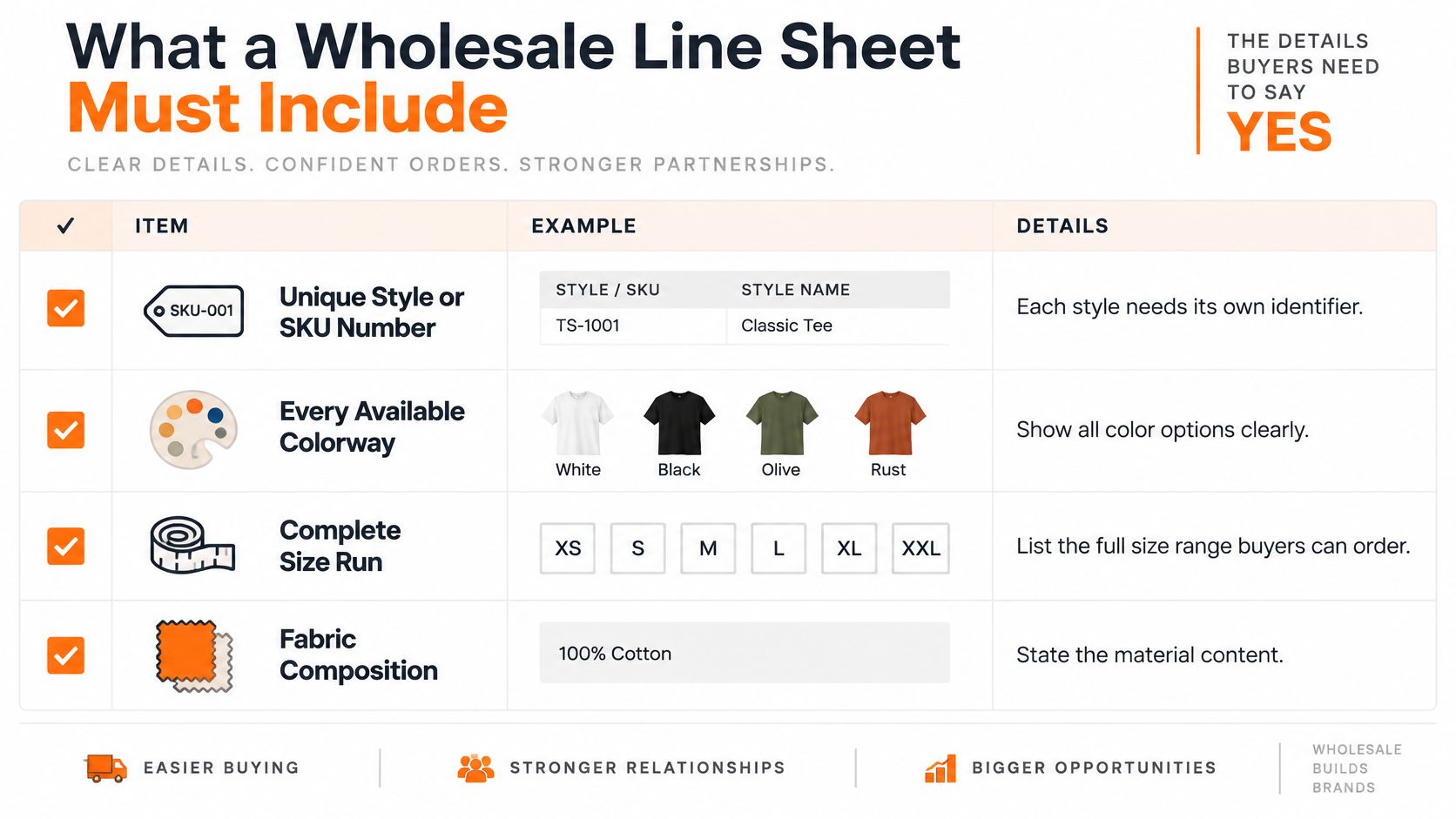
RepSpark's digital line-sheet guidance identifies the commercial and product fields buyers need to evaluate assortment fit, margin, ordering constraints and timing:
- Identification: Unique style or SKU number, with variant codes alongside the relevant prices.
- Available assortment: Every orderable colorway and the complete size run.
- Materials: Fabric composition, care instructions and relevant performance attributes.
- Pricing: Wholesale price and suggested retail price, with the market and currency clearly identified.
- Order constraints: Minimum order quantity and delivery window.
- Dates: Season start ship date, cancellation date and any pre-book deadline.
Standardize the comparison image
Use a clean flat or ghost-mannequin image for each style, with consistent lighting, background and crop. Kobo's line-sheet guide recommends this standardized approach so buyers can compare silhouette, construction and surface detail.
Keep expressive campaign photography in the editorial presentation. A dramatic pose may explain the brand, but it can hide a hem, closure or product proportion that matters to an order.
For beauty, jewelry and home products, apply the same comparison principle with category-appropriate views. Don't use an atmospheric room photograph as the only evidence of a chair's shape or a cropped lifestyle image as the only view of an earring.
Change the assortment, not the underlying facts
Prepare account-specific versions for North America, Europe, department stores, specialty boutiques, flagship stores or own retail when the offer differs. Start with the same product information and change only the selected assortment and applicable terms.
Buyer-readiness check: Can the buyer judge assortment fit, margin and timing from this page alone, without sending a question?
If not, fix the missing field before adding more design elements.
How to Distribute and Version the Lookbook
Distribution is a controlled handoff, not an attachment sent to everyone.
- Wholesale accounts: Send the relevant line sheet and buyer assortment as a PDF or through the buyer portal where the account is already registered.
- Internal teams: Give sales, merchandising and customer service the complete lookbook, including product IDs and approved notes.
- E-commerce: Deliver web renditions and zoom masters matched to the product records.
- Social and email: Prepare short, channel-specific sequences. An iHatePosting social media scheduler can support publishing coordination, but the approved asset record should remain separate from the posting calendar.
- Access: Give editors and sales view rights where appropriate; restrict master files and unreleased colorways to authorized merchandising leads.
Retire superseded files
Name each file with collection, look ID, market and version before sending it. A documented creative asset management workflow helps teams distinguish approved releases from working files.
When a replacement ships, retire the previous version from distribution and tell accounts which release to order from. Confirm that every channel points to the live version, not an old downloaded copy.
Which Tools Fit Your Lookbook Workflow
The right tool depends on where product information breaks between creative and commerce. Compare options by the work they handle and the handoffs they leave to your team.
Lookbook tool categories compared
| Tool type | Best for | Trade-off |
|---|---|---|
| Desktop layout software | Print-accurate spreads with full typographic control | Product data and separate line sheets need manual maintenance without a connected workflow |
| Online design templates | Quick single-PDF lookbooks for small collections | Print controls differ; SKU data usually needs separate management |
| PLM suites | Product specifications and sampling workflows | Editorial layout and lookbook visuals generally need another tool |
| Photography studio or agency | Shoot capture, styling and retouching | Shoot-based costs; cross-account reuse requires agreed rights and asset organization |
| Sprello | AI visuals, a shared product catalog, line sheets and buyer assortments | Complements creative and merchandising workflows rather than replacing every business system |
Studios can deliver reusable assets, and template tools can support hyperlinks. The practical difference is how much product information and linking your team must maintain separately.
Where Sprello fits
Sprello's canvas takes in sketches, CAD files, materials and references to create and refine product visuals. Teams can save a canvas workflow and run it again on the next style.
Every style lives in one shared product catalog with its details and visuals. The catalog shows which products have approved visuals and which still need them. Selected visuals and product details flow from the catalog into line sheets and buyer assortments, and each buyer's assortment starts from the same product information so the mix can be reviewed as a whole.
Category workflows vary: fashion and apparel teams can support editorial campaigns across SKUs, colorways and regions; beauty and cosmetics teams can build hero shots, before-and-afters and ingredient storytelling at catalog depth. Jewelry and accessories workflows support detail-grade product renders and lifestyle context on demand. Home and lifestyle teams can create room staging, seasonal refreshes and style variations without a reshoot.
Line sheets can be built for wholesale presentations to accounts across North America, Europe, department stores, specialty boutiques, flagship stores or a brand's own retail. They can include style or variant codes, material, wholesale price and retail price. Explore colorways and material directions with AI before making the next physical sample.
For a separate video deliverable, assess ClipNova's AI video creator against the motion brief. A still-image workflow and a video brief call for different outputs.
Choose tools by SKU count, sales channels and accounts, and whether line sheets need to draw on the same product information as the lookbook. A demo can walk the team through the catalog, canvas, line sheets and assortments using one of its own product categories, adapted to its workflows after the team shares its catalog size and use case.
Frequently Asked Questions About Making a Lookbook
What's the difference between a lookbook and a line sheet?
A lookbook presents styled products as a collection story and reference. A line sheet supports ordering with style-level prices, minimum quantities and delivery information; both should use matching product IDs.
Does a lookbook have to be a PDF?
No. Print pieces, PDFs, web pages and shoppable galleries can all work, provided the product references remain consistent and the format suits the reader's task.
Can AI create lookbook visuals?
AI can help explore colorways and material directions before the next physical sample. Check approved visuals against product references, especially construction, finish, proportion and color, before using them in a buyer-facing presentation.
How should a team evaluate a new tool?
Bring a season's catalog and a real use case, then test the complete handoff from visual selection to buyer-ready output. Check whether the team can identify missing assets, produce the correct assortment and update the release without rebuilding it manually.
Sprello connects product visuals, the shared catalog, line review, line sheets and buyer assortments so your lookbook can support an accurate commercial presentation. Visit Sprello to book a demo, share your catalog size and use case, and walk through the workflow using one of your own product categories.
Related
More to explore
Fresh reads
Product Design Process: Stages and Handoffs Explained
The product design process explained for fashion, beauty and home brands: stages, handoffs, approval gates and scalable workflow patterns for multi-SKU teams.
What Is a Capsule Collection? a 2026 Brand Guide
What is a capsule collection? A small, edited product group whose pieces combine across looks, channels and seasons. Learn how brands plan one.

Creative Asset Management Software: A Practical Guide
Creative asset management software keeps product visuals, SKUs and approvals in one governed system. Compare it with DAM and PIM tools, and learn how to choose.