November 26, 2026
3D Product Photography: A Guide for Large Catalogs
3D product photography explained for fashion, beauty and home brands: workflow, capture settings, tool options and catalog scaling.

3D product photography builds reusable product views from a three-dimensional model or multi-angle capture of a physical item, but replacing every studio image with 3D is usually the wrong catalog strategy. Sprello supports the AI-assisted route, turning sketches, CADs, materials and references into photoreal visuals and colorways through saved workflows, without making those visuals equivalent to an interactive 3D model.
Published July 17, 2026
What Is 3D Product Photography and Why Brands Use It?
3D product photography is a production system, not a single image format. Teams use the term for rendered stills, photographic turntable sequences, rotatable models and assets prepared for augmented reality. Those outputs require different inputs, so the production brief must say which deliverable the buyer needs.
A flat photograph is a postcard of a product. A genuine 3D asset is closer to the box the buyer turns over in their hands. A photographic spin sits between them: shoppers can rotate through captured views, but they can't inspect an angle the camera never recorded.
Start with the source asset
The main production routes have distinct dependencies:
- Photogrammetry reconstructs geometry and surface appearance from photographs of a physical sample. Reflective, transparent and fine-detail surfaces need particular care.
- Rendered CGI starts with CAD or a prepared 3D model. The team defines materials, lighting and cameras before producing images or interactive exports.
- AI-assisted visuals start with concept inputs and references. They support visual exploration and merchandising, but a photoreal image isn't proof of accurate geometry or a downloadable model.
The reusable-model route follows this production sequence:
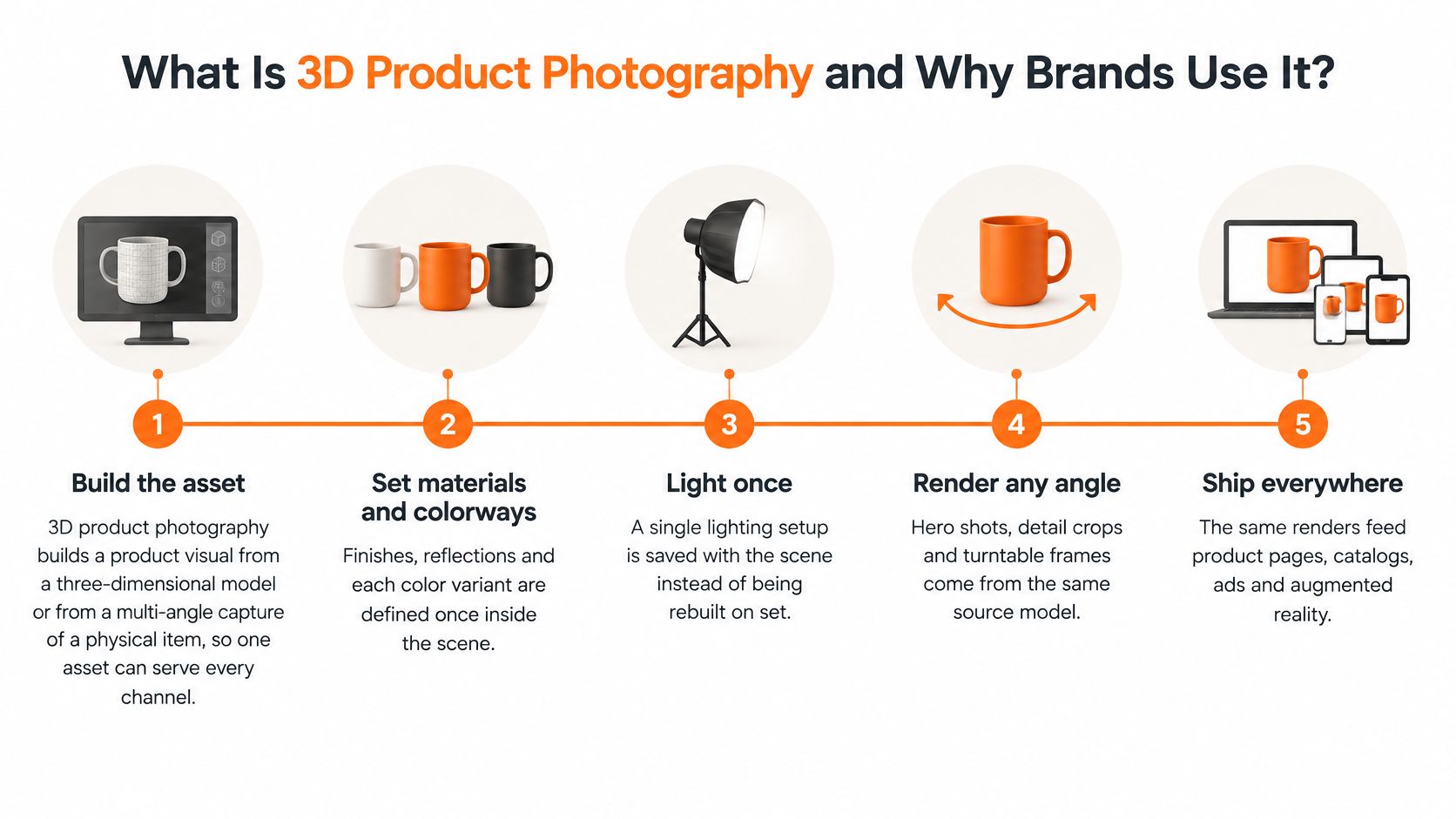
Treat adoption figures as context
A 2025 industry estimate from 360 Research Reports reported that approximately 60% of leading e-commerce platforms offered 360-degree views, about 55% of advanced online retailers used 3D models for some listings, and 3D formats were associated with as much as a 25% increase in add-to-cart events compared with conventional two-dimensional photography. These are industry estimates, not a census or a forecast for your assortment.
The operational value is more concrete than the headline lift. An approved model can supply hero angles, detail crops and supported variants without rebuilding the scene for each output. That matters when merchandising, wholesale and marketing need different presentations of the same product.
Merchandiser takeaway: Buy a reusable source and an approval process, not just an impressive hero image.
Reuse still has boundaries. An image can't become an interactive model merely because it looks dimensional, and a model isn't AR-ready until its scale, materials and delivery format have been checked.
Which Products Need 3D, 2D or a Hybrid?
Choose the format per SKU by what the buyer must inspect. A company-wide requirement for interactive 3D spends production effort on products whose buying questions may already be answered by a clear front view and an accurate swatch.
Compare standardized 2D sets, interactive 3D and a hybrid that assigns each format a specific job.
| Product category | Recommended format | Why |
|---|---|---|
| Jewelry and accessories | 3D with detail-level zoom | Clasps, settings and finish need close inspection |
| Beauty and cosmetics | Hybrid: 2D hero shots plus 3D packaging views | Bottle shape and label placement benefit from rotation; color accuracy relies on calibrated 2D |
| Fashion and apparel | Calibrated 2D per colorway, 3D for fit-critical styles | Colorway accuracy matters most; construction views benefit from 3D |
| Home and lifestyle | 3D for scale-sensitive pieces and room context | Scale and seasonal variations reuse one model |
| Marketplace-first listings | Standardized 2D | Faster delivery and lighter mobile performance |
For jewelry, prioritize views that reveal fastening mechanisms, setting height and the reverse of the piece. A polished rotation that hides the clasp doesn't answer the inspection question. Check tiny components against the physical reference rather than accepting plausible-looking detail.
Beauty needs a stronger separation between packaging geometry and product color. Rotation can explain a dispenser or bottle profile; a calibrated photograph is the better starting point for shade, coverage or texture.
Match the format to the buying risk
For apparel, construction views can clarify pockets, closures and panel placement. They don't establish garment fit. Fit-critical styles require technical validation, whether the merchandising presentation uses photography, specialized garment simulation or both.
Home products need stated dimensions and a credible scale reference. A study published in the Journal of Consumer Behaviour found that 3D product images can make products appear larger than equivalent 2D images. Greater visual presence therefore isn't automatically better communication; an attractive room scene can still create the wrong size expectation.
Record these decisions against each SKU:
- Complexity: Which surfaces or components need inspection?
- Buyer behavior: Will shoppers rotate, zoom or compare swatches?
- Mobile and accessibility: Is there a useful still-image fallback?
- Reuse: Which channels need the source asset?
- Revision cost: Will changes affect materials, geometry or only presentation?
Use 3D where geometry decides the purchase, 2D where color decides it, and a hybrid where both do.
Marketplace-first products may need nothing beyond an accurate, standardized image set. Don't add an interactive viewer unless it resolves a buying question and works reliably on the devices your customers use.
How Do You Set Up and Run a 3D Product Photography Workflow?
Build a capture template before booking catalog production. The template should let another operator reproduce the approved result without guessing where the camera stood or which lighting adjustment made the material look right.
The settings below apply to photographic capture. For CGI, translate them into saved camera, scene and material controls. For AI-assisted work, preserve the approved references and workflow, but don't assume camera settings alone make generated geometry accurate.
Capture and color settings to standardize
The GS1 Product Image Specification recommends a minimum of 24 views, up to 360 for full rotational coverage, and approximately 15 degrees of top elevation for its preferred front-view geometry. Use those coverage values as an image-production reference, not a guarantee that any object will reconstruct successfully.
| Setting | Standard | Why it matters |
|---|---|---|
| Views per product | Minimum 24; up to 360 for full rotation | Supports coverage for alignment and 360 spins under the GS1 guidance |
| Top elevation, front view | About 15 degrees | Establishes consistent preferred front-view geometry |
| Camera | Full-frame | Keeps sensor behavior consistent across SKUs |
| Aperture | Keeps the whole object in focus | Prevents soft edges and alignment failures |
| White balance | Fixed, not automatic | Keeps colorways reproducible between shoots |
| Lighting and exposure | Uniform, balanced and fixed | Prevents exposure shifts between views |
| Color reference | Target in every image, common illuminant | Supports uniform illumination and accurate surface color |
| Validation | Compare against approved TIFF or rendered samples | Catches drift after pipeline or compression changes |
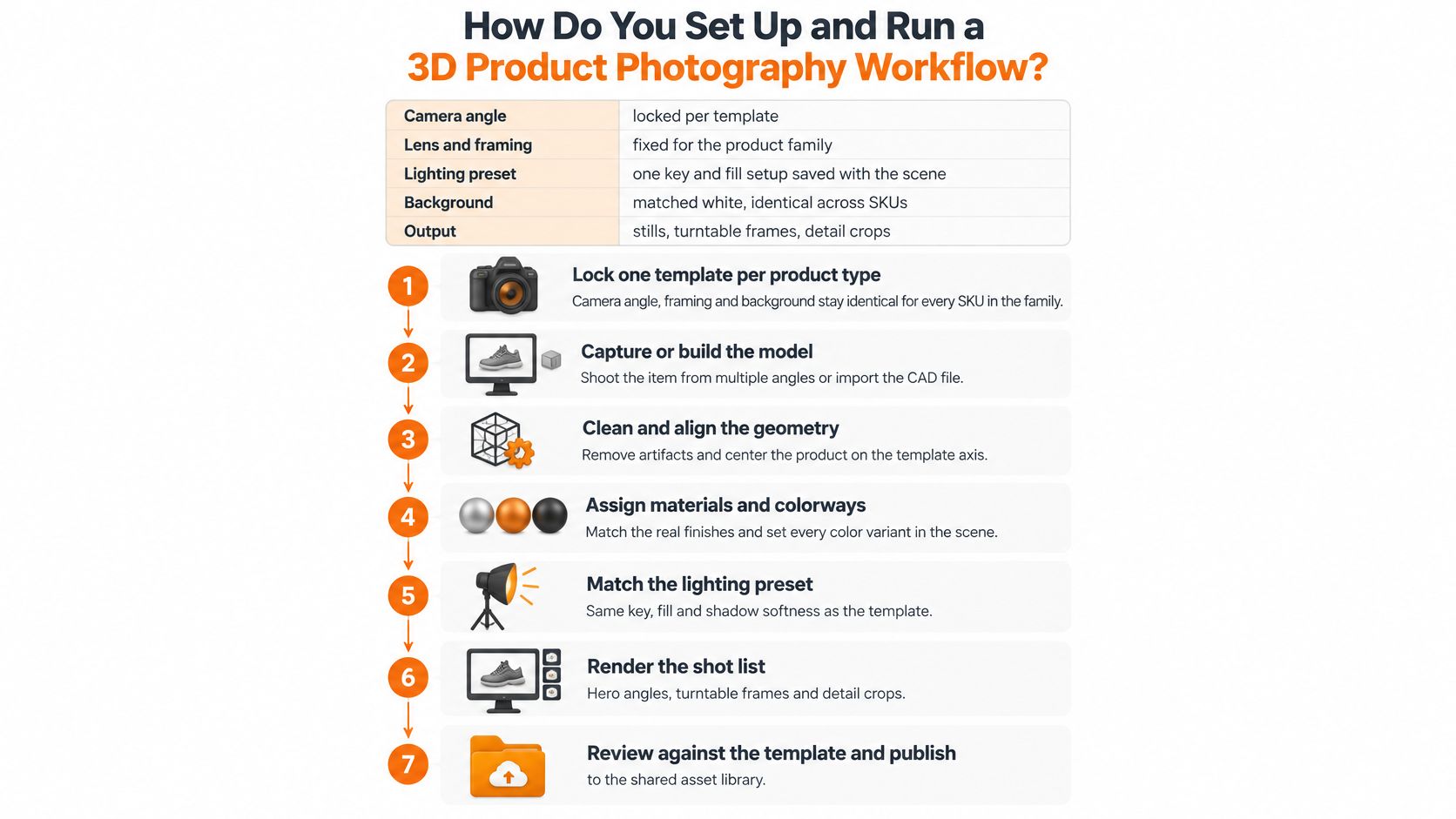
Lock one template per product type.
Record camera distance, focal length, turntable increment, lighting positions, background and file naming. Save a setup photograph and an approved reference frame with the template. A jewelry template needs different framing and coverage from a large home object, but operators shouldn't improvise those differences during a production run.Prepare the right inputs.
Photogrammetry requires the correct physical sample, cleaned and identified by product revision. CGI needs usable geometry, dimensions and material references. AI-assisted production needs sketches, CADs, swatches and approved references that distinguish fixed product details from creative choices. Reject ambiguous inputs before production, especially missing reverse views, unclear closures and unapproved packaging artwork.Capture or build, then inspect the structure.
Use the coverage and front-view geometry in the template, with a full-frame camera and an aperture that keeps the object sufficiently sharp throughout. Keep focus, framing and exposure stable across the sequence. After reconstruction, inspect silhouettes, holes, seams, labels and undersides before spending time polishing textures. A turntable image set isn't automatically a reconstructed model, and an attractive render can conceal broken geometry.Calibrate color and materials.
Include a color target in every captured image, fix exposure and white balance, and transform the set to a common standard illuminant. Colorimetric calibration research published through the Society for Imaging Science and Technology supports this approach for more uniform illumination and more accurate surface reproduction. Validate against approved TIFF or rendered samples, checking diffuse color separately from reflection and roughness. Without a target, the same colorway can look different across pages; changing illumination during a rotational sequence can also produce visible jumps.Identify and approve every asset.
Attach SKU, colorway, region, source revision and approval status. Separate work-in-progress from publishable files so a merchandiser doesn't choose the newest export merely because it has the latest timestamp. Use a predictable filename structure such as style, colorway, view, revision and status. Keep the approval reference beside the source, not buried in an email thread.Export for the actual channel.
Produce the agreed hero shots, detail crops, turntable frames and interactive files from approved sources, then record where each export is used. Our guide to product photography automation is useful when turning that handoff into a repeatable production process. Paid social needs its own composition review; Rapid Ads explains how to scale Meta ad creative production, a useful companion when planning crops and creative variants rather than new product sources.Rerun the reference scene after pipeline changes.
Keep a fixed scene with known scale, lighting and material test objects. Recheck it whenever the renderer, texture processing or compression changes. Compare the output with the approved reference before allowing the new settings into catalog production. Inspect the delivered file too, because a correct master can still become a poor compressed export.
This workflow diagram can sit alongside the capture station as a production reminder:
Define a finished asset
A finished asset has approved product detail, trustworthy color, correct scale, clean geometry where relevant, channel-ready exports and a traceable source. It also has a useful fallback image if the interactive presentation fails.
Keep naming, approval states, color-reference practice and validation rules fixed catalog-wide. Adjust camera distance, focal length, framing and turntable increments by product family. Small jewelry may need denser detail coverage than a simple large object, but reflective surfaces can require a different capture approach altogether.
How the Main Production Approaches Compare for Brands
Compare complete production routes, not a finished photograph against an unprepared CAD file. Sprello is our product; the comparison below describes its role alongside other production categories rather than ranking unlike tools.
| Approach | Best for | Input required | Reuse across channels | Main limit |
|---|---|---|---|---|
| Studio 2D photography | Hero shots and final merchandising images | Physical product and styling | Per asset; new angles need a reshoot | Cost and lead time repeat for each SKU and variant |
| Photogrammetry 360 capture | Rotatable views of physical products | Many photos of a physical sample | High for 360 spins and zoom | Needs a physical sample and a controlled setup |
| 3D rendering (CGI) | Products without physical samples and room scenes | CAD or 3D models | High across views and channels | Modeling time and material setup for each product |
| Sprello (our product) | Catalog-scale photoreal visuals and colorways from concept inputs | Sketches, CADs, materials and references on the canvas | Approved visuals flow to line sheets and buyer assortments | Doesn't replace fit, construction or production validation, PLM or planning systems |
Studio photography offers direct observation of the manufactured product. It's particularly useful when natural variation, fabric texture or the product in use matters more than generating additional angles.
Photogrammetry preserves a connection to the sample but requires careful capture and cleanup. CGI gives the team control over viewpoints and scenes, provided someone can verify the underlying geometry and materials. AI visual tools support concept exploration and photoreal presentation, but their outputs need explicit product-accuracy review.
Evaluate workflow fit and enterprise controls
Sprello's positioning is AI for product development & merchandising. From product concept to buyer-ready collection. Canvas connects saved visual workflows to one shared product catalog, line review, wholesale line sheets and separate buyer assortments per account or channel.
It supports fashion and apparel, beauty and cosmetics, jewelry and accessories, and home and lifestyle. It complements PLM and planning suites; it doesn't provide tech packs, BOMs, pattern making, demand forecasting or open-to-buy. The product visualization software guide helps teams define those boundaries before evaluating a visual-production workflow.
Procurement should examine more than image quality:
- SOC 2: Review the assurance documentation and its scope.
- SSO/SAML: Confirm how employees authenticate.
- Role-based access: Separate creation, review and administrative permissions.
- Training policy: Establish whether customer inputs train any models.
These are concrete enterprise controls, illustrated by Cogram's published security specification, rather than vague assurances about secure AI. Sprello provides SOC 2, SSO/SAML, role-based access and zero training on customer data.
A billion-dollar fashion brand cut prototype-to-market-sample lead time from 4 weeks to 2 and commissioned 20% fewer market samples. That result concerns development workflow, not proof that generated imagery can replace technical fit, construction or production approval.
How Do Brands Keep Imagery Consistent Across Large Catalogs?
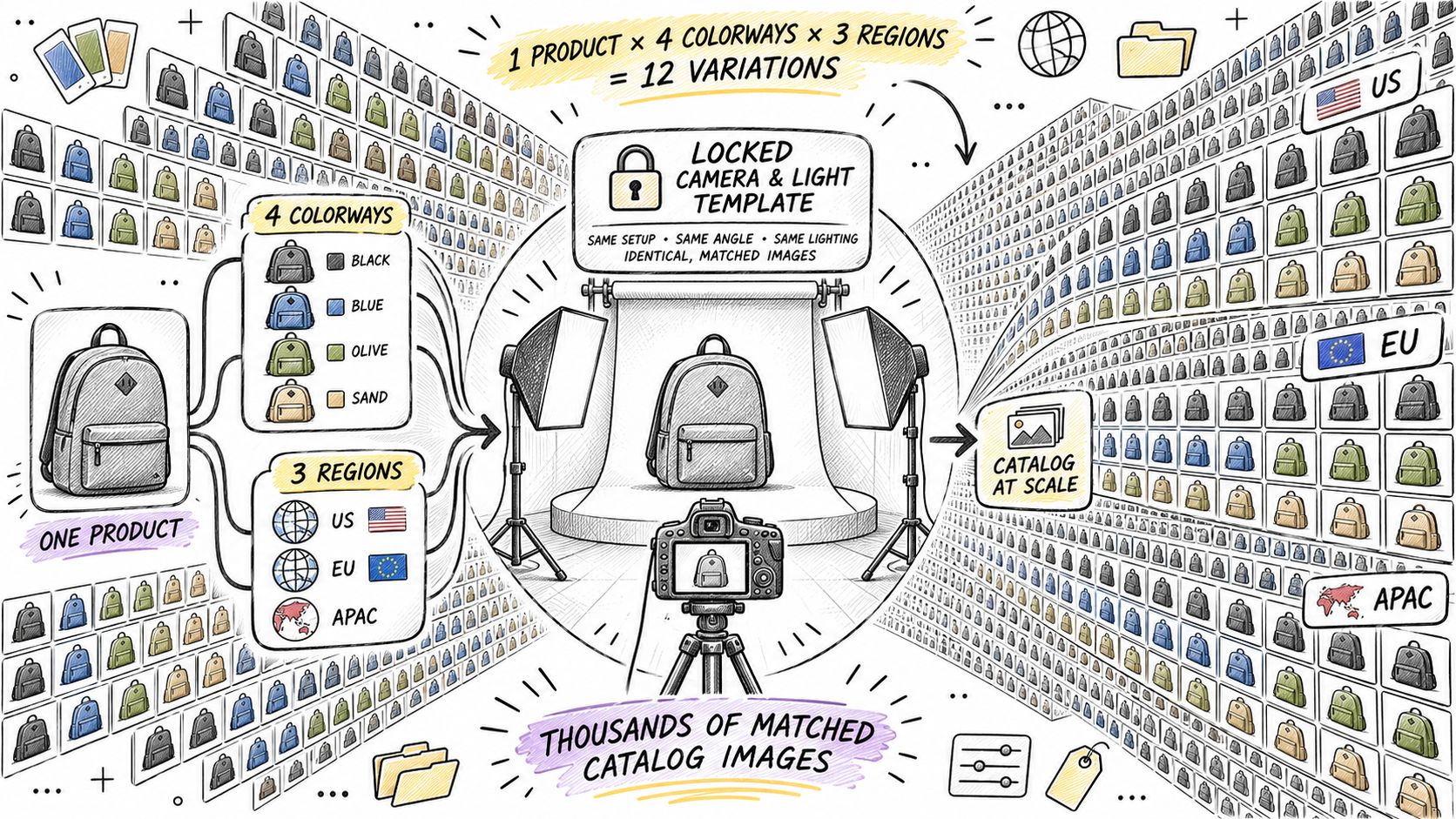
Catalog inconsistency usually starts with unclear ownership, not insufficient rendering capacity. When approved images sit beside drafts and regional edits, teams can publish conflicting versions of the same product. Decide the format SKU by SKU from what the buyer must inspect and how far the asset will be reused, then apply the same capture template across the catalog. Start with one master record per style, approved visuals, source revisions, and a status view showing missing work. Keep the rule visible to everyone touching the asset.
Separate product truth from regional presentation
Take a style with several colorways distributed across regional product pages, a wholesale line sheet, and a seasonal campaign. Build and approve the product source once, then derive the channel presentations from it. That gives merchandising one place to check features, materials, proportions, and revision status before visuals move outward.
Keep color references, product proportions, background rules, and scale treatment fixed. Vary copy, props, or room styling only where the channel requires it. Kogifi's guidance on how to standardize product information for ecommerce is useful because visual consistency depends on reliable product records as well as image templates. A product photography style guide should sit beside those records, with the approved framing, lighting intent, background, and scale cues written down in production language.
Set explicit ownership:
- Product approval: A designated product owner checks features, materials and revision.
- Presentation approval: Brand or merchandising checks framing, styling and intended use.
- Replacement rules: A product change triggers review of affected outputs.
- Distribution records: Each channel points to a named approved file.
An asset isn't governed merely because it's stored centrally. Someone must own its approval and replacement.
The practical trade-off is speed against control. A tight template reduces variation and makes replacement faster, but it can limit regional styling. A loose template gives local teams room to adapt, then shifts the burden to review. For large catalogs, I would keep product truth strict and allow presentation changes only where the channel or buyer need is explicit.
Measure the category, not the showcase
Before rollout, record add-to-cart rate, returns attributed to size or color mismatch, and shoots per season by category. Compare equivalent categories after approved assets go live, accounting for changes in pricing, promotions and traffic mix. This keeps presentation work from being credited with demand changes it did not cause.
A 2022 Sayduck summary citing Shopify data reported an average conversion improvement of 94% for 3D visualization, compared with 60% for video, and a 40% reduction in returns after implementing 3D visualization. These are industry-reported benchmarks, not controlled predictions for your catalog. Use them to frame the discussion, then judge the workflow by the categories you can compare cleanly.
Use the video below as a discussion aid during workflow review, then evaluate your own category outcomes:
If mismatch returns increase, inspect stated dimensions and scale cues first, then check material and color approval. Finish with a retrieval test: ask a merchandiser to find the approved regional visual for an unfamiliar colorway without contacting its creator. If that takes more than a quick search, the catalog structure needs work before the next expansion.
Questions Buyers Ask and Booking a Sprello Demo
What does one asset cost compared with a studio shoot?
Compare the cost per approved channel output, including setup, cleanup, review and revisions, rather than comparing capture fees alone. A reusable model can spread its setup cost across multiple outputs, but that advantage disappears if the product needs extensive remodeling or the team only needs a basic hero shot.
The initial asset carries template and reference-approval work that later assets may share. There's no useful universal price comparison without an output list and representative product inputs.
How long until the first approved asset?
The first approval depends on input completeness, material difficulty and who can sign off product accuracy. Template setup and reference review often determine the schedule more than the act of producing the image.
Once those decisions are settled, additional SKUs can follow a repeatable cycle. Don't promise a launch date until a representative product has passed review through the complete workflow.
What happens when a colorway or size is added after launch?
For a material-only change, reuse the approved geometry, introduce the new material reference and validate the result in the reference scene. Update the colorway identifier and applicable region before releasing the export.
A new size needs a geometry check rather than an automatic material swap. Proportions, component placement and construction may change, so confirm whether the source model still represents the product.
Can one asset serve product pages, marketplaces, line sheets and AR?
An approved master model can support those destinations, but each requires suitable exports, performance checks and presentation rules. A still image or AI-generated visual alone can't supply the geometry needed for AR.
Review real destination layouts before finalizing the export list; SouthShore Fine Linens' sample bedding landing page offers a concrete page to examine when discussing home-category presentation. Check how hero framing, supporting details and room context work together rather than assuming one crop fits every placement.
What should a team prepare before the Sprello demo?
Bring catalog size, categories in scope, the workflow you want to improve, and examples of available sketches, CADs, materials and references. We tailor the sales walkthrough after learning your catalog size and use case, and can demonstrate the catalog, canvas, line sheets and assortments using one of your own product categories.
Include your SOC 2, SSO/SAML and role-based-access requirements in that preparation. Customers' designs, sketches and uploads are never used to train Sprello's models or anyone else's models.
Sprello connects AI product visuals with the catalog, line review, wholesale line sheets and buyer assortments that merchandising teams need to move a collection forward. Visit Sprello to book a demo, and bring one product category so we can walk through your inputs, canvas and buyer-ready outputs against your actual workflow.
Related
More to explore
Fresh reads

Sketch to Render AI: Create Polished Concepts Fast
Turn hand-drawn ideas into polished visuals with sketch to render AI. Explore styles, refine details, and bring your design concepts to life.

Wholesale Management Software: Tools Compared for 2026
Compare wholesale management software for fashion, beauty, and home brands, from order platforms to ERPs, and see where Sprello fits.

Production Pipeline Software: 10 Tools Compared in 2026
Compare 10 production pipeline software tools for fashion, beauty, jewelry, and home brands. Criteria for workflows, handoffs, and deliverables.