October 2, 2026
Product Photography Automation for Fashion Brands at Scale
Learn how product photography automation helps fashion, beauty, and lifestyle brands scale catalogs, cut costs, and keep visuals consistent across every

A merchandising lead opens the seasonal launch board and finds the same problem in every column: samples are arriving faster than the studio can photograph them, regional storefronts need different crops, and the launch date won't move. The photography team has a full booking calendar, retouchers are working through yesterday's backlog, and product pages are beginning to publish with mismatched lighting and backgrounds.
That pressure is why product photography automation has moved beyond a convenience for small batches. The market is developing into large-scale imaging infrastructure. One market estimate places automated product photography solutions at USD 1.24 billion in 2024, with a projection of USD 9.00 billion by 2033, while another estimates USD 1.91 billion in 2025 and USD 6.27 billion by 2034. These estimates differ because the reports define the market differently, but they point in the same direction, automation is becoming part of catalog operations rather than an isolated creative experiment. (independent market estimates)
When a Seasonal Drop Outgrows the Studio
The merchandising lead doesn't need another presentation about artificial intelligence. She needs every approved image available when the assortment goes live. The studio has capacity for a controlled flow, but the seasonal calendar has created a collision between incoming samples, styling appointments, photography, retouching, translations, marketplace exports, and regional approvals.
The first symptoms rarely look like a technology problem. They look like small operational exceptions. One batch has a warmer white background than the previous batch. A black garment loses detail in the shadows. A handbag appears slightly larger in one channel crop. A colorway that looks accurate in the studio appears different on the product detail page because the retouching sequence changed.
Practical rule: Automate the handoffs before automating the image decisions.
A brand usually reaches for automation after the backlog has become visible to customers. That timing is understandable, but it leads teams to compare vendors before defining the work. The better starting point is a map of the complete job, from sample arrival to published asset. Each SKU needs an identity, an image brief, a capture path, a review state, a list of required derivatives, and a clear publishing destination.
The real constraint is capacity
The production window is fixed, while the available hours of stylists, photographers, sample coordinators, and retouchers are limited. Adding people can help for a launch, but it doesn't solve recurring rework caused by unclear specifications or missing metadata. A faster camera setup also won't fix a product information system that sends the wrong color name to a regional storefront.
A scalable workflow separates decisions that require creative judgment from repeatable transformations. The creative team can define the approved lighting style, background family, framing, and retouching boundaries. The workflow can then apply those rules consistently, create channel variants, and send uncertain outputs to a human queue.
This distinction matters for fashion, beauty, and lifestyle catalogs because the image isn't merely a file. It carries information about color, texture, proportion, finish, and use. If the pipeline treats every product as a generic object, it may produce clean-looking assets that misrepresent what the customer will receive.
The operating model therefore has two lanes. The default lane handles repeatable products with known capture and editing rules. The exception lane handles reflective hardware, translucent packaging, unusual materials, color-critical cosmetics, and any image that falls outside the approved confidence range. Automation earns trust when those lanes are designed together, not when the exception path is added after failures reach the site.
Anatomy of a Catalog-Scale Imaging Pipeline
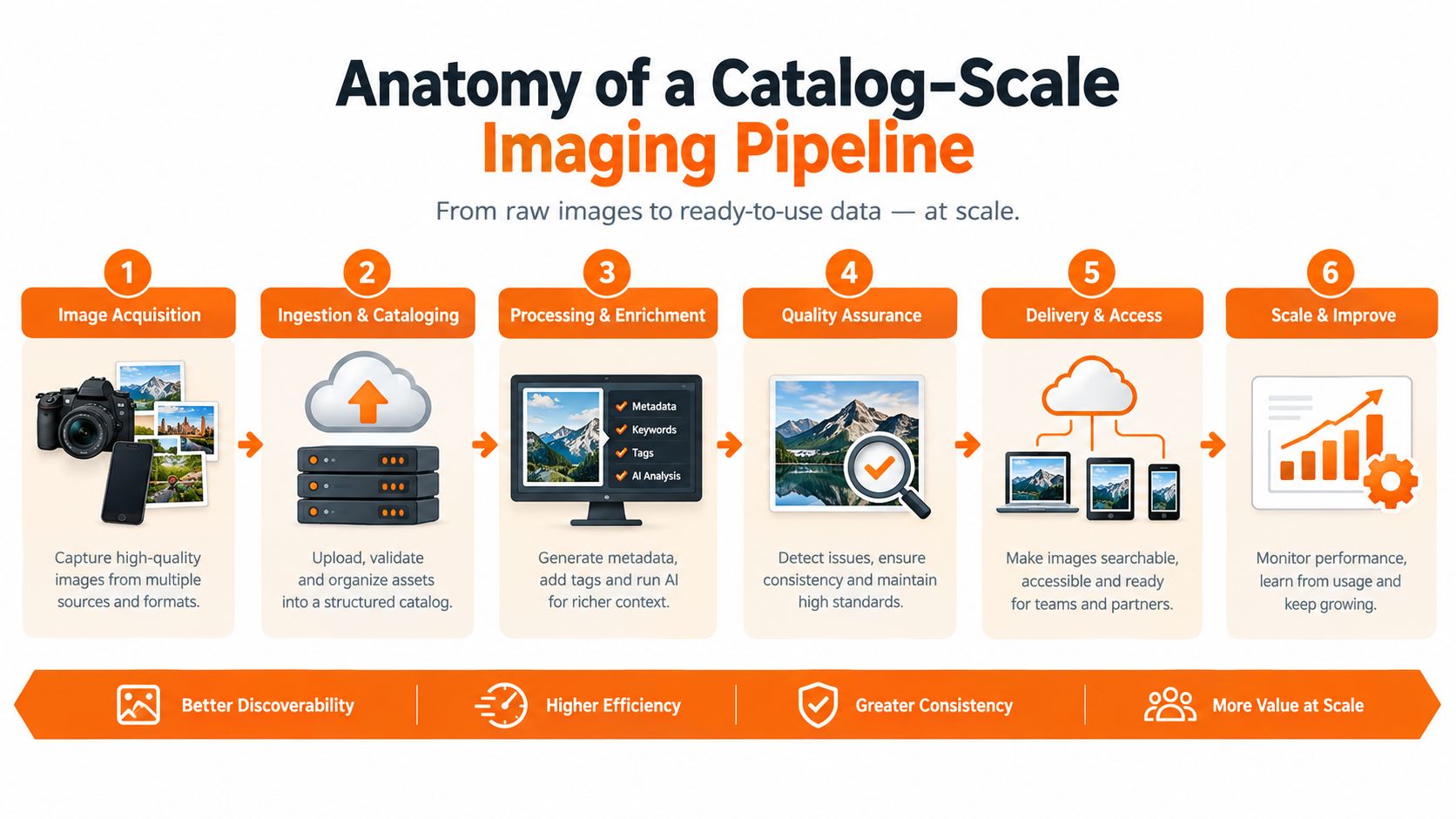
A catalog-scale pipeline should follow the way work moves through the business. The useful sequence is ingest, capture, clean, generate, review, and route. Skipping one of these stages usually pushes the missing work into spreadsheets, shared folders, or manual corrections later.
Start with a machine-readable job
Ingestion turns a physical sample and its creative brief into a trackable job. The barcode or RFID identity should connect to the SKU, colorway, size information, tech pack, sample shipment, image brief, and launch restrictions. If the source image arrives without that context, the downstream system can't reliably decide which background, crop, or regional destination applies.
Capture comes next. A fixed camera position, turntable, light tent, robotic rig, or multi-camera array can reduce variation between operators. The setup needs calibration against a master color target, not just a saved camera preset. Lighting, lens position, sample placement, and exposure should be treated as production parameters that can be logged and repeated.
Cleanup should run in a deliberate sequence. Background removal comes first, followed by edge cleanup, shadow grounding, color correction against a reference, texture preservation, and reflection treatment. Each operation needs a confidence threshold. A high-confidence cutout can continue automatically, while a questionable lace edge or metallic highlight should be flagged rather than aggressively rewritten.
Generate only the derivatives the channel needs
Once the master asset is approved, the system can create derivatives such as ghost mannequin images, on-model composites, lifestyle scenes, detail crops, and marketplace versions. The master should remain untouched. Derivatives inherit its SKU identity and record which transformation created them.
Channel requirements belong in configuration, not in individual retoucher memory. The same product may need a clean commerce image, a wider editorial crop, a mobile-friendly detail view, or a regional version with different overlays. Teams managing these relationships should also review practical guidance on e-commerce digital asset optimization, especially when naming, metadata, storage, and retrieval affect publishing speed.
Route approved files with their context
The final stage writes assets and metadata to the DAM, updates the PIM relationship, and sends the correct derivative to product pages, marketplaces, regional storefronts, and campaign systems. Every file should carry a status, version, crop purpose, region, channel, and approval history. A folder full of images is not a pipeline. A pipeline makes the next action unambiguous.
Cloud deployment is already common in this category, accounting for 64% of installations in one market report, and automation is being used by enterprises with catalogs exceeding 10,000 SKUs. The same report says automated workflows can reduce manual editing time by 55% to 70% per image, while 68% of e-commerce and manufacturing companies use rule-based capture, background removal, and batch post-processing to produce more than 500 images per day from a single studio setup. (market report on automated imaging adoption and workflow performance)
Those figures don't remove the need for production design. They show why the design matters. If ingestion is weak, automation scales confusion. If routing is incomplete, it scales rework.
Designing Brand Guardrails Inside the Workflow
Brand consistency can't depend on a senior retoucher remembering every exception across every collection. At catalog scale, the creative standard needs to become a set of visible, testable controls. That doesn't mean reducing the brand to a rigid formula. It means protecting the details that customers use to judge whether an image feels accurate and intentional.
Four layers keep the system honest
The first layer is a color reference system. Tie each capture session to a master color target and the appropriate ICC profile, then retain that calibration data with the job. The second is a background and surface library. A sub-brand may require a cool neutral, a warm paper tone, a reflective surface, or a controlled lifestyle setting, and those choices should be selected by collection or product family.
The third layer is a do-not-edit register. Logo placement, stitch color, hardware finish, printed labels, gemstone arrangement, and distinctive construction details should be explicitly protected. The fourth is a tone-mapping preset that tells the editing system how to treat skin, fabric, gloss, and reflective surfaces. A cleanup operation that works well on cotton can damage a satin highlight or flatten the depth of a knit.
Version these rules by season, region, and collection. A capsule line can share the same infrastructure as the core assortment without inheriting the same background, contrast, or lifestyle treatment. Teams that need broader operational context can use this brand consistency software resource when documenting how visual rules should remain consistent across production systems.
| Layer | What It Controls | Where It Lives in the Workflow |
|---|---|---|
| Color reference | Capture calibration, white balance, and acceptable color treatment | Capture setup and automated color correction |
| Background library | Surface, backdrop, shadow, and collection-specific presentation | Job brief and derivative generation |
| Do-not-edit register | Logos, stitching, hardware, labels, texture, and product structure | Editing rules and exception checks |
| Tone-mapping preset | Treatment of skin, fabric, gloss, transparency, and reflections | Cleanup stage and human review |
Build a golden set that can fail usefully
A benchmark set should represent the difficult products the brand ships, not only the easy white sneakers and cotton tees that make a demo look polished. Include dark garments, pale fabrics, reflective accessories, translucent packaging, textured surfaces, patterned materials, and products with small marks or hardware.
Run every meaningful workflow change against that set before production. Compare edge integrity, color fidelity, texture retention, framing, shadow behavior, and derivative consistency. If an update improves routine products but damages the benchmark's hardest cases, the team has a choice to make before customers become the test audience.
The guardrail is a contract between creative leadership and operations. Creative teams define what may change and what must remain untouched. Operations teams encode those decisions, version them, and monitor exceptions. Without that contract, people either over-edit to meet a deadline or reject automation because no one can explain why an output is wrong.
QA, Approvals, and the Human Exception Path
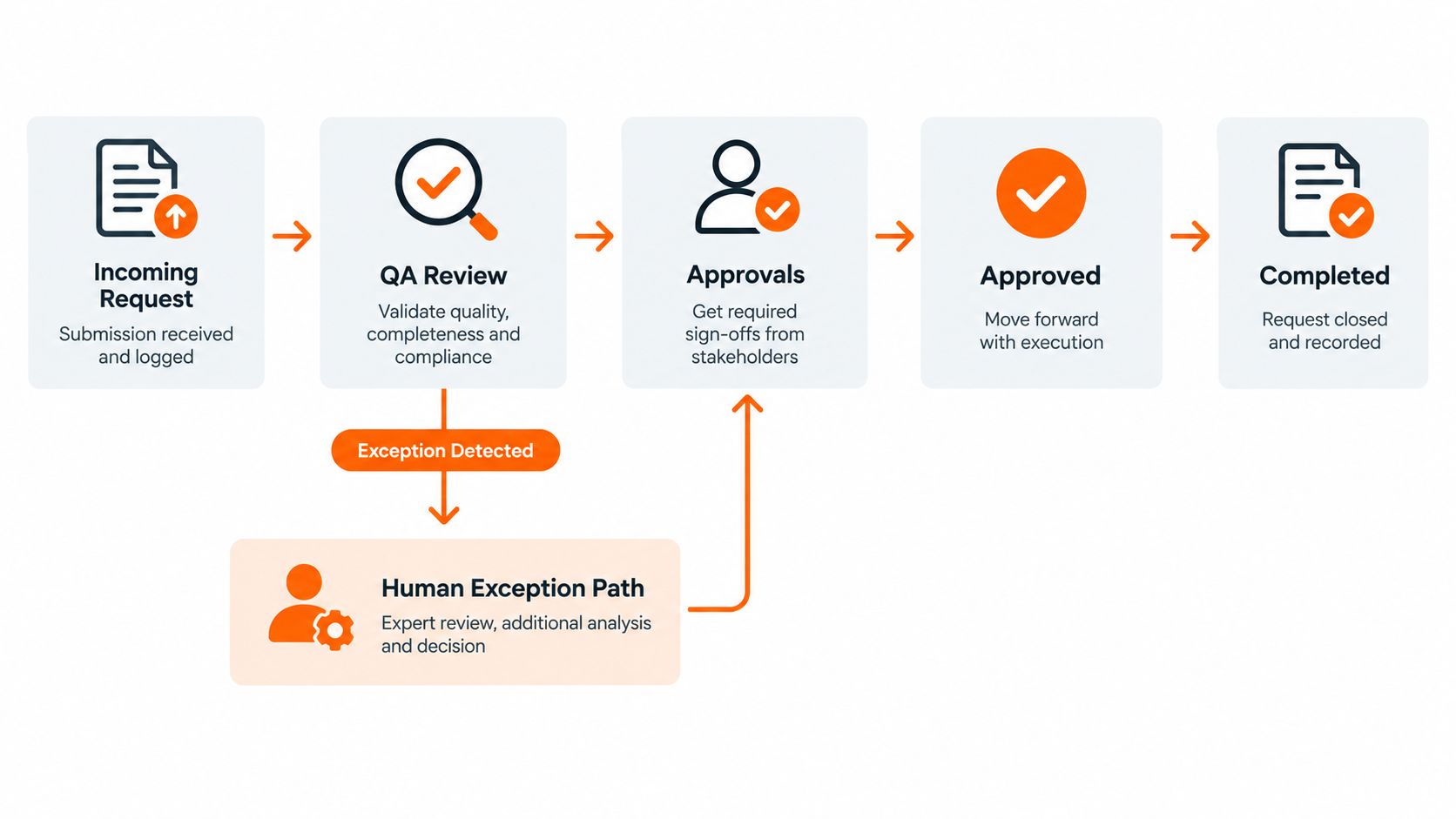
A fast image pipeline still needs a deliberate pause before publication. The purpose of QA isn't to make a human inspect every pixel forever. It's to identify the outputs that automation can approve safely, then reserve specialist attention for images where accuracy or brand judgment matters.
Review the workflow, not just the image
The first production run needs broad review because the team is validating the rules as well as the assets. Later runs can use a mixture of automated checks, targeted sampling, and category-based review. A routine product with a stable history may need less attention than a newly introduced material, even if both pass the same technical checks.
Color-managed swatches help reviewers distinguish a true capture problem from a display or lighting difference. The review interface should expose the source image, the processed image, the reference target, SKU, colorway, timestamp, and rule version. A rejection that says “looks wrong” creates another task. A useful rejection identifies the SKU, image region, failure type, and required action.
Give each reviewer a narrow responsibility
A creative reviewer decides whether the image belongs to the brand. They evaluate tone, styling, retouching restraint, model treatment, and the handling of distinctive materials. A merchandising reviewer checks whether the output matches the assortment and channel requirement. They look for the correct colorway, variant relationship, crop, product count, and launch status.
The exception queue should assign clear service targets. Workflow guidance recommends a target of under 36 hours for catalog images and under 48 hours for hero assets, with a pass rate above 98% used as a benchmark for a stable process. (catalog imaging workflow guidance) Those are operating targets, not promises. A brand should adjust them to its launch calendar and reviewer capacity.
A useful rejection record includes:
- SKU and colorway: Identify the exact product and variant.
- Timestamp and rule version: Show which output and workflow configuration failed.
- Failure category: Choose color, edge, reflection, framing, product accuracy, or channel compliance.
- Correction path: State whether to regenerate, retouch, recapture, or route to a specialist.
- Owner and due time: Make responsibility visible instead of returning the file to a shared queue.
The same discipline applies when imagery moves into social and campaign approvals. A practical guide to social media approval can help teams formalize owners, feedback, and release states rather than mixing campaign comments with production corrections.
Feed failures back into the rules
Rejections should produce learning. If reviewers repeatedly correct the same fabric category, update its capture preset or route tag. If a specific lighting condition causes background errors, change the setup rather than asking reviewers to compensate manually.
The human path becomes a bottleneck when every exception receives the same priority. Separate launch-critical hero assets from replenishment work, reserve specialist review for particularly difficult cases, and monitor queue age by category. The objective isn't zero human involvement. It's predictable human involvement.
Orchestrating Across SKUs, Channels, and Regions
One master asset should act as the canonical record for a product, but it shouldn't be the only file the business ever sees. Every derivative needs a relationship to that master, a defined purpose, and a release condition. This structure prevents regional teams from creating disconnected copies that later drift apart.
Treat derivatives as jobs
After approval, the orchestration layer creates derivative jobs for the required channels and markets. A marketplace image may need a restrained background and strict framing. A regional storefront may need a different aspect ratio, localized overlay, modesty treatment, or pricing card. A campaign team may need a lifestyle crop with more negative space for copy.
Localization extends beyond language. Retouching may need to preserve a broader range of skin tones without applying a single white balance assumption. Regional teams may have different expectations around model styling, garment coverage, surface treatment, or promotional labeling. Those rules should be attached to the region and channel, then inherited by the derivative job.
| Channel / Region | Output Specs | Common Variants | Approval Gate |
|---|---|---|---|
| Core e-commerce site | Master commerce dimensions and responsive crops | Front, side, detail, colorway, mobile crop | Creative and merchandising |
| Marketplace | Platform-specific framing and background | Compliance crop, detail view, variant image | Marketplace compliance |
| Regional storefront | Local aspect ratios and market rules | Language overlay, regional styling, pricing card | Regional merchandising |
| Editorial and social | Campaign composition with flexible negative space | Lifestyle scene, portrait crop, story format | Creative and campaign owner |
Encode priority and release timing
A hero drop needs a different queue priority from a long-tail replenishment SKU. Embargoes, regional launch dates, sample availability, and campaign dependencies should exist as metadata, not in a calendar someone must remember to check. The system can then hold an approved asset until its release condition is met, instead of publishing early or forcing a team to coordinate manually.
A visual workflow canvas can make these dependencies easier to inspect. Teams comparing orchestration approaches may find this explanation of workflow orchestration useful when deciding which steps belong in a single process and which should remain separate services.
The PIM and DAM should receive status changes in both directions. When merchandising changes a colorway, the image job should know. When a reviewer rejects a derivative, the product record should show that publishing is blocked. When a regional team approves its version, the canonical record should retain that decision without replacing the source asset.
The clean operating model has one source of truth and many controlled outputs. It doesn't ask every market to use identical imagery. It gives each market a governed way to be different.
Where Automation Still Breaks on Fashion and Beauty
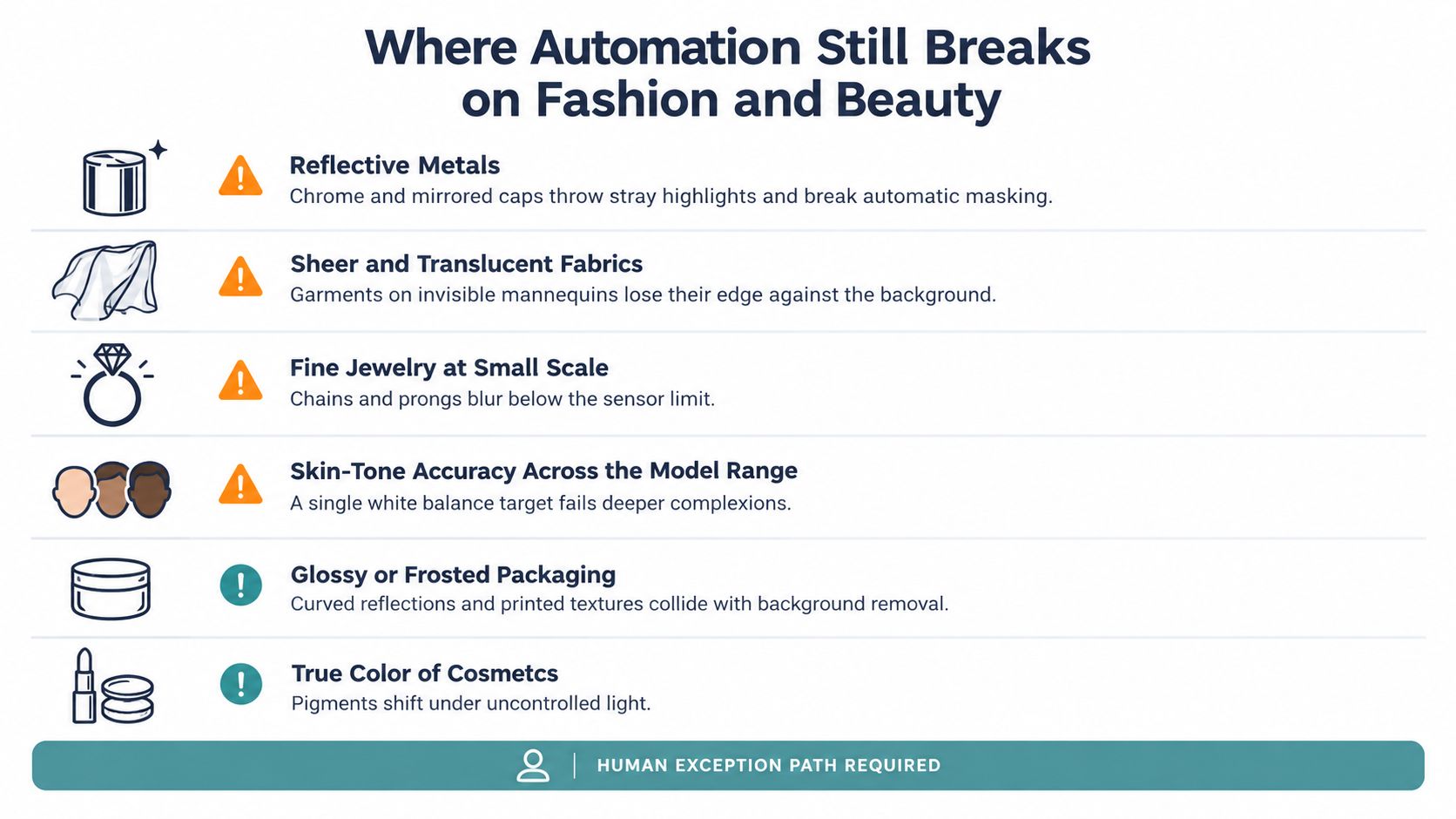
The most convincing automation demo usually features products with clear silhouettes, matte surfaces, and forgiving colors. Production catalogs contain the opposite. Reflective metals, translucent bottles, sheer fabrics, textured knits, embossed leather, and pigment-sensitive cosmetics expose whether the workflow understands a product or merely finds an approximate outline.
Route the difficult products deliberately
Chrome jewelry and mirrored caps throw highlights into the background. A masking model may classify those highlights as background or leave a bright halo around the product. Production fixes can include controlled polarization, specialty lighting, multiple exposures, or a hand-finished mask. The SKU should carry a reflective-material tag so the specialty branch runs automatically.
Translucent skincare bottles create a different problem. The system may erase the liquid boundary, ghost the container against white, or weaken printed text that sits on a curved surface. A darker temporary surface, backlighting, focus-stacked capture, and a protected-text rule can preserve the information that generic background removal tends to lose.
Sheer garments and lace don't have a simple edge. Ghost mannequin composites can fill openings that should remain visible, while invisible-manipulation tools may distort the drape. Capture those pieces with a dedicated garment profile, preserve the alpha structure, and send ambiguous areas to a human retoucher.
Fine jewelry creates yet another limit. Small chains, prongs, and stone settings can disappear at the intended display size even when the original file looks acceptable. The right response may be a macro capture, a detail crop, or a manual override, not another attempt to sharpen the same output.
Keep the default lane moving
Complex textures, intricate reflections, photorealistic detail, unusual shapes, and color fidelity remain technical hurdles in automated product photography, especially for fashion and beauty catalogs. (reporting on AI product photography limitations) Fashion also creates extra pressure because one product may need multiple angles, while beauty customers depend on accurate color and packaging detail before purchase.
A practical rule is to engineer an edge case when the same failure repeats across a meaningful product family or when the manual work threatens launch capacity. Keep it manual when the item is rare, the correction is faster than building and validating a new branch, or the product is too commercially important to use as an experiment.
The goal isn't to automate every product. It's to stop the difficult products from delaying the products that already work.
That distinction protects both speed and trust. A pipeline that routes the hard ten percent away from the default flow can process the clean majority efficiently while giving specialists the time and context needed for exceptions.
Measuring Speed, Cost, and Quality After Rollout
A rollout is successful only when the team can explain what changed in operational terms. A dashboard full of generated-image counts can look impressive while the studio still misses launch dates and reviewers still correct the same color errors. Measure the work from sample arrival through approved publication, not only the number of files produced.
Establish the baseline before changing the process
The speed bucket should include time from sample arrival to published hero, capture throughput per staff hour, queue age, first-pass yield, and time spent waiting between handoffs. Cost should include fully delivered cost per SKU, studio utilization, retouch minutes per asset, reshoot frequency, and freight associated with moving samples.
Quality needs equal weight. Track adherence to brand rules, color accuracy against reference targets, rejection rate by channel, product-accuracy errors, and customer return reasons that mention misleading imagery. A workflow that lowers editing time but increases reshoots or returns hasn't created a useful saving.
| Metric Bucket | What to Measure | Why It Matters |
|---|---|---|
| Speed | Sample-to-publish time, queue age, first-pass yield, throughput per staff hour | Shows whether the launch calendar is becoming more predictable |
| Cost | Delivered cost per SKU, retouch minutes, reshoots, freight, studio utilization | Separates real operating savings from simple file-generation volume |
| Quality | Color accuracy, rule adherence, rejection rate, product-accuracy issues, imagery-related returns | Protects customer trust and reveals where automation is unsafe |
| Resilience | Exception volume, queue age by category, recovery time after failed jobs | Shows whether the human path can absorb difficult products |
Review the outliers, not just the average
Use a 30, 60, and 90-day review cadence after launch. At each checkpoint, segment results by product category, region, channel, material, and workflow version. A strong average can conceal a serious failure in cosmetics, dark apparel, or a particular marketplace crop.
The most useful metrics change decisions. If first-pass yield falls for translucent packaging, improve the capture branch. If one region creates repeated rejections, clarify its local rules. If hero assets consume the exception queue, change their priority or reserve specialist capacity. Metrics that don't lead to an action belong in a report appendix, not at the center of the operating review.
A practical next-quarter sequence is straightforward:
- Instrument the current pipeline. Record handoff times, rework reasons, review load, and publication delays before introducing new automation.
- Pilot one category. Choose a product family with enough repeatability to test the default lane, while including representative difficult items.
- Compare the deltas. Review speed, delivered cost, quality, and exception behavior against the baseline.
- Expand by evidence. Add the next category only when the team understands which rules worked, which assets failed, and who owns the exceptions.
Product photography automation works when creative operations treats it as a governed production system. The software matters, but the durable advantage comes from clear inputs, versioned guardrails, channel-aware routing, and a human path that catches what the default model can't see.
Sprello provides an AI workflow canvas for fashion, beauty, and lifestyle teams, including catalog-scale product photography workflows that organize production across SKUs, channels, regions, and seasons. If you're ready to map your current imaging process and test a governed automation flow, visit Sprello.
Related
More to explore
Fresh reads

Generative AI Ecommerce Playbook for Brand Teams
Generative AI ecommerce guide for fashion and lifestyle brands. Explore use cases, brand controls, implementation steps, and ROI metrics that actually move

Marketing Workflow Software Guide for Enterprise Brands
Explore marketing workflow software built for enterprise fashion and beauty teams. Compare features, integration benefits, and evaluation criteria.

8 Colors That Go Well with Forest Green
Explore 8 colors that go well with forest green, with hex swatches, styling ideas, and campaign tips for fashion, beauty, and lifestyle brands.