October 5, 2026
Product Visualization Software: Guide for Fashion Brands
Compare product visualization software for fashion and lifestyle brands. Learn how to choose the right tool for quality, scale, and seamless integration.
A fashion team can have a beautifully developed collection and still reach launch week without the assets it needs. The samples are in transit, the photography schedule has slipped, regional teams are requesting alternate colorways, and e-commerce is waiting for product pages that merchandising approved weeks ago. Meanwhile, every market is adapting the collection in its own way, with no reliable guarantee that the final visuals still represent the same product or brand.
That's why product visualization software has become more than a way to place a garment in a virtual scene. For enterprise fashion teams, it's becoming part of the operating system for assortment planning, creative production, review, localization, and campaign delivery. The right platform reduces avoidable handoffs without lowering the standard of the final image. The wrong one creates another silo, another approval queue, and another set of files nobody can confidently govern.
The Product Visualization Challenge for Fashion Brands
A typical seasonal launch rarely fails because the creative team lacks ideas. It fails because the workflow can't carry those ideas across a large assortment.
A designer develops a new silhouette, the product team adjusts the material, merchandising adds regional colorways, and marketing requests campaign imagery before every physical sample exists. The photography team works from one set of references, e-commerce receives another, and a regional office commissions its own interpretation when the original asset doesn't fit a local channel. By the time someone notices the mismatch, the problem is embedded in multiple product pages, retailer feeds, and campaign layouts.
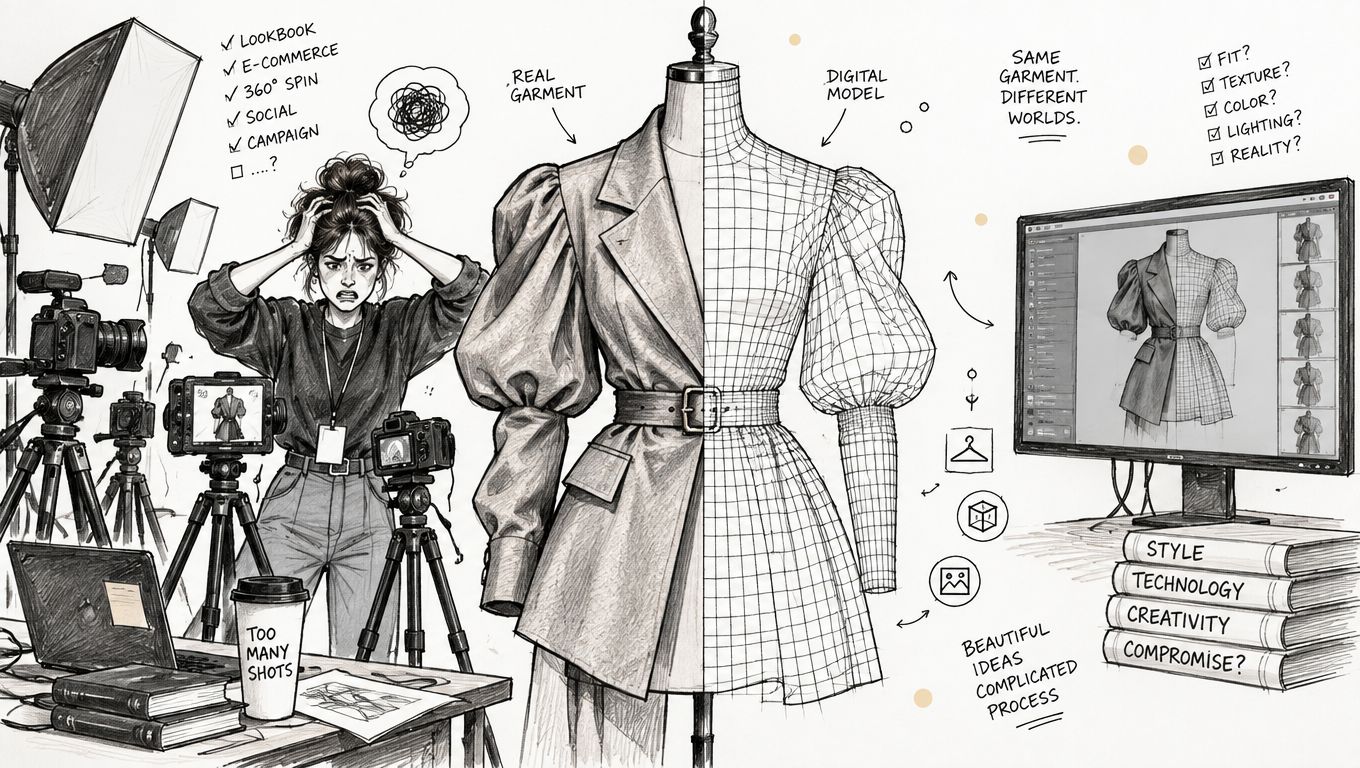
The operational cost isn't limited to photography. Teams lose time checking whether the approved color is the one shown, whether a sleeve construction changed after the render was made, and whether a local market has used an outdated logo treatment. Creative operations then becomes a traffic-control function, chasing files and reconciling versions instead of improving the work.
Why the old production model breaks
Traditional photography remains valuable for tactile, editorial work. It captures drape, texture, movement, and the imperfect details that help a garment feel real. It also creates scheduling dependencies. Samples must be ready, locations and talent must be booked, products must move between teams, and every reshoot carries a new coordination burden.
Three-dimensional workflows solve some of those dependencies, but only when teams connect them to product data and approval rules. A render sitting in a designer's folder doesn't help merchandising compare a full lineup or help a regional content team produce a compliant campaign variation.
For teams reviewing their wider content infrastructure, a practical overview of catalog management software 2026 features key features can help clarify which product attributes, variants, and asset relationships need to travel with the visual file. The same discipline applies to ecommerce content production workflows, where asset creation, review, and delivery need to operate as one chain rather than a sequence of disconnected tasks.
Practical rule: Treat every visual as an operational asset. If nobody can identify its product version, market permissions, channel use, and approval status, it isn't production-ready.
The strongest enterprise use case is therefore not a single interactive viewer on a product page. It's a governed visual system that lets teams see the assortment early, create appropriate assets at the right fidelity, and reuse approved inputs without repeatedly starting from a blank canvas.
| Approach | Where it works well | Main operational advantage | Main trade-off |
|---|---|---|---|
| Traditional 3D and CGI | Hero products, flagship launches, complex materials | High control over geometry, lighting, and animation | Requires specialist skills and deliberate production time |
| AI-driven imaging | Catalog content, background variations, early concepts | Fast iteration across many product and scene combinations | Needs strict review for product accuracy, color, and brand consistency |
| Hybrid pipeline | Seasonal collections, campaign systems, multi-channel production | Combines speed during exploration with control at final output | More process design is required to define handoffs and approvals |
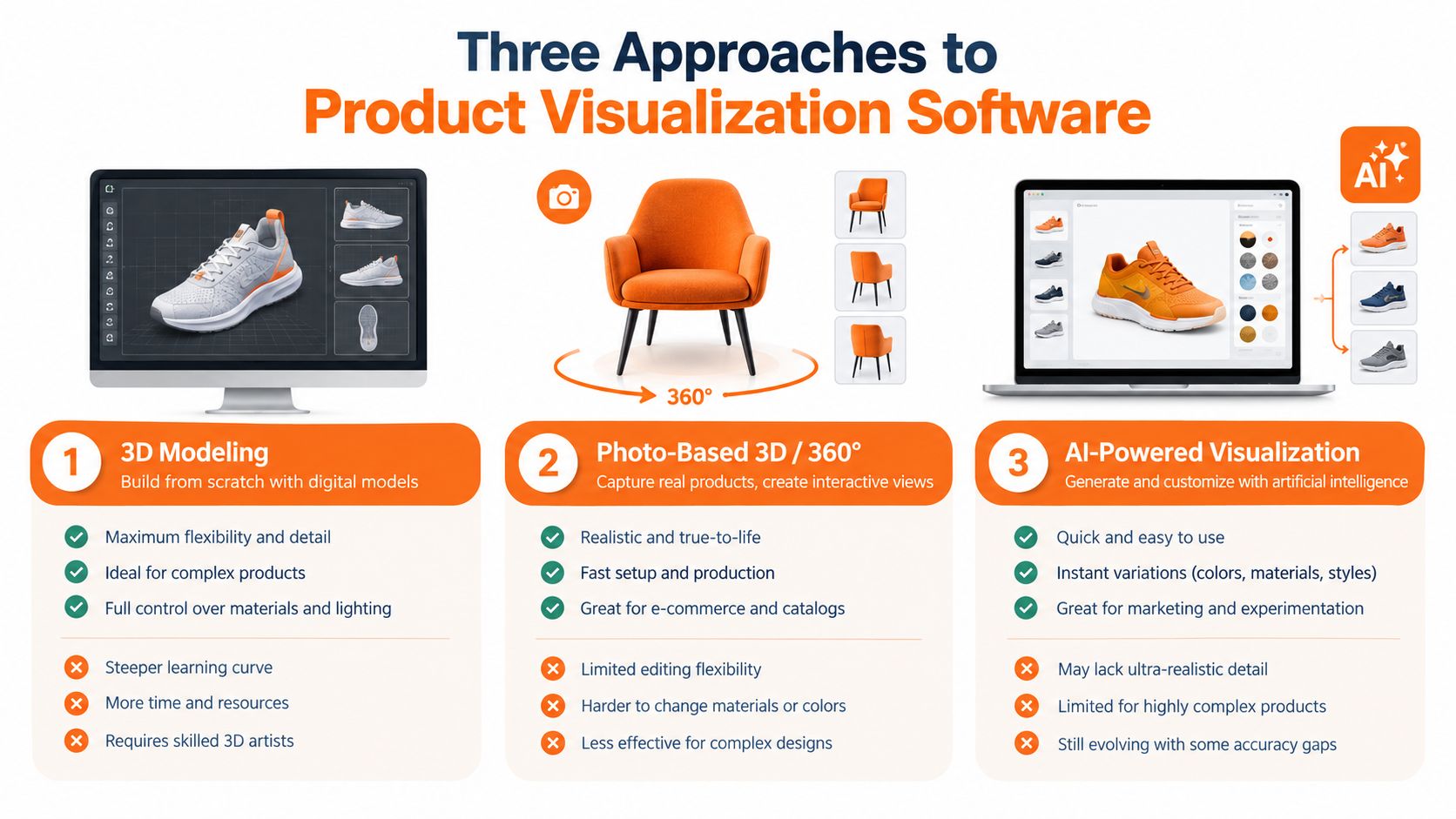
Three Approaches to Product Visualization Software
Before comparing vendors, decide what kind of production problem you're solving. A photorealistic renderer, an AI image pipeline, and a browser-based product configurator may all sit under the visualization label, but they place different demands on people, data, review, and governance.
Traditional 3D and CGI workflows
Traditional 3D begins with a digital product model, often connected to CAD or another design system. Artists refine geometry, materials, lighting, camera position, and animation until the output meets the intended standard. Tools such as Chaos V-Ray are known for photorealistic rendering and advanced visual control, while KeyShot is often chosen for a faster workflow and strong CAD integration, as described in this independent comparison of product visualization software.
This approach suits a flagship handbag, technical outerwear, footwear with complex construction, or a campaign where the camera, light, and material response need close art direction. It also works well when the team already has reliable digital product files and skilled 3D artists.
The weakness is throughput. High-control scenes can become expensive to revise, especially when every colorway or construction change requires a careful update. A 3D viewer may look impressive in a demo while offering little support for assortment decisions, campaign approvals, or asset delivery.
AI-driven imaging pipelines
AI-driven tools start from product photographs, sketches, material references, model images, or text prompts and generate new visual outputs. They can support background creation, styling exploration, virtual model work, retouching, and channel-specific compositions. For fashion teams, resources such as virtual models for clothes illustrate how virtual presentation can extend beyond a standard isolated product shot.
AI is useful when the team needs many variations quickly. A merchandiser can test how a lineup might read in a seasonal story, while a content producer can explore different crops or environments before commissioning final work. It's particularly effective in the concept stage, where speed and breadth matter more than locked physical accuracy.
The risk is trust. A generated image can subtly alter a seam, distort a pattern, change a fabric's weight, or make a color look more desirable than the physical product. Those errors aren't cosmetic when the asset appears in a product listing. AI needs reference controls, review checkpoints, and a clear rule about which outputs are exploratory and which are approved for commerce.
Hybrid systems
Hybrid pipelines assign the right technology to each stage. AI can help generate directions, compare visual treatments, or produce a first-pass composition. Traditional 3D, controlled compositing, or reviewed photography can then establish the final product truth.
This model is often the most practical choice for large fashion organizations because not every asset deserves the same production method. A core hero item may need a tightly directed 3D scene, while supporting colorways need consistent catalog imagery. A seasonal assortment board may only require a fast visualization for internal discussion.
A useful hybrid pipeline doesn't hide the handoff between methods. It records the source product, the approved references, the transformations applied, and the person responsible for final review. Teams that already manage complex product development can also compare visualization choices with their broader fashion design software workflow, particularly where design files and commercial content need to remain aligned.
The market direction supports a software-centered view of the category. One market estimate puts software at 68.5% of product visualization software market activity in 2025, across standalone applications, CAD visualization tools, cloud platforms, and industry suites used in sectors including retail and manufacturing, as reported in this product visualization software market analysis. The important implication for fashion leaders is practical, not merely commercial. The platform around the visual may matter as much as the renderer producing it.
Evaluating Quality, Scalability, Brand Control, and Integration
A vendor demo can make almost any visualization platform look capable. The harder test is whether your team can run a real seasonal workflow through it without compromising the product, multiplying review work, or creating an isolated repository.
Quality should be judged at the product level, not by asking whether an image looks attractive at first glance. Check whether the software preserves material behavior, construction details, color relationships, proportions, and approved logos. Put difficult inputs into the pilot, including reflective trims, patterned textiles, translucent materials, tonal branding, and products with several closely related variants.
Scalability has two meanings. The platform must handle a large catalog, but your organization must also be able to operate it without assigning specialists to every minor update. Ask what happens when a product attribute changes upstream, when a new market needs a variation, or when a campaign requires the same approved asset in several formats.
The evaluation table
| Criterion | What to Evaluate | Red Flags | Enterprise Benchmark |
|---|---|---|---|
| Quality | Color handling, material detail, geometry, camera control, export quality, and review at commerce scale | Attractive demo scenes that avoid difficult products, unclear source references, no approval history | Final outputs can be checked against approved product references and reused without manual reconstruction |
| Scalability | Batch work, variant management, queue behavior, permissions, and operational effort per SKU | Every asset requires bespoke prompting or artist intervention, weak status visibility, unclear usage limits | Teams can process repeatable catalog and campaign work while preserving human review for exceptions |
| Brand control | Style rules, naming conventions, templates, market variations, and locked brand elements | Users work from personal presets, regional edits overwrite master assets, no audit trail | Brand standards are built into the workflow rather than remembered by each contributor |
| Integration | PIM, PLM, DAM, e-commerce, storage, APIs, and export formats | Manual downloads, duplicate product records, unclear ownership, siloed asset libraries | Product and asset metadata travels with the visual through existing systems |
| Governance | Roles, approvals, version history, source tracking, and exception handling | “Final” files have no accountable owner, reviewers approve by email, obsolete versions remain active | Every approved output has a visible source, status, owner, and permitted use |
A browser-based configurator may be the right choice when sales, merchandising, and external stakeholders need shared viewing and quick variant review. A desktop rendering engine may be better for a controlled hero campaign. Independent comparisons commonly distinguish these priorities, with browser platforms emphasizing collaboration and real-time shared scenes, and desktop tools emphasizing photorealism, animation, or specialist control. The mistake is choosing based on the most impressive feature rather than the workflow that feature must support.
During the pilot: Use one difficult product, one ordinary product, one colorway family, and one regional variation. A polished hero asset tells you less than a complete, messy handoff.
Brand control also includes the unglamorous details. Can the system preserve naming conventions? Can a reviewer distinguish an exploratory image from an approved commerce asset? Can a market team request a localized scene without changing the master product representation? Guidance on brand consistency software is useful here because visualization quality and brand governance are inseparable once assets move across teams.
Operational performance deserves its own acceptance criteria. External guidance recommends targeting an initial page load below three seconds, maintaining more than 30 frames per second during interaction, and keeping mobile memory usage below 512 MB, with rendering speed, texture-loading time, GPU utilization, and frame-rate consistency as actionable measures. These thresholds are documented in 3D product rendering performance guidance. Test on the devices and networks your customers and regional reviewers use, not only on a studio workstation.
Workflow Transformation Across Merchandising and Creative Teams
The most useful visualization system changes the meeting before it changes the product page.
A merchandising team should be able to review a seasonal lineup as a system of products, not as isolated images. That means comparing silhouettes, colorways, accessories, and size-related variants in a shared view while the range is still flexible. Designers can then respond to a commercial question with a visual alternative rather than a long explanation, and marketing can begin shaping campaign narratives before every physical sample is available.
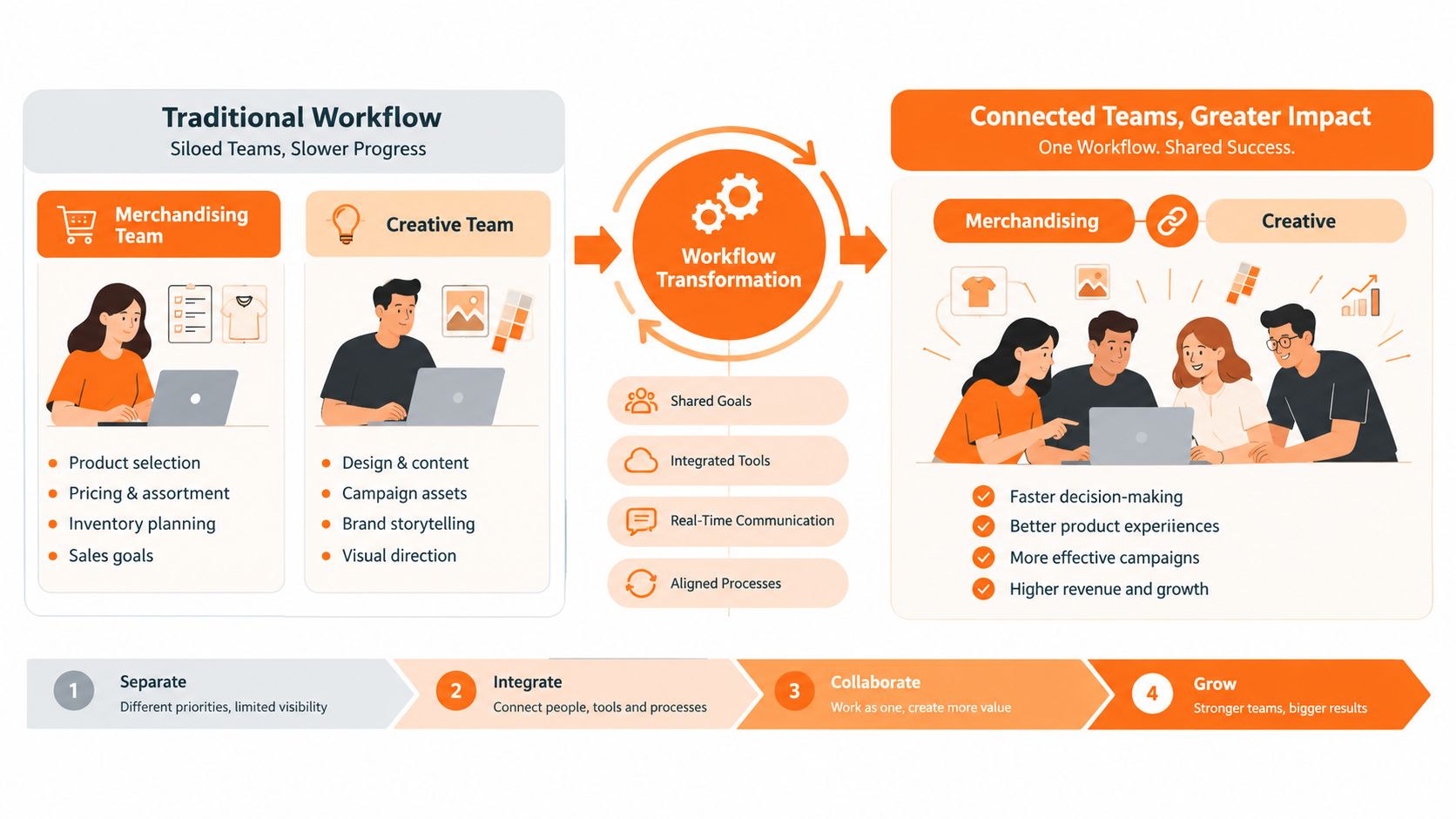
That shared view only works when the platform distinguishes between exploration and approval. A concept image may help a team decide that a collection needs a warmer palette. It shouldn't automatically become the source for a product detail page. The workflow needs explicit checkpoints for product truth, brand compliance, market suitability, and channel readiness.
One visual source of truth
The operational improvement comes from connecting decisions that are often separated:
- Assortment planning: Merchandising reviews the line architecture, color relationships, and accessory stories before production assets are commissioned.
- Creative development: Designers and art directors explore scenes, styling, and composition against approved product references.
- Campaign production: Marketing adapts accepted creative into e-commerce, editorial, social, and retail partner formats.
- Regional execution: Local teams request controlled variations while retaining the master product, brand rules, and usage permissions.
- Delivery and reporting: Content operations can see which assets are approved, pending, superseded, or missing from a required channel.
A canvas-based workflow is valuable because it makes the relationship between these activities visible. Instead of sending a folder of disconnected renders, the team can review the brief, inputs, variations, comments, approvals, and final outputs in one working context. That reduces the chance that a late comment disappears inside an email thread or that a regional team unknowingly uses an earlier version.
Faster review without weaker standards
Concurrent review doesn't mean everyone edits everything. It means each function reviews the part it owns at the appropriate time. Merchandising checks commercial assortment logic. Design checks the product and aesthetic. Brand checks visual rules. E-commerce checks channel specifications and customer clarity.
This separation helps teams avoid two common failures. The first is sequential review, where every function waits for the previous one to finish. The second is uncontrolled collaboration, where too many people make untracked changes and nobody knows which version is authoritative.
Teams looking to formalize these handoffs can use a broader guide to marketing workflow management 2026 as a reference point for permissions, status design, and cross-functional accountability. The relevant lesson for visualization is simple. A high-quality image has limited value if the organization can't reliably move it from approved product input to approved market output.
The category is expanding beyond storefront viewers into broader production systems. One market estimate places the 3D product visualization market at about USD 4.8 billion in 2025, with a projection to USD 14.6 billion by 2034, while the same source estimates e-commerce at 28.7% of the market and retailers at 34.6% of end-user revenue in 2025. Those figures come from this 3D product visualization market report. For fashion operations, the implication is that the winning workflow won't stop at customer interaction. It will connect planning, production, and distribution.
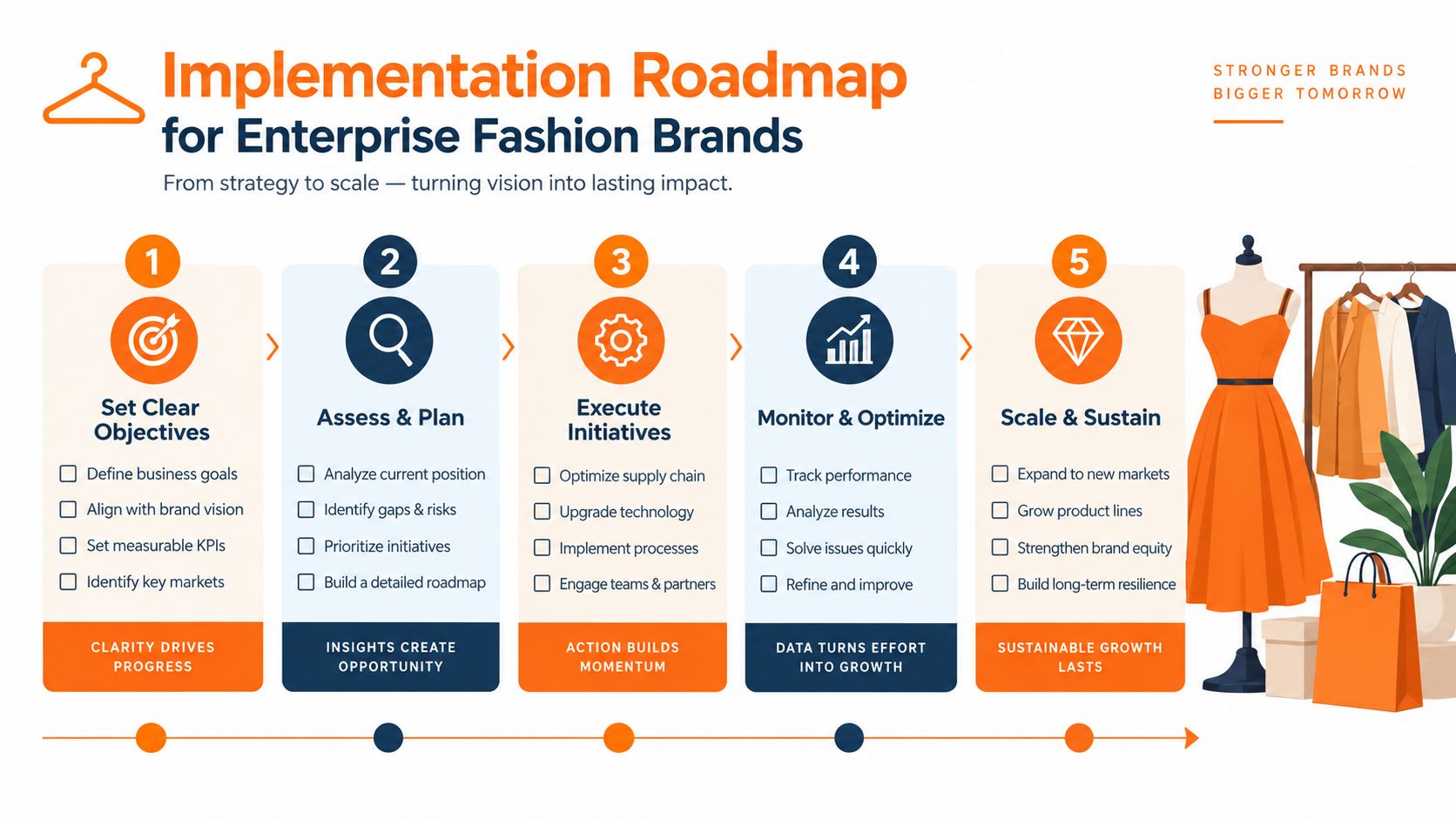
Implementation Roadmap for Enterprise Fashion Brands
Buying a license doesn't create a production capability. Implementation succeeds when the organization defines the work, the source data, the review responsibilities, and the conditions for expansion before asking teams to adopt a new tool.
Start with an operational diagnosis
Map one complete workflow from product definition to final asset delivery. Record where teams re-enter product information, where files change hands, where approvals happen, and where regional variations appear. Include the exceptions. A workflow that works only for a clean, single-color product won't survive a real seasonal assortment.
Choose a starting use case with visible value and manageable boundaries. Catalog-scale product imagery, seasonal assortment visualization, or a repeatable accessory story can work well. Don't begin with every channel, every region, and the most important campaign of the year.
Define the acceptance standard
Write down what “approved” means before comparing vendors. Your checklist should cover:
- Product fidelity: The visual must represent the approved silhouette, construction, color, and material.
- Brand compliance: Lighting, composition, styling, logos, and typography must follow the applicable guidelines.
- Metadata completeness: The asset needs a product identifier, variant, market scope, channel use, owner, and status.
- Review accountability: The workflow must show who checked the product, creative, brand, and commercial requirements.
- Delivery readiness: Outputs need the required formats, crops, resolutions, and destination handoffs.
This prevents the team from scoring vendors on an attractive demo while ignoring the work that makes an asset usable.
Run a representative pilot
A pilot should include real product files and real reviewers. Test a straightforward item, a visually difficult item, multiple variants, and a market-specific requirement. Push each asset through creation, annotation, review, revision, approval, export, and handoff.
Measure the work qualitatively and operationally. Note how many times people leave the platform, how often they need to rebuild an output, whether reviewers understand the status, and whether the final files can be found later. Ask the team what they would do if the product changed after approval. That answer often reveals more about the platform than its generation features.
Design adoption around roles
Merchandisers don't need the same controls as 3D artists. Regional marketers need access to approved templates and permitted variations, while brand managers need oversight and exception reporting. Give each group a clear responsibility and a narrow path through the workflow.
Train people on decisions, not just buttons. Explain when to use an exploratory render, when to request a controlled variation, and when a physical or specialist review remains mandatory. Adoption improves when the platform removes ambiguity from the work rather than merely adding another interface.
Scale through templates and governance
Once the pilot works, document the repeatable pattern. Create workflow templates for common launches, establish naming and status conventions, and define who can change the master product reference. Review exceptions as process feedback, not as evidence that every team needs an entirely different system.
The strongest rollout expands from a proven use case. It doesn't attempt to automate every creative judgment. It gives teams a dependable foundation for the work that repeats, while reserving expert attention for the products and campaigns where craft makes a meaningful difference.
Why Workflow Integration Matters More Than Standalone Features
A standalone feature answers a narrow question: can the software create or display a product visual? An integrated workflow answers the questions that determine whether the visual reaches the market correctly: which product is this, who approved it, where can it be used, what changed, and what must happen next?
That distinction matters because fashion teams rarely suffer from a total lack of creative tools. They suffer from disconnected tools. The product record lives in one system, the design file in another, the asset in a third, and the approval in an email thread. A visualization platform that adds another isolated library may improve one output while increasing the reconciliation work around it.
Integration creates compounding value
Connect product visualization software to product information management, product lifecycle management, digital asset management, and commerce systems where appropriate. The goal isn't to force every task into one application. It's to make the important handoffs reliable.
A connected workflow can preserve the approved product reference while allowing creative teams to explore multiple treatments. It can carry variant information into a campaign brief, send approved assets to the right market, and prevent obsolete files from being mistaken for current deliverables. It can also give operations leaders a view of where work is blocked, rather than relying on individual status updates.
The alternative is feature-led procurement. A team chooses the platform with the most impressive renderer, the most novel generation mode, or the most immersive viewer, then discovers that nobody has decided how assets should be named, approved, localized, or retired. The technical capability remains real, but the organization can't convert it into dependable throughput.
The decision test: If the tool disappeared tomorrow, would your team lose a useful capability or an entire undocumented workflow? Build around the capability, but govern the workflow.
Trust is especially important in fashion and beauty. Visualization can help reduce uncertainty about a product, but unrealistic color, inaccurate sizing, and misleading material representation can create the opposite result. Research summarized in this product visualization platform market overview identifies adoption constraints around color mismatch, size accuracy, hardware compatibility, and integration cost, while also highlighting concerns about misrepresentation and practical usability in retail AR. More immersion isn't automatically more useful. A brand needs visuals that are accurate enough to support a confident decision across devices and markets.
That is why workflow integration should outrank isolated spectacle during procurement. The right platform helps teams preserve product truth, apply brand guardrails, collaborate across functions, and distribute approved work without rebuilding the context each time. It makes visualization part of the operating model, which is where enterprise value is created.
Sprello gives fashion, beauty, and lifestyle teams an AI workflow canvas for assortment visualization, product concepting, catalog-scale product photography, and campaign production across SKUs, channels, regions, and seasons. Visit Sprello to see how a governed visual workflow can connect merchandising, creative review, and production-ready asset delivery.
Related
More to explore
Fresh reads
Ecommerce Content Production: The Enterprise Playbook
Master ecommerce content production for fashion and beauty brands. Learn enterprise workflows, AI acceleration, and scaling strategies for catalog growth.
Enterprise Content Production Platform: Strategy and Guide
Explore the enterprise content production platform for fashion and beauty brands. Learn core capabilities, vendor selection, and ROI implementation strategies.

Product Photography Automation for Fashion Brands at Scale
Learn how product photography automation helps fashion, beauty, and lifestyle brands scale catalogs, cut costs, and keep visuals consistent across every