October 20, 2026
Season Lineup Planning for Visual Merchandising Teams
Plan a season lineup with clear architecture, colorways, size runs, regional variations, and visual workflows that align merchandising and buyers.
A season lineup is the planned assortment of products, categories, and variants you intend to sell in a commercial period, and effective planning makes its architecture, colorways, size runs, and channel or regional differences visible before you approve it. Sprello, AI for product development & merchandising. From product concept to buyer-ready collection, is built for teams who need that plan to be visible and reviewable before samples and buys are locked.
Published May 12, 2026. You're likely reading this between line reviews, with a deck full of attractive product images and a spreadsheet full of rows nobody quite agrees on. The method below treats the lineup as a shared decision canvas, not a finished slide.
What a Season Lineup Actually Includes
You've seen this meeting. The collection file looks polished, every style has an image, and yet the room still argues about which styles anchor the season, which colorways matter, and what a specific buyer will see. The images show products. They don't show the assortment logic underneath.
A usable season lineup includes line architecture, category and price relationships, colorways, size runs, launch timing, market eligibility, and channel variants. It answers practical questions. Which categories carry the season? Where are the entry, core, and premium price points? Which styles are heroes, which support them, and which exist only for one account or region?

That's why a flat SKU list isn't enough. It treats a hero coat and a minor size variant as equals. Jewelry teams hit the same wall when variants multiply by metal, stone, and size, which is why clear SKU setup for jewelry retailers matters for keeping parent products and child variants distinct rather than tangled.
Two Seasons You Need to Separate
First, there's the commercial season, the period you've named in your calendar and sold to buyers. Second, there's the demand season, when customers in a specific place want the product. They overlap, but they aren't identical. A lightweight jacket may belong to your spring delivery while demand for it arrives weeks apart in different markets.
Sprello fits at this visibility layer. In Canvas, your team turns sketches, CADs, materials, and references into photoreal visuals and colorways with saved workflows, then connects those visuals to one shared catalog for line review. You're not forecasting demand there. You're making the plan inspectable.
A season lineup is a shared decision object, not a finished collection slide. If stakeholders can't see architecture, variants, and eligibility together, they aren't reviewing the same plan.
Why Traditional Seasonal Calendars Need Flexible Lineups
The modern system started simple. Brands built around Spring/Summer (SS) and Autumn/Winter (AW), with seasonal planning typically beginning approximately 6 to 12 months before products reached stores. SS was commonly shown in September or October of the preceding year and delivered from roughly February through July. AW was shown around February or March and delivered from August through January.
That model made sense in Western markets with strong temperature swings. Coats sell in winter. Linen sells in summer. What changed is the number of commercial moments layered on top.
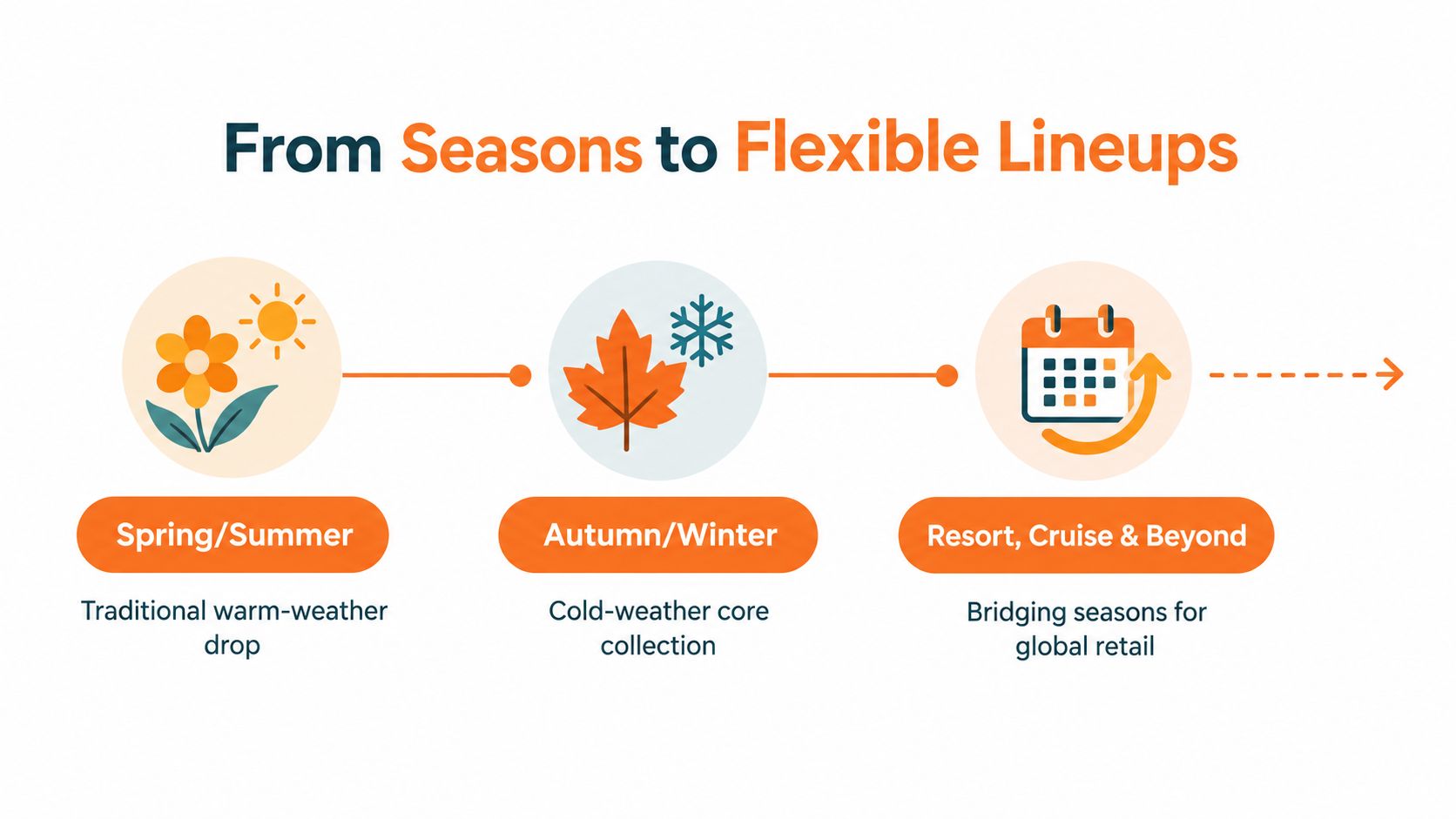
Resort or Cruise originated in the 1920s for affluent customers traveling to warm destinations in winter, and Pre-Fall developed as a bridge toward the main Fall season. Think of the old calendar as one train per season. Today's calendar is several connected drops sharing one direction, with overlapping delivery windows, color stories, and narratives.
Where the Fixed Model Breaks
Weather, regional demand, and channel timing now diverge inside a single season. McKinsey and BoF estimate fashion produced 2.5 to 5 billion excess items in 2023, worth $70 to $140 billion, while above-average temperatures reduced demand for winterwear. Beauty teams feel a version of this too, since seasonal needs shift with climate, and content on natural ways to protect skin reflects how protection and moisture concerns change across conditions rather than on a fixed launch date.
The practical response isn't to abandon seasons. It's to split commitment levels:
- Commit early: Weather-resilient core products with recurring demand and clear category roles.
- Keep flexible: Climate-sensitive fashion bets where color, fabric weight, or launch timing may need to change.
- Decide in season: Variants you can add, drop, or reroute by market once early signals arrive.
That split is why decision states matter. A style that's proposed shouldn't look the same in review as one that's committed. Until your team can see that difference, flexibility is just a word in a planning deck.
Turn Line Architecture Into a Reviewable Product Tree
Start with a simple distinction, because most lineup confusion lives here. A style is the design idea, such as a cropped trench. A style-color is that trench in stone cotton twill. A size is one purchasable variant. A market or channel assortment is the subset of those variants a specific buyer or region receives.
The math escalates fast. A single apparel style in 8 sizes and 6 colors creates 48 SKU variants, so a 100-style collection approaches 5,000 SKUs before channel or account assortments are added. Nobody reviews 5,000 rows well. You review a tree.
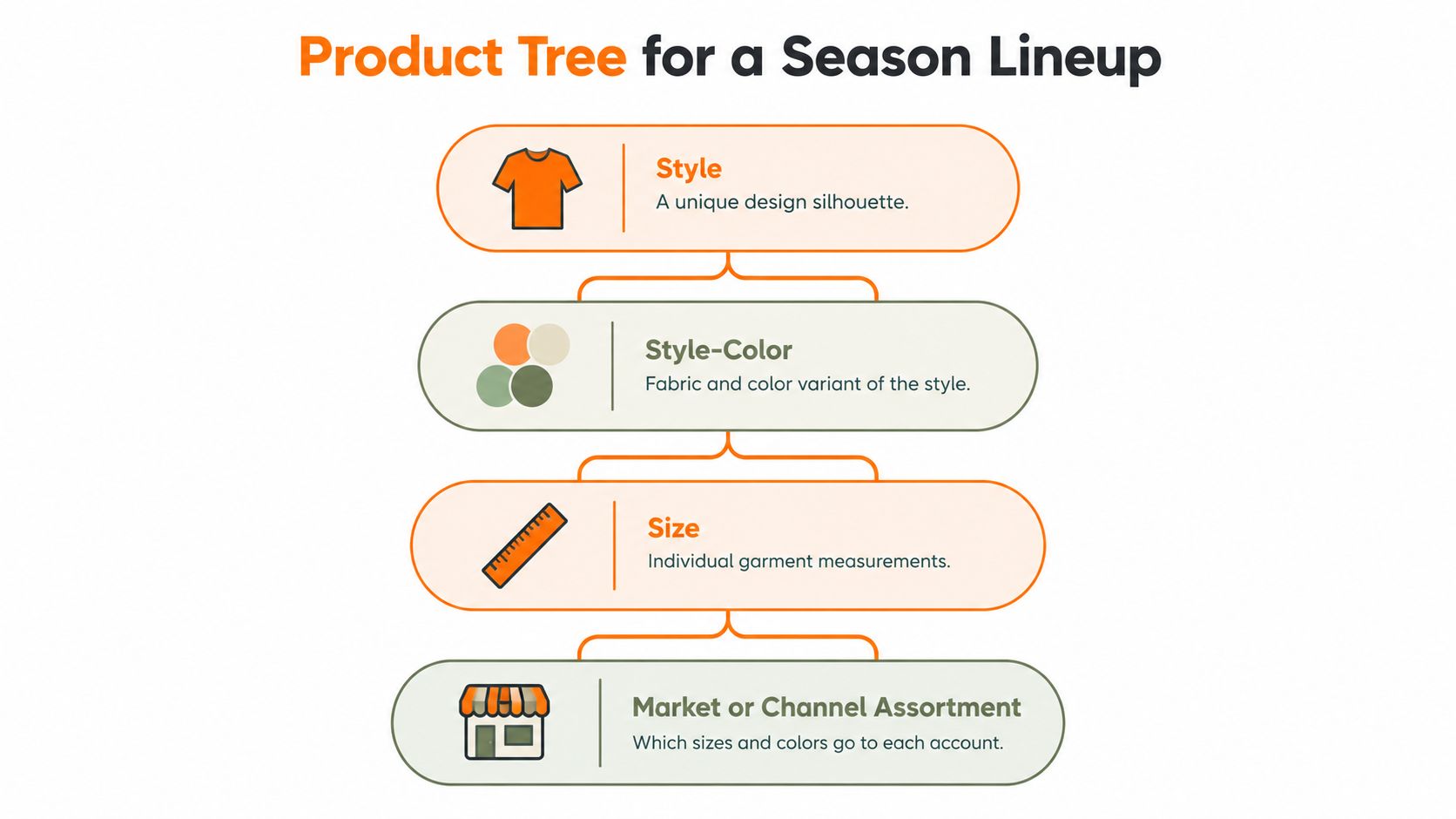
Model each style as a parent node with child variants for colorways, sizes, fabrics, and market or channel eligibility. Assortment research frames the decision as selecting product variety, determining SKU depth, and allocating inventory under budget and space constraints, as described in assortment planning research on variety and SKU depth decisions. The tree keeps that logic visible at the level humans can judge.
What Each Node Should Carry
As planning attributes, and not as outputs Sprello generates for you, useful fields include planned units, target margin, expected sell-through, launch date, replenishment status, substitution relationships, market eligibility, and decision state. Your planning system owns the numbers. The visual tree shows where those numbers attach. A shared catalog structure helps here, and product catalog management software covers how that shared record supports review across teams.
Beauty uses the same logic with different branches. A foundation style becomes shade and format variants. A lip product becomes color, finish, and pack size. The hierarchy changes by category, but the review question stays constant. Can you see breadth without losing the parent product?
Two Checks to Run at Every Review
- Over-assortment: Incremental colors or sizes add complexity, samples, and imagery without covering real demand or a distinct price or market need.
- Under-assortment: Gaps appear in key categories, price points, or size coverage, so the season looks full while missing commercial basics.
Practical rule: If a variant can't explain which customer, channel, or price gap it covers, it's complexity looking for a reason.
Compare Visual Workflow and Planning Tools
Disclosure: Sprello is our product. It's positioned as AI for product development & merchandising. From product concept to buyer-ready collection, and it complements PLM and planning suites rather than replacing them. The fair question isn't which tool wins. It's which system owns which decision.
| Tool category | Best suited for | Season lineup contribution | Important boundary |
|---|---|---|---|
| Spreadsheets | Early lists, quantities, ad hoc scenario math | Flexible working record of styles and variants | Weak visual review, easy version drift |
| PLM systems | Tech packs, BOMs, pattern making, sourcing, production, compliance | Technical truth for approved products | Not built for early visual exploration |
| Assortment planning suites | Demand forecasting, open-to-buy, allocation | Quantity, budget, and forecast decisions | Limited concept visualization |
| Design and presentation tools | Sketches, CADs, moodboards, decks | Creative direction and stakeholder storytelling | Visuals often disconnect from variant structure |
| Sprello | AI product visuals, shared catalog, line review, wholesale line sheets, buyer assortments | Connects Canvas visuals and colorways to a reviewable lineup and account-specific views | Doesn't do tech packs, BOMs, pattern making, forecasting, or open-to-buy |
How to Read That Table
Spreadsheets are honest tools for numbers, but they hide repetition. Ten navy variants look like ten rows, not one visual problem. Presentation tools show the story, yet the story can drift from the actual variant plan once the deck is exported.
PLM and planning suites remain the systems of record for technical development and commercial quantities. Sprello connects AI product visuals in Canvas to one shared product catalog, line review, wholesale line sheets, and separate buyer assortments per account or channel. That distinction matters, and visual merchandising software explains the visual decision layer in more detail.
Speed is part of the context, not a reason to blur boundaries. An industry analysis reports an average 75-week end-to-end go-to-market timeline for sportswear companies in its survey, while vertically integrated companies averaged 11 weeks for product creation and design development compared with 24 weeks for hybrid companies. Shorter visual review cycles help, but they don't remove your need for PLM, sourcing, or compliance.
Choose by decision job. If the decision is technical, use PLM. If it's quantity, use planning. If it's whether the assortment reads clearly before you commit samples, that's the visual workflow layer.
Plan Channel and Regional Variants Without Fragmenting the Plan
One collection usually becomes three arguments. Wholesale wants a tight buyer assortment. E-commerce wants broader color and size coverage. A regional team wants lighter fabrics and a later launch. Each team makes a copy, edits it, and soon nobody knows which version is current.
The fix is a single source of truth. Keep the parent product and creative intent fixed. Then define, as connected views, which variants each market sees, which sizes run where, what's eligible for an account, and how the narrative changes.
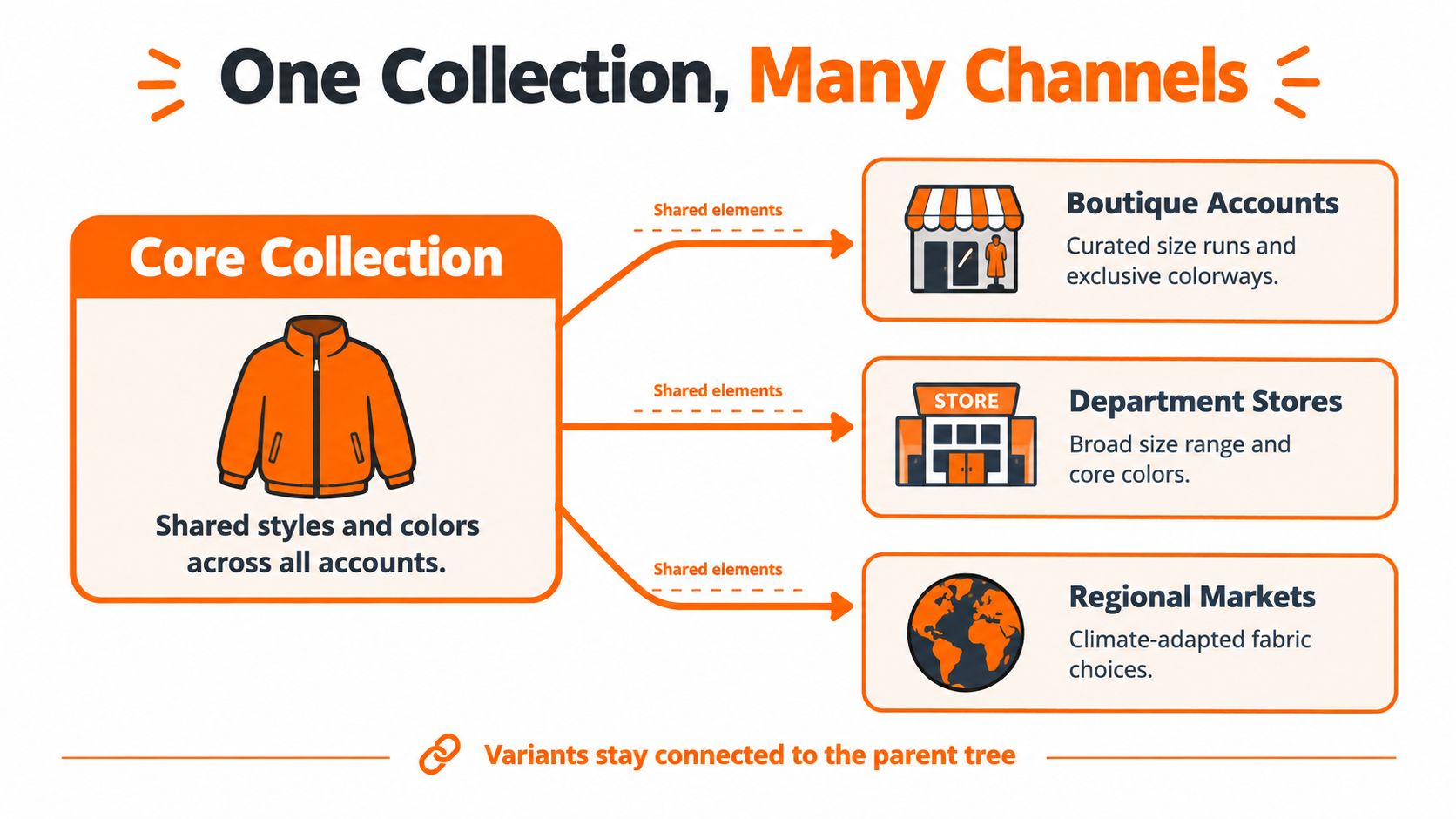
Consider one shirting story in three views. A wholesale buyer assortment shows two core colors and a focused size run for a specific account, presented on a line sheet. An e-commerce assortment adds an exclusive colorway and extended sizes, with imagery cropped for product pages. A regional assortment keeps the same silhouette but swaps fabric weight and shifts the launch window for a warmer market.
Those are different views of one plan, not three planning universes. Separate buyer assortments, region-aware visual treatments, and channel-specific line sheets reduce ambiguity while your naming conventions and brand guardrails keep the parent product recognizable everywhere. This is also where why brand consistency is important becomes operational rather than theoretical, because consistency has to survive local adaptation.
Guardrails That Prevent Fragmentation
- Name once: The parent style name and colorway names don't change by channel, even when the assortment does.
- Eligibility before imagery: Mark which accounts and regions can receive a variant before you produce channel assets for it.
- Accessories stay attached: Coordinate bags, jewelry, or belts to the parent story so complements don't become orphan products in one view.
Sprello supports those views with separate buyer assortments per account or channel, drawn from the shared catalog. It doesn't make purchasing or allocation decisions for you. Your merchandisers decide. The tool keeps their decisions connected and visible.
Apply the Workflow Across Fashion and Lifestyle Categories
The review logic travels across categories. The branches of the tree don't. These composite scenarios show how the same season lineup method adapts without pretending every product is planned the same way.
In fashion and apparel, a designer starts with sketches, CADs, material references, and a color palette. In Canvas, those inputs become photoreal visuals and colorways through saved workflows, then move into the shared catalog where merchandising checks architecture before anyone commissions samples. That's the stage where the reported result is relevant. A billion-dollar fashion brand cut prototype-to-market-sample lead time from 4 weeks to 2 and commissioned 20% fewer market samples, a result presented alongside analysis of typical industry lead times exceeding 40 weeks. We don't name customers, and that result describes sample decisions, not forecasting.
Beauty Needs Earlier Narrowing
Beauty timelines explain why. Beauty product development commonly runs 6 to 18 months from concept to launch, with 3 to 8 sample feedback rounds of 2 to 4 weeks each. Simpler products like lip balm move faster. Foundation and sunscreen need more formulation and testing.
So a beauty team uses concept visualization differently. You compare shade ranges, finishes, and formats early, cut weak options, and send fewer concepts into expensive formulation. Sprello supports the visual comparison. Your lab, regulatory, and testing processes remain separate and essential.
Jewelry, Accessories, and Home
Jewelry and accessories often work as the connective tissue of a season. A merchandiser coordinates earrings, belts, and bags against the core collection's color story, checking that complements extend outfits rather than compete with heroes. Scarcity and drop timing also shape those choices, and a limited edition wardrobe guide is useful context for how limited runs are framed to customers when you decide which accessories stay exclusive.
Home and lifestyle teams organize by room, material, and color relationship instead of size runs. A bedding parent branches into fabric, colorway, and market-specific dimensions. The review question is familiar. Does the range read as one story at the buyer level?
Sprello supports fashion and apparel, beauty and cosmetics, jewelry and accessories, and home and lifestyle. In each case, it covers concept visuals, saved workflows, shared catalogs, line review, and buyer-ready assortments, while PLM, sourcing, production, compliance, forecasting, and open-to-buy stay in their own systems.
Use a Practical Season Lineup Review Cadence
A cadence turns good intentions into decisions someone owns. Run it in the same order each season, and your reviews get shorter because the questions stop changing.
- Define the commercial promise: Name the categories, price architecture, and hero roles the season must deliver before anyone uploads a visual.
- Build the product tree: Create parent styles and child variants, with eligibility and decision states attached from the start.
- Review architecture and density: Check for missing categories, repeated silhouettes, and color or size complexity that doesn't earn its place.
- Create visuals and colorways: Use Canvas and saved workflows so reviewed images match the variants in the tree.
- Prepare channel and regional views: Build buyer assortments and wholesale line sheets from the shared catalog, not from copied decks.
- Hold a structured review: Give merchandising, design, and product development named decisions, and record what's proposed, committed, or exited.
Why does the discipline matter? Because quantity and markdown exposure are linked. In research summarized by Northwestern's Kellogg School of Management, only 43% of inventory units sold at full price, generating 57% of total revenue, while a further 45% of inventory sold after price reductions. Your visual review can't set buy quantities, but it can stop weak variants from reaching the buy plan at all.
Review Checklist
- Hero clarity: Can anyone in the room name the styles the season depends on?
- Variant relationships: Does every colorway, size, and accessory trace back to a parent product?
- Naming consistency: Do names match across catalog, line sheets, and buyer views?
- Unresolved differences: Are account and regional exceptions decided, or just mentioned in meeting notes?
Frequently Asked Questions
Does Sprello replace our PLM or planning suite? No. It complements them. PLM owns tech packs, BOMs, and technical development. Planning owns forecasting and open-to-buy. Sprello handles AI product visuals, the shared catalog, line review, line sheets, and buyer assortments.
How is customer data handled? Sprello provides SOC 2, SSO/SAML, role-based access, and zero training on customer data.
Which categories does it support? Fashion and apparel, beauty and cosmetics, jewelry and accessories, and home and lifestyle.
How do we evaluate it? It's sold through a demo, so your team can see the workflow on your own category structure before deciding.
If your next season lineup review needs visuals, colorways, and buyer assortments connected in one shared catalog, book a demo with Sprello and bring a current line sheet to test against the workflow. You'll see how Canvas visuals move into line review and account-specific assortments while your PLM and planning systems keep doing their jobs.
Related
More to explore
Fresh reads

Product Concept Presentation That Wins Buy-In
Build a product concept presentation that earns sign-off from merchandising and leadership. Step-by-step structure, visuals, and workflows inside.
Product Concept Development That Actually Scales
A practical guide to product concept development across SKUs, regions, and seasons, covering ideation, validation, prototyping, and rollout governance.
Product Concept Testing: A Practical 2026 Playbook
Master product concept testing in 2026 with a practical playbook covering qualitative research, rapid prototypes, A/B tests, KPIs, and AI-assisted workflows