September 25, 2026
8 Product Concept Examples for Brand Teams
Explore 8 product concept example ideas across fashion, beauty, and lifestyle, with strategic analysis and workflows for scaling concepts into production.
A promising silhouette has just emerged from the studio. The material direction is strong, the moodboard has energy, and the creative team can already see the campaign. Then merchandising asks which SKUs belong in the story, marketing asks for channel assets, regional teams ask what can change locally, and operations asks whether anyone has documented the approvals.
That's where a product concept example becomes useful or useless. An attractive image can inspire a room, but a working concept also clarifies the audience, product relationships, commercial role, creative constraints, and production path. Product concept development has long been treated as a formal decision point between idea generation and prototype development, with evaluation tied to market research, consumer perception, and feasibility review, as documented in this history of product development.
The eight examples below move from AI-assisted ideation to assortment architecture, accessory coordination, photography, campaigns, regional adaptation, governance, and reusable seasonal dossiers. Each is assessed through its creative purpose, operational value, trade-offs, and next actions. For teams turning visual direction into production-ready execution, Sprello provides a visual workflow canvas for connecting concepts to SKUs, channels, regions, and seasons. The same discipline also supports launch planning, including mattress product launch strategies, where a product idea must become a coordinated commercial story.
1. AI-Assisted Product Concepting
A product team facing a new season can start with a controlled concept brief: define the silhouette, material palette, target customer, mood, and required brand elements before generating variations. The resulting images give designers directions to compare without redrawing every option manually.
A luxury fashion team might test seasonal colorway combinations before design approval. A beauty team could explore packaging finishes, cap shapes, and surface treatments. An athleisure team might assess how one design language carries across silhouettes and size ranges. Each direction still requires review against construction, fit, materials, cost, and assortment role.

From visual variation to a usable brief
Generated imagery can suggest a strong mood while hiding construction problems, unsuitable materials, unworkable trims, or a silhouette outside the brand's fit standards. Treat every output as a hypothesis until product specialists confirm what can be made.
Write the brief around audience, commercial purpose, aesthetic direction, material boundaries, and intended product role. Record the inputs behind useful results, including the silhouette, fabric cues, accessory treatment, and campaign mood they support. Those records can become repeatable ideation templates across SKUs, channels, regions, and seasons.
Practical rule: Use AI to widen the option set, then let designers, product developers, and merchandisers narrow it through explicit decisions.
Keep feedback attached to each concept. Designers can mark what stays, what disappears, and what needs testing before the direction enters costing or fit development. Teams connecting visual concepts with written campaign narratives can also use this guide to AI-generated advertorials to keep the product story disciplined alongside the imagery. Teams exploring the workflow further can consult this guide to AI for fashion design.
The direction worth keeping is the one that survives material review, costing, fit development, assortment planning, and campaign translation.
2. Seasonal Assortment Visualization
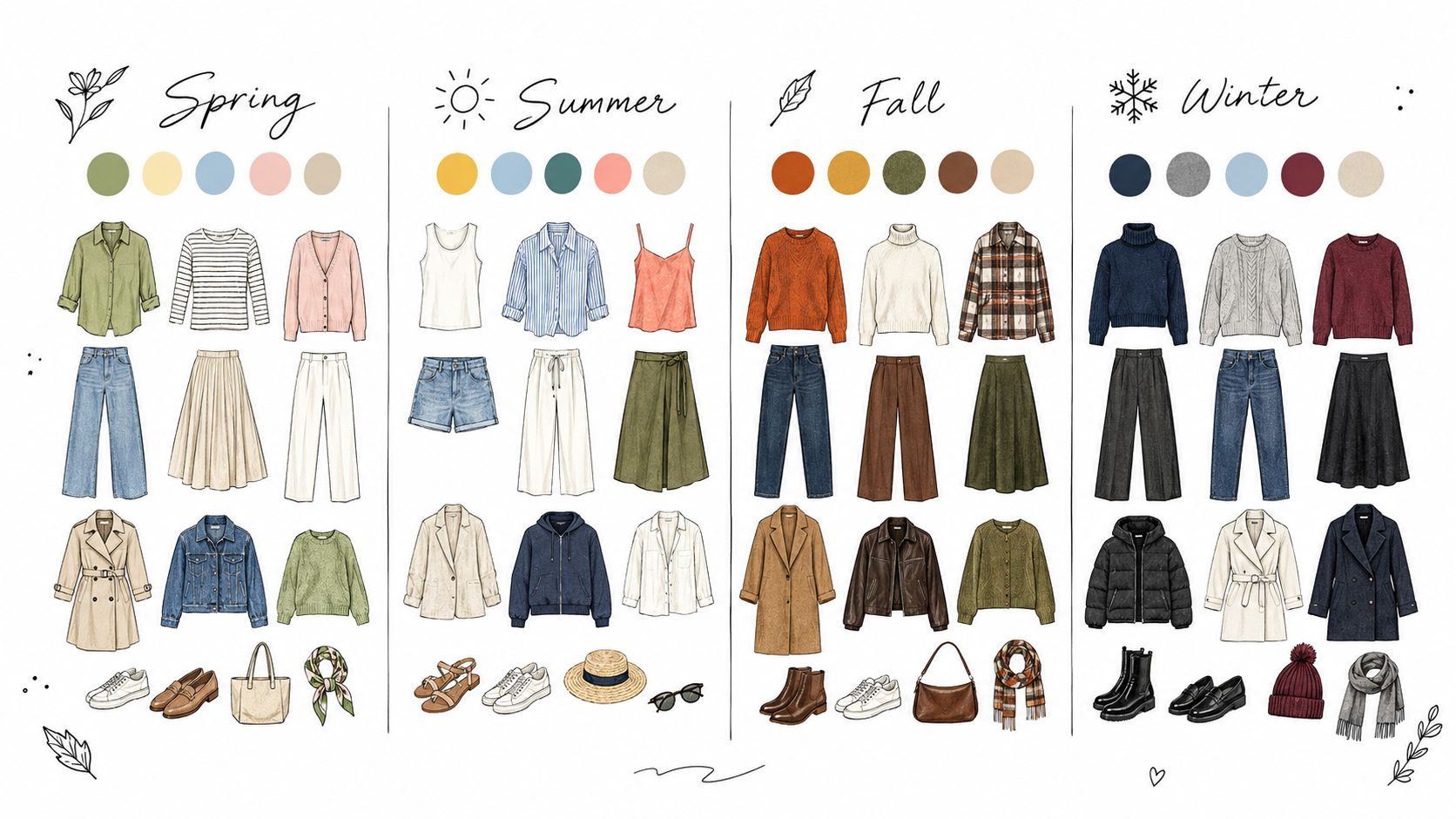
A seasonal concept becomes commercially legible when the team can see how individual products relate. One overshirt may look excellent alone, but its role changes when viewed beside the matching trouser, outer layer, accessory, colorway, and alternative price architecture.
Assortment visualization turns that relationship into a shared view. Merchandisers can map silhouettes, variants, sizes, color progressions, and category gaps before production commitments become difficult to reverse. A department store might use the view to consider floor placement and vendor allocation. A fast-fashion team might inspect whether a trend direction appears coherently across categories. A direct-to-consumer brand might compare how one concept travels across sub-brands.
Make the architecture visible
The creative benefit is easy to see. The harder benefit is decision clarity. If every SKU uses an inconsistent name, a review board can't reliably distinguish a new launch from a carryover, a color variant, or a discontinued item. Establish the naming convention before the canvas fills up, and keep it stable throughout the planning cycle.
Use visual signals for decisions that normally disappear inside spreadsheets:
- Strategic priorities: Mark hero products, key launches, and concepts that anchor the seasonal story.
- Assortment gaps: Flag missing colorways, sizes, silhouettes, or accessory relationships before sign-off.
- Review views: Create focused views such as the accessory story, the color story, or the channel-specific assortment.
- Cross-functional access: Give supply chain and finance read-only visibility so buy-plan changes don't arrive as surprises.
The process works best when the visualization stays current. Update it whenever buy assumptions change, and assign ownership for maintaining the source of truth. The assortment planning workflow is most useful when the canvas supports both creative discussion and operational approval.
The trade-off is that visibility can expose uncomfortable decisions. A concept may look distinctive but occupy too much space in a crowded category. That's productive. The team can adjust the line architecture while the idea is still flexible.
3. Accessory Assortment Generation and Coordination
An accessory concept earns its place when it completes a customer need, not merely when it matches a color. An apparel collection might require a bag, belt, footwear direction, or headwear story. A beauty launch may need brushes, primer, setting products, or travel formats that clarify how the core item fits into a routine.
Start with the silhouette and the use case. A structured coat may call for a compact bag that preserves its shape, while a relaxed knit could support a softer carryall and contrasting footwear. A beige bag may coordinate with a beige coat yet fail the customer's occasion, price architecture, or margin target. A bold accessory can create the contrast that makes the outfit feel deliberate.
Build the recommendation logic from existing assortment evidence. Review which bags support particular apparel stories, which beauty bundles solve a practical need, and which combinations help customers complete an occasion. Approved moodboards, campaign references, materials, hardware, and color relationships can seed the system.
Merchandisers then set the boundaries. “Coordinated” might mean shared hardware, a controlled color relationship, a common material cue, or an intentional contrast. The recommendation engine proposes options; the team protects brand positioning, inventory feasibility, and margin discipline.
Use a governed workflow:
- Seed recommendations: Start with proven pairings and approved visual references.
- Set the aesthetic rule: Define the colors, finishes, proportions, and occasions that belong together.
- Check operational fit: Remove combinations that require unavailable materials, create excess complexity, or conflict with regional assortments.
- Curate channel sets: Adapt the approved relationship for the store, product page, email, and campaign without changing its core logic.
- Test the bundle: Present selected pairings to a limited customer group before applying them across the assortment.
- Review behavior: Compare results by pairing, region, and channel, then refine the recommendation rules for the next season.
The merchandising examples demonstrate why the complete assortment story matters. Breadth can suggest abundance, but weak relationships make a collection harder to shop and harder to produce consistently. A smaller accessory system gives campaign teams a clearer narrative, while documented rules let the same concept scale across SKUs, channels, regions, and seasons.
4. Brand-Consistent Catalog-Scale Product Photography
Catalog photography is where a good concept can lose its identity through inconsistency. One product appears against a warm neutral background, another uses hard studio light, and a third shows a color that looks different from the approved sample. Customers may never know which internal handoff caused the problem, but they experience the catalog as one brand.
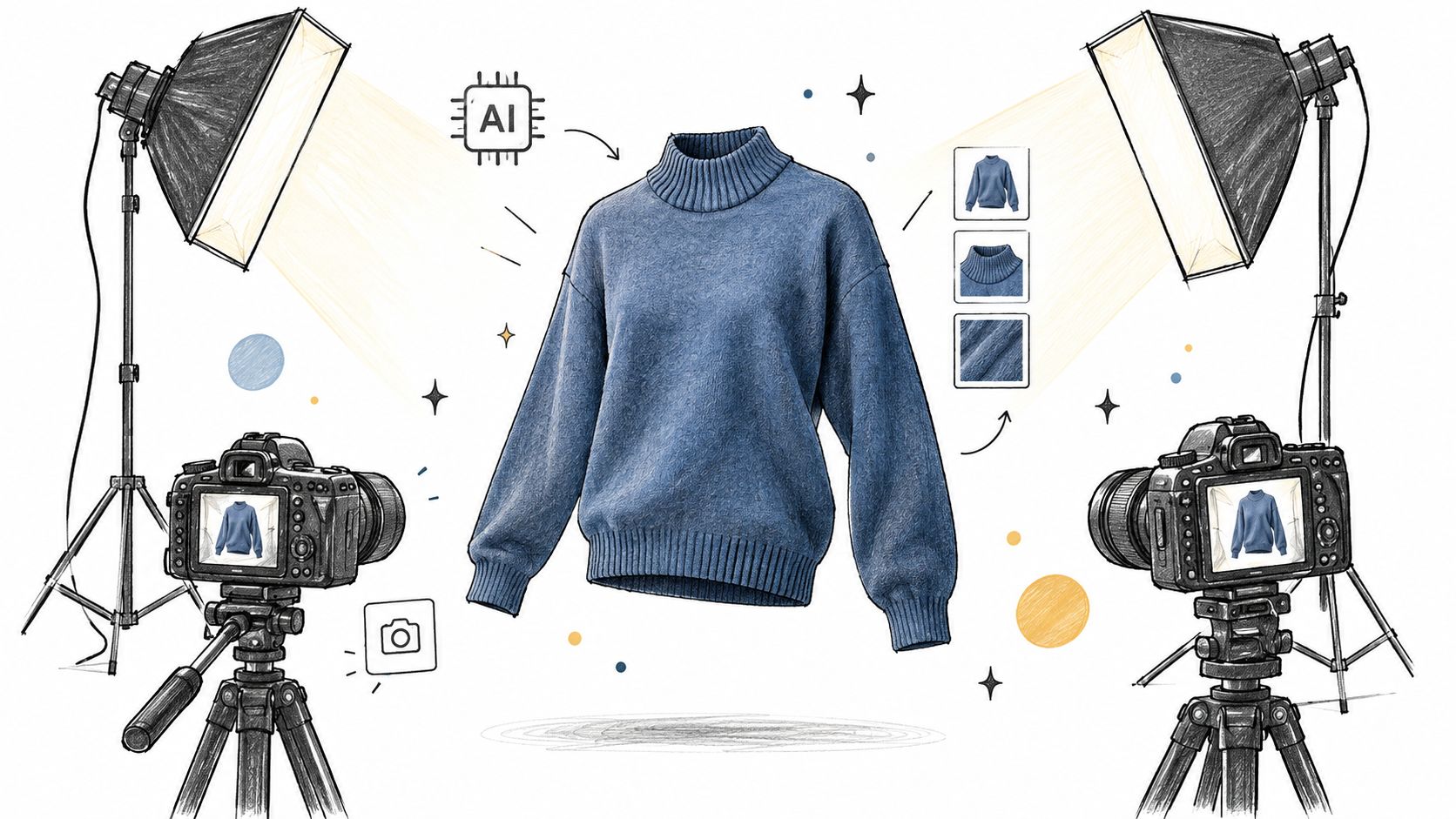
AI-generated product photography can support large assortments by applying consistent lighting, background, styling, and category-specific direction. An apparel team may create region-aware styling contexts without arranging a new shoot for every variation. A beauty team can maintain a controlled visual language across markets while reserving hero imagery for major launches.
The operational requirement is a detailed visual standard. “Premium and clean” won't guide a production system. Specify the lighting behavior, background treatment, prop policy, crop, camera angle, color expectations, garment presentation, and exceptions by category.
Protect accuracy before speed
Start with a representative product set and inspect the output closely. Review color, proportions, material texture, labeling, packaging details, hands, shadows, and any feature that could misrepresent the product. The first review cycle should establish what the brand accepts and what requires correction.
Use generated images to supplement catalog needs, not to replace every major creative decision. A hero campaign may depend on the imperfections, atmosphere, and art direction of a considered shoot. Catalog production has a different job. It needs clarity, consistency, and scalable coverage.
The Sprello product workflow canvas can help teams connect the visual standard to product records and approval stages. The trade-off is obvious. Faster production is valuable only if review remains strong enough to protect customer trust. Set category-specific style profiles, retain human approval for sensitive assets, and separate automatically generated catalog content from campaign work that requires a higher level of art direction.
5. Editorial Campaign Workflows for Multi-Channel Execution
A campaign concept earns approval only after its visual idea survives production. Start with the moodboard, then define how its silhouette, materials, styling, and emotional tone appear in every required deliverable. A lookbook image may need a tighter e-commerce crop, a shorter social edit, and a more informative email treatment, while still preserving the same product promise.
A luxury fashion brand could build digital, print, retail, and social assets around one seasonal narrative. A direct-to-consumer team might reuse a promotional structure across weekly launches. A beauty brand working with creators needs direction that protects the campaign mood and product cues, even when different people produce the final content.
Separate creative approval from delivery approval
Build the workflow from a brief that identifies the product concept, audience, message, visual mood, featured SKUs, and required outputs. Record channel specifications as reusable production rules, including dimensions, crop behavior, copy limits, and content hierarchy. This keeps each team from interpreting the concept again at the delivery stage.
Use separate approval paths. Creative reviewers assess whether the asset expresses the brand and campaign idea. Legal or compliance reviewers check claims, required information, usage rights, and regional constraints. A single vague approval stage often creates late revisions because teams cannot see which issue blocks release.
Treat the asset library as campaign infrastructure. Store approved crops, copy variants, product references, naming conventions, and performance notes together. Tag each asset by SKU, channel, region, season, and concept so teams can reuse a proven visual system without reconstructing it from memory.
Orderly consistency can underperform. Each channel carries different user expectations, so adapt format and emphasis while protecting the central product promise, visual codes, and campaign mood. Teams planning launch activity can compare their workflow with these marketing objective examples for 2026, using objectives as inputs to the brief rather than adding them after production.
6. Cross-Regional and Multi-Channel Asset Adaptation
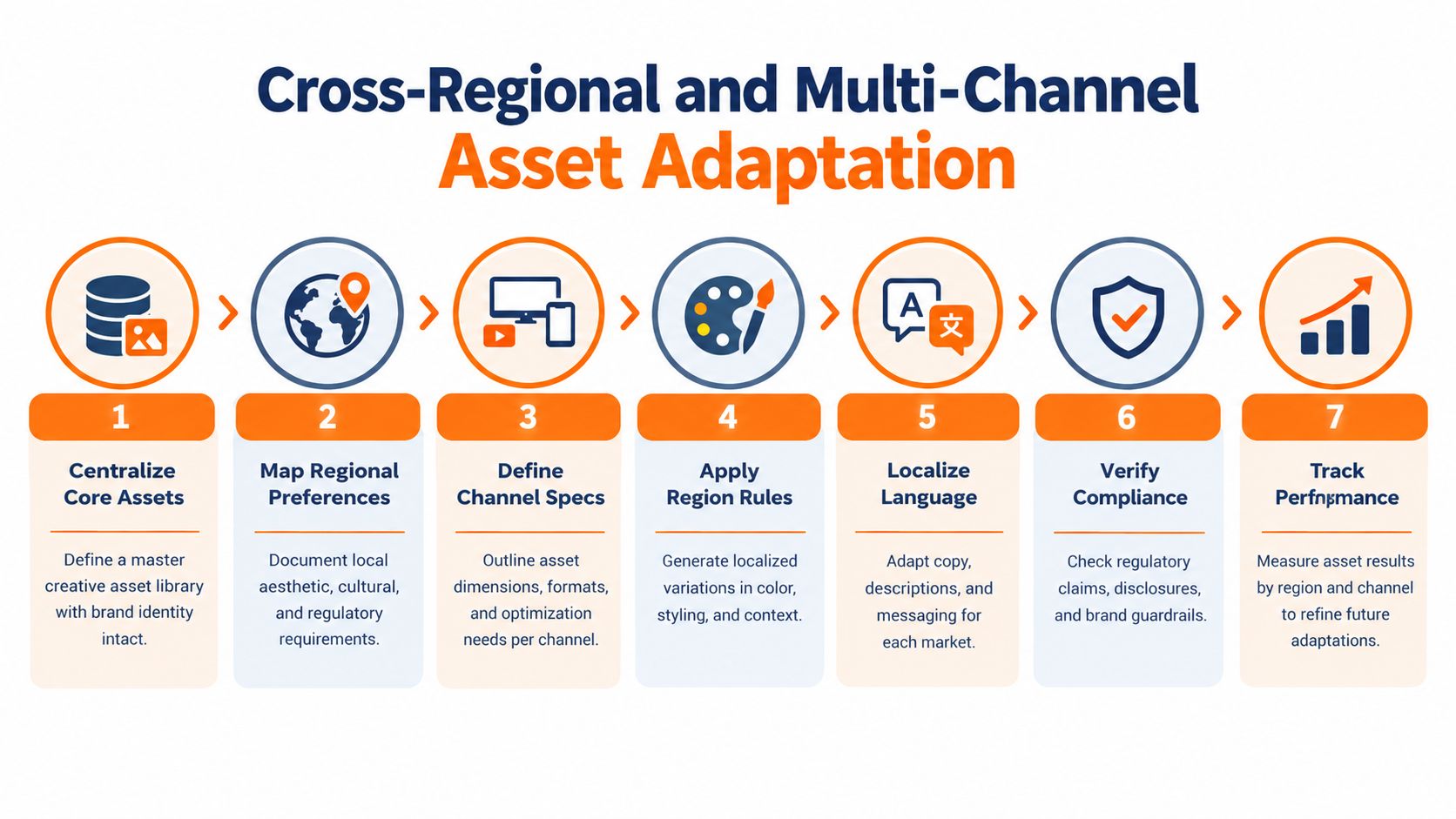
A product concept becomes harder to manage once its silhouette, material story, and campaign mood move across markets and channels. The same hero image may support a global launch, while styling, copy, model direction, color emphasis, and usage context change for local customers. Define those changes before production so regional teams adapt the concept without rebuilding the brand from scratch.
A beauty launch might keep the bottle, shade identity, and visual codes consistent while changing shade presentation, casting, educational context, claims review, and channel format. A luxury campaign can retain its heritage imagery while adjusting language and lifestyle cues. Apparel teams may use climate-sensitive styling to make one collection relevant in different regions. Each variation should connect back to the approved concept and its intended customer role.
Govern adaptation through decision rules
Start with a variation register rather than another broad creative brief. For every asset, record the fixed product attributes, permitted changes, responsible owner, target region, channel, season, and required approval. Link each approved crop, accessory combination, copy version, and campaign use to the relevant SKU.
Keep the rules practical:
- Brand system: Lock logos, core product attributes, identity codes, and required campaign elements.
- Local execution: Let regional teams adjust context, styling, language, casting, and channel emphasis within documented limits.
- Escalation points: Route changes involving claims, product interpretation, cultural sensitivity, or audience intent to shared review.
- Version control: Record accepted, revised, and rejected adaptations, including the reason and final approver.
Review results by region and channel, then connect performance to the specific change. A low-performing crop, for example, may obscure the product silhouette, while a localized styling choice may improve relevance without changing the core image. This gives teams a usable decision record instead of a score with no explanation.
Governance carries a production cost. More variations mean more files, approvals, and naming risks. Create a regional version only when it improves customer understanding, satisfies local requirements, or supports commercial relevance. Apply the same rule across every SKU, channel, and season.
7. Brand Guardrails and Naming Conventions System
A growing brand usually has two kinds of inconsistency. The first is visible, such as incorrect color, typography, packaging language, or image treatment. The second is structural, such as duplicate SKU names, unclear file versions, missing approvals, and campaign assets that can't be traced back to an approved product concept.
A guardrail system addresses both. It gives teams a shared visual reference and embeds rules into everyday production. This matters when several regions, agencies, vendors, and AI tools contribute to the same collection.
A global luxury brand may protect heritage elements while allowing regional campaign context to vary. An apparel retailer may need consistent color and fit representation across vendor imagery. A beauty brand must align packaging language and product claims across categories and markets. In each case, the system should distinguish identity from execution.
Start with the elements that cause the most rework
Don't write an enormous manual that no one opens. Separate essential elements from flexible ones, then show the difference through approved and rejected examples. A visual gallery often communicates faster than dense prose.
Begin with high-impact controls such as color, typography, naming, logo treatment, product representation, and claims. Add more detailed rules after the team can follow the basics consistently. Automated checks can flag missing fields, invalid naming patterns, or obvious brand violations before a manual reviewer spends time on the asset.
Naming deserves special attention. A name should tell the next person what the asset represents, which product it belongs to, which region or channel it serves, and whether it is approved. Use one convention across the concept board, SKU record, asset library, and campaign brief.
Review the rules at a regular seasonal or planning cadence. Product, design, marketing, and regional teams should all be able to propose changes, but one owner must decide which changes become official. Governance works when it helps people make decisions quickly. It fails when it becomes a second creative department that only adds delay.
8. Workflow Templates and Seasonal Production Dossiers
A strong product concept example should survive contact with production. Build a seasonal dossier that connects the approved concept to its audience, silhouette, materials, color logic, assortment, campaign, regional requirements, channel outputs, owners, and review standards. The document becomes the handoff point between creative intent and operational delivery.
Start with a live project rather than an abstract template. Follow one concept from moodboard to SKU setup, accessory coordination, photography, localization, and campaign launch. Mark every point where information is lost, work is duplicated, approvals arrive late, or teams use conflicting files. Those observations should determine the dossier's structure.
Organize the dossier around decisions and dependencies:
- Concept definition: Audience, product promise, mood, silhouette, materials, and intended occasion.
- Assortment structure: Core SKUs, variants, colorways, sizes, accessories, and channel roles.
- Production stages: Required inputs, accountable owners, review criteria, and approval checkpoints.
- Adaptation rules: Regional, language, regulatory, styling, and channel-specific changes.
- Reuse signals: Approved references, successful formats, unresolved questions, and lessons for the next season.
The workflow should show how a creative choice travels. A material direction may affect styling, photography surfaces, product copy, and regional claims. An accessory introduced to complete the silhouette may need its own SKU mapping, image set, and campaign placement. Linking those dependencies prevents a polished concept from becoming an incomplete launch.
Use conditional routes where the work differs. A priority market may need an extra approval, while a standard catalog image can follow a shorter path than a hero campaign asset. Let merchandisers, designers, marketers, and regional reviewers define these rules together. They can identify which shortcuts preserve quality and which create rework.
Close the season by comparing the planned route with the actual one. Record changed decisions, repeated bottlenecks, and assets that were reused successfully. The next dossier should carry those lessons into the following collection.
9. Seasonal Assortment Visualization
A seasonal assortment review works best when the team treats the canvas as a live decision record, not a static mood board. The point is to show how silhouette, material, and color story move together across SKUs, while also exposing where the line feels thin, repetitive, or misaligned with the intended customer.
A practical review usually starts with the full lineup, then narrows into the questions that matter. One pass checks whether the core shapes carry the season. Another checks whether accessories support the main story instead of pulling attention away from it. A third looks at whether the mix still fits the channel and the launch calendar. That same view can also support assortment planning in retail, where teams need a shared way to judge balance before production starts.
Turn the canvas into a decision meeting
Use one stable canvas for the main review, then open focused views for specific trade-offs. Merchandising may want to compare newness against carryover. Design may want to inspect whether a silhouette is repeating too often. Finance may want to flag items that stretch the buy without adding much value.
Color-coding helps only when the codes stay simple and documented. Use a small set of markers for new launches, risk items, approval status, or products that need revision. When every team reads those signals the same way, the canvas stops being decorative and starts supporting decisions.
Decision history matters just as much as the visual layout. When a buy changes, log the reason, the owner, and the downstream assets that need an update. If the assortment moves in one file while campaign or content work keeps running on an old version, the team creates avoidable rework.
Treat the visual assortment as a shared operating surface where teams challenge the concept, identify gaps, assign actions, and approve a version production can trust.
9-Point Product Concept Comparison Guide
| Example | Implementation Complexity | Resource Requirements | Expected Outcomes | Ideal Use Cases | Key Advantages |
|---|---|---|---|---|---|
| AI-Assisted Product Concepting | Medium; requires defined briefs, brand guidelines, and AI configuration | Designers, trend data, brand documentation, AI tools | Faster concept generation, broader exploration, and improved iteration speed | Early-stage fashion, beauty, and product design | Reduces concepting time and supports brand-consistent experimentation |
| Seasonal Assortment Visualization | Medium to high; depends on structured SKU and inventory data | Merchandising teams, product taxonomy, variant data, regular updates | Fewer assortment gaps, clearer line architecture, and better buy planning | Seasonal retail planning and multi-channel assortment management | Creates a shared visual source of truth for assortment decisions |
| Accessory Assortment Generation and Coordination | High; requires recommendation logic and integrated sales, inventory, and customer data | Merchandisers, AI systems, historical sales data, inventory integrations | Increased cross-selling, improved accessory balance, and higher average order value | Coordinating accessories with apparel, footwear, or beauty collections | Automates complementary product discovery and merchandising stories |
| Brand-Consistent Catalog-Scale Product Photography | High; requires model training, style documentation, and quality controls | AI image tools, product images or 3D models, reviewers, brand profiles | Lower production costs, faster asset delivery, and consistent catalog imagery | Large e-commerce catalogs and frequent seasonal product launches | Scales visual production without studio scheduling constraints |
| Editorial Campaign Workflows for Multi-Channel Execution | High; involves cross-team orchestration and channel specifications | Creative, photography, copywriting, marketing, approval, and asset-management teams | Faster campaign delivery, fewer handoff errors, and consistent storytelling | Fashion, beauty, and retail campaigns across web, email, print, and social | Centralizes briefs, approvals, versioning, and channel adaptations |
| Cross-Regional and Multi-Channel Asset Adaptation | High; requires localization rules, governance, and compliance workflows | Regional teams, translators, legal reviewers, performance data, asset templates | Lower localization costs, faster market entry, and improved regional relevance | Global brands adapting assets across markets and channels | Reuses core assets while supporting local preferences and regulations |
| Brand Guardrails and Naming Conventions System | Medium to high; requires comprehensive standards and validation rules | Brand managers, creative teams, governance tools, naming taxonomies | Fewer compliance errors, less rework, and stronger brand consistency | Large organizations, vendor networks, and regulated product categories | Enables scalable production with automated brand and naming checks |
| Workflow Templates and Seasonal Production Dossiers | Medium; requires workflow documentation, template design, and adoption | Process owners, cross-functional contributors, approval rules, governance | More predictable timelines, faster onboarding, and repeatable execution | Seasonal production, campaign launches, and recurring regional workflows | Preserves institutional knowledge and reduces ad hoc processes |
| Seasonal Assortment Visualization (Duplicate Entry) | Medium to high; depends on structured SKU and inventory data | Merchandising teams, product taxonomy, variant data, regular updates | Fewer assortment gaps, clearer line architecture, and better buy planning | Seasonal retail planning and multi-channel assortment management | Creates a shared visual source of truth for assortment decisions |
Turn the Best Concept Into a Repeatable Workflow
The strongest product concept examples share a progression. They begin with a creative signal, such as a silhouette, material, color relationship, package finish, or campaign mood. They then define the audience and product promise, connect the idea to an assortment, add accessories or supporting products, and specify how the story will appear across channels and regions.
That progression matters because concept work sits between inspiration and commitment. Historical product-development frameworks formalized concept development as a stage where ideas become testable product concepts before prototype spending, with attention to consumer perception and feasibility. A concept therefore has to do more than look compelling. It needs enough structure for people outside the original creative conversation to evaluate it.
Use this sequence for the next concept entering your pipeline:
- Define the brief and audience. State who the product serves, what problem or desire it addresses, what mood it should create, and which brand elements cannot change.
- Map the concept to products. Identify the core SKUs, silhouettes, materials, colorways, sizes, accessories, and channel roles. Make omissions visible before they become production requests.
- Set the guardrails. Separate fixed identity elements from flexible regional or seasonal choices. Include naming, image treatment, claims, packaging language, and approval ownership.
- Assign checkpoints. Decide when design, merchandising, product development, marketing, legal, regional, and e-commerce teams review the work. Each checkpoint should have a clear decision, not a general invitation to comment.
- Create adaptations. Build the channel and regional versions from an approved core asset or concept. Record what changes, who approves it, and why the variation exists.
- Document the workflow. Capture the final brief, assortment map, references, rules, deliverables, decisions, and unresolved questions in a seasonal production dossier.
This approach also clarifies trade-offs. AI can expand exploration, but humans must judge feasibility and brand fit. Assortment breadth can create commercial choice, but it can also weaken the story. Regional flexibility can improve relevance, but uncontrolled variation can damage recognition. Faster asset production helps only when quality gates remain visible.
Sprello is one relevant option for designing and auditing this kind of end-to-end workflow across fashion, beauty, and lifestyle teams. Its visual canvas can connect product concepting, assortment visualization, accessory coordination, campaign production, brand guardrails, and seasonal dossiers in one working environment.
Choose one upcoming concept today. Give it a named audience, a defined assortment, a visual rule set, approval checkpoints, channel and regional adaptations, and a documented production path. If the idea can't survive that exercise, revise it while the cost of change is still manageable. If it can, your team has more than inspiration. It has a system that can carry creative intent into execution and inform the marketing objective examples for 2026 that support the launch.
Sprello gives fashion, beauty, and lifestyle teams a visual canvas for turning product concepts into governed workflows across SKUs, channels, regions, and seasons. Use Sprello to map one upcoming concept, assign its approvals, and build the production dossier your team can reuse.
Related
More to explore
Fresh reads
Product Image AI Generator: How Brands Use It at Scale
Learn what a product image AI generator does, how it works, and how fashion and beauty brands use it for catalog-scale content without losing brand quality.
How to Create Storyboards for Campaigns That Scale
Learn how to create storyboards that move from concept to campaign-ready, with tips on framing, sequencing, templates, and clean handoffs to production teams.
Audit Process Steps That Keep Creative Work on Brand
Learn audit process steps for fashion and beauty teams to audit creative workflows, catch errors early, and keep campaigns on brand at scale.