September 30, 2026
Marketing Workflow Software Guide for Enterprise Brands
Explore marketing workflow software built for enterprise fashion and beauty teams. Compare features, integration benefits, and evaluation criteria.
Two weeks before a fall collection goes live, the merchandising director asks a simple question: “Are we still launching on Monday?”
The PIM says yes. The creative team's shared drive contains a hero image marked for Tuesday. E-commerce is tracking work in Notion, email is being briefed in a project tracker, and the agency is following its own Gantt chart. Every team has a current plan. None of the plans agree.
Overnight, a photographer replaces the hero shot and shifts delivery by a day. That change delays PDP copy review, the email team references a SKU that isn't ready, and the homepage carousel receives the wrong lifestyle image. The problem isn't one missed task. It's the rework created when merchandising, creative, e-commerce, agencies, and regional teams operate from disconnected instructions.
For enterprise fashion and beauty brands, marketing workflow software is the connective tissue between assortment decisions, creative production, approvals, and go-to-market execution. It shouldn't add another silo. It should make the existing stack behave like one operating system.
When Five Tools Cannot Agree on a Launch Date
The merchandising lead discovers the problem during a launch readiness meeting. The assortment is commercially approved, but the campaign isn't operationally ready. One tool has the SKU list, another has the latest images, a third shows copy awaiting review, and two more contain conflicting dates.
Nobody has deliberately created chaos. Each team chose a tool that made sense for its own work. Merchandising needs product data and assortment status. Creative needs briefs, files, and feedback. E-commerce needs publishing tasks. Agencies need production schedules. Regional teams need localization queues. The patchwork grows because each department solves an immediate need without owning the complete journey from product decision to customer-facing launch.
Practical rule: If a launch manager has to reconcile dates manually before every status meeting, the business has a workflow problem, not a meeting problem.
The overnight image change exposes the weakness. A shared drive can hold a replacement file, but it can't reliably tell the email manager that the associated SKU is no longer cleared for use. A project tracker can show that copy is in review, but it may not understand that the copy depends on a specific image version and an approved product claim. A PIM can hold accurate product information, but it doesn't automatically route creative work or regional approvals.
That gap is expensive in operational terms. Teams repeat briefs, chase reviewers, rename files, rebuild launch spreadsheets, and explain status instead of producing work. In particular, merchandising loses confidence in the execution layer. The assortment may be right, yet the customer sees inconsistent imagery, incomplete product pages, or campaign messages that arrive before inventory and content are ready.
The category has moved beyond isolated task automation. One industry roundup reports that 95% of enterprise marketing teams and 78% of mid-market B2B organizations use at least one marketing automation platform, while adoption among B2C organizations is reported at 65% in the same roundup, according to the 2026 marketing automation statistics review. Those figures describe platform adoption, but the operational lesson is broader. Enterprise teams now need coordination across systems, not another place to record a deadline.
What Marketing Workflow Software Actually Does
Think of marketing workflow software as an air traffic control tower for go-to-market work. Project management tools show individual tasks. Marketing automation platforms execute customer-facing actions. A digital asset management system stores files and versions. The workflow layer coordinates the flight path between them.

A strong workflow begins with a business event, such as an assortment freeze, a new product record, or a seasonal campaign brief. It then uses triggers, branching logic, assignments, and notifications to route work. A new SKU can create the required creative brief, assign photography, notify a copywriter, request legal review for a product claim, and hold e-commerce publishing until the right assets and metadata are approved. This is the difference between a task list and orchestration, as described in HubSpot's overview of workflow automation tools.
Where the categories separate
Project management software tracks tasks, owners, dates, and progress. It can be useful for a campaign team, but it usually doesn't own the full asset lifecycle or enforce brand-specific approval gates. Marketing workflow software should answer not only “Who owns this task?” but also “What must happen before this asset can be used in this channel and market?”
Marketing automation software handles sends and customer actions. It can trigger an email after a form submission, segment an audience, or update a lead record. It generally doesn't govern whether the campaign concept, image, claim, localization, and product page have passed internal review.
Digital asset management software stores and versions files. It should help teams find the approved image, video, or design file. Workflow software decides when an asset is requested, who reviews it, which version is approved, where it must be distributed, and what downstream work depends on it.
For teams formalizing approvals, a practical guide to implement approval workflow software can help clarify roles, stages, and escalation rules. The important point is architectural: workflow software sits across the stack. It should connect systems of record and coordinate decisions without pretending to replace every specialist platform.
Five Capabilities That Separate Real Platforms From Fancy To-Do Lists
A task board becomes enterprise marketing workflow software only when it can represent the dependencies, controls, and commercial context of a real launch. For fashion and beauty teams, the test isn't whether a vendor can create a card. The test is whether it can move a complex assortment through production without losing the connection between product, asset, approval, market, and channel.
Templates that encode the actual campaign
A generic checklist says “create assets.” An enterprise template says which assets are required for a product story, which channels need them, who owns each deliverable, and which approvals must happen before publication.
For a 240-SKU drop, the template should distinguish hero products, supporting products, paid media crops, PDP imagery, email modules, and regional variants. Merchandising shouldn't rebuild that structure every season. Configurable templates turn the brand's operating method into a repeatable workflow.
Approval chains with version control
A beauty campaign may require sequential review by a copywriter, brand lead, legal reviewer, and regional merchandising manager. Each person needs the correct version, a clear deadline, and a visible record of the decision.
Versioning matters because “approved” is meaningless if the file can change afterward without reopening review. The platform should preserve comments, identify the reviewer, and prevent a superseded asset from returning to production unnoticed.
Dependencies that show the commercial impact
The best systems model relationships rather than isolated tasks. If the final fragrance claim blocks the PDP, and the PDP blocks the email, the workflow should show the chain and identify the owner who can release it.
For a 12-market fragrance launch, this means a regional compliance delay shouldn't remain hidden inside a localization task. It should surface as a launch risk connected to the affected markets and channels.
A live launch readiness view
Executives don't need another board filled with colored statuses. They need a decision view showing what is ready, what is blocked, who owns the blockage, and which customer-facing channels are exposed.
A useful readiness view replaces the spreadsheet rebuilt every Monday. It should filter by collection, market, channel, asset type, and approval stage, while preserving the source record in the PIM, DAM, CMS, or project system.
Governance for rights and regional use
A holiday capsule with co-branded assets can fail after production if usage rights, partner approvals, or market restrictions aren't visible. Workflow software should track expiration dates, permitted regions, mandatory disclaimers, and the approved use of each asset.
| Capability | What it means | Enterprise fashion or beauty scenario | Risk if missing |
|---|---|---|---|
| Campaign templates | Repeatable stages and deliverables based on brand operations | A 240-SKU drop creates channel-specific work from one approved assortment | Teams omit deliverables or rebuild the process manually |
| Approval chains | Ordered reviews with permissions and version history | Legal and regional merchandising review a fragrance claim in sequence | Unapproved or outdated copy reaches a channel |
| Dependency mapping | Links between tasks, assets, systems, and launch conditions | A final image blocks email, PDP, and homepage placement | Delays stay hidden until launch day |
| Launch readiness views | A live operational view of status and blockers | A director sees readiness by market and channel | Leadership relies on stale spreadsheets |
| Rights and compliance governance | Rules for usage, expiration, markets, and required checks | Co-branded holiday imagery carries partner and regional restrictions | Teams reuse assets outside approved conditions |
Brand consistency is part of this control system, not a separate creative preference. Teams comparing governance approaches can use brand consistency software guidance to assess how templates, approved libraries, and review rules support a coherent customer experience.
How Workflow Software Connects Merchandising, Creative, and E-Commerce
Start with the assortment, not the campaign calendar. A seasonal workflow should begin when merchandising locks the products and stories that the business intends to sell. From there, every creative and e-commerce deliverable should inherit the product context instead of asking teams to re-enter it.
Consider a 220-SPU fall beauty collection launching across 8 regional sites. The assortment planning system or PIM remains the source for SKU identity, product attributes, and availability. The workflow layer reads that information, creates the right production work, and routes each item into the appropriate story, channel, and market path.
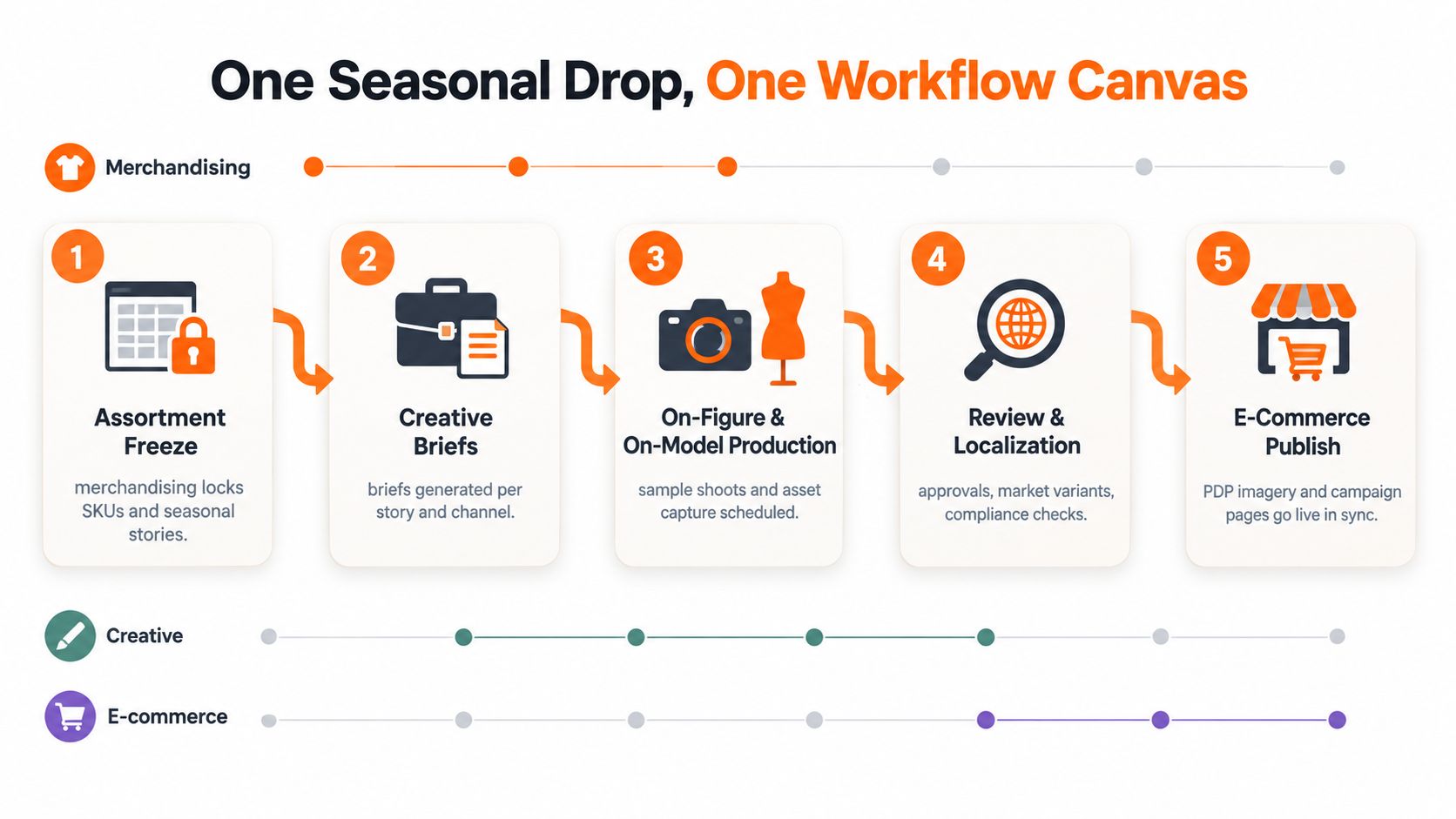
Five handoffs that need orchestration
Assortment freeze: Merchandising locks the SKU list, seasonal stories, and priority products. The workflow creates campaign records and identifies missing product data before creative production begins.
Creative briefs: The system generates briefs by story and channel, carrying product information into the request. A brief for a hero collection image shouldn't be treated the same way as a PDP image or a paid social crop.
On-figure and on-model production: Creative operations schedules samples, shoots, retouching, and asset delivery. Dependencies make it clear which products are waiting for samples and which assets are ready for review.
Review and localization: Brand, legal, and regional teams review the right versions. The workflow routes market-specific copy, imagery, and compliance requirements without forcing one global approval to stand in for eight local decisions.
E-commerce publishing: The CMS receives approved PDP imagery, copy, and campaign modules only when the launch conditions are met. The workflow confirms that the final assets correspond to the correct product records and channels.
The DAM should remain the source for stored assets and versions. The e-commerce CMS should remain the publishing system. The workflow layer coordinates the transition between them. A focused resource on digital asset workflow design is useful when mapping how files move from production into approved channel libraries.
A visual canvas also helps teams identify the failure points before the season starts. If the PIM has a new product record but no corresponding creative brief, the gap is visible. If the DAM has an approved image but the CMS lacks the required crop, the dependency is visible. If a regional site is waiting for a translated claim, the launch view can show the impact rather than burying it in a message thread.
All-In-One Suite vs Best-of-Breed Stack for Fashion and Beauty
The suite versus stack decision is often framed as simplicity versus complexity. That framing is too shallow. The core choice is between centralized governance with broader compromises and specialized capability with integration responsibility.
All-in-one environments from Adobe, Oracle NetSuite, or Salesforce Marketing Cloud can reduce procurement friction and provide a common commercial relationship. They may bundle campaign management, analytics, asset functions, and customer activation under one ecosystem. That matters for organizations that value standardization, centralized administration, and fewer vendor contracts.
The weakness is fit. A generic suite may handle campaign records well while failing to model the detail behind a seasonal assortment, complex creative variants, market-specific approvals, or product-page requirements. The platform can be broadly capable without matching how a fashion or beauty organization really works.
The stack has a different price
A best-of-breed stack might pair Asana or Wrike for work management, Bynder for digital assets, and Akeneo for product content. Each tool can offer stronger depth in its category, but the brand has to own the integration model, permission design, data definitions, and support path.
That integration layer should be deliberate. A collection of lightweight connectors and one-off automations can move notifications, but it won't necessarily preserve product identity, asset lineage, approval status, or regional restrictions. Buyers need a workflow orchestration layer with a clear data model, not just a pile of handoffs.
| Dimension | All-in-one suite | Best-of-breed stack |
|---|---|---|
| Governance | Centralized administration and vendor relationship | Governance must span multiple systems |
| Specialist depth | Broad coverage with possible category compromises | Stronger fit for specific functions |
| Integration burden | Lower at the suite boundary | Higher, but more control over data flows |
| Fashion and beauty nuance | Depends on configuration and extensions | Easier to select tools around merchandising and content needs |
| Change management | One major platform rollout | Several connected rollouts and ownership models |
| Commercial risk | Potential dependence on one ecosystem | Potential tool churn and seat sprawl |
The market context supports taking the stack seriously. One 2026 summary describes marketing automation as growing from $6.4 billion in 2022 to a projected $27.7 billion by 2030, with a 19.9% compound annual growth rate from 2023 to 2030; the same source also presents a more conservative projection from $6.65 billion in 2024 to $15.58 billion by 2030, as summarized in this marketing automation market review. Expansion creates choice, but it also creates duplication and tool churn.
For brands with high SKU counts, seasonal drops, and heavy localization, I recommend best-of-breed where specialist capability affects revenue or brand risk. Keep the suite where it reduces complexity, then add an orchestration layer that connects merchandising, creative, and e-commerce. Before selecting a stack, compare the operating model against campaign management software options, not just feature lists.
Evaluation Criteria That Predict a Successful Enterprise Rollout
Vendor demos reward the platform with the most polished interface. Enterprise rollouts reward the platform that survives real permissions, real assets, real regional exceptions, and real launch pressure. Use a weighted scorecard before the first demo so presentation quality doesn't replace operational evidence.
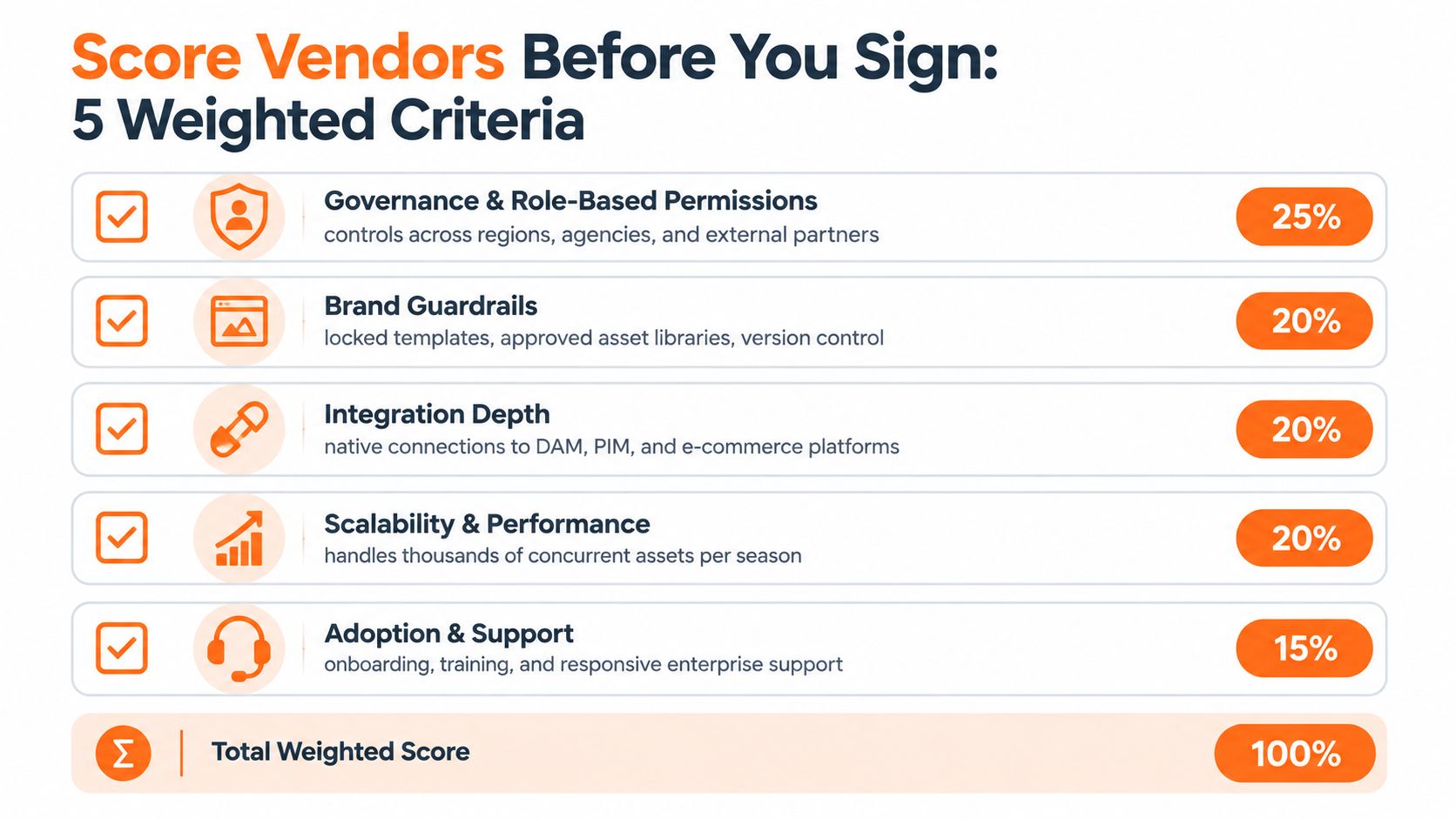
Score every criterion from 1 to 5, then apply the suggested weight. The weights below are a decision framework, not a claim about market performance.
Governance and role-based permissions, 25%
Test whether regional teams, agencies, legal reviewers, merchandising leads, and external production partners can see and change only what they should. Ask the vendor to demonstrate an approval path with different permissions by market and asset type.
Brand guardrails, 20%
Require locked templates, approved asset libraries, version control, mandatory review checkpoints, and rules for naming and metadata. The vendor should show what happens when a user attempts to bypass a required checkpoint.
AI governance, 20%
Ask how the platform exposes model use, protects business data, supports human review, and handles data residency requirements. A generative feature without traceability creates a new review burden instead of removing one.
Integration depth, 20%
Native connections to PLM, DAM, PIM, e-commerce, and analytics systems matter more than a flat file export. Ask the vendor to show what happens when a product status changes in the source system and how that change affects active work.
Time to first campaign, 15%
Measure the path from kickoff to a live, on-brand launch in one region. The vendor should configure a real campaign structure, not a generic sample board, and your team should record how much work remains after implementation.
A weighted score can hide a fatal weakness. Set a minimum acceptable score for every axis and disqualify a vendor that fails badly in governance, brand controls, AI oversight, integration, or time to value, regardless of its overall total. For broader comparisons of tools around the marketing function, Stimulead's tool stack recommendations provide useful context, but your own seasonal workflow should determine the final test.
Why AI Governance Will Decide the 2026 Winner
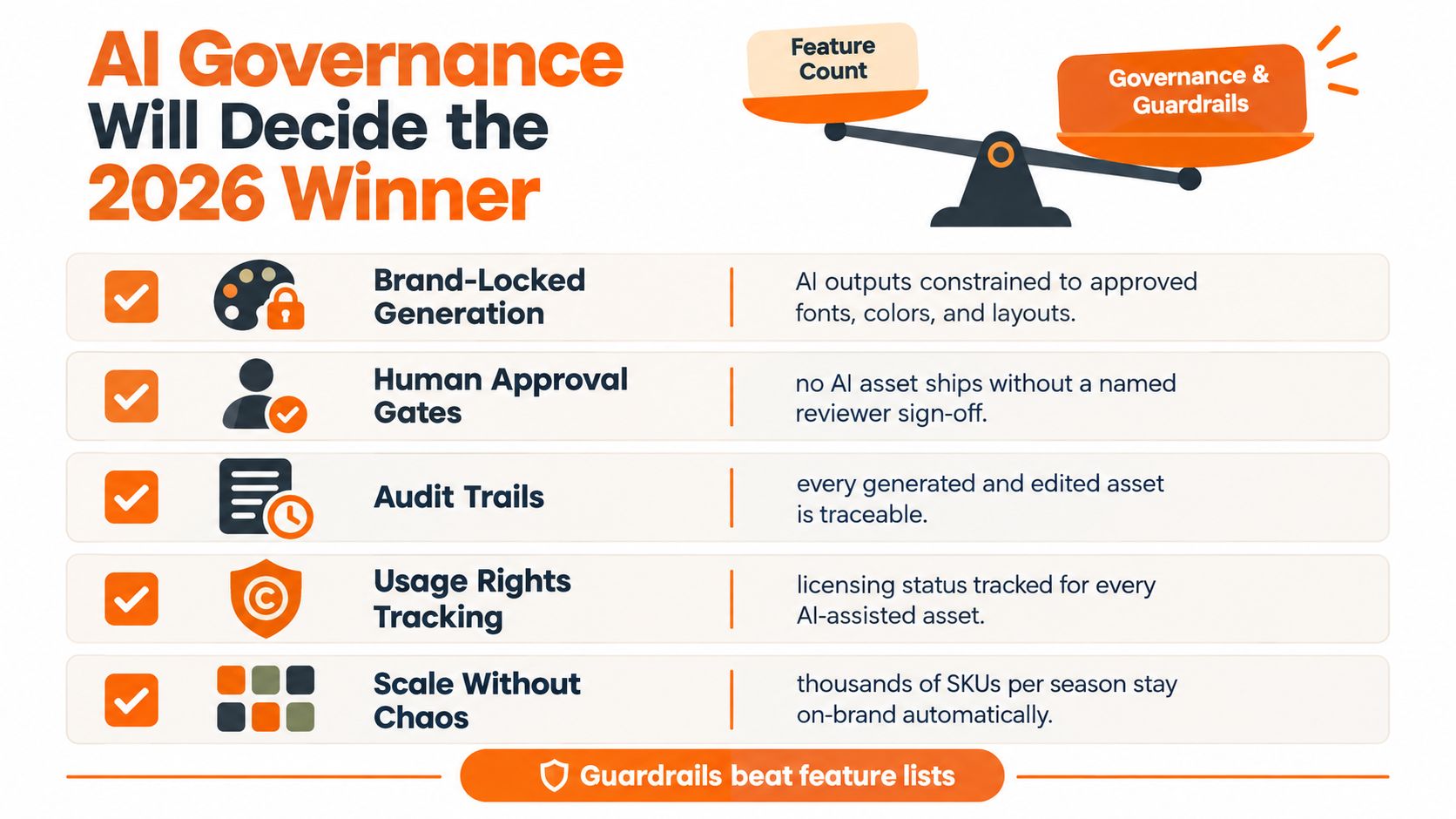
The decisive platform won't be the one with the longest AI feature list. It will be the one that lets a brand use AI at production scale without surrendering control over voice, claims, talent, rights, or regional variation.
Fashion and beauty teams already manage large assortments that require product copy, model selection, campaign imagery, crops, formats, and local adaptations. AI can accelerate those outputs, but speed increases the number of decisions that require governance. A generated asset can look polished and still use an unapproved model, imply an unsupported product benefit, or violate a regional restriction.
The failure modes are operational
An image workflow may generate a beauty visual that drifts outside the approved talent pool. A copy assistant may produce an efficacy claim that legal cannot substantiate. A regional adaptation may preserve the global tone but omit mandatory local language. These failures don't disappear because a person reviews the final campaign folder. The team needs controls earlier in the process.
Governance-forward workflow software should support:
- Approved prompt libraries: Teams use reviewed instructions for recurring product and campaign types.
- Locked style guidance: AI-assisted outputs follow approved visual and verbal rules.
- Named approval gates: Every high-risk asset has a responsible human reviewer.
- Audit trails: The system records the asset version, reviewer, decision, and timing.
- Rights tracking: Teams can identify whether an image, model, claim, or source is cleared for the intended use.
The creative automation market is projected to grow from USD 2.51 billion in 2026 to USD 5.51 billion by 2031, and one report notes that a single campaign may require hundreds of versions across social, connected TV, programmatic display, and retail media, as described in this 2026 marketing automation trends analysis. More variants make governance more important, not less.
A smaller AI feature set with reliable controls will outperform a spectacular content engine that leaves the brand to police every output manually.
Treat AI governance as a procurement requirement. Ask vendors to demonstrate a rejected output, a reopened approval, a regional exception, and an audit record. Broader thinking on operating models and responsible AI teams is available in this AI Task Force governance analysis, but the decision remains practical: score governance depth before generative capability.
A 90-Day Pilot Blueprint and Next Steps
Choose one high-stakes seasonal campaign, such as a fall beauty launch or resort capsule. Don't pilot every brand, region, and channel at once. A contained campaign gives leadership a clear view of integration quality, adoption, and launch control.
Days 1 through 30
Connect the pilot to the merchandising PIM and map the campaign brief, SKU structure, asset requirements, approval roles, and regional conditions. The first gate is simple: pause if the platform can't preserve product identity and produce a usable workflow without manual re-entry.
Days 31 through 60
Run two comparable workflows through the pilot platform and the legacy process. Track cycle time, revision rounds, approval pass rate, blocked dependencies, and launch readiness. Continue only if the pilot shows fewer revision loops, clearer ownership, and an on-time path to release without weakening brand review.
Days 61 through 90
Extend the workflow to a second brand or region and document every handoff that still requires manual intervention. The final gate is a clean brand audit, reliable regional routing, and evidence that the process can scale beyond the pilot team.
Shortlist two vendors from the weighted evaluation matrix. Request reference calls with one enterprise fashion customer and one enterprise beauty customer, then book a governance-focused demo using your own seasonal brief, product records, approval roles, and failure scenarios. Don't let a campaign run on dual systems for years. Decide what the workflow owns, measure it in one season, and either expand with confidence or stop before the patchwork grows.
Sprello offers a visual AI workflow canvas for fashion, beauty, and lifestyle teams to connect creative production across SKUs, channels, regions, and seasons. Visit Sprello to explore how its reusable workflows can support product imagery, campaign assets, brand guardrails, and production handoffs.
Related
More to explore
Fresh reads

8 Colors That Go Well with Forest Green
Explore 8 colors that go well with forest green, with hex swatches, styling ideas, and campaign tips for fashion, beauty, and lifestyle brands.

Coral Green Color: Hex, Meaning, and Brand Uses
Learn what coral green color really is, its hex and RGB values, mood and brand associations, palette pairings, and how to use it across fashion campaigns.
Assortment Planning in Fashion: A Strategic Guide
Master assortment planning in fashion with strategies for line architecture, size curves, visual workflows, and KPIs to optimize seasonal SKU allocation.