September 16, 2026
Campaign Management Software for Enterprise Teams
Compare top campaign management software for enterprise teams. Evaluate creative workflows, DAM integrations, and multi-channel delivery at scale.
The most popular advice about campaign management software is also the least useful for enterprise teams. Buyers are told to prioritize AI copy generation, drag-and-drop calendars, and one-click publishing. Those features can help, but they don't solve the operational problem that slows large brands down: hundreds of creative decisions, product dependencies, approvals, regional adaptations, and system handoffs moving at different speeds.
For a fashion, beauty, lifestyle, or retail organization, a campaign rarely begins with a blank content calendar. It begins with an assortment, a product launch, a seasonal story, or a merchandising decision. The work then passes through design, photography, copy, legal, localization, ecommerce, CRM, paid media, and social teams. The platform's value depends on how reliably it coordinates that chain, not merely on whether it can schedule a post.
The market reflects that expanding role. One recent estimate places campaign management software at US$6.19 billion in 2025, rising to US$6.93 billion in 2026 and projected to reach US$14.68 billion by 2032, with a projected 13.12% compound annual growth rate over that period (Research and Markets market estimate). That growth makes sense only if campaign tooling is becoming more than an execution layer. Enterprise buyers are purchasing an operating system for planning, production, delivery, and measurement.
| Evaluation area | Basic campaign tool | Enterprise requirement |
|---|---|---|
| Planning | Calendar and task assignment | Assortment, campaign, region, and channel dependencies |
| Creative production | File attachments and comments | DAM and PIM connections, version control, structured approvals |
| Delivery | Scheduled publishing | Reliable activation across CMS, CRM, ecommerce, social, and paid systems |
| Governance | Manual review | Role-based permissions, validation, auditability, and brand guardrails |
| Measurement | Engagement dashboards | Operational KPIs tied to cycle time, rework, accuracy, and synchronization |
The Reality of Scaling Campaign Operations
AI and scheduling aren't enough for a large campaign organization. They can accelerate isolated tasks while leaving the underlying workflow fragmented. A generated headline doesn't tell merchandising which products are approved for a region, and a publishing calendar doesn't resolve whether the approved image is connected to the correct SKU, channel specification, and market variant.
The hard part appears during seasonal launches. A merchandising team changes the assortment after design has started. A regional team needs a different claim. Ecommerce requires updated product data. Legal rejects one image. CRM needs a different crop. If those changes live in spreadsheets, email threads, and disconnected project boards, the campaign manager becomes the integration layer.
That manual glue creates two kinds of waste. Teams spend time searching for the current version, and they repeat work because the system can't expose dependencies early enough. The visible symptom may be a late email or a missing product image, but the root cause is usually a weak handoff between people and systems.
Practical rule: Evaluate the workflow that produces and governs campaign assets before evaluating the feature that publishes them.
Why orchestration matters more than feature count
Enterprise platforms differ in how they model the campaign. A shallow tool treats a campaign as a collection of tasks. A deeper system connects the brief to assets, products, audiences, approvals, delivery destinations, and reporting. That distinction becomes critical when teams manage large catalogs and repeated seasonal workflows.
The operational case for these platforms has strengthened over time. One historical estimate put the global campaign management software market at US$2.7 billion in 2020, with a projection of US$5.7 billion by 2026 and a 13.3% CAGR across that span (Business Research Insights market report). The same source includes a U.S. market estimate of US$910.3 million in 2021, indicating that North America was already a significant adoption center early in the decade.
The practical implication isn't that every company needs a monolithic platform. It is that a spreadsheet-led operating model becomes harder to defend as the number of products, markets, channels, and stakeholders grows. Teams exploring personalized customer journeys should also examine the production system that supplies those journeys with accurate, approved, channel-ready content.
Core Architecture of Enterprise Campaign Platforms
Enterprise campaign management software should function as a connective layer between planning, production, activation, and measurement. It doesn't have to replace every system in the stack. In fact, replacing too much at once often creates unnecessary migration risk. The stronger approach is to establish a governed source of campaign truth and connect it to the systems that already own product, customer, content, and channel data.
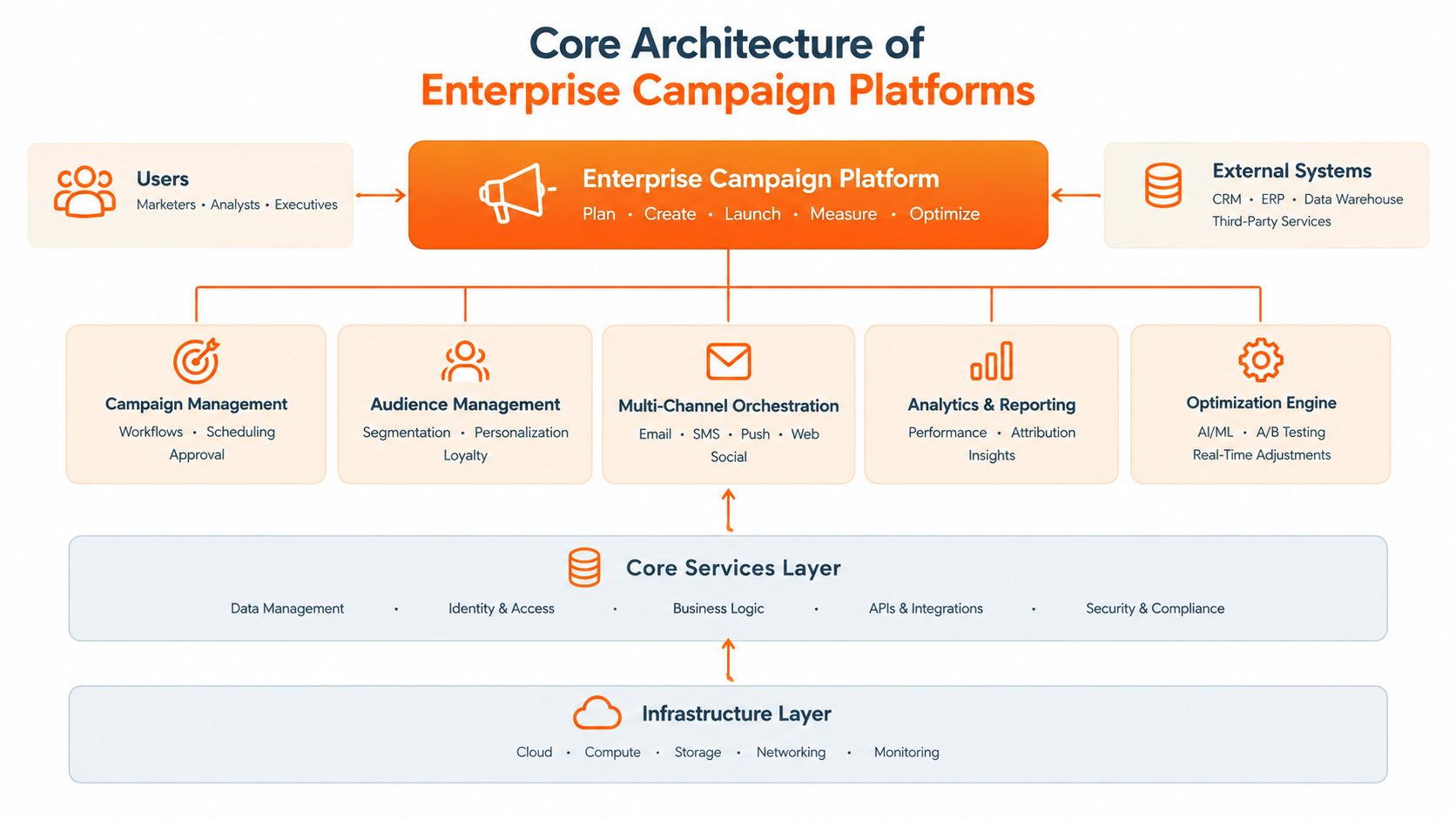
The layers that matter
Campaign management holds briefs, objectives, owners, dates, markets, and dependencies. Teams define what needs to happen and who is accountable. A useful intake process should capture structured information rather than forcing campaign managers to interpret an unbounded request in a chat message.
Orchestration controls the movement of work. It routes assets for review, triggers downstream tasks, identifies blocked dependencies, and applies different paths to different campaign types. A workflow orchestration platform can be useful as a reference point for evaluating whether the system models these paths explicitly or merely provides a collection of boards.
Asset and product connectivity is where many implementations succeed or fail. DAM integration provides controlled access to approved images, video, logos, and design files. PIM integration supplies product names, attributes, variants, descriptions, and availability context. Without those connections, teams can still publish attractive work that contains the wrong product information.
Delivery infrastructure sends approved outputs to the relevant destinations. Depending on the organization, that can include a CMS, PIM, CRM, ecommerce platform, social publishing tools, advertising systems, and localization workflows. The question isn't whether an integration exists on a vendor's feature page. Ask whether it supports the fields, states, permissions, error handling, and reconciliation process your team uses.
Governance belongs in the architecture
Governance shouldn't be a final approval step added after creative production. It should shape the workflow from intake through delivery. Role-based permissions, named approvers, required metadata, version history, and automated validation reduce the number of decisions that depend on memory.
A strong architecture also preserves regional flexibility. Global teams can define essential brand elements, while local teams adapt language, offers, imagery, or channel formats within approved boundaries. That balance is more sustainable than either extreme, centralized control over every detail or unrestricted local production.
The best architecture is therefore not the one with the longest feature list. It is the one that gives each team enough autonomy to work quickly while making dependencies visible to everyone who needs to act.
Comparing Orchestration Depth and AI Capabilities
AI is now a baseline feature, so it should not decide the purchase by itself. The practical question is where AI sits inside the operating model, which work it controls, and what evidence the team can review before outputs move downstream. For enterprise brands, that means examining creative throughput, SKU-level accuracy, regional variation, and governance alongside audience orchestration.
Independent comparison data rates Salesforce Marketing Cloud Account Engagement at 9.3 out of 10 overall and Adobe Journey Optimizer at 8.6 out of 10 overall (enterprise campaign platform comparison). The comparison associates Salesforce with multi-channel orchestration, lead management, journey automation, and detailed reporting. Adobe is associated with AI-driven recommendations and real-time data orchestration.
| Platform focus | Core strength | Ideal enterprise use case |
|---|---|---|
| Salesforce Marketing Cloud Account Engagement | Lead management, journey automation, multi-channel orchestration, and reporting | Organizations that need deep lifecycle coordination between marketing and sales |
| Adobe Journey Optimizer | AI-driven recommendations and real-time data orchestration | Teams that prioritize adaptive experiences from connected customer data |
| Creative operations platform | Structured asset production, approval routing, and channel-ready outputs | Brands managing large catalogs, repeated seasonal workflows, and visual consistency |
| General project management platform | Intake, task ownership, collaboration, and campaign visibility | Teams that need a central operating workspace across varied marketing projects |
The comparison points to a selection trade-off rather than a universal winner. A journey-focused platform can determine which customer receives a message and when, yet still leave teams coordinating SKU-level image production, regional art direction, and approvals for thousands of connected assets elsewhere. A creative automation platform (creative automation platform) can standardize those production steps without replacing the customer data platform that governs audience decisions.
The boundary between systems matters. Campaign orchestration should pass accurate context between audience, product, creative, approval, and delivery workflows. Otherwise, automation may increase output volume while making incorrect variants harder to detect.
Assess AI by control, not novelty
Useful AI reduces repetitive production work, surfaces risks, or adapts content while preserving governance. Each output should remain connected to the product, market, campaign, channel, and approval state that authorized it.
Ask vendors to demonstrate production tasks rather than present a chat assistant:
- Can the system create channel variants while retaining the correct product reference?
- Can reviewers see the source assets and instructions that shaped an output?
- Can the workflow stop publication when required metadata is missing?
- Can teams distinguish approved production assets from exploratory concepts?
- Can a regional adaptation follow local rules without drifting from global brand guidance?
AI orchestration needs a precise definition. A useful resource on orchestration for sales leaders distinguishes isolated AI features from coordinated actions across systems. In campaign operations, orchestration means moving data and work through a defined process while people retain visibility over consequential decisions.
Cost pressure makes that distinction measurable. IDC projects the marketing campaign management market to grow 13.5% over five years, describes economic headwinds, particularly in retail, and notes that AI becomes a growth driver in 2026 through license expansion and price increases (IDC market guidance). Implementation quality therefore determines whether AI produces controlled, repeatable productivity or adds another layer of review and correction.
Real-World Scenarios for High-Volume Catalogs
A seasonal catalog rollout exposes the difference between a task tracker and an operating platform. The work starts with an assortment plan containing product families, variants, colorways, and market priorities. Merchandising needs a clear view of the line. Design needs the approved visual direction. Marketing needs campaign narratives and channel deliverables. Ecommerce needs product-linked assets and accurate content.
Seasonal launch
A weak workflow creates a folder for the campaign and asks people to manage the rest. Designers upload files with inconsistent names. Merchandisers maintain a separate assortment sheet. Regional teams duplicate folders. Approval decisions remain in email. By launch week, nobody has a reliable view of which assets are final, which products changed, and which markets are ready.
A stronger workflow begins with structured product and campaign relationships. Each asset carries context such as product reference, season, market, channel, format, status, and approver. When merchandising removes a product, the system can expose the dependent creative work instead of allowing disconnected assets to proceed toward publication.
product catalog management software becomes relevant to campaign operations. Campaign teams don't need product data as background information. They need it attached to the production workflow so creative decisions remain connected to the assortment being sold.
SKU-level content production
Large assortments create a different challenge from a single editorial campaign. The brand may need consistent product imagery, alternate crops, detail views, and channel-specific adaptations. Manual production can create long queues, especially when each variant requires repeated coordination between creative, ecommerce, and regional teams.
Catalog-scale AI product photography can help generate production-ready content at volume, but only when the workflow includes style guidance, review criteria, and asset traceability. An attractive image that breaks a brand rule or represents the wrong product variant is not a productivity gain. It shifts the cost downstream into correction, reapproval, and customer-facing risk.
Regional and channel adaptation
A global campaign often needs local versions without becoming a collection of independent campaigns. Teams should define which elements remain fixed, such as visual identity or product representation, and which can vary, such as language, offer framing, or channel composition.
The useful test is not whether the platform can create many variants. It is whether the team can understand the relationship between the master asset and each derivative. Reviewers should know what changed, who approved it, and where the final version is scheduled to appear.
A scalable catalog workflow doesn't remove human judgment. It puts human judgment at the points where it matters most.
That distinction separates responsible automation from uncontrolled asset generation. The platform should accelerate repeatable production while protecting product accuracy, brand consistency, and regional accountability.
Measuring Execution Efficiency and Workflow KPIs
Engagement metrics matter, but they don't tell you whether the campaign operation is healthy. A team can report strong clicks while losing time to unclear briefs, repeated revisions, failed integrations, and unpredictable approvals. Enterprise buyers should establish an operational baseline before migration and continue tracking the same measures after launch.
The most relevant KPI set includes end-to-end campaign cycle time, stage-specific cycle time, approval turnaround predictability, rework volume, automation success rate, publishing accuracy, and cross-system sync reliability (workflow KPI guidance).
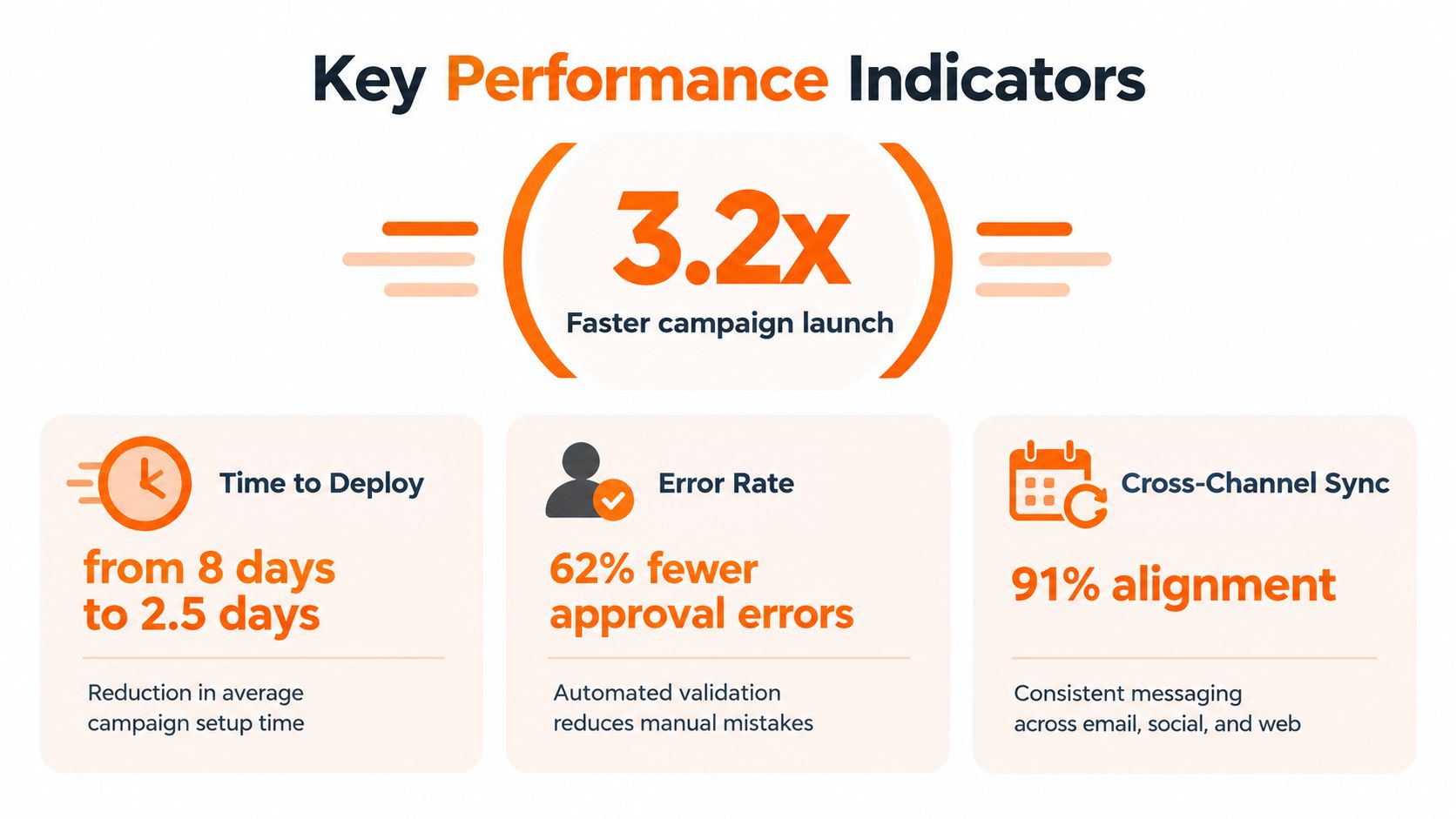
Build the measurement model
Start by defining the campaign lifecycle in observable states. For example, intake received, brief approved, production started, review requested, final approval, published, and synchronized. If teams use different definitions for “ready” or “complete,” the resulting dashboard will create false confidence.
Track the full duration from accepted brief to final launch, then separate the stages. A long cycle may come from design capacity, legal review, missing product data, or a publishing failure. Stage-specific measurement shows where the queue forms.
Next, examine quality and predictability:
- Approval turnaround: Measure whether reviewers respond within the agreed operating window, not just the average time.
- Rework volume: Count revisions caused by unclear briefs, incorrect product data, brand issues, or technical specifications.
- Automation success rate: Review how often automated actions complete without manual correction.
- Publishing accuracy: Check whether the approved asset, product, market, and channel combination reaches the intended destination.
- Sync reliability: Reconcile campaign states across the campaign platform, CMS, PIM, CRM, ecommerce system, and social tools.
The value of these metrics is diagnostic. If cycle time falls but rework rises, the workflow may be moving bad inputs faster. If automation success improves but publishing accuracy doesn't, the integration may be technically active without carrying the right business context.
Teams that also track commercial outcomes can use Arlo Inc.'s ecommerce metrics guidance to connect operational measures with revenue-facing reporting. Keep the two layers distinct. Operational KPIs explain how work moves. Commercial KPIs explain what the market does with the finished campaign.
A short visual guide can help stakeholders understand the measurement vocabulary:
Strategic Recommendations for Brand Teams
The right campaign management software depends on where the organization loses control. Start with the dominant failure mode, not the vendor category.
A brand with a mature customer data foundation and complex lifecycle programs should prioritize journey orchestration, audience logic, real-time data access, and reporting. Salesforce Marketing Cloud Account Engagement and Adobe Journey Optimizer represent different strengths in that decision. The former fits teams that need deep lead and journey management. The latter fits organizations that value AI-supported recommendations and real-time data orchestration.
A fashion or lifestyle brand with a large assortment may have a different constraint. The primary problem may be getting accurate, consistent, approved assets from merchandising and creative into ecommerce, CRM, social, and regional workflows. In that case, a customer journey platform alone won't address the production queue. The business needs a campaign operating layer that understands products, variants, visual standards, and repeatable seasonal work.
Match the platform to the operating model
Use these questions during selection:
- Where does work begin? If requests arrive through email and spreadsheets, prioritize structured intake and campaign templates.
- Who owns the source data? Identify whether product attributes live in a PIM, customer data lives in a CRM, and assets live in a DAM. Require clear synchronization rules.
- Where do approvals fail? Look for named roles, conditional routing, version history, and audit trails.
- What repeats every season? Turn recurring work into templates and production dossiers instead of rebuilding the process from memory.
- What must remain local? Support regional variation without allowing ungoverned changes to global brand elements.
- What proves value? Tie the business case to cycle time, rework, publishing accuracy, and synchronization reliability.
A platform that solves the wrong bottleneck will create expensive overlap. Teams may buy a powerful customer engagement system when the creative organization needs production governance, or adopt a project board when the business needs live customer data and automated journey decisions.
Treat AI as an operating capability
AI should fit the approved process. It can assist with concepting, content variants, product photography, recommendations, and repetitive transformations. It shouldn't become a parallel production channel that bypasses product data, brand review, or legal controls.
Sprello fits one specific profile in this category. Its AI workflow canvas is designed for fashion, beauty, and lifestyle brands, with workflows for assortment visualization, editorial campaigns, product concepting, accessory assortments, and catalog-scale product imagery. Its visual canvas, brand guidance, naming conventions, and seasonal production dossiers are relevant when the priority is connecting creative production to SKU, channel, region, and season governance.
The decision should be based on operational fit. Ask each vendor to reproduce a real campaign process using your product relationships, approval roles, regional rules, and delivery destinations. A polished demonstration using generic assets says little about whether the platform can handle the exceptions that consume your team's time.
Navigating Implementation and Team Adoption
Most campaign platform migrations fail operationally before they fail technically. The integration may work, but the team keeps using spreadsheets because the new workflow adds fields, hides familiar context, or doesn't reflect how approvals happen. Adoption improves when the platform represents work instead of forcing every department into an abstract process model.
Begin with one repeatable campaign type. A seasonal launch, product drop, or recurring promotional workflow provides enough complexity to expose dependencies while keeping the scope manageable. Document the current path, including informal approvals, manual exports, duplicate data entry, and the points where teams create local workarounds.
Design the migration around decisions
Separate what the new system must govern from what it only needs to reference. Product data may remain authoritative in the PIM. Customer records may remain in the CRM. The campaign platform can coordinate the work while storing the states and relationships needed to move it forward.
Create a migration checklist that covers:
- Definitions: Agree on what intake, review, approval, and publication mean.
- Ownership: Assign one accountable owner for each stage and system handoff.
- Templates: Build the recurring seasonal process once, then refine it after live use.
- Guardrails: Require product references, market information, channel specifications, and approval status before release.
- Exceptions: Document what happens when a product changes, an approver is unavailable, or an integration fails.
- Training: Teach each role through the work it performs, not through a feature tour.
Don't automate an unstable process. If the brief is incomplete, automated routing only moves incomplete work faster. If product identifiers aren't consistent, synchronization will create confusion at scale. Clean the operating rules first, then automate the decisions that teams repeat reliably.
Protect creativity while enforcing consistency
Governance works best when it reduces unnecessary debate. Give creative teams flexible exploration spaces, then define the point at which an asset enters production and must follow naming, metadata, brand, and approval requirements.
Maintain a seasonal production dossier for every recurring campaign family. Store the approved brief structure, product relationships, channel requirements, regional adaptations, review roles, and lessons from the prior cycle. That record turns institutional knowledge into a repeatable operating asset.
Implementation is complete when the team can see the work, trust the status, and act without asking for a private spreadsheet. Measure adoption through workflow behavior, not login counts. If people stop creating shadow trackers because the official system answers their questions, the migration is doing its job.
Sprello helps fashion, beauty, and lifestyle teams design production-ready creative workflows across SKUs, channels, regions, and seasons. Visit Sprello to explore how its visual canvas can connect assortment planning, campaign production, catalog-scale imagery, and governed handoffs in one operational workflow.
Related
More to explore
Fresh reads

How to Make a 4x6 Photo Template for Print
Build a 4x6 photo template at 1200×1800 px and 300 PPI, with bleed, a safe zone, and export settings for lab, inkjet, and retail print.

4 Square Chart Guide for Fashion Line Reviews
A 4 square chart sorts fashion styles into four decisions. See axes, scores, quadrant actions, and a line-review template.

What Is a Context Diagram? Notation, Examples and Uses
Learn what is a context diagram: its system boundary, external entities and labeled flows, notation rules, and a fashion product-development example.