October 1, 2026
Generative AI Ecommerce Playbook for Brand Teams
Generative AI ecommerce guide for fashion and lifestyle brands. Explore use cases, brand controls, implementation steps, and ROI metrics that actually move
The product team has a seasonal problem that no prompt can solve on its own. A new assortment arrives, the campaign date is fixed, the studio can photograph only part of the range, and merchandising still expects every product to appear accurately across the site, email, paid media, and regional storefronts. The pressure lands simultaneously on creative operations, design, ecommerce, legal, and the people responsible for getting products live.
That's why generative AI ecommerce is best understood as a content supply chain, not a software category. The model matters, but the handoffs around it matter more: who supplies the product truth, who sets the visual direction, who approves the output, who publishes it, and who owns the correction when a generated asset misrepresents a shade, texture, fit, or claim.
The commercial context is already substantial. Adobe Analytics reported that AI and agents influenced $262 billion in global online retail revenue during the 2025 holiday season, roughly 20% of total sales. AI-referred visits to US retail sites grew 693% year over year, and those visitors converted 31% more often, spent 45% more time on site, and had a 33% lower bounce rate, according to the reported holiday ecommerce analysis. The opportunity is real, but production discipline determines whether a brand captures it without weakening trust.
The Monday Morning That Changes Everything
On Monday morning, the merchandising lead opens the assortment plan and sees the collision immediately. Four thousand SKUs reached the distribution center last Thursday. The fall drop launches in eleven days. The studio has capacity to shoot 600 products, and the buyer still needs the complete range represented in the launch story.
The art director is waiting for a final assortment map and a clear visual brief. The ecommerce manager needs approved hero images, alternate crops, product detail views, and copy that matches the PIM record. Legal wants substantiation for every product claim and a review path for anything created or altered with AI. The buyer needs enough visual evidence to confirm that the collection reads as a coherent commercial story, not a pile of disconnected items.
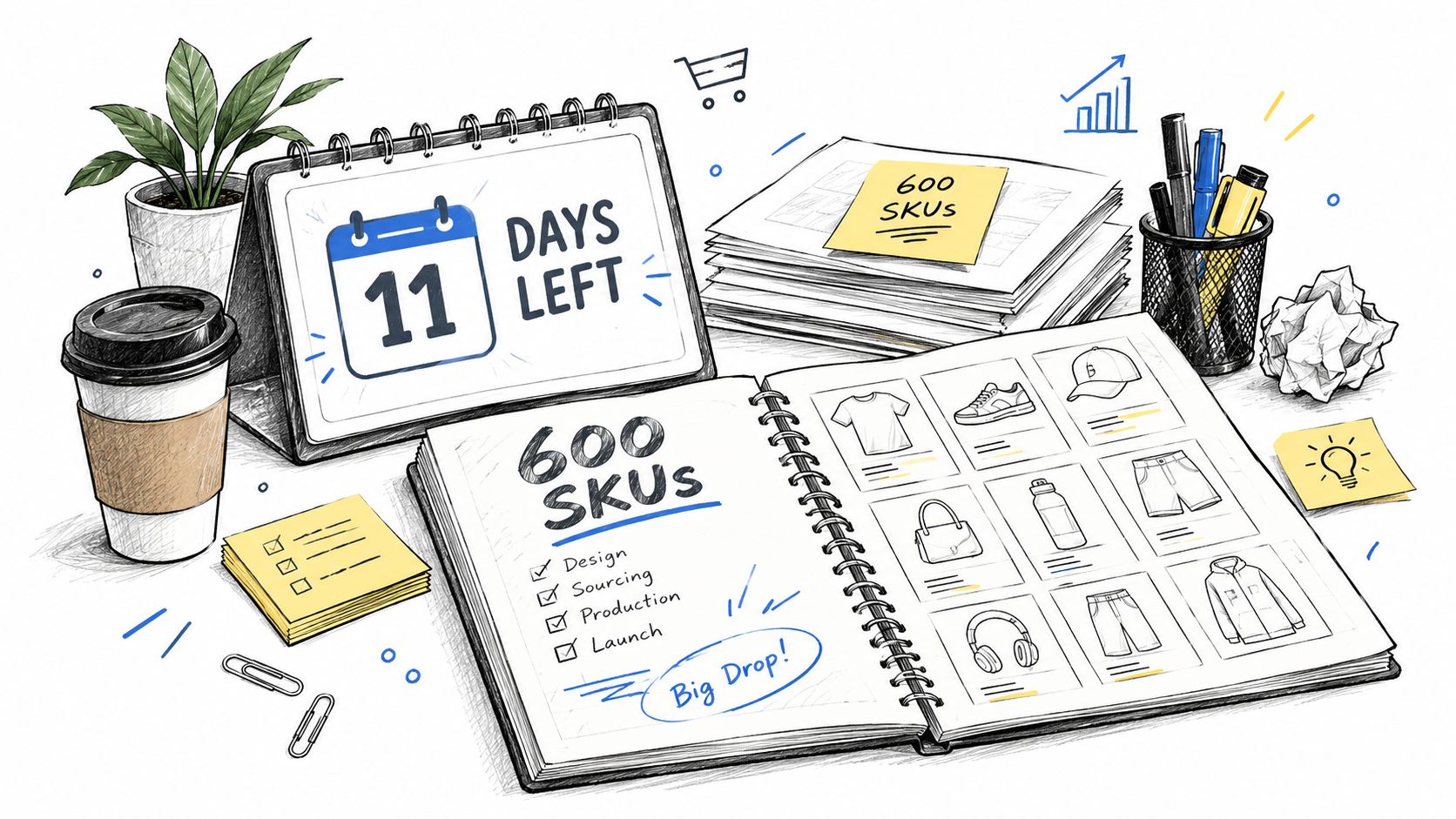
The old workflow breaks at the first handoff. Merchandising sends a spreadsheet with product names and colorways. Design interprets the range, often without complete reference imagery. The studio prioritizes hero items. Ecommerce chases missing files, while copywriters work from inconsistent specifications. By launch week, teams are reviewing filenames instead of making creative decisions.
Generative tools can help, but only if the team decides what must be true before generation begins:
- Product truth must be structured. Materials, dimensions, shades, fit notes, and approved claims need a reliable source.
- Creative direction must be explicit. A prompt cannot replace a seasonal mood, casting logic, crop system, or channel brief.
- Approval states must be visible. Draft, review, approved, rejected, and published assets need distinct ownership.
- Every output needs lineage. Teams should know which product record, reference image, instructions, and model version produced it.
Practical rule: If nobody can explain which source asset an image came from and who approved it, the workflow isn't ready for catalog scale.
The standup ends with a different decision than the team expected. They won't buy a tool and hope it closes the gap. They'll design a production system that connects the buyer's assortment logic to the art director's intent, the ecommerce manager's publishing requirements, and legal's risk controls. That supply chain becomes the playbook.
What Generative AI Ecommerce Actually Means
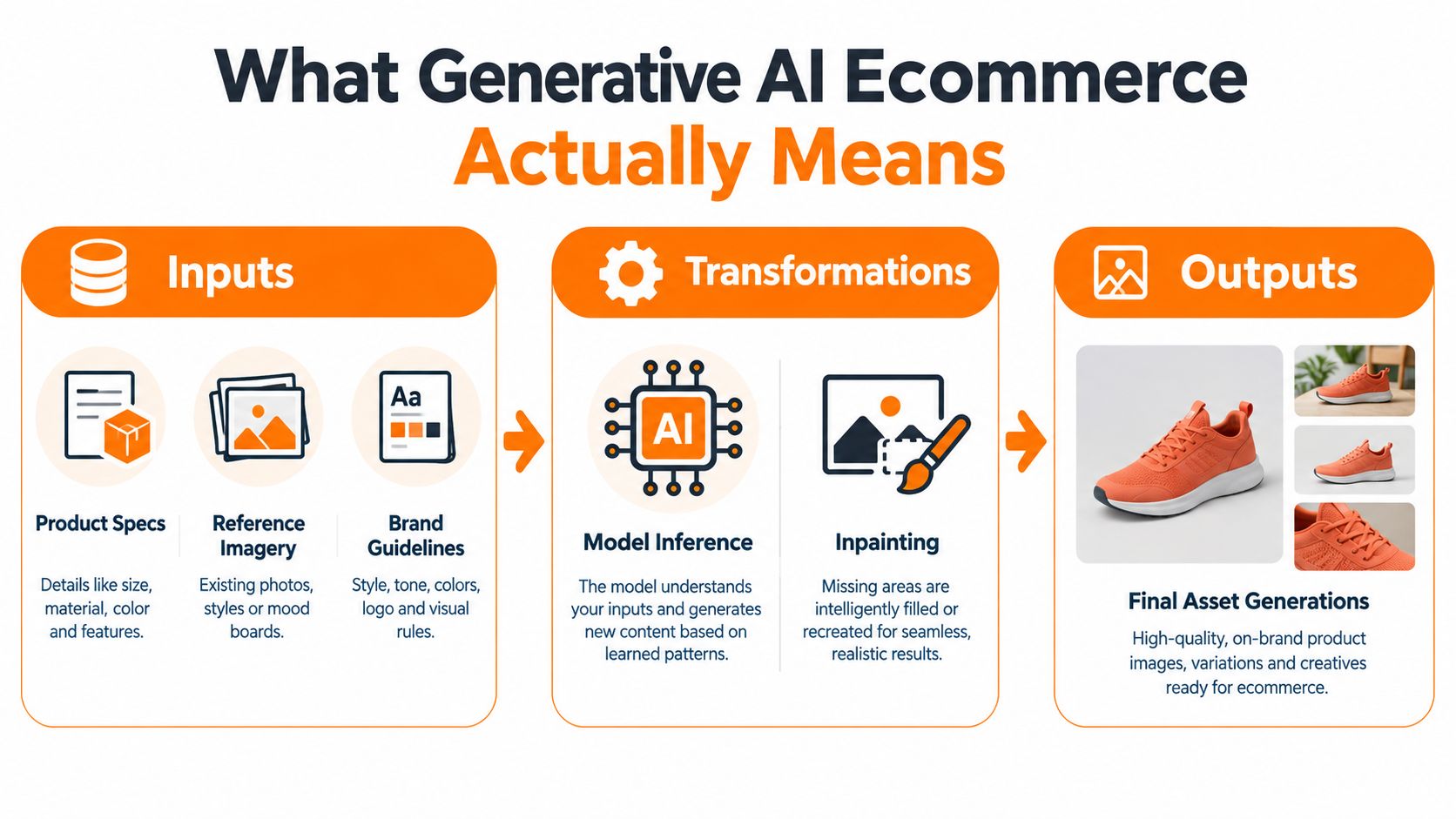
Generative AI in ecommerce is a pipeline with three stages. Inputs provide the facts and creative constraints. Transformations alter or combine those inputs. Outputs become customer-facing assets.
The inputs might include product specifications, reference photography, material swatches, approved brand guidelines, campaign briefs, prompt libraries, and channel requirements. Transformations can include model inference, inpainting, background generation, image extension, style transfer, and copy variation. Outputs include PDP imagery, on-model frames, lookbook pages, ad creative, localized descriptions, email modules, and recommendation tiles.
A fashion shoot makes the model easier to understand. The model and prompt function like an art director and shot list. Sampling resembles casting, where the team selects an appropriate visual subject and pose. Inpainting is closer to retouching, except the system can alter a defined region while preserving surrounding elements. The final asset still needs a producer, an approver, and a publishing path.
The difference from automation
Classic automation moves known information through predefined rules. A feed can map a color field to a storefront label, resize an image, or route an approval notification. Analytics identifies patterns in existing data. Generative AI produces a new representation based on learned relationships and supplied constraints.
That difference creates both advantage and risk. Automation usually fails by applying the wrong rule. Generative systems can produce an asset that looks plausible while changing the garment's construction, a beauty product's shade, or the meaning of a claim. The review process therefore has to inspect visual and factual fidelity, not just whether a file was created.
Teams evaluating adjacent workflows may also benefit from this overview of AI tools for ecommerce, especially when comparing content production with merchandising and operational use cases. For customer support operations, a separate resource on how to automate help desk with AI shows how the same input, transformation, and output logic can apply beyond the storefront.
Enterprise teams need more than attractive samples. They need auditability, so an approver can trace an output. They need repeatability, so a successful treatment can be applied across a range without drifting. They need brand-safe production, so the system can produce at catalog scale without turning every SKU into a fresh interpretation of the brand.
Where Generative AI Moves the Needle for Brands
The strongest use cases remove a specific bottleneck rather than adding another creative surface. Catalog imagery, campaign variation, and merchandising assets all benefit when teams separate the product truth from the presentation layer.
Catalog production
A product line can begin with a clean packshot, flat lay, sketch, or material reference. Generative workflows can extend that source into on-model scenes, ghost mannequin views, alternate backgrounds, colorway presentations, and detail crops. The operational gain comes from reducing repeated studio, retouching, and resizing work across the assortment.
The quality bar differs by category. Fashion teams need accurate fabric drape, seams, closures, proportions, and body representation. Beauty teams need shade fidelity, finish, packaging text, and container geometry. Lifestyle brands need believable scale, materials, lighting, and object relationships. A polished image that gets any of those wrong creates a merchandising and customer-service problem.
Campaign and lifecycle creative
Campaign teams can use a controlled reference set to explore moodboards, lookbook frames, paid-social variants, and lifecycle email imagery. That makes early concepting faster, but it doesn't eliminate the need for an art director. The system can generate options, while the creative team decides which options support the collection's story and which belong to a different brand.
Personalization also works best as a bounded variation system. A location-aware crop, audience-specific composition, or channel-specific framing should change the presentation while protecting the product and campaign idea. Uncontrolled variation creates a fragmented customer experience.
Merchandising surfaces
Search thumbnails, PDP detail crops, recommendation tiles, and collection banners often need different compositions from the campaign hero. A single source image rarely serves every surface well. Generative adaptation can create those variants from an approved asset, provided the workflow preserves the product's defining features.
| Use Case | Workflow Stage | Pain Point Removed |
|---|---|---|
| On-model and ghost mannequin imagery | Catalog production | Limited studio capacity and repeated product presentation work |
| Colorway and shade variants | Catalog enrichment | Manual recreation of consistent views across variants |
| Lookbook and moodboard frames | Campaign ideation | Slow exploration before a concept is approved |
| Regional and audience-aware creative | Campaign adaptation | Rebuilding related assets for each channel or market |
| Search thumbnails and PDP crops | Merchandising deployment | One image failing across multiple commerce surfaces |
| Recommendation and email modules | Lifecycle activation | Repeated resizing and recomposition for retention channels |
Models still struggle with hands, text, reflective packaging, complex prints, transparent materials, and subtle shade differences. Teams should treat those areas as review-heavy or reference-dependent rather than promising full automation. A product image AI generator can support the production layer, but the team still needs acceptance criteria for texture, color, construction, and context.
Designing Workflows That Scale Across SKUs and Seasons
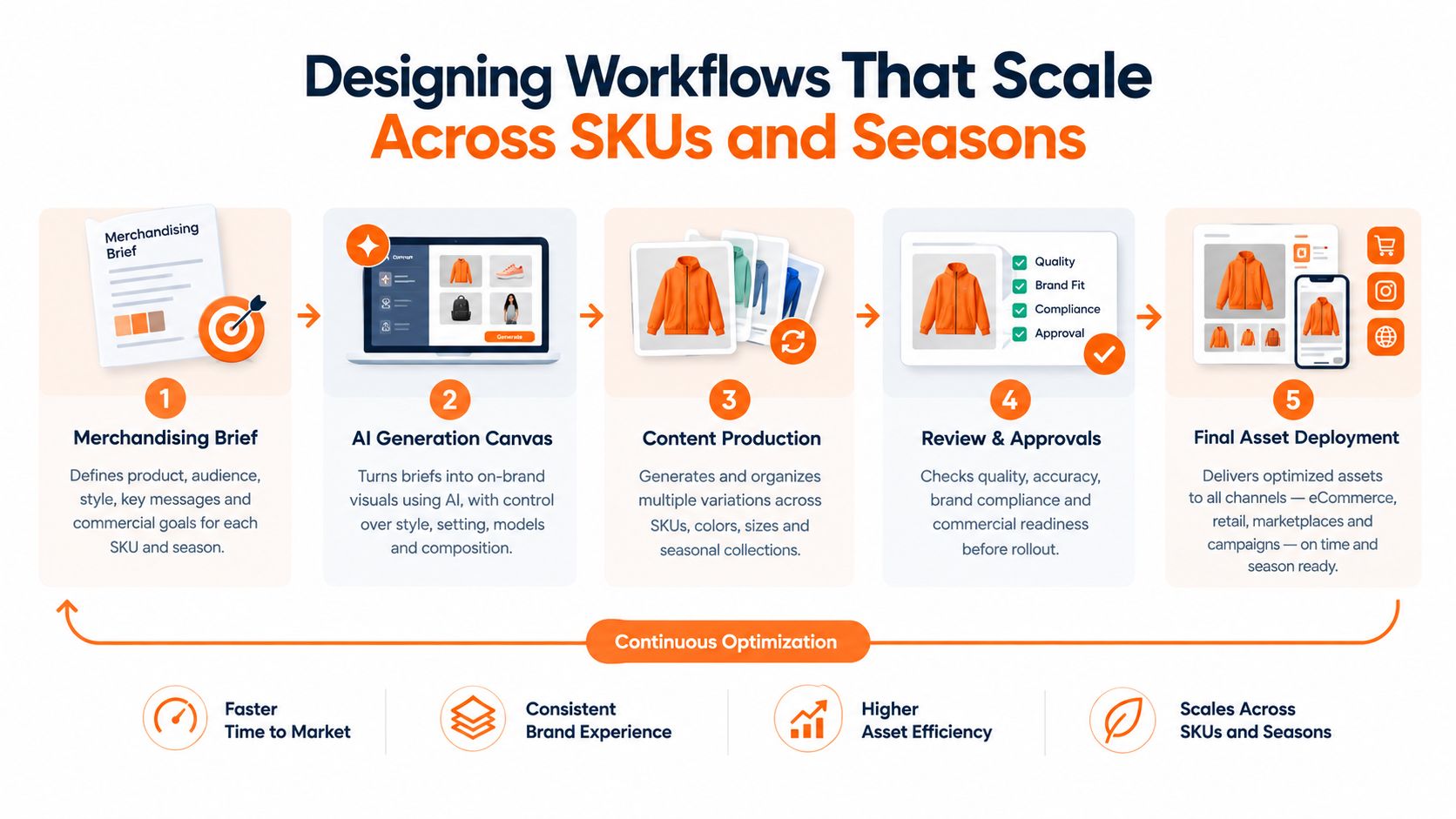
A scalable workflow starts with the merchandising brief, not the generation interface. The brief identifies the collection, product hierarchy, priority markets, required channels, reference assets, claims, and launch dependencies. That gives creative operations a production unit that can be tracked from intake to publication.
A canvas-style architecture, such as the workflow approach described by Sprello, connects each handoff. Merchandising defines the assortment and product relationships. Design establishes templates, composition rules, casting direction, and seasonal art direction. AI enriches approved flat lays, product photographs, and reference materials. Ecommerce pulls approved assets into PDPs, email modules, and campaign placements.
The handoffs need owners
The workflow becomes reliable when each team receives an artifact it can use immediately:
- The buyer receives: assortment visualizations, line architecture, colorway coverage, and exception flags.
- The designer receives: a locked brief, approved references, templates, and channel dimensions.
- The copywriter receives: structured product facts, terminology rules, and claim boundaries.
- The ecommerce manager receives: named, tagged, approved files mapped to product and channel records.
- Legal receives: claims, sources, review thresholds, and a clear record of what changed.
The connective tissue is not the canvas itself. It's version control, asset lineage, and approval state. Without those elements, a large rollout becomes a spreadsheet with embedded uncertainty. A team may know that an image is “final,” but not which final, approved by whom, or whether it reflects the latest product specification.
A useful workflow also separates reusable systems from seasonal decisions. The naming convention, metadata schema, review gates, and publishing integration should persist. The campaign concept, model casting, palette, crop logic, and prompt package can change with each season.
That distinction makes iteration safer. Teams can improve the production system without accidentally changing the brand's visual language, and they can refresh a seasonal treatment without rebuilding the entire operational path. A structured AI content workflow can serve as a reference when mapping these stages, but the workflow still has to reflect the retailer's systems and ownership model.
Brand Controls, Guardrails, and Production-Ready Outputs
A vendor demo usually shows the most flattering outputs. Procurement needs to test what happens when the input is incomplete, the product has a difficult material, the model release changes behavior, or legal rejects the first draft.
Start with five controls.
Lock the reference system
A brand library should contain approved visual references, product images, typography rules, color guidance, casting principles, and examples of acceptable composition. The system should distinguish official references from exploratory material. Otherwise, a draft moodboard can easily become the source for a production asset.
Version the instructions
Prompt libraries, seeds, templates, model versions, and transformation settings need identifiable versions. A team should be able to reproduce an approved treatment or explain why a later output differs. “The model changed” isn't a sufficient incident record.
Set review thresholds
Not every output requires the same level of inspection. A background extension may follow a lighter path than a generated on-model image or a beauty shade presentation. Define which categories require human review, which attributes must be checked manually, and who can approve exceptions.
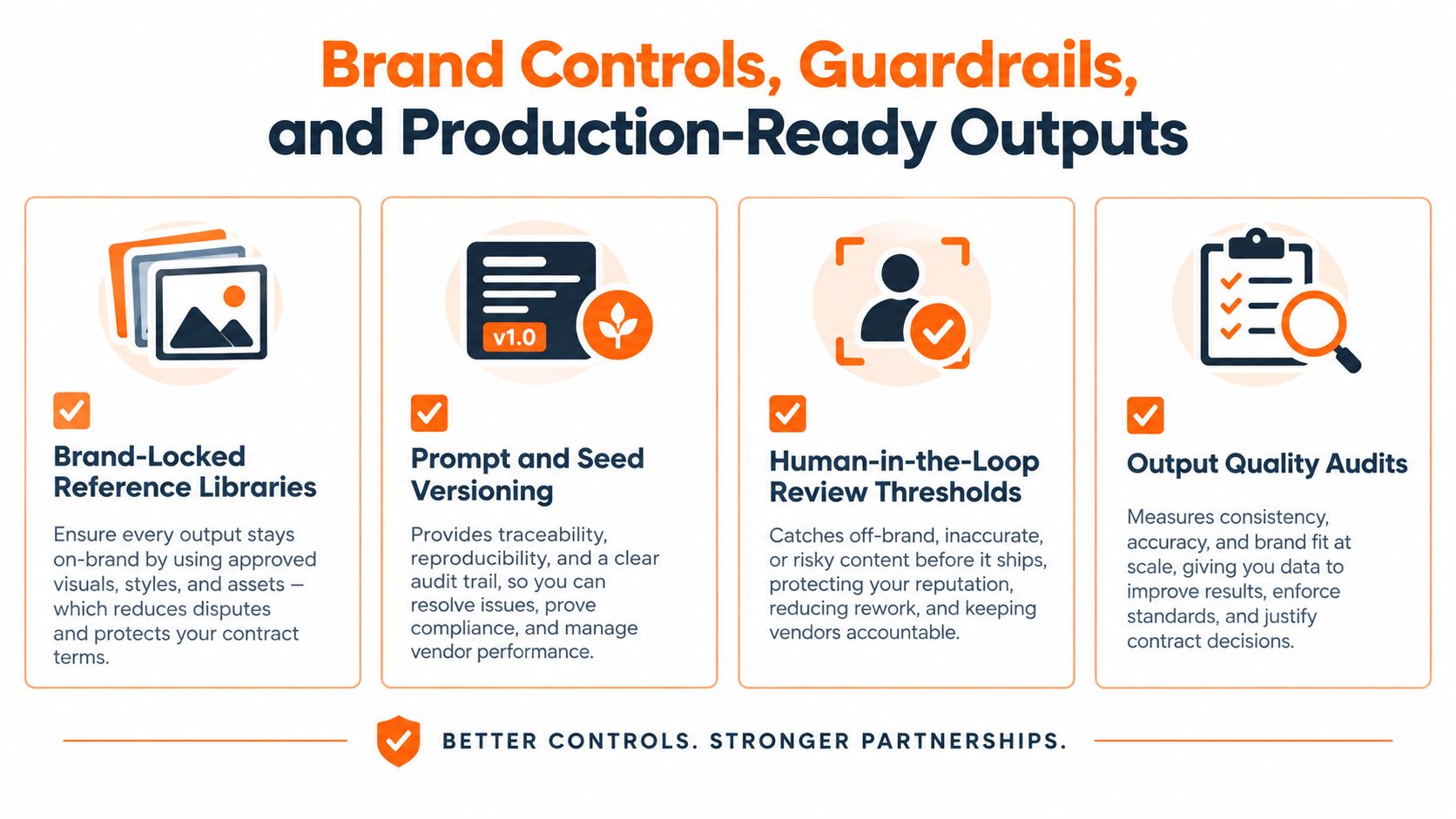
Audit the output, not just the workflow
Production-ready files need correct dimensions, color handling, naming conventions, metadata, alt text, and product relationships. They also need checks for distorted logos, altered packaging, incorrect garment details, unsupported claims, and unsafe or misleading context.
Integration determines whether the controls survive contact with the organization. The platform should connect to the DAM for asset storage, the PIM for product facts, and commerce APIs for publishing. Enterprise security teams will also look for SSO, role-based permissions, audit logs, retention rules, and a clear policy for vendor access to brand and customer data.
A clean demo image is not a production deliverable. A production deliverable has the right product, the right metadata, the right approval, and a traceable path into the right channel.
Model release monitoring matters as much as prompt governance. If a provider changes an underlying model, the team should know which workflows are affected and whether previously approved outputs need revalidation. That's the difference between a creative experiment and an operating capability.
Measuring ROI Beyond Cost Per Asset
Cost per generated image is easy to calculate, but it rarely captures the business case. A lower unit cost can still produce a weak result if the asset reaches the storefront late, misrepresents the product, or cannot be adapted across channels. Leadership needs measures that connect the content supply chain, from merchandising handoff through design and ecommerce publishing, to customer and commercial outcomes.
Start with operational signals. Time to market shows whether a collection can move from assortment readiness to launch without waiting for a full studio schedule. Localization throughput shows whether regional teams can adapt approved creative without reopening production. Campaign iteration speed indicates whether teams can test, learn, and revise while the campaign still matters. These measures expose where handoffs slow the program, whether the constraint sits with approvals, asset preparation, or channel delivery.
Customer metrics need controlled comparisons. Test an AI-generated variant against traditional creative while keeping product, offer, placement, audience, and timing as consistent as possible. Use holdouts for brand sentiment and qualitative feedback. A conversion result may look positive while the imagery reduces perceived quality or creates expectations the product cannot meet.
Adobe's holiday analysis, cited earlier, found stronger engagement from AI-referred visitors. Use that finding as a reason to instrument the journey, not as proof that every generated asset will outperform existing creative. Track the source of the visit, the asset treatment shown, product-page behavior, add-to-cart activity, and downstream returns. The holiday performance data provides context, while controlled tests show whether your own workflow produces a repeatable result.
| Metric | What It Measures | Operational Decision It Informs |
|---|---|---|
| Time to market | Speed from assortment readiness to published content | Whether to expand the workflow to another category |
| PDP bounce rate | Whether the page meets initial shopper expectations | Whether imagery, copy, or page context needs revision |
| Add-to-cart rate | Product consideration after exposure to the asset | Whether a creative variant deserves broader deployment |
| Campaign iteration speed | How quickly teams can produce and approve alternatives | Whether to increase variation within a campaign |
| Localization throughput | Regional output without full production restart | Whether to centralize or distribute adaptation work |
| Return rate by asset treatment | Whether imagery sets accurate product expectations | Whether a visual treatment creates avoidable mismatch |
| Creative reuse | Number of channels and placements served from approved inputs | Whether the workflow is reducing downstream rework |
A leadership score can weight speed, conversion quality, and creative reuse, then compare the program with other growth investments. Keep the scoring consistent across pilots and include review time, integration work, correction costs, and returns. The goal is to identify workflows that keep producing value after merchandising, design, and ecommerce teams have completed their handoffs.
Why Creative Direction Still Wins
The idea that generative AI makes creative teams optional confuses production volume with creative judgment. A model can render a garment in a scene. It can't decide what the collection should say, why a particular casting choice matters, or how the same product should appear on a PDP, a paid-social crop, and a lookbook spread.
Creative direction protects three decisions.
First, there's taste setting. The art director chooses the campaign concept, visual references, casting logic, composition, and emotional register. That work determines which generated options are useful and which are merely attractive. Without that filter, teams accumulate polished images that don't belong to the season.
Second, there's governance. Someone must approve a render before it becomes a catalog asset. That person needs enough product knowledge to spot a changed seam, inaccurate fit, altered shade, or context that creates a misleading expectation. Legal and brand management also need a path to stop an asset before it reaches paid media or a storefront.
Third, there's orchestration. A seasonal launch combines physical photography, generated enrichment, copy, design templates, partner deliverables, localization, ecommerce development, and media deadlines. Creative operations sequences those dependencies so one delayed approval doesn't create a chain of emergency work.
The strongest teams use AI to multiply judgment that already exists. They build reference libraries, define visual rules, and create review systems that allow specialists to spend more time selecting and refining the right work. They don't hand the brand's direction to a vendor because the vendor owns the interface.
The model can increase the number of options. Creative leadership decides which options deserve to become the brand.
That distinction also changes hiring and team design. A production designer may spend less time preparing repetitive variants and more time establishing templates. An ecommerce manager may become responsible for asset readiness and lineage, not just publishing. A buyer may use assortment visualization earlier, before production commitments make every decision expensive.
The competitive advantage therefore sits above the model layer. Brands with clear direction, clean product information, and disciplined review can use different generation tools over time without rebuilding their identity. Brands without those foundations will keep changing tools while producing the same confusion.
Where to Start This Quarter
Choose one pilot that a merchandising or creative operations lead can ship in eight to twelve weeks, rather than evaluating an entire platform stack. Product imagery for one category, on-model renders for one region, or seasonal enrichment for a hero drop are practical starting points because the inputs, owners, and acceptance criteria can stay visible.
Prepare clean PIM data, approved reference photography, brand guidelines, naming conventions, and the channel list before generation begins. Bring in the buyer, designer, ecommerce lead, copy owner, and legal reviewer at intake, not after the first batch is complete.
Set one exit criterion for each dimension: the output must meet the visual quality bar, pass product-fidelity review, arrive with usable metadata, and move through the publishing path without manual reconstruction. Scale only when the pilot proves repeatability. Stop when correction effort, integration friction, or brand risk outweighs the saved production work.
The best first pilot is where the cost of being wrong is low and the learning value is high. The first quarter isn't about producing a dramatic headline. It's about building internal evidence that merchandising, design, ecommerce, and legal can trust the same supply chain.
Sprello provides a visual AI workflow canvas for fashion, beauty, and lifestyle teams, connecting assortment planning, product imagery, campaign production, and structured handoffs across channels. If you're ready to test generative AI ecommerce as an auditable production workflow rather than a standalone tool, visit Sprello and define a focused pilot around the assets your team needs most.
Related
More to explore
Fresh reads
Marketing Workflow Software Guide for Enterprise Brands
Explore marketing workflow software built for enterprise fashion and beauty teams. Compare features, integration benefits, and evaluation criteria.

8 Colors That Go Well with Forest Green
Explore 8 colors that go well with forest green, with hex swatches, styling ideas, and campaign tips for fashion, beauty, and lifestyle brands.
Coral Green Color: Hex, Meaning, and Brand Uses
Learn what coral green color really is, its hex and RGB values, mood and brand associations, palette pairings, and how to use it across fashion campaigns.