September 24, 2026
Product Image AI Generator: How Brands Use It at Scale
Learn what a product image AI generator does, how it works, and how fashion and beauty brands use it for catalog-scale content without losing brand quality.
The creative review starts with a familiar problem. Merchandising has approved the collection, the launch date is fixed, and the product data is mostly ready. The image pipeline hasn't kept up. Some samples are still in transit, the studio calendar is full, and the team is deciding which products deserve photography and which will launch with a placeholder, a supplier image, or nothing at all.
A product image AI generator appears to offer an escape route. Upload a product, describe the scene, and receive an ecommerce-ready visual without arranging another shoot. That promise is real, but incomplete. The hard question isn't whether AI can produce one attractive image. It's whether the system can process a catalog while preserving product truth, brand consistency, licensing clarity, and review discipline.
The market context is already substantial. One independent report estimates the AI image generator market at $349.6 million in 2023, with a projection of $1,081.2 million by 2030 and a 17.7% CAGR from 2024 to 2030 (DataIntelo's AI image generator market report). Product imagery sits inside that wider category, alongside catalog visuals, lifestyle composites, and campaign assets.
The Catalog Problem Every Fashion Brand Is Trying to Solve
On Tuesday morning, a merchandising director is reviewing a seasonal drop with her creative team. A wall of garments is approved, but the image tracker is full of gaps. Several colorways still need assets, the marketplace crops haven't been prepared, and the studio slot covers only a fraction of the collection. The team can either delay publication, prioritize the highest-value products, or send a long list of requests back to photography.
The backlog grows because one SKU rarely means one file. A product may need a clean PDP image, detail views, a lifestyle composition, paid-social crops, email assets, and marketplace variants. Multiply that across a large seasonal assortment and photography becomes a scheduling system as much as a creative discipline. Samples must arrive, stylists must prepare them, photographers must shoot them, retouchers must correct them, and channel teams must resize and route the results.
Traditional photography still matters, especially for hero creative and products where material accuracy drives purchase confidence. But it doesn't always make sense to repeat a complete studio process for every derivative asset. A background variation, a regional crop, or a styled flat-lay may be valuable while remaining impractical to produce through another physical shoot.
Operational principle: Use AI to extend visual coverage, not to pretend that every asset has the same creative or evidentiary value.
That distinction changes the buying conversation. The team isn't choosing between “AI” and “photography.” It's deciding which parts of the content supply chain require a camera, which need retouching, and which can be generated from approved references under controlled rules.
Retail adoption has already moved beyond isolated experiments. Amazon introduced an AI lifestyle image generator to U.S. sellers in late 2023, and the cited retail summary says it became standard across Seller Central and Vendor Central in that market by 2024. The same overview reports that Walmart used large language models in 2024 to create or improve more than 850 million pieces of product-catalog data, while a cited NVIDIA survey found 98% of retailers planned to invest in generative AI within the next 18 months (Photoroom's AI image statistics overview).
The strategic question is no longer whether a product image AI generator can make a nice picture. It's whether it can run as part of a dependable catalog operation. That means testing throughput, controls, review, provenance, and failure recovery before the seasonal backlog becomes a launch risk.
What a Product Image AI Generator Actually Does
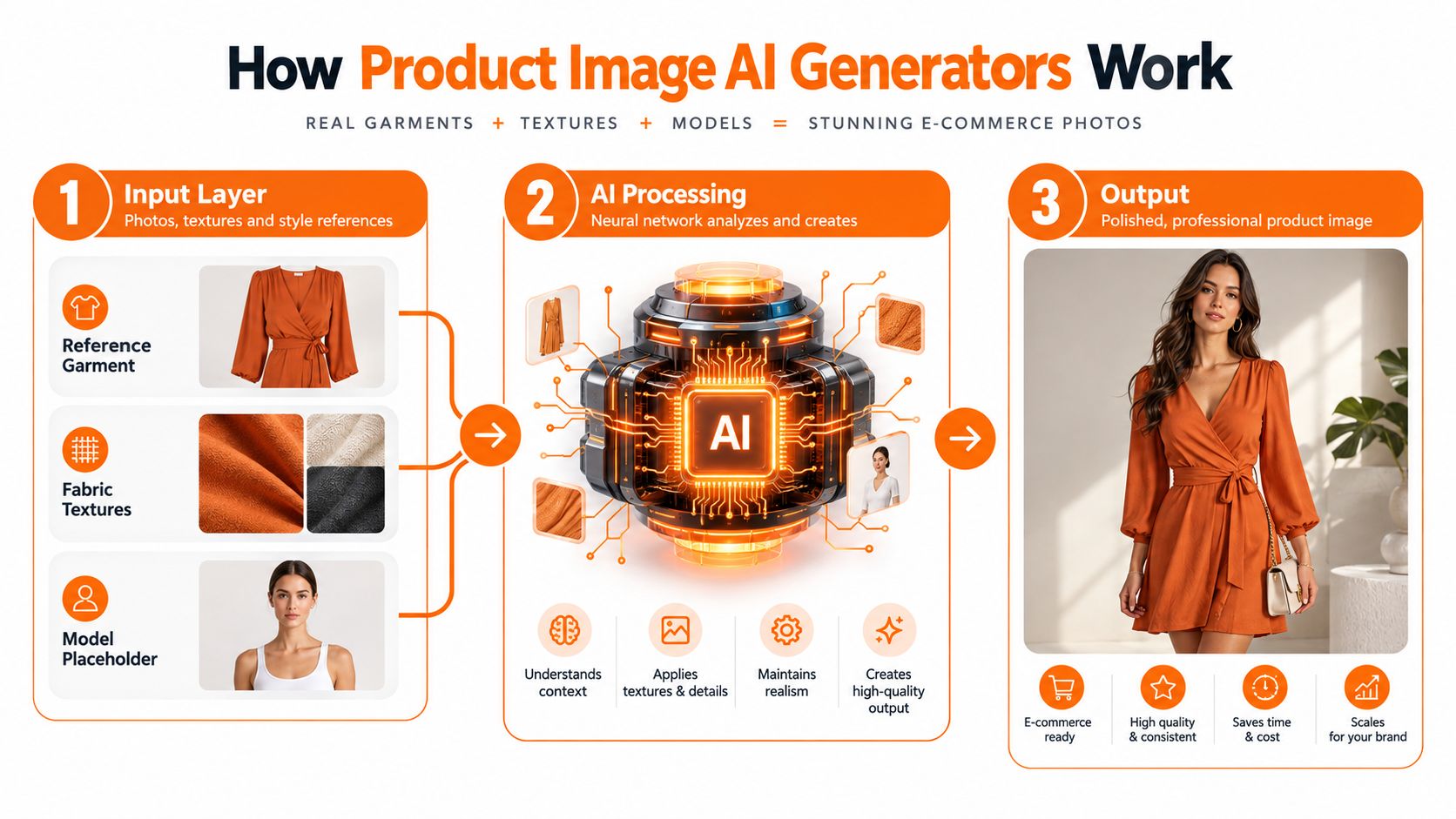
Think of the system as a virtual photo studio with a strict brief. A stylist doesn't hand a photographer one vague instruction and expect a complete campaign. They provide the garment, fabric references, model direction, set design, lighting intent, camera angle, and crop requirements. A capable generator works from a similar combination of visual and written inputs.
The first layer is the reference package. It might include a clean product photograph, a fabric swatch, a model reference, approved backdrop examples, and metadata describing the SKU. A prompt can add the creative direction, such as a soft daylight studio, a three-quarter pose, a neutral background, or a close crop showing a particular construction detail.
The model then composes a new image by interpreting those inputs. Some elements are directly grounded in the reference, while others are inferred. Product silhouette, visible color, logo placement, and distinctive hardware should remain anchored to the supplied product. Lighting mood, environment, pose, shadow behavior, and composition are more likely to be generated.
Control and inference are different things
The practical risk sits in the boundary between what you specify and what the model guesses. If the source photograph doesn't show the side seam, the system may invent one. If a transparent bottle is partly obscured, it may reconstruct the liquid level incorrectly. If small packaging text isn't legible in the reference, the output may contain convincing but false lettering.
The output stage can be useful even when the first generation isn't final. Teams can request background swaps, model changes, alternate crops, on-model versions, or flat-lay compositions from a source asset. The value comes from producing controlled derivatives without reopening the entire physical production process.
This is different from a consumer filter or a one-off creative app. A production workflow should ingest asset metadata, apply brand rules, retain the relationship between source and output, and export files into channel templates. Teams exploring the wider creative territory may also benefit from generative AI tools for UK creatives, especially when comparing ideation tools with systems intended for commercial production.
For a more ecommerce-specific view of the workflow, see AI product photography. The important distinction is simple: a single-image tool helps someone make an image, while a production system helps a team manage a repeatable image process.
Quality Versus Scale and Where the Tradeoffs Show Up
A beautiful hero image and a catalog of consistent product visuals are different problems. AI often performs well when the brief allows creative latitude. It has more room to generate a convincing environment, a mood, or a styled composition around a stable product reference. The same freedom becomes a liability on a PDP grid, where shoppers compare adjacent products and notice small differences in color, framing, lighting, and proportion.
The strongest use cases are usually derivative. Background variants, styled flat-lays, social crops, and simple colorway explorations can extend coverage when the original product identity remains clear. AI can also help teams visualize a merchandising story before they commit to every physical asset.
Standardized catalog photography demands stricter control. A shirt may look correct in isolation but show a different drape beside the next colorway. A handbag's stitching can change between angles. A beauty bottle may acquire altered reflections, a distorted cap, or text that looks plausible but isn't accurate.
The failures that appear after the pilot
Single-image QA hides cumulative drift. Reviewers tend to approve an image because it looks attractive on its own. Once a batch grows, repeated model poses, shifting lighting temperature, inconsistent backdrop scale, and gradual color changes become visible. These issues are operational, not merely aesthetic, because they create rework and weaken the catalog as a coherent shopping environment.
The product itself sets the boundary. Reflective hardware, sheer fabrics, intricate embroidery, metallic finishes, transparent packaging, and complex leather surfaces remain difficult. Coverage on ecommerce image tools notes that these materials can require hybrid workflows and human review, particularly where texture, color, or packaging detail affects buying decisions (StayModern's detailed review of AI image tools for ecommerce).
| Asset Type | AI Quality | Scale Benefit | Watch-outs |
|---|---|---|---|
| Hero lifestyle image | Strong when creative latitude is high | Extends campaign exploration | Product identity, pose, and material details need close review |
| PDP studio image | Uneven without locked references | Produces channel variants quickly | Lighting, framing, color, and construction can drift |
| Styled flat-lay | Often useful for derivative content | Adds merchandising and social options | Props can overpower the product or alter its perceived scale |
| Colorway variant | Useful when the base reference is clear | Reduces repeated scene production | Color accuracy must be checked against the approved sample |
| Beauty packaging | Riskier for regulated or text-heavy products | Can support background and composition testing | Labels, reflections, liquid levels, and cap geometry may change |
| Detail crop | Valuable for simple, visible features | Makes more product information available | Small text, stitching, hardware, and texture can hallucinate |
Commercial evaluation should focus on more than visual similarity. ServImageBench covers 1.07k paid commercial design tasks, 2.05k designer deliverables, 33k candidate images, and 33k human annotations, and connects image evaluation with commercial value in real design work (ServImageBench research). The lesson is direct: judge outputs against the task and its economic purpose, not against an attractive sample in a vendor demo.
AI usually wins on derivative variants, loses on flagship creative, and creates its best return in the long tail of assets that previously never got made.
Enterprise Requirements That Separate Tools From Platforms
A slick interface can produce an impressive sample. It doesn't prove that a creative director can govern the workflow on Monday morning. Enterprise readiness starts with repeatability, traceability, and the ability to stop a bad batch before it reaches a storefront.
The visual control layer
A production platform should let the brand define what must remain fixed. That includes approved color references, backdrop families, model representation rules, lighting direction, framing, aspect ratios, typography restrictions, and banned compositions. Prompt guidance alone isn't enough. A rule that matters to the brand should be encoded as a guardrail or enforced through review.
Consistency controls also need to work across SKUs. The same model pose, lighting temperature, backdrop scale, and crop logic should be reusable without forcing a designer to rebuild every scene manually. Reference-based generation research points to the same technical priority. RefAdGen introduces the AdProd-100K benchmark and uses Stable Diffusion v1.5 as a shared backbone for fair baseline comparisons, emphasizing reference consistency in advertising and product-image generation (RefAdGen research).
The governance and legal layer
Every generated file needs lineage. The system should record the source assets, prompt or template, model version, reviewer decision, regeneration history, and final export. Versioned prompts matter because a seasonal update shouldn't change approved imagery across the catalog. Deterministic outputs are also valuable where teams need to reproduce a result or investigate a discrepancy.
Legal review belongs in the purchase process, not after the pilot. Ask for:
- Training-data provenance: Can the vendor explain the origin and licensing status of the material used to train the relevant model?
- Output rights: Does the contract clearly cover commercial use, campaign distribution, packaging, and marketplace publication?
- Indemnification: What protection does the vendor provide if a third party challenges the output?
- Customer-data handling: Are uploaded product photos, model references, and brand assets used to train shared systems?
- Rollback and retention: Can the team remove assets, recover prior versions, and preserve an audit trail?
The difference between an open-weights model trained on scraped imagery and a licensed model trained on cleared catalog data is material. Don't accept “commercial use allowed” as the whole answer. Read the terms, ask for the relevant policy, and have counsel address gaps.
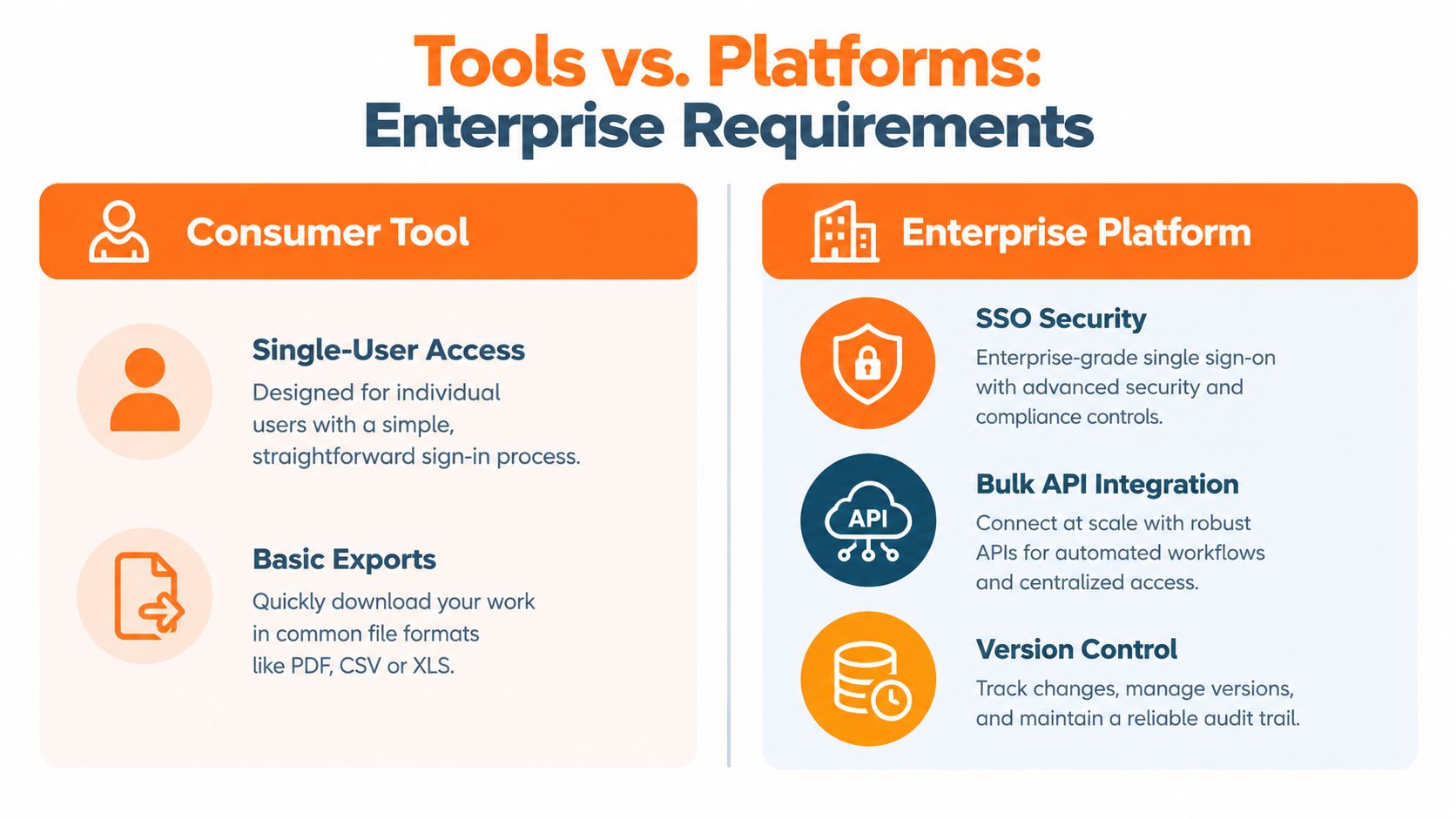
A consumer tool gives you a picture. A production platform gives you the picture, the audit trail, the contract, and the rollback plan. Teams evaluating workflow infrastructure can use this creative automation platform perspective to separate image generation from the broader operating system required to run it safely.
Implementing AI Product Imagery Across a Fashion or Beauty Catalog
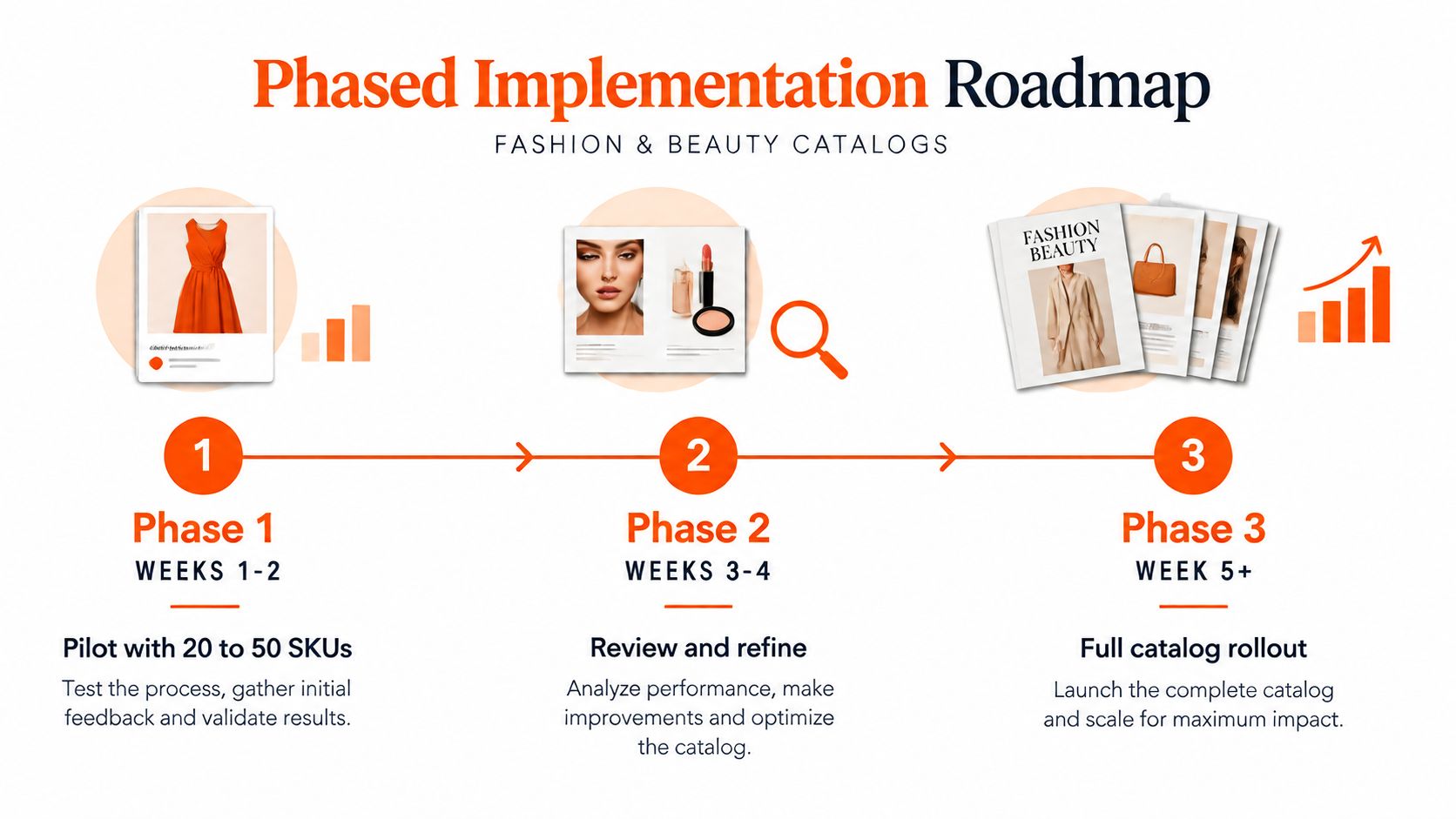
Implementation should start with a recoverable problem, not the entire catalog. Choose one category and one surface, such as PDP imagery, paid social, or email, then test a deliberately mixed group of products. Include straightforward items alongside the products most likely to expose failure, rather than selecting only easy wins.
Phase one sets the rules
Before generating anything, document the inputs. The brand needs an approved color palette, backdrop options, lighting references, model representation guidance, product-positioning rules, and a written do-and-don't list. Include examples of unacceptable changes, such as altered hardware, missing seams, incorrect label text, or a shifted finish.
Build the review grid before the first output arrives. Each reviewer should see the source and generated image side by side, with a consistent rubric covering:
- Color accuracy: Does the output match the approved product reference?
- Material behavior: Does the fabric, leather, glass, or metal behave credibly?
- Detail fidelity: Are labels, closures, stitching, caps, and distinctive features intact?
- Composition: Does the scene follow the brand's framing and hierarchy?
- Channel readiness: Does the image meet the intended crop, background, and placement requirements?
A reject-and-regenerate loop should be explicit. Reviewers need to know which errors require another generation, which require retouching, and which disqualify the workflow for that product category.
Phase two expands carefully
After review, refine the prompts, reference package, and rejection rules. Then expand within the category before adding another surface. Connect approved outputs to the PIM and DAM so files carry SKU identifiers, channel tags, version information, locale data, and approval status. A digital asset workflow helps frame this as routing and governance, rather than merely image creation.
For teams focused on high-volume operations, product photo batching AI is useful context when comparing batch processing approaches. The tool still needs to fit the brand's review and metadata process.
Assign one accountable owner. Hold a weekly review while the workflow stabilizes, and plan for ongoing tuning as new collections introduce unfamiliar fabrics, packaging formats, and styling requirements. The operating model should grow in stages, with each expansion earned through quality evidence.
Common Misconceptions and Failure Modes in Real Catalog Runs
The first misconception is that AI replaces the shoot. In practice, it more often replaces reshoots, variant shoots, background changes, and derivative production. Flagship imagery still benefits from a real camera when the brand needs exact material representation, distinctive art direction, or a visual statement that carries campaign weight.
The second is that one prompt can serve every SKU. It can't. A cotton jersey, a reflective sunglass frame, a sheer blouse, and a serum bottle require different references, constraints, and review criteria. A universal prompt template usually hides category differences until the output reaches production.
The third is that a weak source image can be rescued by a more elaborate instruction. Poor references create confident errors. If the product photograph doesn't show the construction clearly, the model may invent the missing information rather than flag the uncertainty.
Name the errors before they reach customers
At scale, the failure list becomes predictable. Build checks around it:
- Color drift: Adjacent colorways gradually move away from the approved sample.
- Logo hallucination: Branding, label text, or monograms change shape or spelling.
- Hardware mutation: Zips, buckles, clasps, caps, and buttons gain or lose parts.
- Body-shape inconsistency: The same garment appears on materially different proportions across a set.
- Skin-tone shifts: Model appearance changes between neighboring assets without an approved reason.
- Material distortion: Sheer, reflective, metallic, textured, or transparent surfaces lose their real behavior.
- Metadata corruption: Batch renaming breaks SKU links, locale tags, crop assignments, or approval states.
The 200-SKU test is valuable because these defects may not become obvious in a small demonstration. One independent operations guide recommends testing 200 real SKUs, including transparent packaging, reflective surfaces, small label text, and multi-component products, because those edge cases reveal production weaknesses (Epinum's ecommerce AI image generator guide).
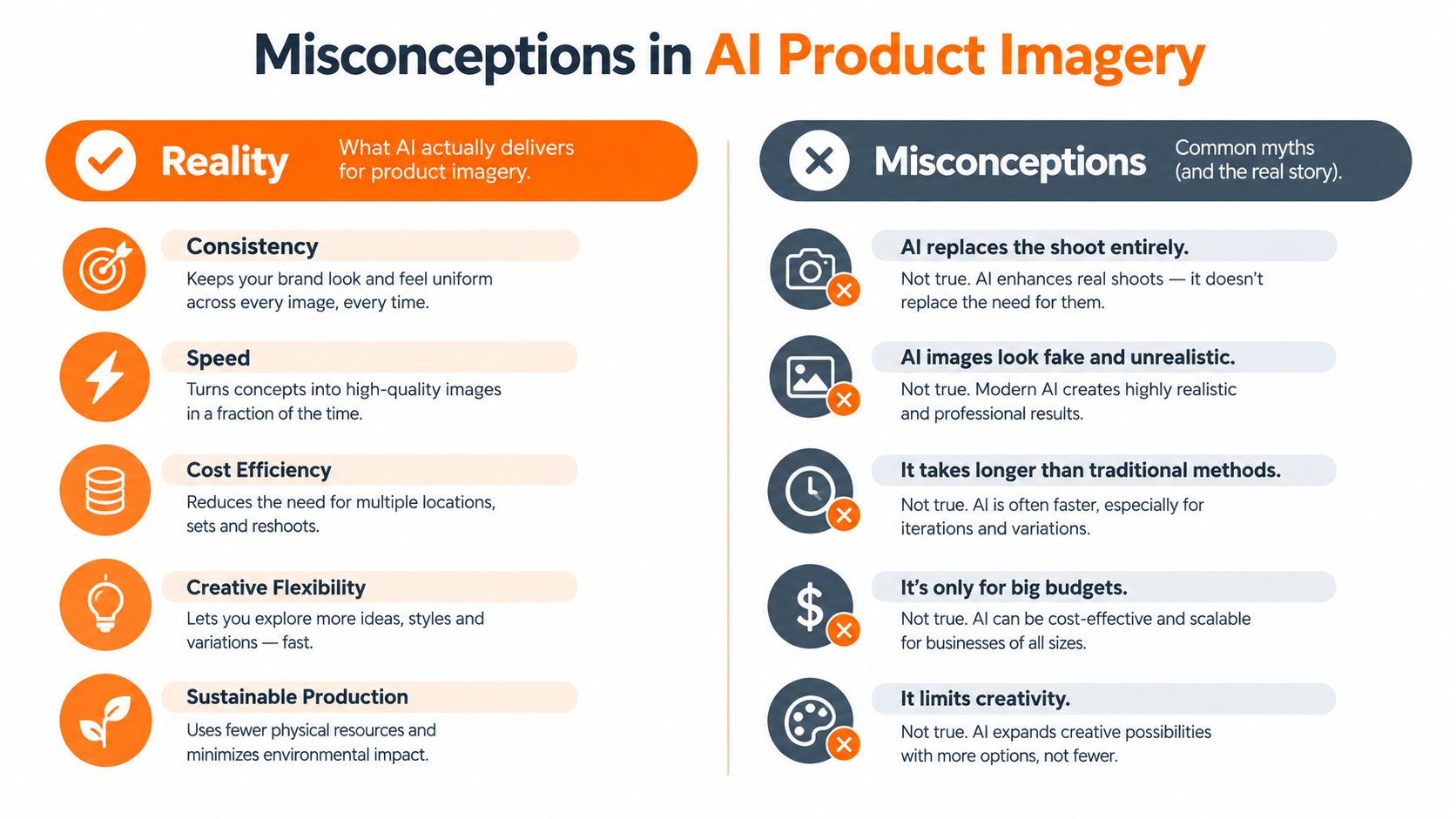
Human review should remain asset-level for risky categories. Batch approval is efficient only when the system has already demonstrated that its controls catch the errors that matter.
Evaluating Vendors With an Enterprise-Ready Checklist
Don't compare vendors by scrolling through their prettiest examples. Run a structured evaluation across five areas, and require each vendor to demonstrate the answer using your references.
Output control
Ask whether the system supports style references, precise inpainting, negative prompts, product locking, and repeatable scene templates. A passable answer includes a live demonstration on your own products. A red flag is a gallery of unrelated examples with no explanation of how the vendor preserves identity.
Brand governance
Ask how the vendor enforces color tokens, logo placement, model rules, and prohibited compositions. Look for custom brand references, locked presets, approval states, and version history. If the answer is “your team can add those instructions to the prompt,” governance is too weak.
Pipeline integration
Ask whether the platform connects to your PIM, DAM, commerce system, and review tools through an API or stable connector. Confirm how it handles SKU IDs, file naming, crop variants, locales, retries, and failed generations. A manual download workflow isn't a catalog pipeline.
Legal clarity
Ask where training data comes from, who owns the output, whether your uploads enter shared training, and what indemnification applies. Any answer that sends you to vague marketing language instead of contract terms deserves legal escalation.
Operational support
Ask for service levels, throughput expectations, incident handling, and an accountable support contact. Then structure a pilot around a mixed sample of 25 to 50 SKUs, spanning hero, detail, and lifestyle crops. The vendor should explain what failed, not showcase what passed.
Teams comparing adjacent creative technologies may also find a broader AdManage.ai alternatives guide for 2026 useful, but comparable category references matter more than generic feature lists. Ask for examples from fashion, beauty, or lifestyle catalogs with similar material and compliance demands.
Where Brand Teams Go From Here
The next decision isn't “Which image generator should we buy?” It's “Which part of our image operation should change first?” A brand team that starts with a vendor usually ends up adapting its process to the tool. A team that maps the pipeline first can assign AI to the bottleneck it is equipped to solve.
Trace the current path from sample arrival to published asset. Mark where work stalls: reshoots, retouching, localization, crop production, approvals, metadata, or handoffs between merchandising and marketing. If creative direction is the bottleneck, AI won't fix the problem. If derivative production and channel adaptation are consuming the team, a controlled generator may be useful.
The brands that gain durable value will treat the technology as infrastructure. They'll maintain documented prompts, versioned references, SKU-level audit trails, clear reject rules, and an approval owner who can stop a batch. They won't measure success by how quickly someone creates a striking demo image.
As models improve, the competitive question will shift from adoption to absorption. Can the operating model handle more variants without losing product truth? Can creative directors review batches without surrendering judgment? Can legal, merchandising, and ecommerce teams work from the same asset record?
Start by redesigning one workflow, prove that it survives real catalog pressure, and expand only when the controls are stronger than the novelty.
Sprello gives fashion, beauty, and lifestyle teams a visual canvas for building production-ready workflows across SKUs, channels, regions, and seasons, with brand guidance and asset organization built into the process. If you're ready to test catalog-scale AI imagery without treating governance as an afterthought, visit Sprello and map the workflow your team needs first.
Related
More to explore
Fresh reads
How to Create Storyboards for Campaigns That Scale
Learn how to create storyboards that move from concept to campaign-ready, with tips on framing, sequencing, templates, and clean handoffs to production teams.
Audit Process Steps That Keep Creative Work on Brand
Learn audit process steps for fashion and beauty teams to audit creative workflows, catch errors early, and keep campaigns on brand at scale.
Product and Concept Guide for Fashion Development
Learn how product and concept workflows turn sketches and materials into production-ready apparel briefs with scalable, brand-consistent processes.