November 4, 2026
Fashion Ecommerce Photography: Shot Lists, AI and Scale
Fashion ecommerce photography for catalog-scale brands: the shot list per SKU, AI model rules, size coverage and enterprise controls. Updated 2026.
Fashion ecommerce photography is a product-information system: each image helps shoppers assess appearance, construction, and fit before ordering. A complete SKU usually needs several images, not just one hero shot. Sprello's Canvas takes in sketches, CAD files, materials, and references to create and refine product visuals, with each style and its details in one shared product catalog. The value of that coverage is clear in the Coresight Research reporting summarized by On Model: the average online apparel return rate was 24.4% in 2023.
Published 2026
Shot List Every Fashion SKU Needs
I would treat the shot list as product information, not decoration. Each image type answers a different question, so dropping a view doesn't save cost cleanly. It moves the unanswered question to the shopper, who either guesses, orders two sizes, or leaves.
One industry guide from Landing Partners recommends seven images per product, split into three to four packshots, two to three on-model images, and one detail or lifestyle image. That's a production rule, not a universal law. Use it as your baseline, then adjust by category and risk.
Per-SKU Shot List for Fashion Ecommerce
| Shot type | Images per SKU | What it shows | Shopper question answered |
|---|---|---|---|
| Packshots (front, back, three-quarter, flat detail) | 3-4 | Silhouette, colour and construction | What does the garment look like? |
| On-model images | 2-3 | Drape, proportion, scale and apparent fit | How does it hang on a body? |
| Detail or lifestyle | 1 | Material, finish, hardware and use context | What is it made from, and where is it worn? |
| Model metadata (height, size worn, fit notes) | One record per on-model image | Fit reference recorded as structured data | Is the fit evidence complete? |
Packshots carry the clean record. Front and back show silhouette and construction, the three-quarter view shows depth and how seams wrap, and a flat detail angle shows surface, print placement, or hardware without body distortion. If a garment has a back vent, a rear closure, or a train, the back view isn't optional filler. It's where the shopper checks whether the design works from behind.
On-model images do what packshots can't. They show drape, proportion, and scale against shoulders, waist, hips, and legs. Two or three angles let a shopper judge length and ease without relying on a single styled pose. Record height, size worn, and fit notes as structured data beside each image, not only in a caption that a marketplace may strip out.
Practical rule: If a view doesn't answer a named shopper question, don't shoot it. If a named question has no view, add one.
Adjust the mix by category. Close-ups matter more for jewelry and cosmetics, where stone setting, clasp, shade, and finish drive the decision. Room context matters more for home products, where scale against furniture is the uncertainty. Apparel with stretch, sheer panels, or tailoring usually needs more fit evidence, not more lifestyle mood.
To size the work, count next season's SKUs by category, multiply by the shot count you've set for that category, then add colorways that need their own proof. That total, not the SKU count alone, sets your studio days, sample demand, retouching queue, and approval load. It's also the number that tells you whether a manual spreadsheet can track the programme or whether you need catalog-level controls.
Why Photo Coverage Drives Fit and Returns
A shopper cannot test the cloth, pull the waistband, or sit down in the dress. Product images must answer the fit questions a fitting room would, making photography part of the product-information system. Styling can attract attention, but coverage must help shoppers predict how a garment will behave on their body.
A 2022 peer-reviewed study in the Journal of Consumer Behaviour analyzed responses from 400 UK women. It found that showing diverse body shapes improved consumers' evaluations of garment fit, but did not produce a corresponding increase in purchase intention. Better representation can improve fit assessment without automatically changing the purchase decision.
Size uncertainty also appears in returns. In a 2025 DHL survey of 24,000 online shoppers across 24 countries, more than half had returned an item because it was the wrong size. Showing only conventionally thin models may increase perceived fit risk for shoppers who wear larger sizes. Casting models closer to shoppers' own sizes can help them assess fit and make a more informed choice.
Views Chosen by Fit Risk Not Habit
Choose views based on where a garment is most likely to fail the shopper's expectations. A fitted woven dress needs side and seated views to show hip ease and skirt pull. A knit top needs a stretch view and a close-up at the bust, where tension can change opacity. Trousers need to show hem behavior over a shoe and how the knee sits when seated. Active pieces need movement views: a static front view cannot show whether a shoulder seam restricts rotation, a concern for shoppers comparing stretch polos for a comfortable golf swing.
A fit-risk list might include front, side, seated, movement, fabric stretch, hem behavior, and close-ups. Select the views that address each garment's likely failure points, then connect them to the size-chart entry and measurement they support. If return reasons repeatedly cite tight hips or unexpected length, check whether the relevant area was clearly shown.
That connection makes image coverage useful for managing returns. Sort SKUs by return reason, compare high-return styles with their existing views, and add coverage where the same information gap recurs. More images do not automatically reduce returns. The practical goal is to show the details shoppers need to judge fit before checkout.
Capture Standards for Consistent Catalog Images
Consistent capture is the precondition for a catalog that reads as one brand across thousands of SKUs. If lighting, crop, and color drift between sessions, shoppers read the drift as product difference. Lock the settings before the season starts, not during retouching.
- Fix lighting and background per category. One documented setup per category keeps packshots matching across seasons and reshoots.
- Calibrate color with a reference target. Check each colorway against the physical sample under controlled light before approval, because screen-only approval is where navy becomes black.
- Fix camera height, lens, and crop rules. Front, back, and three-quarter views should line up across the catalog so shoppers can compare styles.
- Write the on-model casting brief. One model identity per brand or campaign, a saved pose library, and styling rules stop each shoot reinventing the look.
- Set retouching limits in writing. Removing lint and steaming wrinkles is allowed. Changing seams, hardware, texture, or silhouette is not.
- Name and tag every file. SKU, view, colorway, and capture date in the file record let you match each asset against the shot list automatically.
- Store the approved settings. Reshoots and late colorways should reuse the same setup sheet rather than a photographer's memory.
For teams setting up a garment bay from scratch, Display Guru's garment photography advice covers the basic studio arrangement in useful detail. Adapt it to your own lock list rather than copying any single setup wholesale.
Keep two checklists. The studio-level list holds what's locked for everyone, including background, color target, file naming, and retouching limits. The category list holds what varies, such as macro lenses and tighter crops for jewelry and cosmetics, or wider framing for home products. When a reshoot comes back looking different, the checklists tell you which level failed.
How to Write a Per-SKU Photo Brief
A good brief reads like an evidence plan for one SKU. It names the questions the shopper will ask, assigns a view to each, and states what counts as proof. Write it before samples move, because a brief written on shoot day becomes a description of whatever the studio already planned.
The four core moves fit on one page, as this summary shows.
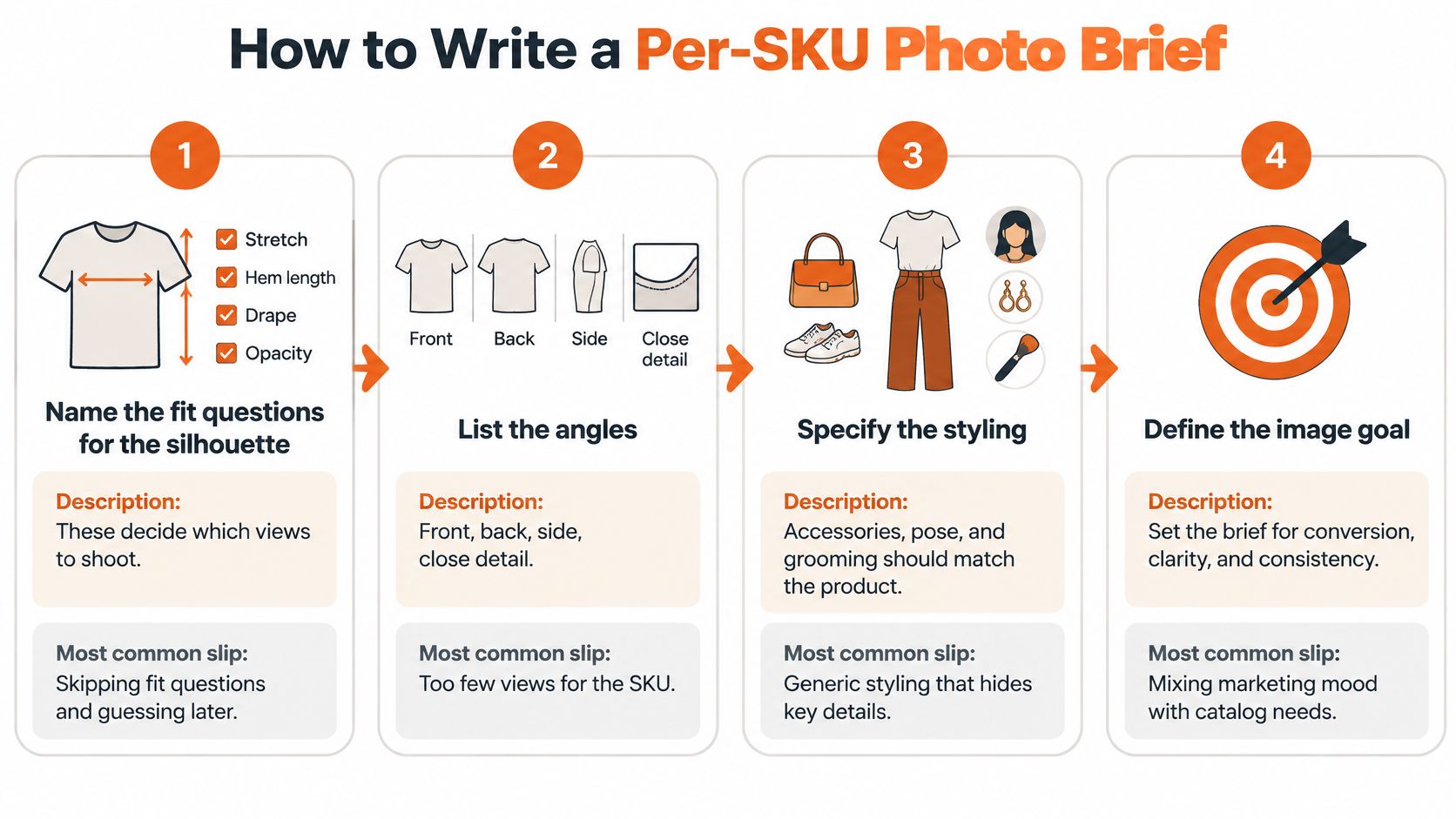
- Name the fit questions for the silhouette. Stretch, hem length, drape, and opacity decide which views you need. The common slip is writing one generic brief for every dress in the range.
- Set the view list from the shot list. Three to four packshots, two to three on-model images, and one detail or lifestyle image. The common slip is dropping the back view to save time, then fielding questions about closures.
- Specify model height, size worn, and pose. Add a second body size for wide ranges so fit evidence spans the size run. The common slip is casting one size for every SKU and calling it consistency.
- Lock colorway and material truth. Attach a physical sample or fabric swatch to the brief, because color mismatch is among the first causes of disappointment. The common slip is approving color on a screen alone.
- Brief close-ups on decision details. Closures, hardware, seams, stitching, and surface texture are what shoppers zoom on. Name them per SKU instead of asking for generic detail shots.
- Validate delivered assets against the shot-list schema. Check completeness before channel delivery so a missing view is caught across thousands of SKUs, not during merchandising review.
- Record approved views on the SKU record. Gaps stay visible to design, merchandising, and marketing until they're filled.
The case for combining formats is documented, not a matter of taste. In usability research summarized by Baymard, flat cutouts alone were found insufficient for products designed to be worn, and a benchmark in the same analysis found that 21% of apparel sites provide no human-model imagery or only one model image. Packshots communicate color, construction, and silhouette. On-model images reveal drape, proportion, and apparent fit. Your brief needs both jobs covered.
A finished brief contains fit questions, the view list, model and size specification, the physical color reference, named close-ups, and the validation rule. If one element is missing, the brief isn't finished.
Teams that brief design work as well as photography can align both documents using a shared structure, such as our sample design brief guide. Beauty and jewelry briefs use the same skeleton with different detail priorities. Shade accuracy and finish replace drape, and clasp or setting close-ups replace hem behavior, but the logic of question, view, and proof doesn't change.
Channel and Regional Variations for Product Truth
Product truth stays identical across channels. Casting, cropping, styling, and copy length vary. If the garment, color, or fit changes between your own site and a wholesale partner, you don't have a channel strategy. You have three different products wearing the same SKU number.
Wholesale line sheets go to buyers who commit money against what they see. Views and measurements must be complete, crops tight and consistent, and every colorway present. A buyer can't order a back detail she never saw, and she shouldn't have to ask whether the sample matches the sheet. In Sprello, selected visuals and product details flow from the shared catalog into line sheets and buyer assortments, so the wholesale view starts from the same approved record as every other channel.
Owned-site product pages can carry the full shot list. Zoom, alternate views, second body sizes, and fit metadata earn their place because the shopper has time and screen space to use them. Put model height and size worn where the size selector sits, not buried under the fold.
Marketplaces may limit image count, backgrounds, or overlays. Work within the limit by keeping core fit views and dropping decorative images first. A lifestyle shot is expendable. The side view that shows hip ease is not. Set the marketplace subset as policy so the choice is made once, rather than per upload by whoever is on deadline.
Regions vary on the human side of the image. Cast models so shoppers see bodies close to their own, and adjust styling and copy to local norms without changing the garment, color, or fit. A modest styling variant is legitimate. A recolored variant that no warehouse holds is not.
Separate buyer assortments per account or channel keep this manageable. Each buyer sees the right SKUs and views, drawn from one catalog, while the underlying product record stays single. End every season with one audit question per SKU. Does every channel and region show the same product reality, and where exactly do they differ?
Where AI Models Save Time and Where They Cost Trust
The usual debate asks whether shoppers can spot AI imagery. That's the wrong test. What matters is whether the image still tells the truth about the product once a shopper looks closely.
This comparison frames the practical question, which is where generated imagery helps and where it needs photographic proof behind it.
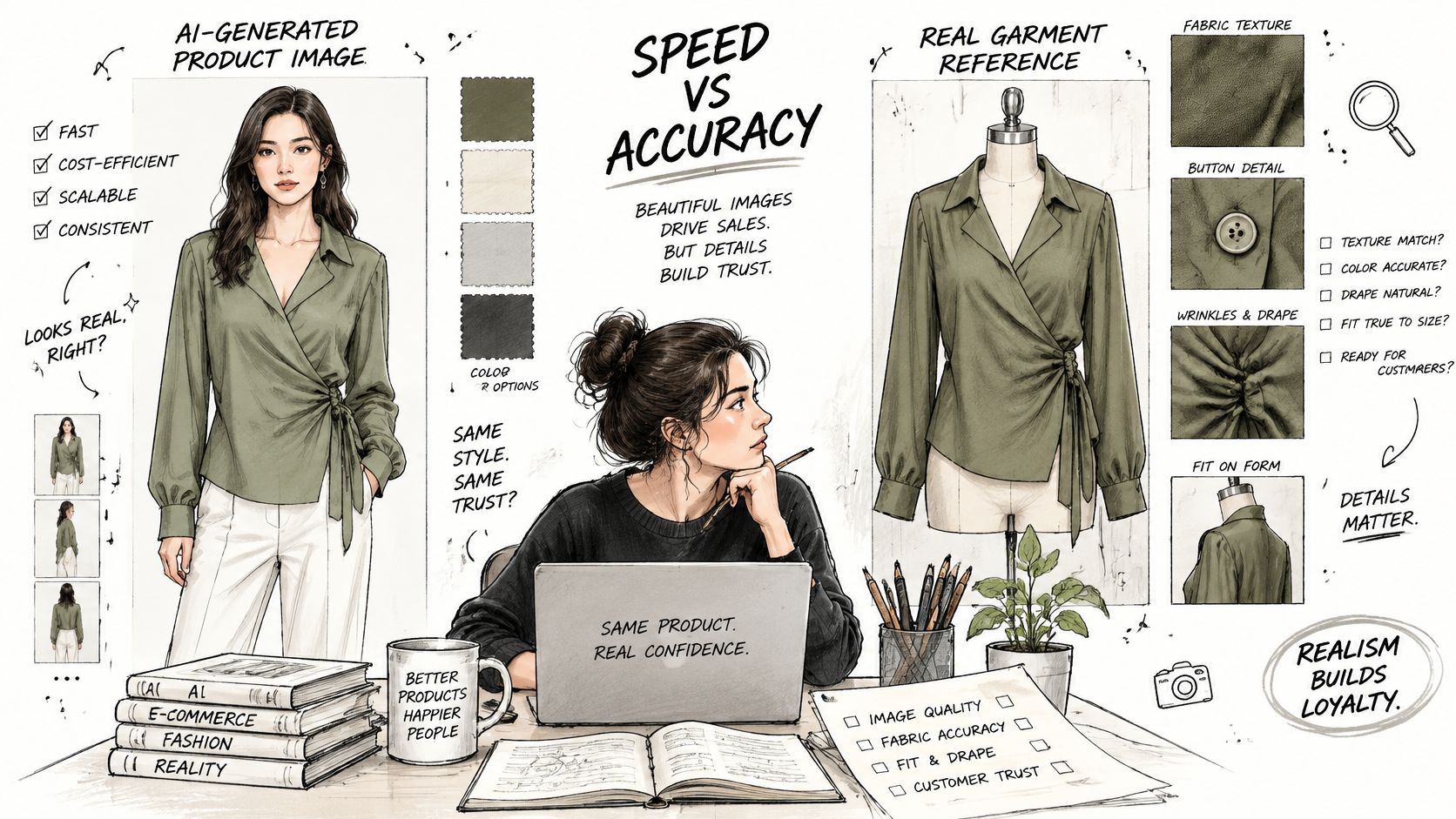
In a 2025 Stylitics survey, 76% of respondents considered model photos the most useful format for making a purchase decision, and 71% of participants could not identify whether an image was real or AI-generated. Confidence declined when details such as buttons, wrinkles, or fabric texture appeared incorrect. Physical accuracy beats realism. A plausible image with the wrong button count is worse than no image, because it teaches the shopper something false. Our own guidance on AI-generated model photos works through the production checks that follow from that finding.
Disclosure doesn't settle the trust question either. Academic research held in the AUT open repository found no inherent trust difference between human models and AI-generated models, including disclosed and undisclosed AI imagery. Disclosed AI models were perceived as less human-like and realistic, which could increase perceived risk. So disclosure is a governance decision to make deliberately, not a trust guarantee. Creative teams weighing the wider production picture may find Studio Liddell's AI art guide a useful starting point on the commercial side.
Risk Tiers for AI-Generated Fashion Visuals
| Risk tier | Example products | Proof required before publishing | Role for AI visuals |
|---|---|---|---|
| Low | Core basics in stable knit or jersey | Verified garment reference and one physical sample photo | Colourway and variant visualisation, model diversity variants |
| Medium | Structured or woven pieces such as dresses and shirts | Physical packshots plus at least one human-shot on-model image | Concept visuals and supplementary model views |
| High | Transparent fabrics, tailored garments, footwear, colour-sensitive items, unusual proportions | Human-shot photography for every required view and verified colour | Concept and internal review only, not the proof image |
These tiers are planning judgements, not findings. Set them with your own return data and move products between tiers as evidence changes. A basic tee in a stable jersey behaves predictably and tolerates generated variants well. A sheer blouse over a lining does not, because opacity under light is exactly what generation tends to flatter.
The short video below is worth watching before you set your own tiers, because it shows where generated output typically drifts from the physical garment.
Governance makes AI workable at scale. Label synthetic assets in the record, keep one consistent model identity across SKUs, check for visual artefacts at full resolution, and link each output to its source assets and an approval checkpoint. In Sprello's workflow, teams test materials, silhouettes, references, and colorways on the Canvas before deciding which assets need physical sampling or final production photography. Customers' designs, sketches, and uploads are never used to train our models or anyone else's models. The decision rule stays simple. When return risk is high, the AI output is a concept or supplementary asset, never the proof of the product.
Choosing Tools and Controls for Catalog Production
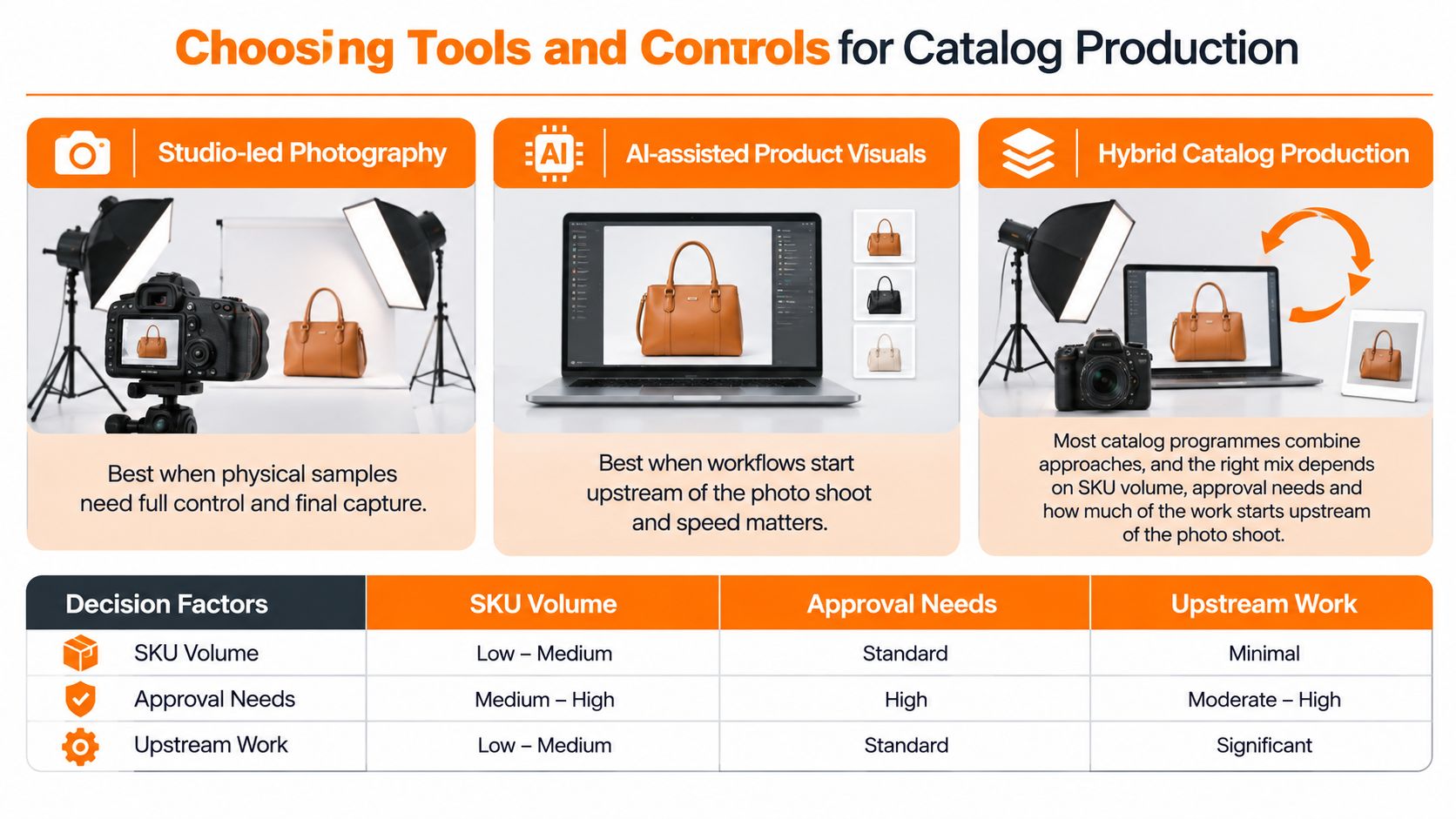
Tool choice depends on what each SKU needs to prove, how many variants must be covered, and where teams need a shared record. Physical photography provides evidence of the actual garment. AI-assisted workflows can help produce and review visuals across a catalog, while planning systems hold product and buying information. The practical choice is usually a combination, with clear boundaries between them.
Production Approaches for Fashion Catalog Photography
| Approach | Strongest at | Limit at catalog scale | Check before buying |
|---|---|---|---|
| Traditional studio or agency shoot | Showing the physical garment and supporting fit assessment | Cost and lead time rise as SKU and colorway coverage expands | Turnaround per SKU and usage rights |
| General AI image generators | Fast concept and mood images | May not connect outputs to product details or an approval trail | Whether outputs trace back to source assets |
| PLM and planning suites | Tech packs, BOMs, costing and open-to-buy | Not built to produce or review visuals | Whether they connect to your visual workflow |
| Sprello | Creating and refining product visuals from sketches, CAD files, materials and references, with styles held in a shared catalog | Complements PLM and planning; does not do tech packs, BOMs, pattern making, demand forecasting or open-to-buy | A walkthrough tailored to your team's workflows and product category |
Sprello is an AI workflow canvas for fashion, beauty, and lifestyle brands. Teams can create and refine visuals from sketches, CAD files, materials, and references, then save a canvas workflow to run again on the next style. Each style lives in one shared product catalog with its details and visuals. The catalog shows which products have approved visuals and which still need them. Selected visuals and product details can flow from the catalog into line sheets and buyer assortments. For the catalog mechanics behind that workflow, see this overview of product catalog management software.
Studios remain the stronger choice when a shopper needs evidence of fit, drape, or a difficult construction detail. General generators can serve early concept work, while catalog workflows help teams manage visual production and approvals across styles. Compare tools by tracing one asset from its source file through review and approval, then checking whether the product details stay connected. A tool that cannot show that path leaves teams with a coverage and control gap.
Controls checklist: Set access controls appropriate to your team, and require a written commitment that customer designs, sketches, and uploads are never used to train the provider's or anyone else's models.
A demo can show the catalog, canvas, line sheets, and assortments on one of your own product categories. Sales demos are set up as a walkthrough aligned with the team's workflows, after the team shares its catalog size and use case.
Fashion Ecommerce Photography Questions Answered
How Often Should Risk Tiers Be Reviewed
Re-check each tier assignment against your own return data at every season close. The tiers are planning judgements, so a product that returned heavily for fit reasons moves up a tier, whatever its category. A product with clean returns across two seasons can move down.
What Happens When a Delivered Asset Is Missing a View
It goes back to the shoot or generation step, and the SKU record shows the gap until it's filled. Don't publish around a missing required view. A visible gap in the catalog is cheaper than a silent gap on the product page.
Which Metadata Should Travel With Each Image
Keep SKU, view type, colorway, capture date, model height, size worn, and the source files the image was made from. That record lets you audit fit evidence, reproduce a reshoot, and trace any AI output back to its inputs. Captions alone won't survive channel delivery.
Can One Shoot Serve Every Channel
It can supply the master set, and it should. Crops, image order, and copy length are then set per channel, while the master files are kept for future variants and regions. One master set with governed derivatives beats three separate shoots that drift apart.
Test Your Catalog Workflow in a Sprello Demo
Start with the sorting decision. Put next season's SKUs into low, medium, and high risk tiers, then write the shot list each tier needs using the seven-image baseline adjusted for category. That exercise alone shows you where studio proof is required and where AI visuals can carry the load.
Then book a demo at sprello.ai. Our demos are walkthroughs customized to your team's workflows once you share your catalog size and use case, and a demo can show the catalog, Canvas, line sheets, and assortments on one of your own product categories. Bring your season SKU count, current shot list, risk-tier assignments, approval steps, and the channels and regions you sell into. You'll see visuals built from sketches, CADs, materials, and references linked to one shared catalog, line review, wholesale line sheets, and separate buyer assortments per account or channel. Sprello complements your PLM and planning suites rather than replacing them. Book a demo at sprello.ai.
If your next season needs fit evidence for every SKU rather than hero shots for a few, Sprello connects AI product visuals from sketches, CADs, materials, and references to one shared catalog, line sheets, and buyer assortments built for catalog-scale fashion ecommerce photography. Bring one product category and your current shot list, and we'll trace an asset from source file to approved visual. Book your walkthrough with Sprello.
Related
More to explore
Fresh reads
AI Generated Model Photos: A Practical Guide for Brands
Learn what AI generated model photos are, how brands produce them, the QA checks, disclosure rules and when to pilot them across SKUs and channels.
8 Use Cases Examples for Product Merchandising Teams
Eight use cases examples from fashion, beauty, jewelry, and home teams: line planning, catalog photography, buyer line sheets, and regional content.
Swim Lane Chart Guide: Roles, Handoffs and Audits
Learn what a swim lane chart is, how merchandising and creative teams map roles and handoffs, and how to audit workflows. Includes a tool comparison.