October 26, 2026
Analogous Color Scheme: How to Build One for Fashion
An analogous color scheme uses three to five neighboring hues in a 30 to 60 degree arc. Learn to build, test and apply one across SKUs and channels.
An analogous color scheme uses three to five neighboring hues on the color wheel, usually within a 30 to 60 degree arc; the three-hue, 60 degree version is the most common starting point. That proximity doesn't guarantee usable contrast, so teams using Sprello to explore colorways should verify lightness, perceptual distance and color-vision performance before requesting samples.
Published March 6, 2026
What Is an Analogous Color Scheme and How Wide Can It Be?
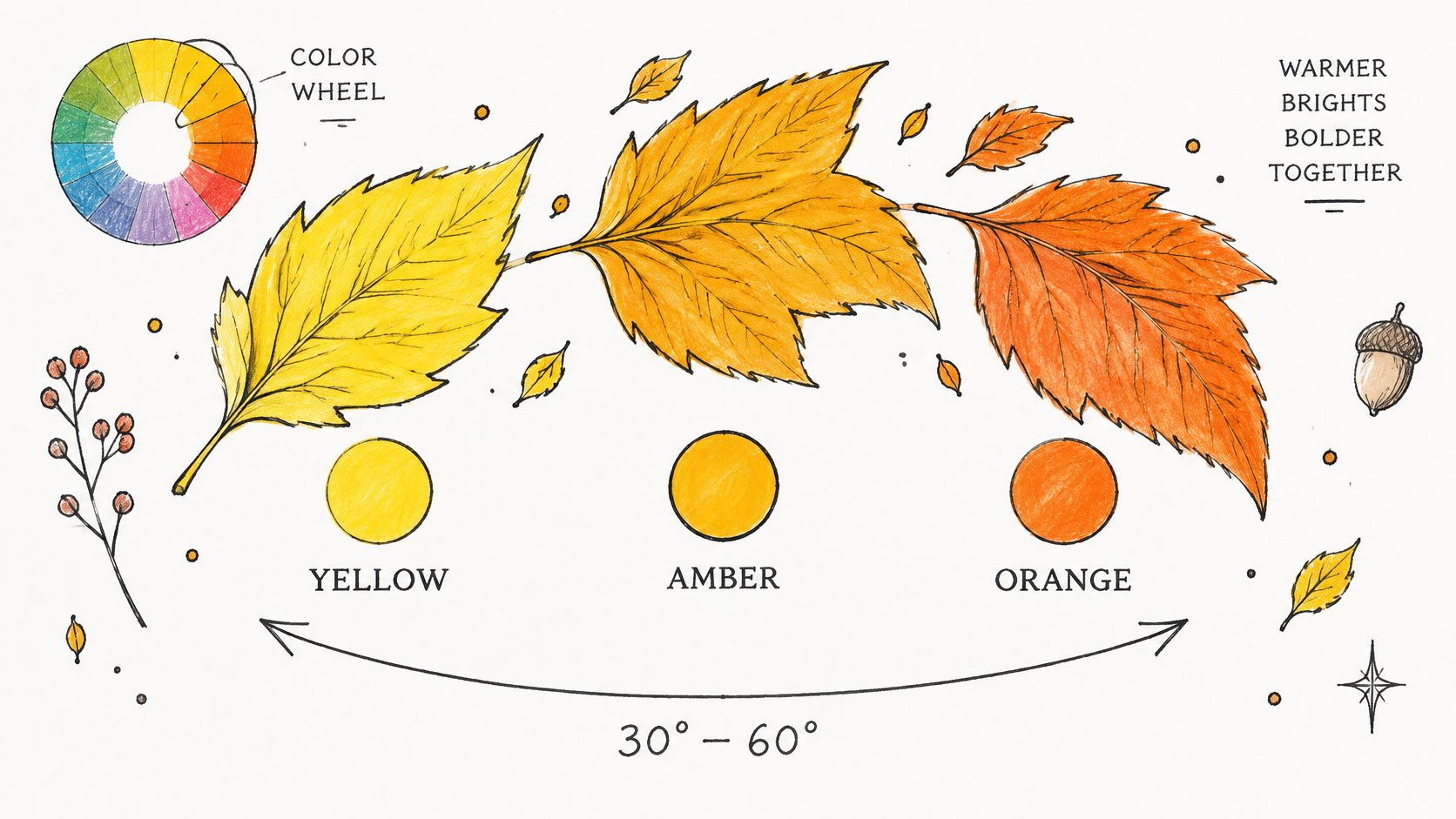
An analogous palette gives a collection a shared color direction while allowing its products to remain distinct. The Xplore Color wheel guide describes a practical range of roughly 30 to 60 degrees, which on a 12-segment wheel usually means two to three neighboring hues. The actual span depends on the wheel and how the hues are selected.
Red-orange, yellow-orange and red-violet can belong to a neighboring warm-color region, though they are not consecutive positions on every wheel. A complementary pair, by contrast, sits across the wheel. For product teams, the practical question is whether neighboring hues retain enough separation to read clearly across the assortment.
Analogous hue count and arc size
This table counts consecutive positions on a conventional 12-segment wheel. The role descriptions are merchandising starting points, not assortment quotas.
| Hues in scheme | Arc on a 12-segment wheel | Inside the 30-60 degree practical range? | Typical role |
|---|---|---|---|
| 2 neighboring hues | 30 degrees | Yes, at the narrow end | Quiet tonal shift within one family |
| 3 neighboring hues | 60 degrees | Yes, at the wider end | Anchor, support and accent |
| 4 neighboring hues | 90 degrees | No, wider than the practical range | Wider assortment breadth |
| 5 neighboring hues | 120 degrees | No, beyond the conservative range | Reads closer to multicolor |
A broader arc can serve an assortment that needs more product roles, but hue count alone does not confirm that those roles will look distinct. Selecting intermediate hues inside a compact cluster can also produce a different span than counting full wheel segments. Record the wheel model and selection rule, then check that the colors remain distinguishable at the size and lightness used in product-grid images.
Autumn leaves show the relationship clearly: yellow, amber and orange sit near one another, while differences in lightness help separate them.
A 2024 Chalmers University of Technology study surveyed more than 400 people in Sweden about color schemes, including a set of four analogous colors. That finding does not establish a universal preference rate. Preferences can vary across palettes, and a favorable response to a color scheme does not confirm that neighboring hues will stay distinct in product imagery.
Starting rule: Begin with a compact anchor, support and accent set. Widen it only when the assortment needs another distinct product role, then check hue separation and lightness before samples are cut.
How Do I Build an Analogous Palette Step by Step?
Start with the product, not a pleasing row of digital swatches. A brushed knit, glossy compact and polished pendant can make related colors behave very differently.
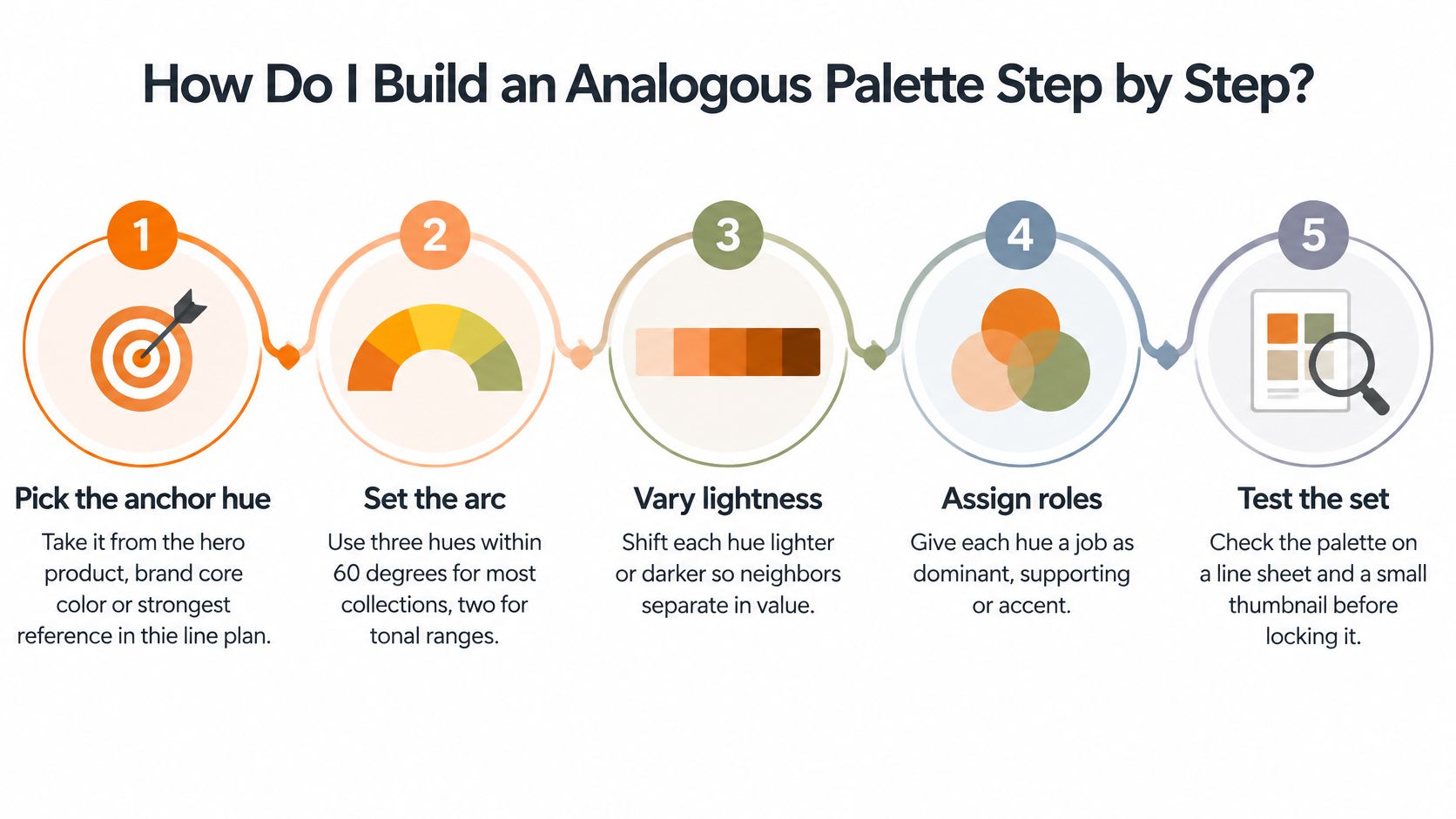
This overview shows the main decisions before you document the full palette.
Build the palette around a material reference
Pick the anchor hue. Take it from the hero product, brand core color or strongest material reference in the line plan. The common slip is approving a screen color before checking the actual fabric, formula or finish.
Set the arc. Choose a compact group for a focused collection, a narrower pair for tonal merchandise, or additional neighbors when the line needs breadth. The slip is adding another wheel position without noticing that you've widened the whole scheme.
Place support and accent. Put the support near the anchor and reserve the far edge for seasonal emphasis. Don't make every neighboring hue equally prominent, or the buyer won't know which product establishes the story.
Assign lightness steps. Start with a mid-value anchor, move support lighter or darker, and consider higher chroma for the accent without automatically making it the lightest swatch. Matching the accent's value to the support often removes the distinction you intended.
Add a neutral field. Cream, taupe or charcoal can separate color blocks without introducing another competing hue family. Skipping this field makes dense boards harder to read.
Test every adjacent pair. Review the palette at thumbnail size, in grayscale and with color-vision simulation before approving material development. Don't test only isolated swatches on a generous white canvas.
Record the decision. Put the wheel model, hue angles, lightness values, material reference and assigned role on a palette sheet. An attractive image without these decisions isn't a usable specification.
Give hierarchy more than a hue name
Lightness and area establish hierarchy. Let the anchor occupy the largest visual share, then reduce the support and accent areas according to the line plan.
Hue also changes visual weight. In an otherwise comparable arrangement, yellow-orange can attract more attention than red-violet, so equal-sized tiles don't necessarily feel balanced.
For grounded apparel references, California Cowboy's guide to earth tones for après-ski outfits is useful for thinking through wearable combinations. For a cooler anchor, the sapphire-blue color guide offers another starting reference.
Use the video as a visual exercise, then return to your own material swatches.
A finished palette sheet should show named roles, a stated arc and a value order that still reads correctly without color.
How Do I Confirm Analogous Colors Are Distinct Before Samples Are Cut?
Neighboring hues aren't automatically low-contrast. A Color Memory Game technical analysis reported two three-color palettes with identical angular spacing: a green-centered example measured approximately ΔE 14, while a cyan-to-blue example measured approximately ΔE 62.
That comparison illustrates why evenly spaced RGB or HSL values don't establish evenly perceived differences. It isn't a universal acceptance threshold, and ΔE results should be compared only when the calculation method and reference conditions are consistent.
Separate perceptual difference from accessibility
Use CIEDE2000 to evaluate adjacent swatches across lightness, chroma and hue. Record the input color space, reference conditions and calculation method so the next reviewer can reproduce the result.
Check luminance contrast independently. The WCAG non-text contrast guidance requires at least 3:1 for visual information identifying user-interface components and essential graphical boundaries; if adjacent colors fall below that threshold, add a sufficiently contrasting boundary or another effective identification cue.
This requirement isn't a minimum difference between every garment photographed in a grid. It applies to essential interface information, and it doesn't replace separate text-contrast checks.
Separation tests for an analogous palette
| Test | What it checks | Use it for | Pass signal |
|---|---|---|---|
| CIEDE2000 difference between adjacent swatches | Perceived lightness, chroma and hue difference | Colorway boards and palette swatches | Team-set threshold met for every adjacent pair |
| Luminance contrast (WCAG 3:1 for non-text) | Lightness separation of graphical boundaries | Digital grids, filters and labels | Required contrast met, or an effective contrasting border or other cue added |
| Color-vision simulation | How deuteranopia and protanopia affect palette differentiation | Product grids, charts and calls to action | Essential roles stay distinct |
| Grayscale check | Whether lightness alone separates roles | Print, packaging and catalog thumbnails | Each role reads as a different value |
| Material swatch under store light | Surface reflectance and texture effects | Fabric, cosmetics and jewelry finishes | Adjacent colors still separate in hand |
Set project acceptance criteria before review, rather than negotiating them after everyone likes the palette. The interface minimum remains a requirement, not a team preference.
For close reds, the oxblood versus burgundy comparison is a useful naming reference, but names don't prove separation. Keep the hue relationship, adjust value where necessary, and label SKU choices explicitly.
Which Hue Role Does Each SKU Take in a Fashion or Beauty Assortment?
Assign the anchor to products that establish the collection, support to related breadth, and accent to selective emphasis. Those roles describe what merchandise does in the line, not merely where a swatch sits.
The BYU color-theory guide recommends generous whitespace because analogous colors lack sufficient intrinsic distinction for reliable side-by-side separation. In merchandising, spacing is part of the palette system, not leftover layout space.
Worked category examples
- Fashion knitwear. Say a 12-piece capsule uses rust across core sweaters, terracotta for skirts and tops, and raspberry for trims and hats. Treat this as a proposed warm-color story: measure the selected shades before calling the finished set analogous.
- Beauty blush. Peach anchors the family, coral supports it and rose-pink provides emphasis. Shade names should map clearly to the actual pans or product swatches, not just the packaging.
- Jewelry finishes. Yellow gold anchors the case, rose gold supports it and copper adds warmth at the edge. This is an analogous-inspired finish story, but reflectance and metal treatment matter more than a flat color-wheel diagram.
- Home collections. Sage, olive and moss create a related green family, with cream ceramics providing a neutral field. Depending on the selected swatches, this may behave more like a tonal range than separate neighboring hue families.
Palette roles and starting proportions
These percentages are an illustrative allocation, not a proven merchandising formula. Use them to sketch a board, then revise them against category depth and buying priorities.
| Role | Position on the arc | Starting share of colorways | Example in a fashion line |
|---|---|---|---|
| Anchor | Center of the arc | About 60% in this illustrative allocation | Rust across core knit styles |
| Support | One step either side of the anchor | About 30% in this illustrative allocation | Terracotta skirts and tops |
| Accent | Far edge of the arc | About 10% in this illustrative allocation | Raspberry trims, hats and bags |
| Neutral field | Outside the arc, low chroma | Set by the line plan | Cream, taupe or charcoal base pieces |
Commercial balance belongs in fashion assortment planning, not a universal color ratio. For apparel worn near the face, ClothME's guide to flattering color choices for family wardrobes offers useful context for evaluating combinations on people rather than boards alone.
Separate close color blocks with whitespace, neutral fields, texture, scale or value. If support and accent look like the same group in line review, fix their presentation or lightness before inventing another color name.
When Does an Analogous Palette Fail and What Should Replace It?
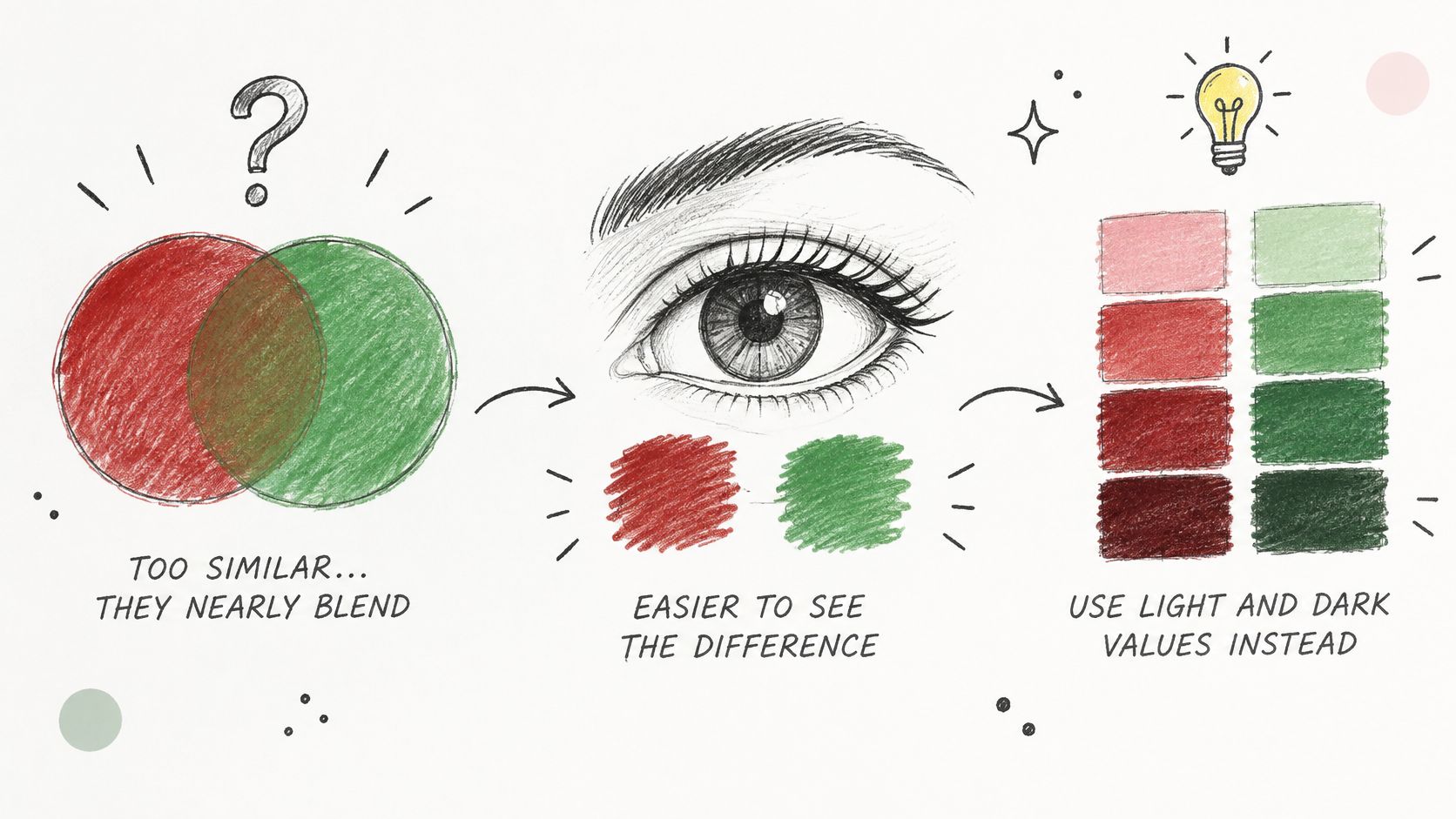
A 2025 accessibility study published on PubMed Central found analogous schemes among the less effective tested approaches, with particularly poor essential-element visibility and aesthetic satisfaction for red-green analogous palettes among people with deuteranopia and protanopia.
That finding doesn't mean every neighboring palette fails. It means a refined design-review board isn't enough evidence that shoppers can identify variants, compare products or find an action.
The illustration shows how value changes can preserve differentiation without abandoning the palette.
Analogous fit by merchandising situation
| Situation | Analogous fit | Better choice |
|---|---|---|
| Product grid where red and green SKUs must be told apart | Poor for red-green pairs when hue is the only cue | Add lightness steps, borders or icons, or test a split-complementary set |
| Single hero product within a seasonal story | Strong | Analogous set with a clearly assigned accent |
| Campaign needing high-contrast calls to action | Weak when the action blends into the palette | Neutral base with a single strong accent |
| Regional assortment across mixed displays | Moderate, needs testing | Analogous set with enforced lightness steps and labels |
| Tonal beauty range for one skin-tone family | Strong | Monochromatic or analogous set with shade-name coding |
Changing the scheme alone doesn't guarantee accessibility. A split-complementary palette can still fail if its values converge or its labels disappear against the background.
Use borders to identify selectable swatches, patterns for chart categories, icons for states and stable names for product variants. Keep those cues consistent between the product grid and detail page.
Choose analogous harmony when shoppers can still identify essential roles without relying on hue alone.
For calls to action, separate the functional interface from the seasonal art direction. The campaign can retain its warm peach-to-coral story while the purchasing control uses a clearly differentiated neutral treatment.
How Do Palette Rules Hold Across SKUs and Channels?
A line sheet gives reviewers room to compare. A mobile grid compresses that same collection into small images, while a printed wholesale copy can change the apparent difference between shades.
Use this channel overview as a review checklist, then test the actual output rather than approving the master artwork alone.
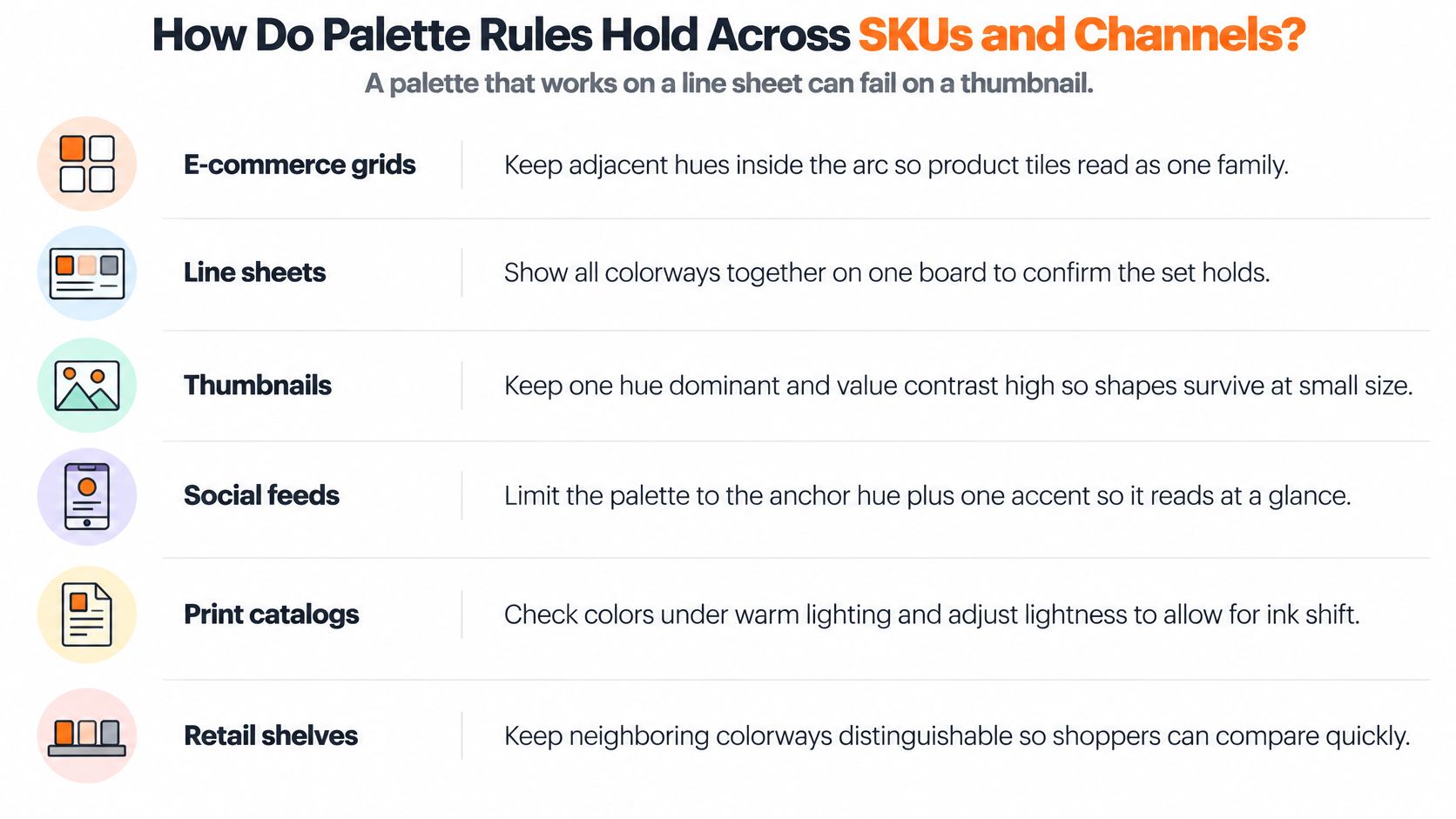
Channel risks and palette rules
| Channel | Main risk | Rule to apply |
|---|---|---|
| E-commerce grid and thumbnails | Adjacent hues merge at small size | Keep a clear lightness step between roles and label each SKU |
| Lookbook and editorial layouts | Backgrounds compete with product hue | Use neutral fields and whitespace between color blocks |
| Packaging and print | Color shifts across substrates | Check in grayscale and on a printed proof |
| Regional digital displays | Brightness and saturation vary by screen | Calibrate references and test on each market's main device |
| Wholesale line sheets | Buyers read colorways from copies | Print colorway names beside each swatch |
| Buyer assortments per account | Role assignment changes by account | Keep a master palette and filter subsets per account |
Don't lighten a product image just to make the tile stand out if that misrepresents the merchandise. Change the background, spacing or label treatment instead.
For shopping listings, Product Metrics' guide to improve a Google Shopping product feed provides useful operational context. Keep color names aligned between the feed, product page and buyer-facing materials.
Keep product identity separate from assortment emphasis
Store the approved colorway identity and master role with the product record. If an account selects mostly accent products, record that account's presentation emphasis separately rather than rewriting the master palette without notice.
Sprello is a supporting option for this workflow. Canvas turns sketches, CADs, materials and references into photoreal visuals and colorways with saved workflows, connected to a shared product catalog, line review, wholesale line sheets and separate buyer assortments per account or channel.
It complements PLM and planning suites; it doesn't replace them. AI visuals help teams compare options, but material approval still requires physical checks.
How Do Palette Tools Compare by Category?
Sprello is our product, an AI workflow canvas for fashion, beauty, and lifestyle brands. It supports work from product concept through buyer-ready collection, including production workflows that scale across SKUs, channels, regions, and seasons.
Choose tools by the decision they support. Creating a convincing colorway image, checking perceptual separation, and approving a material specification are different jobs. A polished rendering can help a team review a palette, but neighboring hues still need to be checked for lightness and perceptual distance before samples are cut.
Palette tools compared by category
| Tool category | Primary job | Role in analogous palette work |
|---|---|---|
| Sprello | Product concepting, AI visuals, shared workflows, assortment views, campaign production | Connects colorway exploration to collection review and buyer presentation; complements PLM |
| PLM suites | Product data, tech packs, BOMs, and sample workflow | Maintain product specifications; teams still define palette roles |
| Planning suites | Demand forecasting and open-to-buy | Set quantities by color rather than establish perceptual harmony |
| General design and CAD software | Artwork, rendering, and colorway files | Support flexible visual development; role rules depend on the designer |
| Color-measurement utilities | CIEDE2000 and contrast calculations | Check separation numerically without managing assortment workflows |
Sprello supports fashion, beauty, jewelry, and home categories, and teams can book a demo. Its visual canvas helps teams design and review workflows, while brand guardrails and style guidance support consistency across assets and campaigns.
Keep measurement, material specifications, and commercial planning in the systems built for those decisions. Use palette imagery to compare options, then verify hue separation and lightness on the intended product grid before approving samples.
What Do Teams Ask About Analogous Color Schemes?
How many colors should a collection use?
Start with an anchor, support and accent. Use a narrower pair for tonal merchandise, and add neighbors only when each has a clear assortment job rather than filling space on a board.
Is analogous the same as monochromatic?
No. Monochromatic palettes vary the lightness and saturation of a single hue, while analogous palettes introduce neighboring hue families. Product names alone won't tell you which system you've built; inspect the actual swatches.
Are analogous palettes accessible by default?
No. Run color-vision simulations on the actual grid and controls, not just the palette strip. Where shoppers must distinguish variants, provide readable names and selection cues that don't depend on color recognition.
What separation threshold should the team use?
Set a CIEDE2000 acceptance threshold for the intended task and document the calculation conditions. Apply the relevant accessibility requirements separately, and don't assume a perceptual-difference score proves that text or controls are legible.
Can a master palette serve every channel and account?
Yes, as a reference system rather than an identical layout. Keep approved colorway identities stable, select account-specific subsets and test each output in its intended viewing conditions.
A retailer's selection may shift the apparent emphasis of the collection. Record that change in the assortment presentation without changing the underlying product identity.
What Should a Team Lock in Before the Next Line Review?
Adopt a written palette rule card before requesting samples. The card should let another merchandiser understand why each color exists and how the team will approve it.
- Selection rule. Record the wheel model, arc and approved material references.
- Product roles. Assign anchor, support, accent or neutral, with a clear value order.
- Acceptance criteria. Document perceptual-difference targets, interface contrast requirements, simulation checks and physical review conditions.
- Output rules. Specify thumbnail treatment, print proofing, account presentation and colorway naming.
At line review, check each SKU against the card. Flag failures for the appropriate correction: an interface border, a clearer label, a presentation change or a revised product color.
Don't change the material color to solve a layout problem, and don't use a new name to disguise indistinguishable variants. The card makes decisions repeatable, but it can't replace real materials, printed proofs and display checks.
Sprello connects Canvas colorway exploration with a shared product catalog, line review, wholesale line sheets and buyer assortments per account or channel. Visit Sprello to book a demo and see how your team can carry approved palette decisions from product concept to buyer-ready collection.
Related
More to explore
Fresh reads
Sapphire Blue Color: Hex, RGB and Palette Pairings
Sapphire blue color is #0F52BA, or RGB 15, 82, 186. Learn how to define it, pair it in palettes and specify it for fashion, beauty and home campaigns.
Oxblood vs Burgundy: Color Differences and Use Cases
Oxblood vs burgundy explained with hex values, undertones, and material behavior. See which shade fits fashion, packaging, and campaign work.
Burnt Sienna Crayon Color Guide for Designers
A practical burnt sienna crayon guide with hex and RGB values, pigment background, complementary palettes, and merchandising tips for fashion and beauty teams.