November 21, 2026
Wholesale Line Sheet Template That Buyers Can Order From
Build a wholesale line sheet template with style codes, prices, variants, minimums, and delivery dates buyers can order from.
A wholesale line sheet template is a sales and ordering document that gives each style an image, identifiers, variants, wholesale and suggested retail prices, minimums, and delivery and payment terms so a buyer can place an order. Sprello provides a path from one shared product catalog into wholesale line sheets and separate per-account assortments.
You're preparing for a buyer appointment, but the designer's presentation, sales spreadsheet, and latest delivery update don't agree. The PDF looks finished. The buyer still can't tell whether the blue shirt is available, which minimum applies, or what code belongs on the purchase order.
That's the problem a useful template should solve. Buyer-specific views should change the assortment and commercial terms, not create competing versions of the product record.
Published March 2026
What Goes on a Wholesale Line Sheet
A buyer needs to identify the product, evaluate the commercial offer, and submit an executable order. A lookbook can establish the collection's mood, but it doesn't replace those ordering details.
The 2Slides wholesale line sheet guide describes the format's garment-trade roots: an image or drawing, an identifying number, and often a swatch. That relationship still matters. Buyers select styles visually, while sales and operations process their choices through codes, quantities, prices, and dates.
Copy the fields before designing the page
Use the following wholesale line sheet template fields as spreadsheet columns or linked tables. The examples are hypothetical working entries, not recommended commercial terms or actual product offers.
| Field group | What to record | Why the buyer needs it | Example |
|---|---|---|---|
| Identity | Style name, immutable style number, season or collection | Matches purchase orders and invoices | Woven shirt, style 2417, summer collection |
| Image | One photo or technical image tied to that style number | Stops the buyer ordering the wrong style | Front view, flat and swatch |
| Variants | Colorway, size, scent, metal or dimension, variant SKU, GTIN where used | Orders the exact option, not just the style | 2417-BLU-XS, Blue, XS |
| Materials | Composition, formula, finish or key spec | Checks claims and care before the buy | 100% cotton, enzyme wash |
| Price | Wholesale cost and MSRP in the account currency | Shows intended margin at the appointment | Account tier A; wholesale and MSRP shown |
| Minimums | Opening vs reorder MOQ, and style vs color, size or pack minimum | Prevents an order the brand cannot ship | Opening 6 per color; reorder 2 |
| Pack | Case pack and pack ratio | Sets how units actually ship | Pack of 6, ratio 1-2-2-1 |
| Availability | In stock, preorder, backorder or discontinued | Sets whether the style can be written now | Preorder |
| Dates | Ship start, ship end or window, order deadline, cancel date | Aligns floor set and inventory commitment | Ship 15 Jun–15 Jul 2026; order by 1 May 2026; cancel 1 Aug 2026 |
| Terms | Payment, freight, returns, ordering contact | Makes the sheet executable with the PO | Net 30, FCA warehouse |
| Ordering route | Buyer portal, rep email, EDI or PO requirements, order deadline | Tells the buyer exactly how to submit the order | Rep email or portal; PO must quote style and variant codes |
Separate the style from its options
Say you're selling a woven shirt in three colorways, with sizes XS–XL. The style number identifies the shirt design; the variant code identifies the exact color and size. A photograph labeled only “woven shirt” doesn't give the buyer enough information to order the blue XS rather than the navy XL.
Beauty, jewelry, and home teams use the same structure. Replace apparel size with the relevant shade, scent, metal, finish, capacity, or dimensions. Keep those attributes in separate fields rather than burying them inside a long description.
The retailer also needs to judge assortment breadth, intended margin, delivery timing, and inventory commitment. That's why a visually attractive page without minimums or suggested retail prices remains unfinished.
Practical rule: Every image should lead to an identifiable, orderable product, not an email asking which version the buyer meant.
Paste these rows into a spreadsheet before starting any PDF layout. Resolve missing information while it's still easy to compare fields side by side.
How to Build the Sheet Style by Style
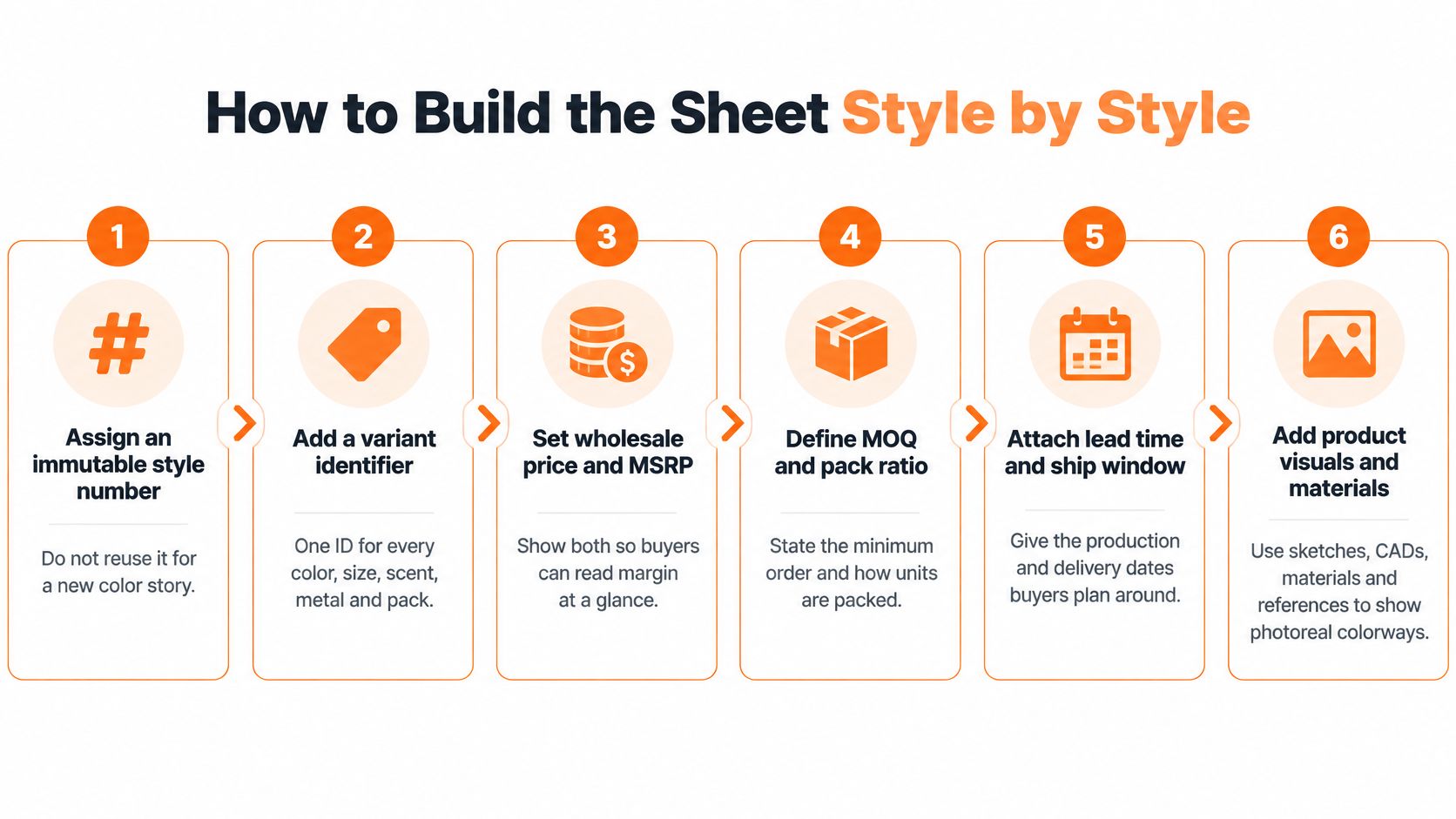
A buyer can recognize a shirt in a photograph and still be unable to order it. The sheet needs a stable style number, a code for each orderable variant, and commercial details tied to the correct product. The MakeupAR line sheet guide covers these fields, including materials, prices, minimums, delivery details, and terms.
Build an executable product record
Assign a stable style number. Keep it attached to the same design throughout the product's life. Don't reuse an old number for a different design or for a color story your operations system treats as a separate product.
Code every orderable variant. Give each color, size, scent, metal, dimension, or sellable pack a distinct variant identifier. Include a GTIN if your brand uses one. A shared style number alone won't tell the buyer whether they are ordering one metal or another.
Connect the right visuals. Link the approved image to the style, then attach color-specific images to their variants. A filename such as “final-blue” can't reliably identify a product once files are replaced or shared.
Attach commercial details to the right codes. Record material or formula, wholesale price, MSRP, MOQ, case pack, availability, and ship window against the relevant style or variant. Use the same units and pack terminology that will appear on the purchase order.
State the terms clearly. Separate opening-order minimums from reorder requirements. Include payment, freight responsibility, lead time, returns, order deadline, and ordering contact. Brandboom's line sheet explanation defines Net 30 as payment due 30 days after shipment, Net 60 as payment due 60 days after shipment, and 2/10 Net 30 as a 2% discount within 10 days, with the remaining balance due within 30 days. Name the payment trigger so both the buyer and accounting team know when the clock starts.
Test one sample order. Choose a color and size, then check the variant code, price, pack rules, and ship window against the ERP or inventory master. If the entry needs an explanation before a representative can place the order, fix the record before release.
Example template rows for one woven shirt
The hypothetical rows below show how a few variants can be represented, not a complete size run. The example prices are in USD; replace them with approved account prices and MSRP before sharing a buyer-specific sheet.
| Style number | Color | Size | Wholesale | MSRP | MOQ | Pack | Ship window | Status |
|---|---|---|---|---|---|---|---|---|
| 2417 | Blue | XS | 24.00 USD | 60.00 USD | 6 per color opening; 2 reorder | Pack 6 | 15 Jun–15 Jul 2026 | Preorder |
| 2417 | Blue | S | 24.00 USD | 60.00 USD | 6 per color opening; 2 reorder | Pack 6 | 15 Jun–15 Jul 2026 | Preorder |
| 2417 | Blue | M | 24.00 USD | 60.00 USD | 6 per color opening; 2 reorder | Pack 6 | 15 Jun–15 Jul 2026 | Preorder |
| 2417 | White | M | 24.00 USD | 60.00 USD | 6 per color opening; 2 reorder | Pack 6 | 15 Jun–15 Jul 2026 | Preorder |
| 2417 | Navy | L | 24.00 USD | 60.00 USD | 6 per color opening; 2 reorder | Pack 6 | 15 Jun–15 Jul 2026 | Preorder |
| 2417 | Navy | XL | 24.00 USD | 60.00 USD | 6 per color opening; 2 reorder | Pack 6 | 15 Jun–15 Jul 2026 | Preorder |
Add a variant SKU column to the buyer view so each row points to an orderable product. The color minimum applies across eligible sizes, not separately to every row shown. If reorders can ship below the opening pack quantity, state the broken-pack rule. If they cannot, make clear that a lower reorder minimum still requires a full pack.
A single product record can feed buyer-specific views, so account terms can change without creating a second, contradictory product sheet. Keep product facts consistent, then show the assortment and terms that apply to the account. A line sheet and assortment planning template can help teams review the collection mix alongside the transaction-level details. Release the sheet only when a representative can enter the sample order without asking product development to interpret a code, price, or pack rule.
Which Dates Must the Sheet Carry
Wholesale selling happens ahead of the shop floor. The Linesheet.io wholesale fashion calendar describes Spring/Summer merchandise in stores from February through July, with wholesale selling approximately June through September of the preceding year; Fall/Winter is worn August through January, sold around December through March, and shipped roughly June through August.
The same calendar describes market presentations about 12–14 months before the in-store season, assortment reviews around nine months before availability, and a typical wholesale order window of 4–8 weeks, with activity concentrated near its beginning and end. These are planning references, not deadlines to copy into every category or account.
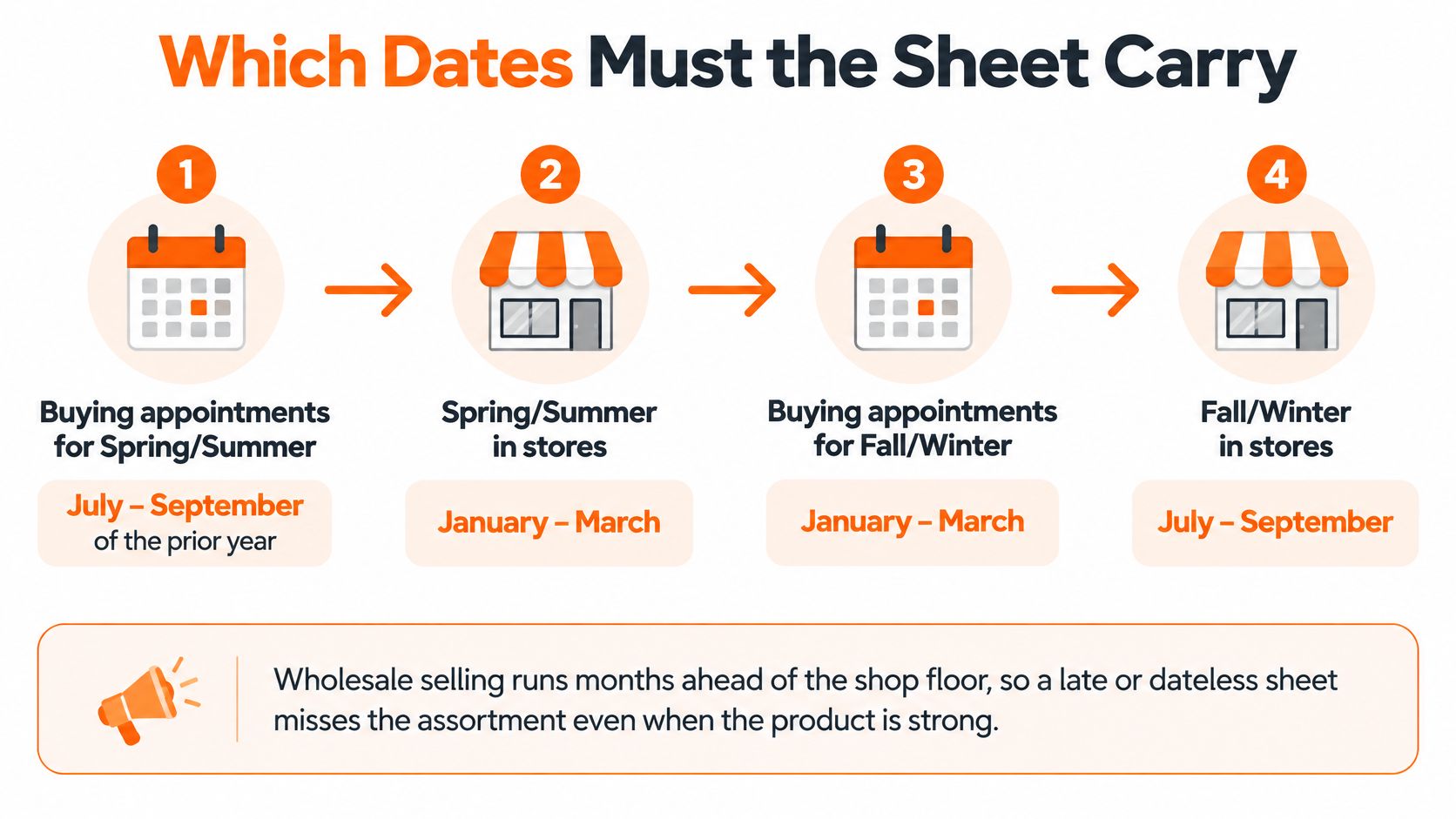
Treat a seasonal timeline as an illustration of buying ahead, not an account-specific delivery promise. Your approved dates must reflect the retailer's appointment schedule, assortment lock, and intended floor set.
Publish dates buyers can plan against
The average time from wholesale order placement to shipment was 102 days in 2024, down from 263 days in 2019, according to JOOR data reported by FashionNetwork. That historical change doesn't establish your lead time; it reinforces why a generic production estimate is a poor substitute for an explicit delivery commitment.
Display the following date fields clearly:
- Ship start: The earliest date the applicable delivery group is expected to leave the agreed shipping point.
- Ship end or ship-by date: The latest planned shipment date, with the destination-arrival expectation stated separately where needed.
- Order or pre-book deadline: The cutoff for submitting the order under the published offer.
- Cancel date: The applicable cancellation deadline, using terminology consistent with the commercial agreement.
The WisePIM line sheet guide also identifies season, delivery window, order deadline, and applicable cancellation dates as buyer-facing planning information. Put the season or collection beside those dates so the buyer doesn't have to infer it from a filename.
Don't confuse location with timing
Ship-from identifies a location; ship-by identifies a deadline. A lead-time note describes elapsed time from a defined trigger, such as order acceptance. None of those fields automatically tells a retailer when merchandise reaches the selling floor.
For a global assortment, add delivery group and currency to the relevant market view. A North American delivery commitment shouldn't carry over to a European offer.
Check the account calendar before release. If the published order deadline falls after the buyer's assortment lock, move the appointment or offer an appropriate later delivery rather than assuming the buyer can reopen the buy.
How Account Terms Stay on One Master
The universal buyer is a poor model for wholesale merchandising. A department store, specialty boutique, distributor, and marketplace may need different pack structures, order values, currencies, payment arrangements, and replenishment rules.
The SKULaunch wholesale line sheet template covers the core commercial fields that need this account-level interpretation. The practical answer isn't to print every possible exception on every page. Keep a canonical assortment, then publish the applicable buyer view.
What stays global and what changes by buyer
| Rule | Lives on | Same for every buyer? | Example |
|---|---|---|---|
| Style and variant codes | Global master | Yes | Style 2417; variant 2417-BLU-XS |
| Approved image and material | Global master | Yes | Front view, 100% cotton |
| Currency and Incoterm | Market view | No | USD and FCA vs EUR and DAP |
| Delivery group and ship window | Market view | No | NA June delivery vs EU July delivery |
| Opening and reorder minimums | Account view | No | Boutique 6 per color; department store prepack |
| Price tier and payment terms | Account view | No | Net 30 boutique vs Net 60 key account |
| Channel exclusions | Account view | No | Marketplace drops a wholesale-only style |
| One-off commercial deals | Order confirmation | No | Seasonal markdown support |
The table's commercial entries are hypothetical examples. The important distinction is where each rule lives, not whether those particular terms suit your brand.
Keep base product availability on the global record, with regional eligibility and allocations handled in the applicable view. A product can exist in the master without being offered to every account.
Change the offer without duplicating the product
Consider the woven shirt example. A specialty boutique receives a hypothetical six-unit opening minimum per color; a department store receives a defined prepack. Both offers reference the same underlying shirt and variants.
If the navy colorway is discontinued, change its central status and remove it from new offers in both views. Preserve already-issued versions as historical records, and handle accepted orders through the appropriate commercial process. Don't erase the audit trail or alter a commitment.
A negotiated seasonal markdown allowance belongs on the order confirmation, where the account and scope are explicit. It shouldn't become an unexplained footnote on a shared collection sheet.
More product copy doesn't resolve contradictory terms. Consistent status labels and clearly scoped rules do.
Assign ownership as well as scope. Product development can maintain materials, merchandising can approve assortment eligibility, and sales or finance can approve account terms. A change should reach the person responsible for that field before publication.
Before the next market appointment, mark every column Global, Market, or Account. Move negotiated exceptions out of the reusable template and into the order-specific record.
How to Check the Sheet Before Release
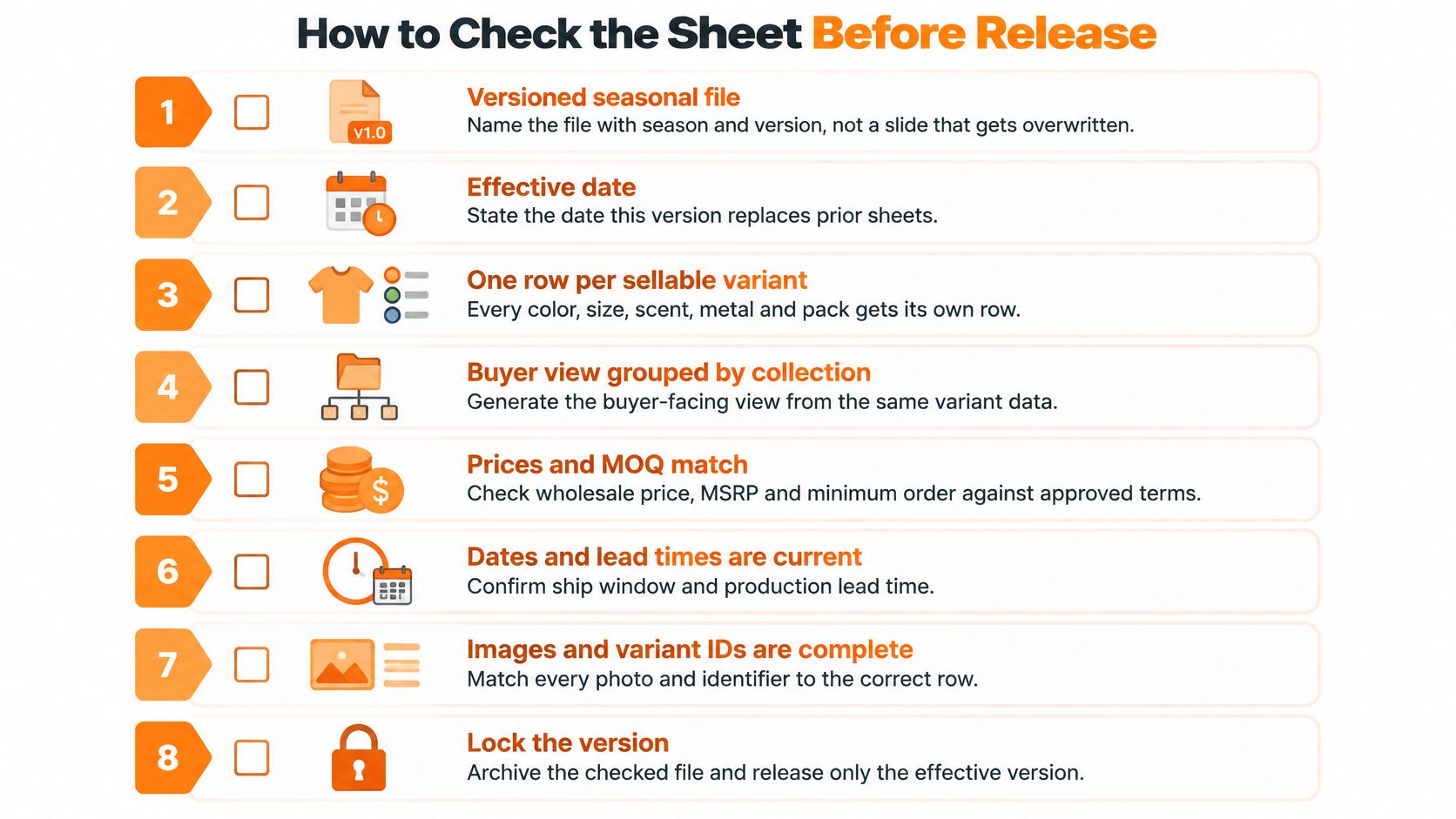
Treat the line sheet as a versioned seasonal file with an effective date, not a presentation someone overwrites. Maintain a canonical table with a row for each sellable variant, then generate buyer-facing views grouped by collection, delivery, or merchandising story.
RepSpark's digital line sheet guidance supports variant identifiers, clear availability, case-pack information, commercial terms, and checks for duplicate codes, missing variants, pricing inconsistencies, and date conflicts. Use those controls before a file reaches a buyer.
Give every control a fail condition
- Duplicate-SKU detection: Fail when different sellable variants share a code. In the canonical table, investigate repeated variant rows rather than assuming they're harmless duplicates.
- Orphan-variant detection: Fail when a displayed swatch, size, finish, or pack has no orderable identifier. Also flag active codes whose required product attributes are missing.
- Price-to-MSRP check: Fail when wholesale is blank, currencies are mixed without labels, or the implied retailer margin differs from the approved account tier. Confirm whether tax is included before comparing values.
- Date and season check: Fail when the ship window contradicts the intended season or the cancel date precedes ship start without an approved contractual reason.
- Minimum and pack check: Fail when opening and reorder rules, or style and pack constraints, are collapsed into an ambiguous number. Test whether an allowed quantity can be packed and shipped.
- Human visual check: Fail when the photograph, swatch, name, and code disagree. Review the rendered buyer document, not just the source table.
Use product naming conventions to make similar styles distinguishable without relying on a salesperson's memory. A readable name helps people review the offer; it doesn't replace the identifier.
Preserve the released record
The Order41 line sheet template emphasizes matching style numbers to order forms and invoices, distinguishing color and size at SKU level, and separating shipping and cancellation information. Build those relationships into the approval checklist rather than checking each document in isolation.
One wrong code creates production and service work later.
Add a version note, effective date, and validity date. Archive the approved file and identify which earlier version it supersedes, so a representative doesn't keep sending an obsolete colorway or price.
Finally, inspect the PDF at ordinary viewing size. Small type, clipped terms, and broken page references can make correct source data unusable. Don't send the PDF until a sample order keys cleanly against the master.
Which Format Fits the Wholesale Workflow
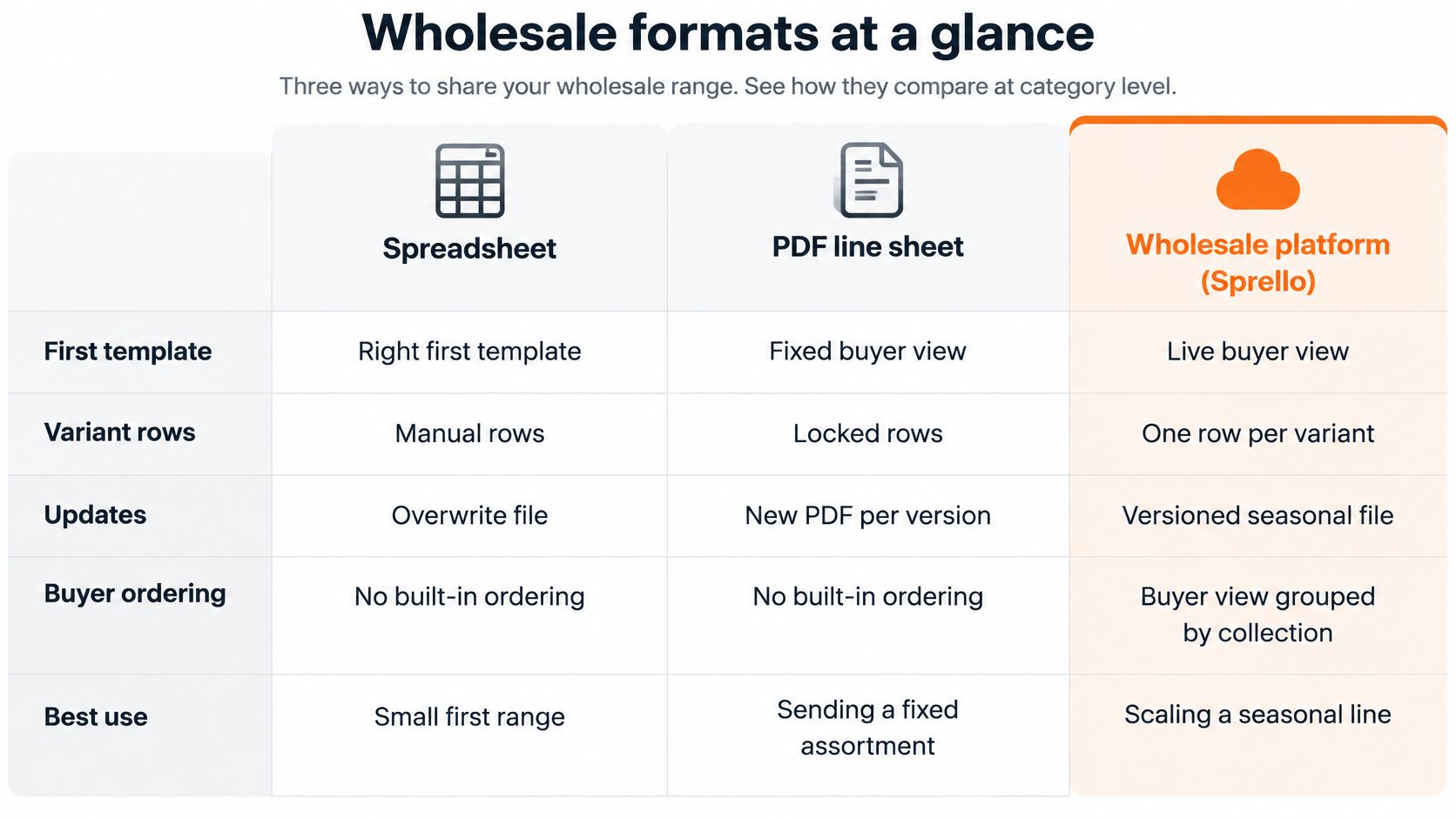
When a buyer places an order, the style code, variant, price, minimum, and dates must agree across the presentation and the order record. A polished PDF still fails if one field is wrong. Choose a format by the job it needs to do: develop the collection, maintain product information, show a buyer a clear offer, or capture an order.
A spreadsheet works well for a first draft, especially while teams are checking variant rows and calculating quantities. A PDF gives buyers a fixed presentation to review or keep. Both can support the process, but the file itself does not guarantee that product details, versions, and account terms stay aligned.
Where a wholesale line sheet can live
| Format | Best use | What it keeps straight | Where it stops |
|---|---|---|---|
| Spreadsheet template | First draft and order math | Style, SKU, price, MOQ, dates | Images and versions can drift apart |
| PDF or slide leave-behind | Showroom and market appointments | One designed view of the line | Codes and prices are harder to revise |
| Wholesale ordering platform | Buyer self-serve ordering | Catalog, orders, and account terms | Focuses on ordering rather than making collection visuals |
| PLM or planning suite | Product master and planning | Specs and the planning record | Supports product and planning processes rather than the buyer-facing sheet |
| Sprello | Catalog to buyer-ready sheets | Shared product information, visuals, line sheets, and buyer assortments | Complements PLM and planning suites |
Category boundaries matter more than a feature-count ranking. Ordering platforms focus on buyer access, catalogs, and order capture. PLM and planning suites support product and planning processes. A buyer presentation can use the same product information without replacing those systems.
Connect collection development to buyer presentation
Sprello is an AI workflow canvas for fashion, beauty, and lifestyle brands. Its canvas uses sketches, CAD files, materials, and references to create and refine product visuals. Selected visuals and product details then flow from the catalog into line sheets and buyer assortments. With one shared product catalog, teams can build buyer-specific views without maintaining a second, conflicting product record.
Line sheets can support presentations to different accounts and channels, including department stores, specialty boutiques, flagship stores, and a brand's own retail. They can show style or variant codes, material, wholesale price, and retail price. Each buyer's assortment starts from the same product information, while the proposed mix can be reviewed as a whole.
For a category-specific buying context, sourcing guest robes for hospitality buyers offers a relevant example. Keep the buyer's purchasing use case in view when deciding which product details belong in the presentation.
Keep a spreadsheet while teams are resolving variant codes. When account versions begin to diverge, compare shared-catalog workflows using these line sheet software criteria. A demo can walk through the catalog, canvas, line sheets, and assortments using one of your product categories, aligned with your team's workflow.
What Do Buyers Ask About the Template
What belongs in every buyer-view header?
Include the season, collection, currency, order deadline, ship window, ordering contact, and validity date. If the offer differs by account or channel, identify the buyer's applicable version.
Should buyers see internal cost or margin?
Show wholesale price and MSRP. Keep landed cost, internal margin, and price-tier logic in the controlled master. Buyers need the terms that apply to their account, not the calculations behind them.
How should an unphotographed style appear?
Use an approved technical image or CAD, and label it accurately. Set availability to preorder only if that reflects its actual commercial status. If the visual changes, issue a new released version rather than editing a document buyers already have.
Should the sheet include lifestyle images?
Use an approved product image as the primary ordering reference, and reserve campaign imagery for the lookbook. Clear product references help buyers separate the item from its styling, props, and surrounding merchandise.
Sprello connects product visuals and catalog details to buyer-ready line sheets and account-specific assortments. Each buyer view can draw on the same product information, so the account's offer is clear without maintaining a second, conflicting sheet. Share your catalog size and use case, then book a Sprello demo to walk through the catalog, Canvas, line sheets, and assortments using one of your product categories.
Related
More to explore
Fresh reads

PLM Software for Fashion Industry: 10 Tools for 2026
Compare 10 PLM software for fashion industry options, from enterprise suites to AI-assisted product development. Find the right fit for your team.
10 Line Sheet Software Options Worth Comparing in 2026
Compare 10 line sheet software options for fashion and lifestyle brands, including what each tool does well, what it lacks, and how to choose the right fit.
Jewelry Line Sheet Template: Fields, Steps and Compliance
Build a jewelry line sheet template with the fields, imagery, minimums and compliance details wholesale buyers check before they order.