September 17, 2026
AI Tools for Retail That Actually Scale Operations
Explore AI tools for retail from visual search to automation. Learn categories, use cases and how to evaluate enterprise-ready workflows.
A fashion team can have a complete seasonal range approved and still be weeks away from having the content, inventory logic, and regional campaign assets needed to sell it. Merchandising is checking colorways and size runs, design is refining concepts, marketing is requesting product imagery, and e-commerce is waiting for descriptions that match every channel. The problem isn't a lack of software. It's that the tools often work in isolation.
That's where AI tools for retail become useful. The strongest applications don't add a chatbot to a storefront or produce an occasional image. They connect decisions across SKUs, channels, regions, and seasons, helping teams move from assortment planning to creative production, replenishment, and campaign execution with fewer disconnected handoffs.
By 2026, AI had moved from experimentation into mainstream retail operations. One industry summary reports that 91% of retailers were using or assessing AI, while active deployment had risen to 58% from 42% in 2024. The same summary reports that 89% of retailers saw revenue gains and 95% saw cost reductions, with applications spanning pricing, assortment decisions, content production, and customer operations at scale (Quantumrun's overview of artificial intelligence in retail).
Introduction to AI Tools Reshaping Modern Retail
A merchandising director preparing a seasonal launch usually isn't asking, “Can AI write a product description?” The more important questions are operational: Which variants should the team visualize before committing to production? Which markets need different campaign assets? Can the content team create consistent photography for a large catalog without sending every request through a studio queue? Can replenishment teams act on demand signals before stores run short?
Those questions reveal the role of AI in retail. AI is becoming a workflow enabler, not merely a point solution. It can help a team see patterns in product data, create variations from approved inputs, predict demand, and coordinate actions between departments. Its value increases when the output enters the next business process instead of ending as a draft in a separate tool.
The distinction matters for enterprise brands. A generated image has limited value if it doesn't preserve the approved fabric, silhouette, or colorway. A forecast has limited value if planners can't use it inside replenishment decisions. A personalized recommendation creates friction if the underlying catalog information is incomplete or inconsistent.
Practical rule: Evaluate an AI tool by asking what decision or handoff it improves, not only what it can generate.
This guide follows that logic. It starts with the basic mechanics behind retail AI, then separates the major tool categories by job, applies them to merchandising and marketing workflows, and finishes with an enterprise evaluation and integration framework. The aim isn't to build the largest possible tool stack. It's to help retail teams identify where AI can remove repeated work while preserving brand control, operational context, and measurable accountability.
How AI Tools Work Behind the Scenes in Retail
Think of an enterprise retail team as a busy studio. One specialist examines products and recognizes details. Another creates visual or written variations. A third coordinates schedules, inventory signals, and campaign requirements. A fourth studies feedback and helps the studio improve its next decision.
AI tools perform similar roles, but they depend on the quality and structure of the information they receive. A product image, SKU identifier, material description, price, promotion, regional rule, and historical sales signal can all become useful inputs. The tool then transforms those inputs into a classification, a recommendation, a forecast, an asset, or an action.
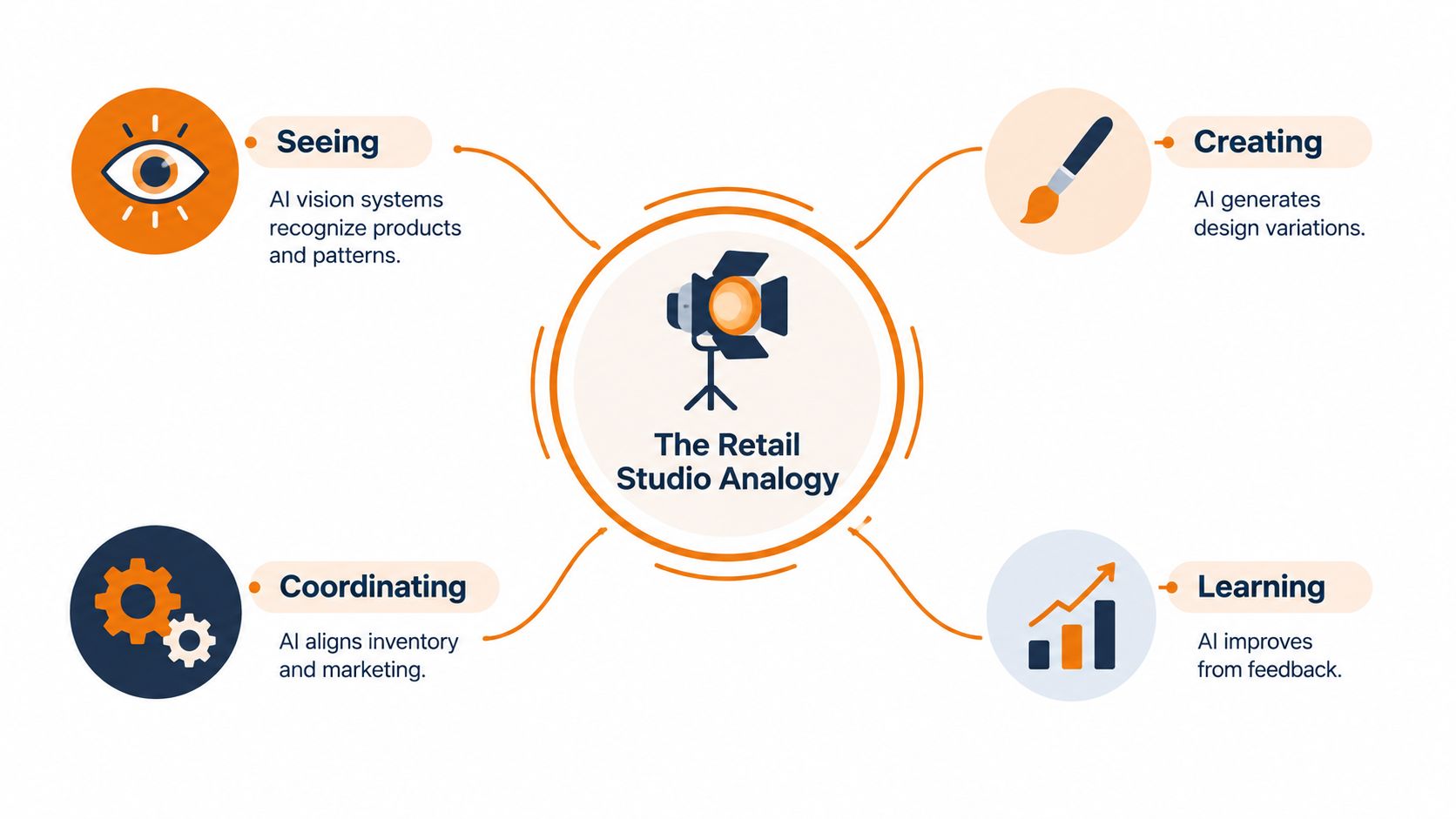
Seeing and recognizing
Computer vision helps AI inspect images and identify useful product characteristics. For a fashion team, that might include garment type, visible color, pattern, sleeve shape, neckline, or the presence of an accessory. The system can support visual search, image tagging, duplicate detection, and catalog organization.
This role is perceptive rather than creative. It doesn't decide which collection a buyer should approve. It turns unstructured visual material into information that other systems and people can use.
Creating and adapting
Generative AI produces new text, images, or design variations based on instructions and reference material. A team might use it to draft product descriptions, explore a colorway, adapt an approved campaign concept to another market, or create a product image variation for a channel with different requirements.
The output still needs review. Generation is fast, but speed doesn't guarantee that the fabric, fit, proportions, claims, or visual identity are correct. Retail teams need approved references and clear guardrails so that creative variation doesn't become product misrepresentation.
Coordinating and acting
Automation and orchestration connect tasks. An orchestration layer might identify new SKUs, route them to a product-content workflow, request required approvals, create channel-specific deliverables, and record which version went live. In planning, it might connect a forecast signal to a replenishment recommendation rather than leaving the forecast in a reporting dashboard.
This is the point at which separate AI capabilities become a workflow. The system coordinates inputs, rules, approvals, and outputs. People remain responsible for decisions that require commercial judgment, compliance review, or brand ownership.
Learning from feedback
Prediction systems learn from historical and contextual data to estimate what may happen next. Retail examples include demand forecasting, propensity modeling, assortment analysis, and recommendations. The quality of the result depends on whether the model sees the conditions that shape demand, such as price, promotion, timing, channel, and store or regional context.
A useful mental model is a relay race. Vision prepares structured product information, generative tools create usable assets, predictive tools estimate demand, and orchestration moves the result into the team's operating process. If one runner drops the baton, the entire workflow slows down.
Four Core Categories of AI Tools for Retail
Retail teams often group AI products by technology, but business users usually need a clearer distinction. They want to know which job the tool performs, what information it needs, and what the team can use afterward.
Generative AI adoption has accelerated since 2023. Adobe's 2025 retail digital trends research reported that 45% of retailers were already using generative AI for customer experience management, while Deloitte's 2026 retail outlook said nearly 68% of retailers expected to deploy agentic AI for core operational and enterprise activities within 12 to 24 months (Deloitte's retail and distribution industry outlook).
| AI Tool Category | Primary Job | Typical Inputs | Enterprise Retail Output |
|---|---|---|---|
| Visual search | Find visually similar or related products | Product images, visual attributes, catalog data | Search results, tagged products, related-item discovery |
| Generative imagery | Create or adapt product and campaign visuals | Reference images, product data, style guidance, briefs | Product photography variations, campaign assets, concept visuals |
| Personalization | Match products or content to shopper context | Behavior, catalog attributes, customer signals, channel context | Recommendations, tailored content, ranked assortments |
| Automation | Move work through repeatable processes | Workflow rules, approvals, product records, outputs | Routed tasks, completed deliverables, alerts, audit trails |
Visual search
Visual search helps shoppers or internal teams begin with an image rather than a phrase. A buyer could locate similar silhouettes across a catalog, while a customer could use a reference item to discover related products. The tool is strongest when product imagery and attributes are consistent enough to support meaningful matching.
Generative imagery
Generative imagery supports both exploration and production. Designers can test a visual direction before requesting finished samples, while marketing teams can create channel-specific assets from approved product references. The risk is drift. If the system changes a material detail or product construction, the image may look polished but fail commercially.
Personalization
Personalization ranks products, messages, or content for a particular shopper or context. It can support recommendations, merchandising placements, and regional experiences. Teams should connect personalization to current availability and assortment rules, otherwise the system may promote products that customers can't receive.
Automation
Automation is the category most likely to determine whether AI scales. It handles the movement between systems and people, from intake through review and publication. For teams comparing content-focused options, a resource on how to generate product descriptions with AI can help clarify the difference between generating copy and managing the broader approval and publishing workflow. Retailers exploring the wider e-commerce sector can also review AI tools for ecommerce to compare adjacent applications.
Real World Use Cases Across Merchandising and Marketing
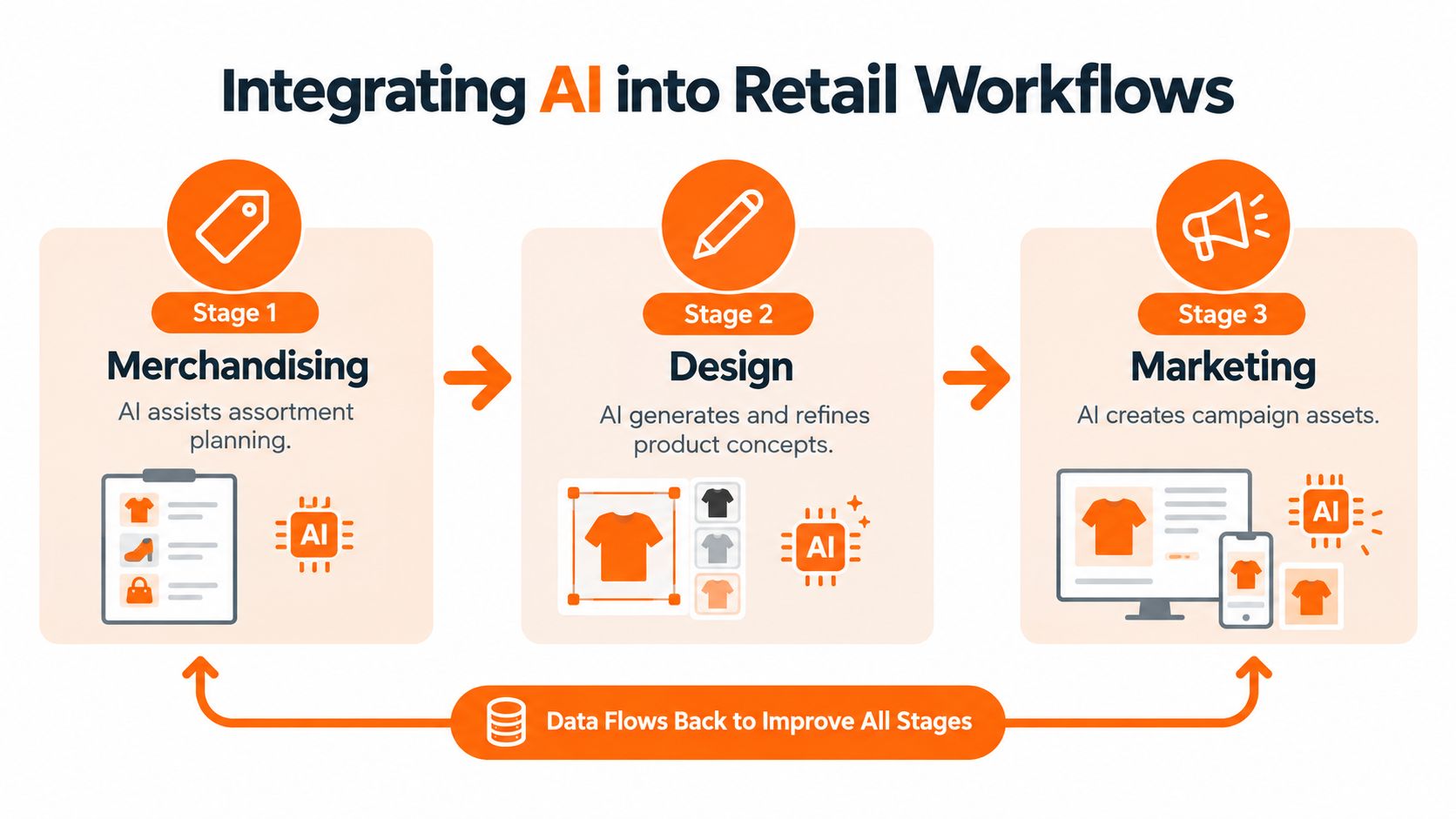
A fashion merchandising team starts with a seasonal range plan. Before committing to every variation, it needs a clear view of how silhouettes, colors, accessories, and sizes work together. AI-assisted assortment visualization can turn product concepts and references into shareable views that help buyers discuss the line architecture earlier, before the same questions appear in multiple meetings.

The important output isn't a pretty board. It's a shared commercial reference. Merchandising can review the relationship between core products and accessories, design can refine the concept, and marketing can understand which visual stories will need campaign support. The workflow becomes more valuable when the approved assortment information flows into later product and content tasks.
From product concept to catalog asset
A design team might begin with sketches, material swatches, and silhouette references. Generative tools can help explore alternatives, but the team needs a controlled path from exploration to an approved product record. Once the product is confirmed, AI-assisted photography and copy workflows can create consistent assets across channels without asking teams to rebuild the same brief repeatedly.
The same principle applies to regional campaigns. A global brand may retain the approved product and visual identity while adapting composition, copy, or delivery format for different markets. The system should preserve what cannot change and expose what can change, rather than allowing every market to create an unrelated interpretation.
Forecasting that reaches replenishment
Demand forecasting is another area where workflow connection matters. A quasi-experimental study using retail SKU, store, and time data reported statistically significant forecast-accuracy gains alongside lower stockout rates, higher inventory turnover, and reduced inventory holding costs, with the strongest effects in high-variability categories (the retail demand forecasting study).
The operational lesson is straightforward. A forecast should not remain a number on a dashboard. It should inform replenishment decisions, inventory policies, and planner review. Better short-horizon signals can help teams address overbuying and underbuying, but the final process still needs category knowledge, promotion context, and exception handling.
Teams building the marketing layer can use an AI marketing solutions guide to compare content, campaign, and customer-experience applications. The evaluation should always return to the handoff. Can the output be traced to a SKU, approved for a channel, localized for a region, and measured after publication?
How to Evaluate AI Tools for Enterprise Retail Teams
Feature lists can make two AI products look similar. Enterprise teams need a harder test: can the tool perform reliably inside the work people already do?
Deloitte reports that 75% of retail and CPG leaders call AI a top strategic priority, yet only 16.5% can quantify ROI, while enterprise-wide deployment remains in the single digits, from 7% to 10% (Deloitte's state of AI adoption in retail and CPG). Those figures point to a scaling problem. Retailers generally understand that AI matters, but many still lack the measurement, governance, and operating model needed to move beyond pilots.
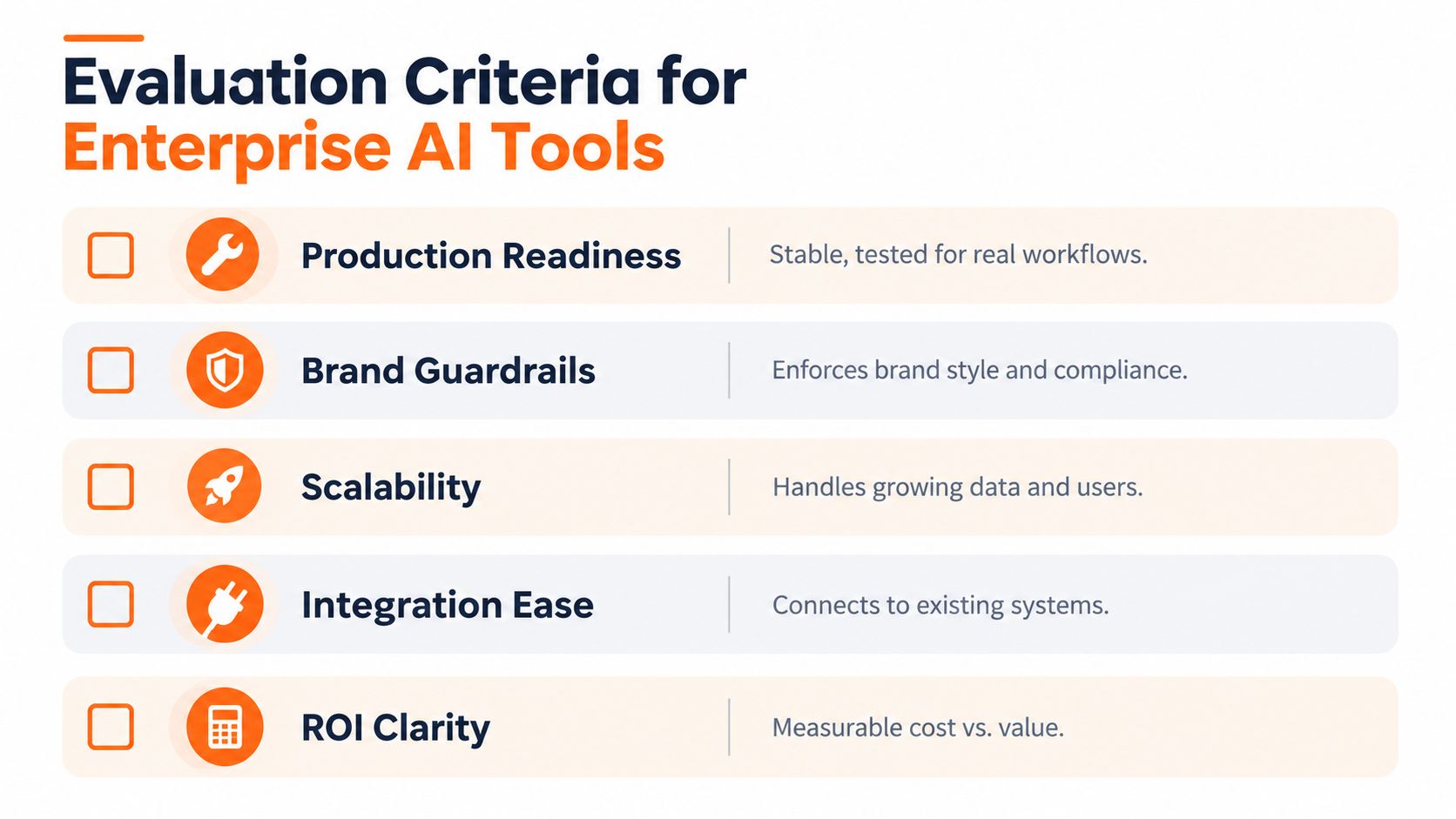
Production readiness
Ask whether the tool supports repeatable work, not just impressive demonstrations. Can it process the product records your team uses? Does it preserve source references? Can users review, revise, approve, and retrieve outputs without creating manual side files?
A production-ready tool also needs predictable failure behavior. If an image doesn't meet the required standard or a product record is incomplete, the system should flag the issue instead of producing an asset that looks finished.
Brand guardrails
Retail brands need rules for visual identity, product accuracy, language, claims, and market requirements. Look for controls that let teams define approved references, style guidance, naming conventions, and review permissions.
Guardrails shouldn't remove creative judgment. They should protect the parts of the brand and product that must remain stable while allowing controlled variation where teams want it.
Scale and integration
A tool may work for one collection and still fail across a full catalog. Test the workflow with different product types, incomplete inputs, regional requirements, and multiple channels. Then examine how it connects with product information, digital asset management, commerce, planning, and collaboration systems.
Teams seeking a broader framework for workflow evaluation can also consult AI workflow tools. The question isn't whether a platform has an integration logo. It's whether data can travel through the process without repeated exports, naming errors, or manual reconstruction.
ROI clarity
Define the baseline before testing. Measure the work the team currently performs, the approval steps involved, the rework created by inconsistent outputs, and the time required to prepare assets or decisions. Then choose a small set of operational measures that match the use case.
A content workflow may track completion quality, revision volume, and channel coverage. A merchandising workflow may focus on decision speed, assortment visibility, or the usefulness of replenishment recommendations. ROI becomes easier to discuss when the team measures the workflow rather than promising a vague transformation.
Decision test: If the team can't identify the owner, input, approval point, output, and measure for a use case, the tool isn't ready for a serious enterprise pilot.
Integrating AI Tools Into Existing Retail Workflows
Integration starts with process mapping, not procurement. Take one seasonal workflow and write down what happens from the first product brief to the final approved asset. Include the systems involved, the people who review each step, the naming conventions, and the information that gets lost between handoffs.
Start with a controlled production path
Choose one workflow with a clear owner and a repeatable output. For example, a team might connect approved SKU data to product-image generation, human review, channel formatting, and asset-library delivery. The pilot should test the entire path, not only the generation step.
Create a seasonal dossier that contains the collection brief, approved product references, style rules, market constraints, and output requirements. That dossier gives every participant the same context and makes it easier to audit why an output looks the way it does.
Standardize the basics:
- Product identity: Use stable SKU names and identifiers so every image, description, and approval refers to the same item.
- Reference material: Store approved sketches, samples, swatches, and product images in a controlled location.
- Output rules: Define required dimensions, formats, copy fields, channel destinations, and review states.
- Human ownership: Assign responsibility for product accuracy, brand approval, legal review, and final publication.
Prepare people for coordinated systems
Workforce readiness often receives less attention than model selection. Designers need to know how to provide useful references and reject inaccurate outputs. Merchandisers need to interpret recommendations alongside commercial context. Marketing operations teams need to manage exceptions, version control, and approvals.
The industry is also approaching more autonomous workflows, but adoption remains uneven. TCS reports that 85% of retailers have not yet begun implementing or planning multi-agent AI systems, while 24% are using AI for autonomous decision making and 51% still rank chatbots and virtual assistants as their main AI initiative (TCS research on AI adoption gaps in retail).
That doesn't mean every team should rush toward multi-agent systems. It means teams should design clean handoffs now, so future automation has reliable data, explicit permissions, and understandable checkpoints. A practical starting point is to review AI workflow automation through the lens of specific retail processes rather than abstract autonomy.
Building a Scalable AI Toolkit for the Next Season
A scalable retail AI toolkit isn't a collection of unrelated generators. It's a connected operating layer that helps teams make, review, distribute, and learn from decisions across the product lifecycle.
Start with an audit of the current season. Identify where teams repeat the same work, where approvals stall, where product data changes hands manually, and where channel or regional variations create rework. Choose one workflow with a clear business owner, then connect its inputs, AI step, human review, and final output.
Forecasting illustrates why this approach matters. Across comparable retail forecasting evaluations, AI models outperformed strong statistical baselines by a median WAPE reduction of about 7% to 9%, while richer feature sets such as price, promotion depth, holiday proximity, and identifier embeddings added another 3% to 6% improvement (the retail forecasting evaluation review). The useful lesson isn't to promise the same result in every business. It's to connect model inputs to the decisions that planners can change.
Creative operations need the same discipline. If your team is trying to produce more content without quality drift, define what must remain consistent before increasing volume. Approved product truth, brand guidance, naming, regional rules, and review ownership should travel with every output.
Sprello is one example of a visual workflow canvas designed for fashion, beauty, and lifestyle teams. It supports assortment visualization, product concepting, editorial campaign workflows, accessory assortment generation, and catalog-scale AI product photography across SKUs, channels, regions, and seasons. The practical objective is a visible, auditable path from creative and merchandising inputs to production-ready deliverables.
Audit one seasonal workflow this week, then choose the handoff that creates the most repeated work between merchandising, design, and marketing. Visit Sprello to explore how a visual AI workflow canvas can help your team connect assortment planning, creative production, and catalog-scale execution in one operating process.
Related
More to explore
Fresh reads
Swim Lane Chart Guide: Roles, Handoffs and Audits
Learn what a swim lane chart is, how merchandising and creative teams map roles and handoffs, and how to audit workflows. Includes a tool comparison.
How to Make a 4x6 Photo Template for Print
Build a 4x6 photo template at 1200×1800 px and 300 PPI, with bleed, a safe zone, and export settings for lab, inkjet, and retail print.
4 Square Chart Guide for Fashion Line Reviews
A 4 square chart sorts fashion styles into four decisions. See axes, scores, quadrant actions, and a line-review template.