
Ever wonder why a quote for a "simple" corporate video can range from $1,000 to over $20,000? It’s a common source of sticker shock, but understanding where that money goes is the first step toward building a realistic budget—and finding clever ways to save.
Why Traditional Video Production Is So Expensive
If you’ve ever gotten a video production quote and thought, "How can it possibly cost that much?", you're definitely not alone. The price for a professional video isn't arbitrary; it’s a reflection of specialized labor, high-end gear, and a whole lot of time. Before we get into building a cost calculator, let's pull back the curtain on what you're actually paying for.
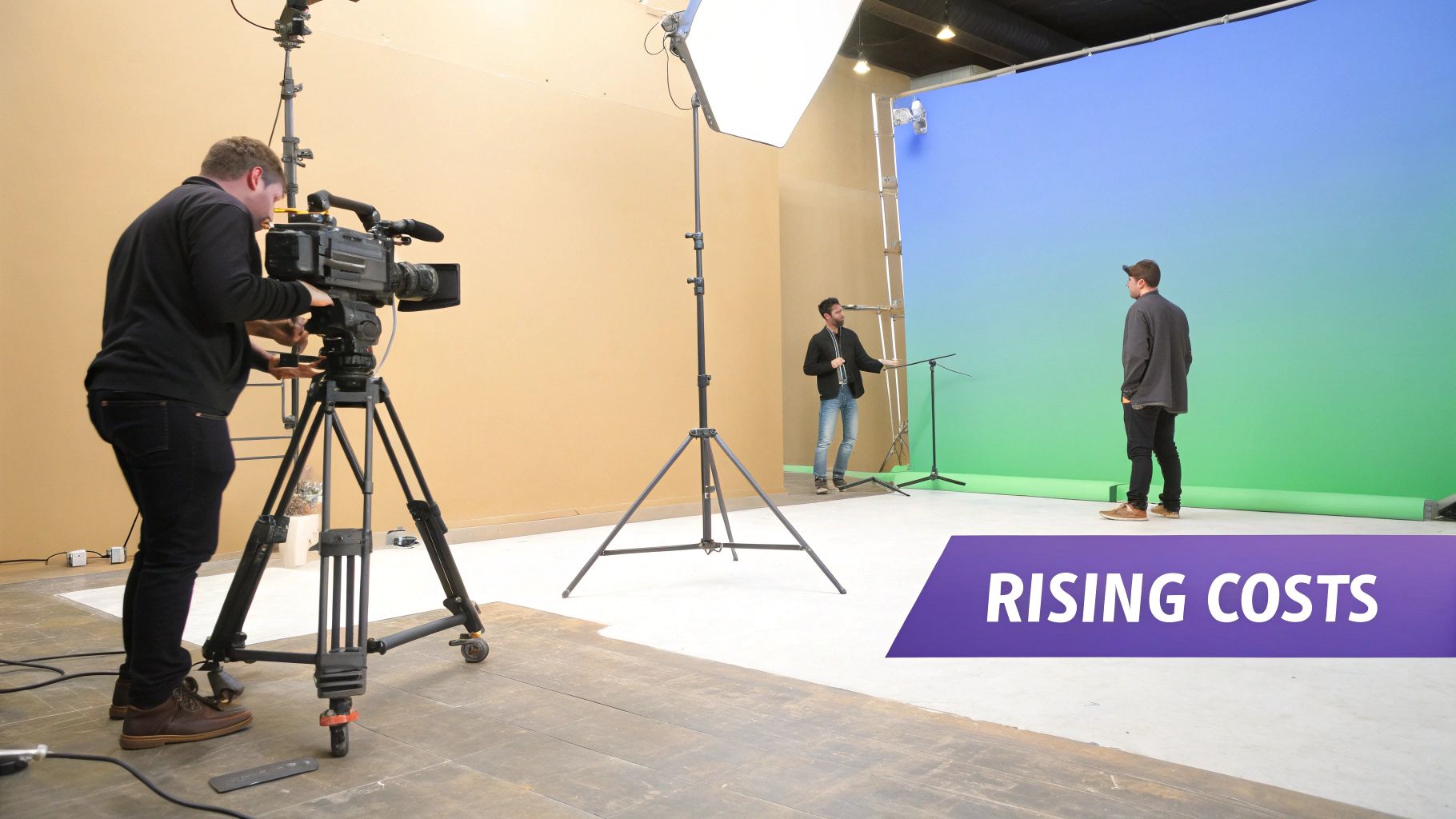
The industry itself is booming. The global video production market hit a staggering USD 98,987.9 million in 2023 and shows no signs of slowing down. This isn't just a number; it means the demand for skilled pros and top-tier equipment is high, which naturally drives up prices. You can get a deeper dive into these market trends over at Grand View Research.
The People Behind the Camera
A massive chunk of any video budget—often 40-70% for a standard corporate video—goes straight to the crew. We're not talking about one person with a camera. A professional shoot is a team sport, with each player bringing a specific skill set to the field.
Just to give you an idea, here’s a typical lineup:
- Director: The creative lead who shapes the story and vision.
- Director of Photography (DP): The expert who makes everything look good, managing cameras and light.
- Sound Engineer: The person responsible for capturing crystal-clear audio (it's more important than you think!).
- Gaffers & Grips: The hands-on crew that sets up all the lighting and camera rigs.
- Producers & PAs: The logistical wizards who keep everything on schedule and on budget.
Each of these roles has a day rate, and depending on their experience, that can be anywhere from a few hundred to a few thousand dollars. A single shoot day can easily run between $750 to $5,000 just for the crew.
The Talent and the Tech
Once you have the crew, you need people to put on screen. Professional actors can command fees from $150 to over $2,500 per day. Suddenly, that simple "talking head" interview video has a bill of $1,500 for one day when you add up the talent and a small crew.
Then comes the gear. Professional cameras, lenses, lights, and microphones are incredibly expensive. Most production companies rent this equipment, and the costs add up fast. Just a high-end cinema camera package can easily cost $1,000 per day to rent.
The bottom line is that traditional video production is a service-based industry. You're not just buying a video file; you're investing in the combined time, skill, and tools of a small army of experts.
This financial reality is exactly what's pushing businesses to look for smarter alternatives. If you're trying to make every dollar count, a great starting point is learning how to reduce production costs with better planning and new tools. Luckily, the game is changing, and powerful new options are making high-quality video more accessible than ever.
Breaking Down Your Video Budget Line by Line
If you want to get a handle on your video costs, you need to start thinking like a producer. Every project, whether it’s a quick social media clip or a full-blown commercial, breaks down into three core stages: Pre-Production, Production, and Post-Production. Building a cost calculator that actually works means putting a price tag on every single task within these phases.
This isn't just about avoiding a surprise invoice at the end—it's about gaining total control. When you itemize everything from the initial script idea to the final color grade, you can spot where the money is going and find smart ways to save before a single frame is shot.
Pre-Production: The Blueprint for Your Video
This is the planning stage, and honestly, it’s the most important part. Every dollar you spend here will save you three or four dollars down the road. Cutting corners in pre-production is the fastest way to end up with budget-killing reshoots and endless, frustrating revisions.
Think of this as your project's foundation. Your checklist will include things like:
- Concept Development & Strategy: Nailing down the video's goals, who it’s for, and the one thing you want them to remember.
- Scriptwriting: Getting the story, dialogue, and any on-screen text just right. A pro scriptwriter is worth their weight in gold.
- Storyboarding & Shot Lists: This is your visual game plan. It maps out every scene so the director knows exactly what to capture on shoot day.
- Casting & Talent: Finding the right actors or voiceover artists to bring your script to life.
- Location Scouting & Permits: Securing the perfect backdrop, which can involve scout fees, rental costs, and city permits.
- Crew Hiring: Assembling the A-team, from the director to the production assistants who keep everything moving.
- Production Insurance: This is non-negotiable. It protects you from liability, equipment damage, and a dozen other things that can go wrong.
A well-planned video is an on-budget video. Treat pre-production as your best defense against unexpected costs and creative chaos.
Production: The "Lights, Camera, Action" Phase
This is where the plan comes to life—and where costs can spiral if you're not careful. Your production budget is mostly driven by the number of shoot days, the size of the crew, and how complex your shots are.
Here’s a look at what you’re paying for when the cameras are rolling:
- Crew Day Rates: This will be your biggest expense. It covers everyone on set: the Director, Director of Photography (DP), sound mixer, lighting crew (gaffers), and makeup artists.
- Talent Fees: The daily or hourly rate for your actors or on-screen presenters.
- Equipment Rental: Cameras, lenses, lights, audio gear, and any special toys like drones or stabilizers.
- Location & Studio Rental: The daily fee for that cool office space or controlled studio environment.
- Art Department & Props: Anything needed for set design, props, and wardrobe to create the right look.
- Travel & Catering: Getting the crew and gear to the location and keeping everyone fed and happy during a long day.
Post-Production: Putting It All Together
Once you’ve got all your footage, the project heads into post-production. This is where a skilled editor weaves all the raw material—video, audio, and graphics—into a polished final product. The time this takes can vary wildly depending on the video's length and complexity.
Your post-production budget will need to cover:
- Video Editing: The editor's time to select the best takes, sequence the story, and pace the video.
- Color Correction & Grading: This is what gives your video that professional, cinematic look and consistent feel.
- Sound Design & Mixing: Cleaning up dialogue, adding sound effects, and balancing music to create a rich audio experience.
- Motion Graphics & Animation: Creating animated logos, titles, or other visual effects.
- Music Licensing & Stock Footage: Buying the rights to use music tracks or B-roll clips.
- Revisions & Final Delivery: Most editors include one or two rounds of revisions in their quote. Anything more will usually cost extra.
To give you a clearer picture, here’s a table breaking down potential costs across these phases.
Video Production Cost Breakdown by Phase
This table offers a detailed checklist of potential expenses you might encounter. The costs can vary dramatically based on your project's scope, the crew's experience level, and your location. Think of the "Low-End" as a smaller, more streamlined production and the "High-End" as a more complex project with a larger team and higher production values.
| Phase | Line Item | Low-End Cost Estimate | High-End Cost Estimate |
|---|---|---|---|
| Pre-Production | Concept & Scriptwriting | $500 | $5,000+ |
| Storyboarding/Shot List | $250 | $2,000+ | |
| Casting (Director & Fees) | $300 | $3,500+ | |
| Location Scouting & Permits | $200 | $2,500+ | |
| Producer/Coordinator | $600 | $4,000+ | |
| Production | Director & DP (Day Rate) | $1,200 | $5,000+ |
| Crew (Sound, Grip, Gaffer) | $1,000 | $6,000+ | |
| Talent (Per Person/Day) | $400 | $2,500+ | |
| Equipment Rental (Camera/Light/Sound) | $800 | $7,000+ | |
| Location/Studio Rental (Per Day) | $500 | $4,000+ | |
| Art Department (Props/Wardrobe) | $300 | $3,000+ | |
| Post-Production | Video Editor (Hourly/Project) | $1,000 | $8,000+ |
| Motion Graphics/Animation | $500 | $7,500+ | |
| Color Grading | $400 | $3,000+ | |
| Sound Design & Mixing | $400 | $3,500+ | |
| Music & Stock Footage Licensing | $200 | $2,000+ |
This breakdown helps clarify where your budget is allocated and highlights areas where you can potentially make strategic cuts without sacrificing quality.
Understanding these line items is your key to making smarter decisions. For example, a basic corporate video often starts at $1,000-$5,000 for pre-production alone, with the entire project easily landing in the $10,000-$30,000 range. To get an even more granular view, you can dig into the specifics of TV ad production costs, which detail every expense from script to screen.
With this knowledge, you can start comparing costs intelligently. How does hiring a live actor stack up against using an AI avatar? What's the cost difference between a location shoot and using high-quality generated B-roll? For a deep dive into the tools that can help with these choices, check out our video production software comparison. This level of detail turns your budget from a rough guess into a powerful planning tool.
Estimating Costs for Different Video Types
It’s an old saying in this industry: not all videos are created equal. And neither are their price tags. The budget for a punchy 30-second social media ad is a world away from a detailed 10-minute corporate explainer. Knowing the difference is the key to using any video production cost calculator accurately and keeping your expectations grounded in reality.
Ultimately, a video's final cost comes down to a mix of its type, length, and the overall production value you're aiming for. A simple "talking head" video sits at one end of the spectrum, while a multi-location brand film loaded with visual effects is at the other. Each has a completely different recipe of resources, time, and talent, all of which drive the budget.
Social Media and E-Commerce Product Videos
For anyone focused on direct response and immediate engagement, social media and e-commerce videos are your bread and butter. These are usually short, punchy, and built to grab someone's attention in the first three seconds. Think TikTok ads, Instagram Reels, and those quick product demos you see on an Amazon page.
Their biggest cost advantage is their brevity. A 15 to 60-second runtime means less time on set and less time in the editing bay.
- Low Budget Range ($500 - $2,500): This usually means you're working with existing assets, simple graphics, or a tiny crew for a single, controlled product shoot. Many folks in this bracket lean on stock footage or even AI video tools to keep costs down.
- Mid Budget Range ($2,500 - $7,000): Now you're talking about a more professional setup. This budget can get you better lighting, a skilled videographer, and maybe a paid actor or model. It also opens the door to more dynamic shots and custom motion graphics.
- High Budget Range ($7,000+): This is for highly polished ads. You're likely looking at multiple locations, a small cast, and higher-end visual effects to create that premium, can't-ignore-it feel.
Quick, engaging, and cost-effective—social media videos thrive on simplicity and repetition. The goal isn't a cinematic masterpiece; it's a clear, compelling message that drives a specific action, like a click or a purchase.
This handy flowchart gives you a sense of how a typical video budget breaks down across the three main production phases.
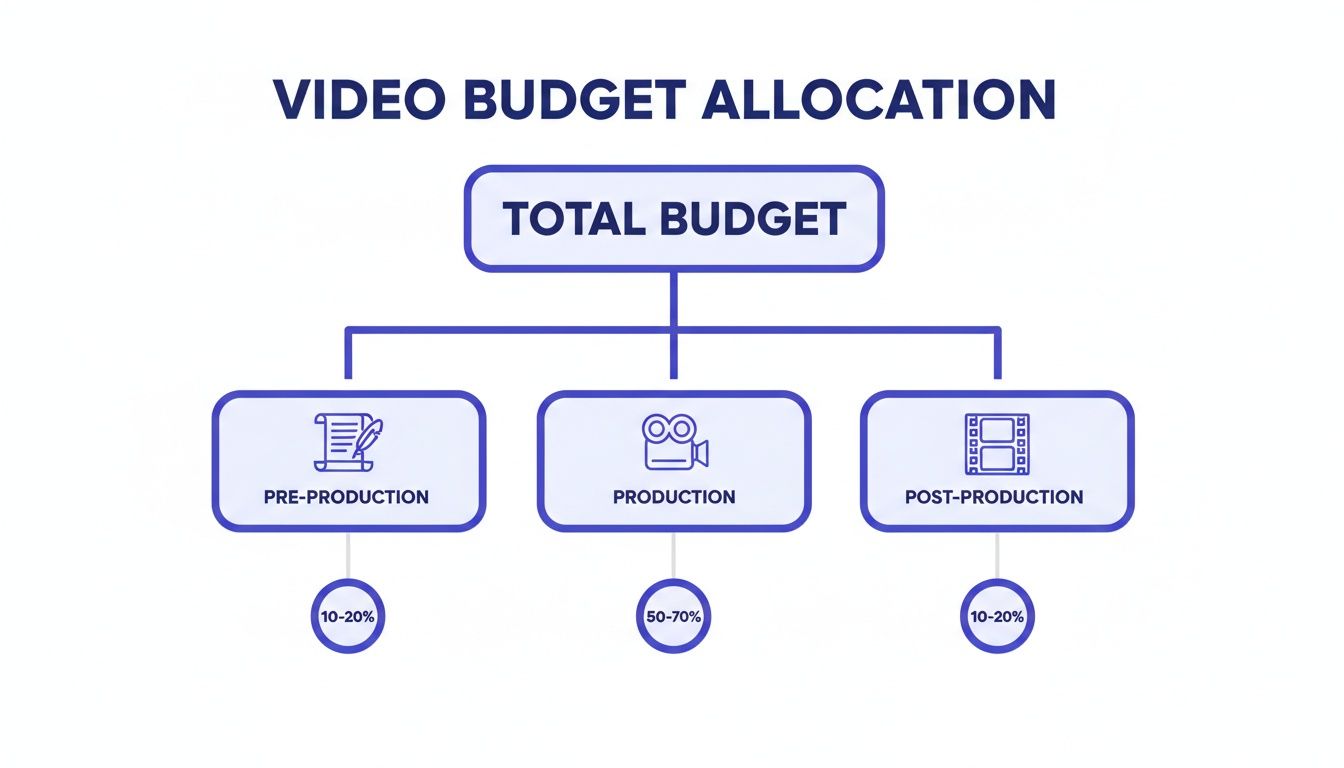
As you can see, the actual filming (Production) is often the biggest slice of the pie. That’s precisely why nailing down the details in Pre-Production is so important for keeping your budget in check.
Corporate Explainers and Training Videos
Corporate videos play a different game entirely. Their job is to inform, educate, and build trust, usually over a longer runtime of 2 to 10 minutes. This bucket includes everything from company culture videos and brand stories to in-depth employee training modules and product tutorials.
Longer videos, of course, demand more resources. You’ve got more script to write, more footage to capture, and a lot more hours staring at a timeline in the editing suite.
For a live-action corporate video, a mid-range production might land somewhere between $5,000 and $20,000. That budget typically covers a professional crew for a day or two of shooting, a few different camera setups, and a polished final edit.
Animated explainer videos have a different cost structure. You save money on crew and location fees, but you're investing that directly into skilled design and animation. A custom-animated video often ends up in a similar ballpark, from $4,000 to $15,000, depending on how complex the graphics get. A simple whiteboard animation from a template will be much cheaper, while high-end 3D work can send costs soaring.
Estimated Cost Ranges by Video Type and Length
To give you a clearer picture, I've put together a table with some general benchmarks. Think of these as a starting point for your own video production cost calculator, and remember to tweak them based on the specific creative vision for your project.
| Video Type | Typical Length | Low Budget Range | Mid Budget Range | High Budget Range |
|---|---|---|---|---|
| Social Media Ad | 15 - 60 seconds | $500 - $2,500 | $2,500 - $7,000 | $7,000 - $15,000+ |
| E-commerce Product Video | 30 - 90 seconds | $800 - $3,000 | $3,000 - $8,000 | $8,000 - $20,000+ |
| Animated Explainer | 1 - 3 minutes | $1,500 - $5,000 | $5,000 - $15,000 | $15,000 - $30,000+ |
| Live-Action Corporate Video | 2 - 5 minutes | $3,000 - $7,500 | $7,500 - $25,000 | $25,000 - $50,000+ |
| Educational/Training Content | 5 - 15 minutes | $2,000 - $6,000 | $6,000 - $18,000 | $18,000 - $40,000+ |
These numbers reveal a pretty clear pattern: the longer and more complex the video, the bigger the investment. A simple talking head video for internal training will always be easier on the wallet than a cinematic brand story meant for a national campaign. By figuring out your video type first, you can get a much more realistic handle on your costs and build a budget that makes sense.
How AI Is Radically Changing Video Budgets
The old rules for budgeting video are being torn up and thrown out. For years, we've accepted that high-quality video means a five-figure price tag. That’s just not true anymore, and AI is the reason why. This isn't just about trimming a few expenses; it's a complete teardown of the traditional cost structure that kept so many businesses on the sidelines of video marketing.

Platforms like Sprello are leading this charge by zeroing in on the most expensive and time-sucking parts of making a video. By automating key elements, AI is simply erasing entire line items from your cost calculator. What used to be a massive, one-off investment is quickly turning into a predictable, low monthly expense.
Sidestepping On-Set Production Costs
Let's be honest, the single biggest budget killer in any traditional video project is the shoot day. Think about it. You’re renting a location and paying for a whole crew: a director, camera operator, sound engineer, lighting techs, and makeup artists. On top of that, you have talent—actors or influencers who can easily command anywhere from $500 to over $2,500 per day.
What if you could just skip all that? With AI, you can.
AI video platforms replace those physical needs with powerful digital solutions:
- AI Avatars Instead of Actors: Forget about casting calls and talent fees. You can now pick from a library of hyper-realistic AI avatars that will deliver your script perfectly every single time. They can even speak in multiple languages and never need a break.
- Generated B-roll Instead of Location Shoots: Why pay to rent an office or travel to a scenic spot? New AI models like Veo and Kling can generate beautiful, high-def B-roll from a simple text description. Need a shot of a busy city street or a quiet mountain trail? You can have it in minutes.
- Virtual Sets Instead of Physical Ones: AI tools can instantly remove and replace backgrounds, letting you place your avatar in any setting you can imagine. From a sleek corporate office to a futuristic cityscape, you can skip the costs of set design and construction entirely.
By removing the physical production day from the equation, AI doesn't just lower costs—it eradicates them. This fundamentally changes how you approach budgeting, shifting the focus from managing massive, one-time project fees to leveraging a scalable, subscription-based tool.
If you're curious about the different options out there, exploring the best AI video editor tools for content creators is a great way to get a broader view of the market.
Streamlining Pre-Production and Post-Production
The savings don't stop with the shoot. The planning and editing stages, which are notoriously labor-intensive and pricey, are also being completely transformed by AI.
AI brings a new level of efficiency to every step. For instance, platforms like Sprello can generate dozens of script hooks and variations tailored to your specific audience, which drastically cuts down on back-and-forth revisions with expensive writers. This gives your team the freedom to test more creative ideas without blowing the budget on copywriting. You can see how this affects the bottom line in our guide on the cost of AI video ads production.
Post-production is another area where AI is a game-changer. A human editor can spend hours, sometimes days, just sifting through footage, syncing audio, adding captions, and getting the color right.
Here’s how AI speeds all of that up:
- Automated Captions: Instantly generate and sync subtitles. This is huge for accessibility and engagement on social media and used to be a tedious manual task.
- One-Click Effects: Complex features like picture-in-picture or background removal often become simple, one-click operations, saving hours of masking work in pro editing software.
- AI Voiceovers: Need a professional voiceover? AI voice generators from companies like ElevenLabs offer incredibly realistic, natural-sounding audio for a tiny fraction of what it costs to hire a voice actor.
The New Math of Video Marketing
This whole shift is much more than just a way to save money—it’s a real strategic advantage. When you slash the time and cost it takes to produce one video, you change the entire marketing equation.
Instead of sinking $10,000 into a single corporate video and crossing your fingers that it works, you can now create dozens of variations. You get the freedom to experiment with different hooks, visuals, and calls-to-action to find out what your audience actually responds to. This agile approach lets you scale your video marketing without scaling your budget, giving you a serious edge in a crowded market.
Your Video Cost Calculator and Smart Savings Tips
Talking about video costs is one thing, but actually crunching the numbers is where the rubber meets the road. To help you do just that, we’ve put together a simple, interactive video production cost calculator. It pulls together all the line items and variables we've been covering, letting you plug in your own project details to get a solid cost estimate on the spot. This is your first step to budgeting with real confidence.

[NOTE TO DEVELOPER: Embed the interactive calculator widget or a downloadable spreadsheet link here.]
Of course, a tool is only as good as the strategy behind it. Once you have that estimate, the real work begins: finding smart ways to make every dollar work harder. True savings aren't about cutting corners; they're about making shrewder decisions long before anyone yells "action!"
Go Beyond the Obvious Savings
Sure, everyone knows a smaller crew or fewer filming days will bring costs down. But the most significant budget wins are usually hiding in plain sight, not in the obvious places. It all comes down to being resourceful and thinking about the long game.
Try these strategies on for size:
- Repurpose and Recycle Your Assets: Your video content shouldn't just live and die with a single campaign. Plan your shoots to capture extra B-roll and interview snippets. This footage can be sliced and diced for social media, future training videos, or even website banners. Every asset you reuse is one you don't have to pay to create later.
- Batch Your Production Days: If you know you need a handful of videos over the next quarter—maybe a series of product demos or client testimonials—film them all at once. Batching production saves a ton on crew, location, and equipment rental fees compared to booking one-off shoots.
The most expensive words in video production are "Let's fix it in post." Meticulous pre-production is your best defense against costly reshoots and endless editing cycles. A locked-down script and a clear shot list are non-negotiable.
Embrace AI for Smarter Workflows
The biggest shift in cost-saving right now is coming from AI. Platforms like Sprello aren't just about replacing a task here or there; they're fundamentally changing the entire production workflow. By bringing AI into the process, you can wipe out some of the most persistent and expensive line items on a traditional video budget.
Think about how these changes can impact your bottom line:
- Eliminate Talent and Location Fees with AI Avatars: Instead of spending thousands on actors, travel, and location scouting, you can use a realistic AI avatar. You can place them in any virtual setting imaginable—a sleek office, a busy city street, you name it—without spending a cent on physical logistics.
- Generate B-roll and Voiceovers Instantly: Need a specific shot to drive a point home? Generate it with a simple text prompt. Need a professional voiceover? AI voice models can produce incredibly natural-sounding narration in minutes, for a fraction of what a voice actor would charge.
- Automate Tedious Post-Production Tasks: AI can now handle the time-sucking jobs like generating and syncing captions, removing backgrounds, and even creating a solid first draft of the edit. This frees up your human editor’s time, which directly slashes your post-production costs.
By combining careful planning with powerful new technology, you can stretch your video budget further than ever. Use the calculator to get your baseline number, then apply these strategies to turn that estimate into a lean, efficient, and seriously effective production plan.
Got Questions? We've Got Answers
Even with the best calculator and a detailed plan, budgeting for a video can feel a bit like navigating a maze. Questions always come up. Let's walk through some of the most common ones we hear from people just like you, so you can feel confident about where your money is going.
Think of this as your final sanity check before you lock in that budget.
What’s the Biggest Hidden Cost in Video Production?
Hands down, the most frequent budget-buster is endless post-production revisions. One "small tweak" to the edit turns into ten, and before you know it, those billable hours have spiraled. This is exactly why a rock-solid pre-production plan, with clear sign-offs at every stage, is your best friend.
Licensing fees are another classic surprise. You find the perfect song or a stunning stock video clip, only to discover the commercial license costs a fortune. Or worse, you use it without the right permissions and face legal trouble down the road. Always, always clarify licensing terms before you fall in love with an asset.
The single best way to avoid surprise costs? Over-communicate. Get everything in writing. Your contract should spell out exactly how many rounds of revisions are included and what the licensing covers. No assumptions.
How Can I Make a Great Video on a Shoestring Budget?
When you're pinching pennies, you have to be strategic. Forget the fancy gear and focus on what truly matters to the viewer.
First up: audio. People will forgive a video that's a little grainy, but they will click away instantly if the sound is terrible. A decent microphone is one of the best investments you can make, and it doesn't have to break the bank.
Next, get smart with lighting. You don't need a Hollywood lighting rig. A big window is your best friend. Plan your shots meticulously to make every second of filming (and editing) count.
And of course, lean into the tools you already have:
- Your smartphone: The camera in your pocket is ridiculously powerful. Learn to use it well.
- AI video tools: Platforms are popping up that offer AI avatars, stock libraries, and automatic captions, letting you create professional-looking content without a crew or complex software.
How Much Should I Actually Budget for Distribution?
This is the question everyone forgets to ask until it's too late. You can create an absolute masterpiece, but if no one sees it, what was the point? Making the video is only half the job.
A good rule of thumb is to set aside at least 20-30% of your total production budget just for getting it out there. This isn't fluff; it's the fuel for your video's success. That money covers things like social media ad campaigns, paying influencers, or securing placements that get your video in front of the right people.
Ready to skip the headaches and high costs of traditional video production altogether? With Sprello, you can create high-converting video ads and social content in minutes, not weeks. Generate scripts, use realistic AI avatars, and produce polished videos without any filming or editing. Start creating smarter and faster at https://sprello.ai.


