
Before you write a single word of your script, you need to know who you’re talking to, what you want them to do, and where you’ll be meeting them. Getting these three things straight from the start is the difference between a video that flops and one that converts.
Laying the Groundwork for a Winning Script
It’s tempting to jump right into brainstorming hooks and punchy lines, but the real magic happens before you even open a blank document. A script without a solid plan is just wishful thinking. A script built on a strategic foundation becomes your most powerful conversion tool. This early planning is what separates the pros from the amateurs.
Before you start writing, nail down these three core elements. Think of them as the pillars holding up your entire video strategy.
The Three Pillars of Script Planning
| Pillar | Key Question | Why It Matters for Conversion |
|---|---|---|
| Audience | Who am I talking to and what's their biggest problem? | Your message only resonates if it speaks directly to a viewer's specific pain points or desires. |
| Goal | What is the one thing I want them to do next? | A single, clear call to action eliminates confusion and makes it easy for the viewer to take the next step. |
| Platform | Where will this video live? | Format, tone, and length must match what users expect on TikTok vs. YouTube vs. LinkedIn to feel native. |
This upfront work ensures every scene, every line, and every visual you choose has a clear and defined purpose. Let’s break down what each of these really means in practice.
Define Your Audience and Their Problem
Who are you really trying to reach? Dig deeper than just "millennials" or "small business owners." What keeps them up at night? What are their secret ambitions? What kind of language do they use in their own communities?
A script for a CTO vetting new software will be worlds apart from one aimed at a new mom looking for a time-saving hack. When your video solves a specific, nagging problem for them, you create an instant bond.
Set One Clear Goal
Here's where so many video scripts go wrong. They try to do too much. A single video can't drive sales, build your email list, and get a million shares. Pick one.
What is the single most important action you want someone to take? Build your entire script to lead them to that one conclusion.
- Sales Conversion: Every scene should build desire and remove friction, leading them to the "Buy Now" button.
- Lead Generation: Persuade them that your webinar or e-book is the key to solving their problem.
- Brand Awareness: Focus on telling a memorable story that sticks in their mind long after they scroll away.
The most effective scripts are ruthlessly focused. If a line doesn't support your primary goal, it doesn't belong in your video. This disciplined approach is a cornerstone of crafting content that converts.
Choose Your Platform Wisely
Where your video lives dictates the rules. A script for a 30-second Instagram Reel needs to be fast, punchy, and visually driven. A 10-minute YouTube deep-dive needs to build value over time and hold attention with a compelling narrative arc.
This isn't just about video length; it's about matching user expectations. The core principles of persuasion are universal, something explored in detail when Crafting the Perfect Sales Pitch Script.
The demand for great video content is exploding, and with it, the market for tools to help create it. The screen and script writing software market was valued at USD 178.8 million in 2024 and is expected to rocket to USD 494.0 million by 2033. This growth shows just how critical efficient, well-planned scripting has become.
Ultimately, this groundwork connects your creative ideas to real-world results. A big part of that connection comes from understanding how to build a solid https://sprello.ai/blog/brand-messaging-framework.
Crafting a Hook That Stops the Scroll
You don't have minutes to grab someone's attention anymore. You have seconds. In the infinite scroll of social media, the first three seconds of your video are everything. Their only job? Make the viewer stop.
A powerful hook is your secret weapon for making that instant impression. This isn't about bland introductions or saying "Hey everyone!" A truly great hook shatters expectations and makes the viewer pause and think, "Wait, what is this?" It’s not clickbait; it’s about creating genuine intrigue that perfectly sets up the value you're about to share. Your hook is a promise, so make it a good one.
Proven Hook Techniques
Not sure where to begin? Let’s dive into three hook strategies that work like a charm. Each one taps into a different psychological trigger, and you can start using them in your scripts today.
Ask a Relatable Question: Jump right in with a question your audience is already thinking about. For a fitness app, you could open with, "Tired of workout plans you can never stick to?" It instantly signals that you understand their pain.
Make a Bold Statement: Lead with something that challenges a common belief. A marketing tool’s video could kick off with, "Everything you know about email marketing is wrong." It’s provocative and makes people want to hear why.
Use a Visual Jolt: Sometimes, the best hook isn't spoken at all. It can be a sudden, unexpected visual—think of a phone dropping into a glass of water in super slow-motion, or a bizarre scene that just makes no sense at first. The voiceover then swoops in to provide the context.
Examples of Effective Hooks
Here’s how these hooks might look in a couple of different scenarios.
Social Media Ad (SaaS Product):
(Visual): A user frantically clicking a mouse as a dozen error messages flood the screen. (Voiceover): "Stop letting bad software kill your productivity. What if you could finish your reporting in just five minutes?"
Educational YouTube Video:
(Presenter to Camera): "You're probably wasting at least 50% of your ad spend. In this video, I'm going to show you the three biggest leaks in your funnel and exactly how to plug them."
The idea is to open up a curiosity gap—the space between what your viewer knows and what they desperately want to find out. That gap is what keeps them glued to the screen.
Your hook’s job is to earn you another five seconds. Your intro’s job is to earn you the next thirty. The transition between them must be seamless, immediately proving that the hook wasn't just bait—it was the start of something valuable.
Once you’ve stopped the scroll, your introduction needs to quickly build on that momentum. Tell them exactly what the video is about and what they’ll get out of it. This creates a smooth handoff from a powerful opening to the core of your message.
If you want to dig deeper, you can also explore how to create attention-grabbing hooks with AI video tools to speed up your creative process.
Craft a Story That Keeps Them Watching
A killer hook buys you three seconds. A great story earns you the entire watch time. Once you’ve grabbed their attention, you need a solid narrative to hold it, guiding your viewer from that initial spark of curiosity right through to your call to action.
Think of these narrative frameworks less as rigid rules and more as proven blueprints for persuasion. They tap into basic human psychology to build momentum, create a natural flow, and keep your audience locked in. Mastering these simple structures is the key to writing scripts that don't just get started—they get finished.
Popular Video Scripting Frameworks
Different goals call for different story shapes. A direct-response ad needs to get to the point fast, while an educational video can take its time building a case. I’ve found that most high-performing video scripts lean on one of a few core structures.
Here’s a quick look at three of the most effective frameworks I use and when they work best.
| Framework | Best For | Key Stages |
|---|---|---|
| Problem-Agitate-Solve (PAS) | Hard-hitting marketing ads, landing page videos, and any content targeting a specific pain point. | 1. Problem: Call out the viewer's problem directly. 2. Agitate: Twist the knife by exploring the frustrations of that problem. 3. Solve: Position your product as the perfect way out. |
| Hook-Story-Offer (HSO) | Social media content, brand storytelling, and videos designed to build an emotional connection with your audience. | 1. Hook: Snag their attention in the first 1-3 seconds. 2. Story: Tell a relatable or inspiring story. 3. Offer: Present your call to action as the natural next step. |
| The Three-Act Structure | Deeper educational content, detailed tutorials, and even brand documentaries where you're guiding someone through a journey. | 1. Setup: Introduce the main idea and the status quo. 2. Confrontation: Dive into the challenges, complexities, or key learning points. 3. Resolution: Wrap it up with key takeaways and a clear conclusion. |
Choosing the right one from the start makes the entire scripting process smoother.
This simple diagram breaks down how to think about that crucial first step—the hook—which is the gateway to any story you tell.
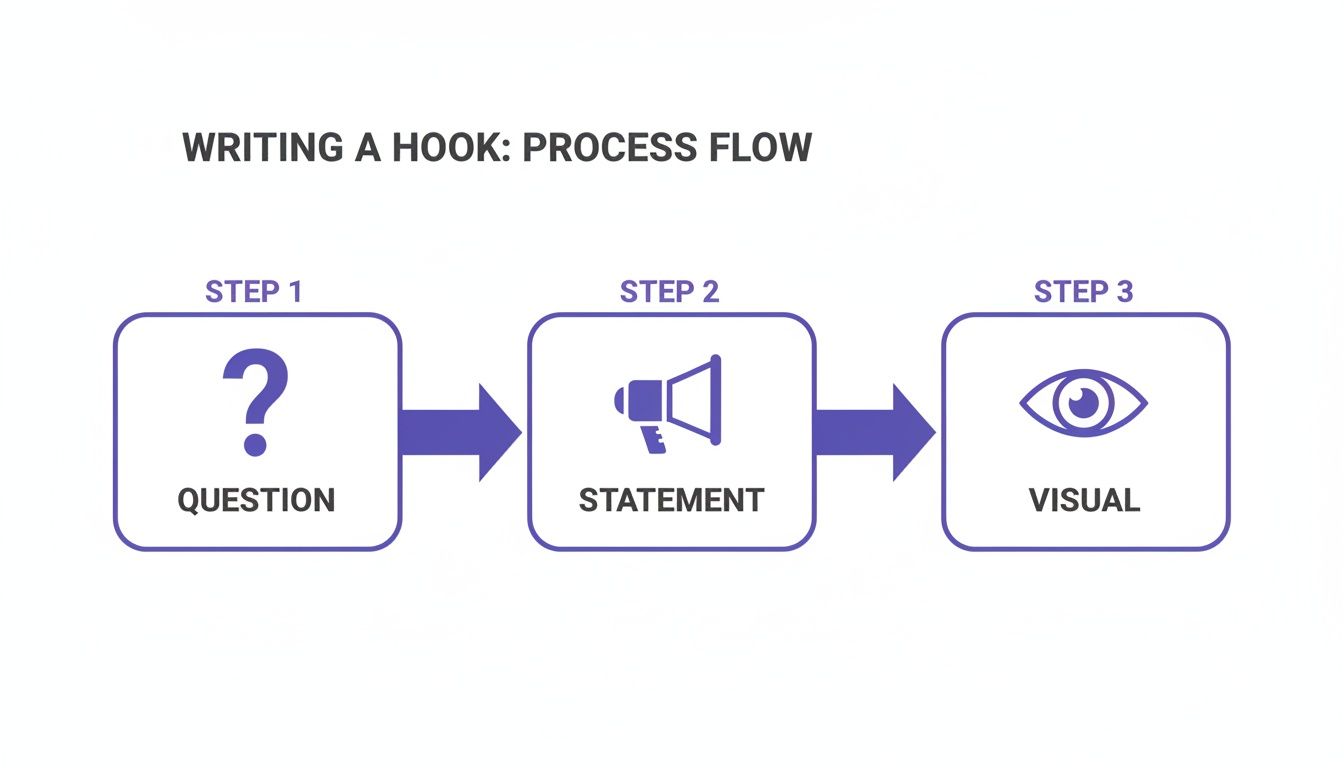
Starting with a sharp Question, a bold Statement, or a can't-look-away Visual gives you a few different creative angles to capture that initial interest before you launch into your main narrative.
Bringing a Framework to Life
Let's see how the Problem-Agitate-Solve (PAS) framework plays out in a real-world scenario. Imagine we're scripting a video for a project management tool.
(Problem): "Are you still trying to manage projects with a mess of spreadsheets and endless email chains? It’s a nightmare. Key tasks are falling through the cracks, and no one ever seems to be on the same page."
(Agitate): "That chaos isn't just annoying—it's actively costing you. Missed deadlines mean unhappy clients. Worse, your team is completely burnt out from the constant confusion and finger-pointing."
(Solve): "Now, imagine everything in one place. Every project is perfectly organized, every deadline is crystal clear, and your team is finally collaborating without friction. That’s exactly what our tool delivers."
See how that works? It follows the viewer's internal monologue, validating their frustration before presenting a clear, desirable solution. You're not just listing features; you're selling a way out of their current headache.
A great script doesn't just present information—it creates a transformation. It takes the viewer from a state of uncertainty or frustration to one of clarity and confidence. The framework is simply the bridge that gets them there.
Writing a Call to Action That Actually Converts
You’ve held their attention all the way to the end—don't let it go to waste now. Those final few seconds are your golden opportunity, and a weak call to action (CTA) can make the whole video feel pointless. A vague "learn more" or "check us out" just isn't going to get you anywhere.
Your CTA is the logical next step you want your viewer to take. It’s not just an instruction; it’s the final, crucial piece of your script that turns a passive viewer into an active customer, lead, or subscriber.
Moving Beyond Generic Phrases
To write a CTA that actually gets clicks, you have to be direct and specific. Tell people exactly what to do and what they’ll get for doing it. Forget the generic stuff and focus on action-oriented language that creates a little urgency without sounding overly aggressive.
Here’s a simple shift in framing that makes all the difference:
Instead of: "Learn more on our site."
Try: "Get your free marketing checklist by clicking the link in the description now."
Instead of: "Follow us for more."
Try: "Hit that subscribe button so you don’t miss next week’s video on boosting your ad spend."
This kind of clarity removes all the friction. The viewer knows precisely what action to take and, more importantly, why it benefits them. No guesswork involved.
Aligning Your CTA with Your Goal
Your call to action has to connect directly back to the original goal you set for the video. If your goal was to generate leads, a CTA pushing for a hard sale will feel jarring and totally out of place. The command needs to feel like the natural conclusion to the story you just told.
A high-converting CTA is the bridge between the value you just provided and the value you want to provide next. It should feel less like an ask and more like a helpful suggestion that solves the viewer's problem.
Let's say your video was all about the pain of manual content creation. Your CTA should point them straight to the cure. Something like, "Ready to automate your video production? Start your free trial with Sprello today and create your first AI video in minutes." This ties the problem you highlighted directly to the solution you offer.
If you want to dig deeper into the psychology of these prompts, our guide on what is a call to action breaks down the art of crafting commands that drive results. Just remember, the final words of your video script are often the most important ones you'll write.
Using AI as Your Creative Co-Pilot
Let's get one thing straight: AI isn't here to steal your creative job. It's here to make you better at it. Think of AI scriptwriting tools less like a ghostwriter and more like a brilliant, tireless assistant who's ready to brainstorm ideas, smash through writer's block, and polish your first drafts in a fraction of the time.
This isn't just a nice-to-have anymore. The demand for content is exploding. Just look at Europe, where streaming subscriptions blew past 150 million in 2022, fueling a 37% jump in the use of writing tools. Creators are under immense pressure to produce more, faster. With writer employment projected to hit 151,300 by 2032, using AI is quickly becoming a crucial part of staying competitive. You can read more about these scriptwriting industry trends to get the full story.
Master Your Prompts for Better Scripts
The secret to getting great results from AI? It all comes down to your prompts. If you give it vague instructions, you'll get generic, unusable mush back. To get a script draft that actually sounds like your brand and connects with your audience, you have to be specific.
Give the AI as much context as you can. Think of it like briefing a new team member. For a much stronger starting point, be sure to include details like:
- Your Target Audience: "Write for busy marketing managers who feel like they're drowning in data."
- The Core Problem: "Their biggest headache is proving the ROI of their social media efforts."
- Your Video's Goal: "The point of this video is to get them to download our free ROI calculator."
- Desired Tone: "Keep the tone confident and helpful, but not stuffy. No corporate jargon."
- Key Talking Points: "Make sure to mention our tool's custom dashboards, automated reporting, and Google Analytics integration."
When you're using AI as your creative partner, a powerful tool like the best AI story generator can be a game-changer for building out compelling narratives. A detailed prompt like this turns the AI from a simple text generator into a genuine collaborator.
Brainstorming and Outlining with AI
Where AI really shines is right at the beginning, during that initial ideation phase. Instead of staring at a blank page, you can ask an AI tool to spit out a dozen different hooks for your video. This instantly gives you multiple creative angles to play with.
Don't ever treat the first AI draft as the final product. See it as a lump of clay. Your job is to mold it with your human touch—the unique insights, personal stories, and brand personality that only you can provide.
For example, you could ask it to create a script outline using that Problem-Agitate-Solve framework we covered. It’ll probably give you a decent structure, but it's on you to inject real customer language and specific, relatable examples to make it hit home. This back-and-forth process helps you work so much faster without losing the authenticity that actually builds trust with your audience.
Got Questions About Writing Video Scripts? Let's Answer Them.
Even with the best templates, you're going to hit a few roadblocks when writing your script. It happens to everyone. Getting straight answers to these common sticking points can save you a ton of time and make the whole process feel less daunting.
Let's clear up some of the most frequent questions I hear from creators.
How Long Should My Script Be?
This is the classic "it depends" question, but the answer is actually pretty simple. The length of your script is dictated by two things: the platform you're on and the goal of your video. You don't get to decide the length—your audience's attention span does.
A good rule of thumb is to base your word count on a natural speaking pace, which is about 150 words per minute.
Here’s a quick breakdown:
- TikTok/Instagram Reels (15-60 seconds): You're looking at 40-150 words. These scripts have to be incredibly tight. Get straight to the point, and don't waste a single word.
- YouTube Ads (1-3 minutes): A 150-450 word script is a great target. That gives you just enough room to hook the viewer, outline a problem, and present your solution before hitting them with a clear call to action.
- Educational YouTube Videos (5-10 minutes): Here you can stretch your legs a bit with 750-1500 words. The trick is to keep viewers engaged by breaking up the script with visuals, on-screen text, and pattern interrupts.
Pro tip: Always, always read your script out loud with a timer. It's the only real way to check your pacing. Something that looks short on the page can feel like it drags on forever when spoken.
How Detailed Should My Scene Descriptions Be?
The short answer? As detailed as they need to be. It all comes down to who’s reading the script. Is it just for you, or are you handing it off to a videographer, an editor, or a whole production team?
Your goal is to eliminate any chance of confusion.
A Simple Way to Think About It
| Who's It For? | Level of Detail Needed | Example |
|---|---|---|
| Just Me (Solo Creator) | Minimal. Just enough to jog your memory. | B-roll of a frustrated person at a laptop. |
| Me & a Small Team | Moderate. Enough for everyone to be on the same page. | Scene 2: Close-up on a user's face, looking stressed. Quick cut to their screen showing a messy spreadsheet. |
| A Full Crew or Agency | Hyper-specific. Leave nothing to chance. | Scene 2: [INT. OFFICE - DAY] Close-up on ANNA (30s), brow furrowed. The blue light of her monitor reflects in her glasses. CUT TO: Screen view of an overwhelming Excel sheet filled with jumbled data. |
Think of it this way: a little extra detail upfront can save you from expensive and time-consuming reshoots down the road. Be the director on the page so your team can execute your vision perfectly.
How Do I Stop My Script from Sounding So... Robotic?
This is a big one. The fastest way to lose a viewer is to sound like you’re reading a press release. The secret is simple: write like you talk. Your script should feel like a real conversation, not a machine reciting facts.
Here are a few tricks I use to make my scripts sound more human:
- Use Contractions: It's "don't," not "do not." It's "you're," not "you are." This small change instantly makes your writing feel more relaxed and conversational.
- Ask Questions: Pull the viewer into the video by asking them questions. Even if they're rhetorical, it creates a sense of dialogue and makes them an active participant.
- Read It Aloud (Yes, Again): This is so crucial it’s worth repeating. If you find yourself stumbling over a phrase or a sentence feels clunky, rewrite it. If it’s awkward to say, it will be awkward to hear.
Your script is a conversation starter. Keep the language simple, direct, and focused on one thing: connecting with the person on the other side of the screen.
Ready to stop guessing and start creating? With Sprello, you can generate audience-aware scripts, visualize scenes, and produce high-converting videos in minutes. Let our AI co-pilot handle the heavy lifting so you can focus on your message. Start creating with Sprello today.


