
Making a commercial video that actually gets results can feel like a massive undertaking, especially when you don't have a Hollywood-sized budget. This guide breaks down the entire process, showing you how to go from a simple idea to a finished ad that brings in real traffic and sales. Forget the complicated production headaches; we're focusing on a modern, AI-powered way to create commercial video content quickly and effectively.
Your Blueprint for High-Impact Commercial Videos
Not long ago, turning a creative spark into a commercial video was a multi-week ordeal. It required a whole team of specialists for scripting, filming, and editing. That old-school model is not only slow but incredibly expensive, putting growing businesses at a huge disadvantage.
Today, things look completely different. An integrated, AI-driven workflow means anyone can produce professional-quality ads in a tiny fraction of the time. This new approach brings everything under one roof—from generating a script that speaks to your audience to producing custom visuals and adding all the final, polished touches. Instead of juggling a dozen expensive tools and freelancers, you can run the whole show from a single platform.
If you're looking for a solid primer on the strategies that work, this ultimate guide to video ads is a great place to start. It covers the foundational tactics you’ll need.
From Idea to Revenue Faster Than Ever
The real magic of this new blueprint is speed. You're not cutting corners on quality; you're just getting there faster. What once took a whole production pipeline to complete can now be knocked out in a single afternoon.
This speed is a game-changer for testing. You can quickly create different ad creatives, try out new hooks, and experiment with various offers to see what actually connects with your audience. You’re no longer stuck with one big, costly video—you can spin up dozens of variations to fine-tune your campaigns for the best possible results.
This infographic breaks down the modern workflow into three simple stages.
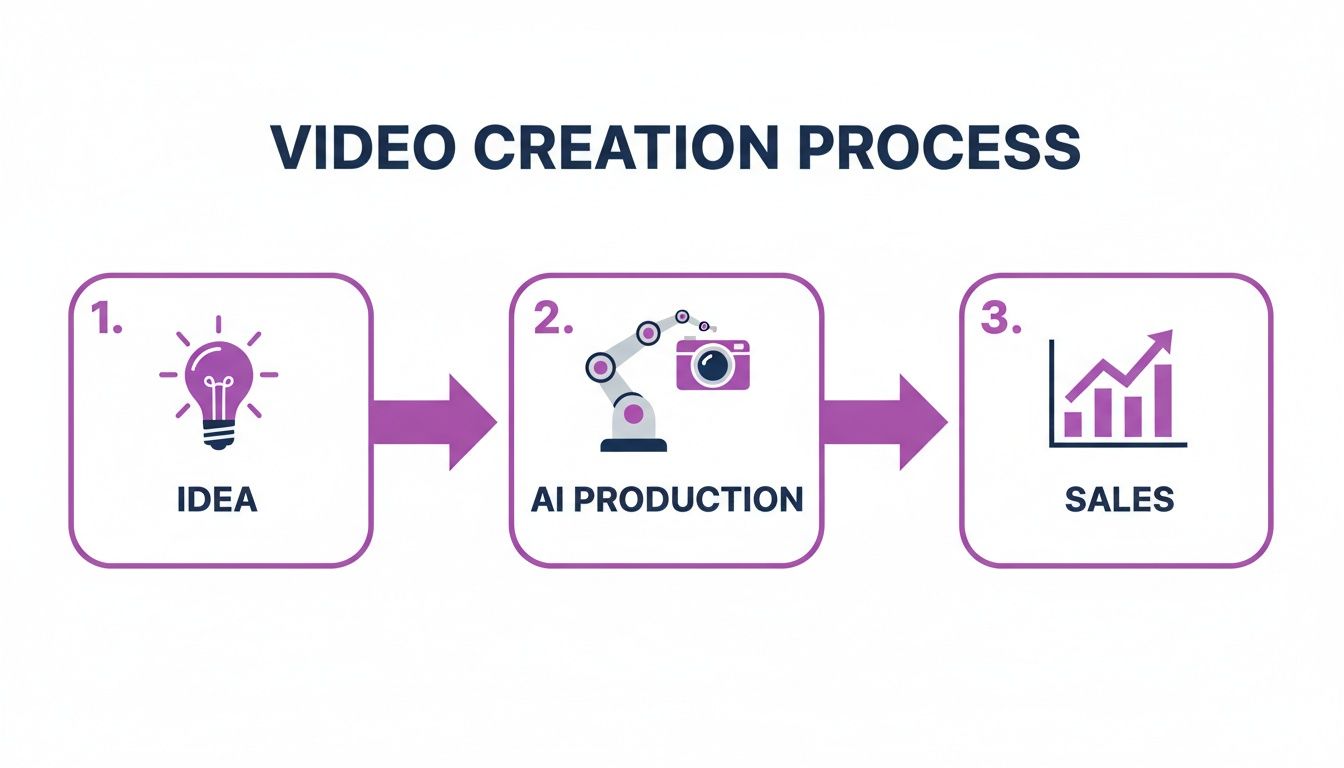
It shows a straight line from your initial concept through AI production and right to the finish line: more sales. It's all about the efficiency of having an integrated system.
The demand for video isn't just growing; it's exploding. Consider this: the global video production market hit a massive USD 94 billion in 2023, fueled by nonstop consumption on social media and e-commerce sites. And with 87% of marketers saying that video directly boosts their sales, the opportunity for brands that can keep up is huge.
The shift to AI-powered creation makes this possible. Here's a look at just how much time you can save:
Modern vs. Traditional Video Creation Timelines
This table shows a side-by-side comparison, and the difference is pretty staggering.
| Stage | Traditional Method (Weeks) | AI-Powered Method (Minutes) |
|---|---|---|
| Brief & Scripting | 1-2 weeks | 5-10 minutes |
| Storyboarding | 3-5 days | 2-5 minutes |
| Filming/Asset Creation | 1-3 weeks | 10-15 minutes |
| Editing & Post-Production | 1-2 weeks | 15-20 minutes |
| Total Time | 4-8 weeks | 32-50 minutes |
As you can see, a process that once took months can now be handled in under an hour, giving you an incredible advantage.
The goal isn't just to make one video. It's to build a scalable system for producing ads that consistently convert. An AI-powered workflow lets you test more ideas, learn faster from the results, and generate a real return on your efforts.
Ultimately, this blueprint is about giving you the power to compete. It provides small businesses, agencies, and individual creators with the tools they need to thrive in a video-first world. To dive deeper into putting these ideas into action, check out our guide on video marketing best practices. It’ll walk you through how to turn a great idea into a polished ad that delivers tangible results for your business.
Lay the Groundwork with a Killer Script and Brief
Every truly great commercial doesn't just happen. It's planned. Long before you're thinking about visuals or generating a single frame, the real work begins with a rock-solid plan.
Jumping straight into production without a clear idea is a surefire way to burn through your budget and end up with a video that, while maybe looking slick, doesn't actually do anything for your business. The bedrock of any ad that converts is a sharp creative brief and an even sharper script.
Think of this early stage as the blueprint for your entire project. It's what ensures every word, every scene, and every call-to-action is pulling in the same direction—towards your business goals.
Why You Can't Skip the Creative Brief
A creative brief isn't complicated. It’s a simple, one-page document that aligns everyone on the "why" behind the video. It's the North Star that guides every decision from this point forward, preventing costly detours down the road.
Your brief just needs to answer a few crucial questions:
- What’s the main goal? Are you trying to sell a new product, get sign-ups for a webinar, or just get your name out there? Be specific. "Increase sales of Product X by 15%" is much better than "drive sales."
- Who are we talking to? Get specific about your audience. What keeps them up at night? What do they want more than anything? What language do they speak? A video for a Gen Z audience buying skincare is going to feel totally different from one targeting a CFO at a software company.
- What's the one thing they must remember? If your viewer walks away with just one thought, what should it be? Nail this down in a single, powerful sentence.
- What should they do next? What's the immediate, tangible action you want them to take? Click a link? Book a demo? Buy now? Tell them exactly what to do.
A tight brief is what separates a video that just gets views from one that actually gets results. It forces you to be strategic before you get lost in the fun of creating.
Writing Scripts That Convert with AI
Once the brief is locked in, it's time to script. This is where you can really gain an edge. Instead of battling a blank page, you can use AI to do the heavy lifting.
Modern platforms like Sprello let you feed in the core details from your brief—your audience, product, goal—and almost instantly get back multiple script options. The AI doesn't just spit out generic copy; it crafts hooks and narratives designed for your specific audience. If you're stuck, browsing through a library of sample video script templates is a great way to see what works and get your own ideas flowing.
This approach crushes writer's block and lets you quickly test out different messaging angles to find what really clicks.
Real-World AI Scripting in Action
Let's make this practical. Say you're launching a new vitamin C serum for busy professionals (ages 25-40) who are worried about their skin looking tired.
Your prompt could be: "Create a 30-second video script for a new vitamin C serum called 'Glow Up.' The target audience is busy young professionals who feel their skin looks dull from too much screen time. The goal is to drive purchases with a 'Shop Now' CTA."
An AI tool might give you something like this:
- (Hook - 3 seconds): Visual of a person looking drained on a video call. "Another long day staring at a screen? Feel like your skin has lost its spark?"
- (Problem/Solution - 15 seconds): Quick cuts of the 'Glow Up' serum bottle, texture shots, and someone applying it. "You’re not alone. That's why we created Glow Up. It’s a potent vitamin C serum made to fight digital fatigue, brighten your complexion, and bring back your natural radiance in just one week."
- (CTA - 7 seconds): Final shot of the person looking vibrant and confident. "Stop letting screen time dull your shine. Get your glow back. Tap 'Shop Now' to try Glow Up today."
This script works because it immediately hits a specific pain point (screen fatigue), offers a clear solution with a tangible result, and closes with a direct command.
Now, let's switch gears to a B2B example for a project management tool.
Prompt: "Write a 45-second script for a lead-gen ad. The product is 'SyncFlow,' a project management tool for marketing agencies struggling with missed deadlines. The goal is to get demo sign-ups."
Here’s what the AI might generate:
- (Hook - 5 seconds): Fast-paced montage of overflowing inboxes, chaotic spreadsheets, and Slack notifications. "Tired of chasing down updates and watching deadlines fly by? Your agency's workflow is broken."
- (Problem/Solution - 25 seconds): Smooth transition to the clean SyncFlow dashboard. "SyncFlow brings all your projects, comms, and approvals into one calm, intuitive space. Stop managing chaos and start delivering incredible work, on time, every time. See exactly who’s on what and get a bird's-eye view of every campaign."
- (CTA - 10 seconds): Clear shot of a cursor clicking the 'Book a Demo' button. "Ready to fix your workflow for good? Book your free SyncFlow demo and see the difference for yourself."
In both cases, a clear brief fed into an AI tool results in a script that isn't just creative—it's strategically sound. That’s how you set yourself up for a win from the very first step.
Bring Your Story to Life with AI Visuals
With a solid script in hand, it's time for the fun part: turning those words into visuals that captivate your audience. This is the moment your commercial goes from a concept on a page to a story people can see and feel. The best part? You don't need a film crew or a Hollywood-sized budget to create professional, high-quality scenes anymore.
Thanks to modern AI tools, you can generate everything you need—from custom B-roll to lifelike avatars—straight from your keyboard. This approach is a massive time-saver, but more importantly, it gives you total creative freedom over every single frame.
Map Your Scenes with a Simple Storyboard
Before you dive into generating visuals, you need a plan. A storyboard is basically your video's blueprint, outlining each scene shot-by-shot. Don't worry, you don't need to be an artist. A simple list of shots or a few rough descriptions will do the trick.
The whole point is to connect your script to specific visuals. For every line or key moment, what should the viewer be seeing? This simple exercise ensures your video tells a coherent story and keeps the pacing tight. A well-planned storyboard also stops you from wasting time generating assets you don't need and keeps your production on track.
Let's take the "Glow Up" serum script. The storyboard might look something like this:
- Scene 1: Close-up shot. A tired-looking person on a late-night video call, bathed in harsh, unflattering light.
- Scene 2: Product shot. The sleek "Glow Up" serum bottle sitting on a clean, minimalist background.
- Scene 3: Macro shot. A dynamic, close-up view showing the serum's rich texture as a single drop falls.
- Scene 4: Quick cuts. The person applying the serum, a genuine smile on their face as they look refreshed.
- Scene 5: Final shot. The person is now looking confident and radiant in soft, natural morning light.
This simple outline gives you a clear path forward, making the actual visual generation process a whole lot smoother.
Generate Custom B-Roll with Text Prompts
This is where the magic really happens. Forget spending hours sifting through generic stock footage sites, hoping to find a clip that kinda works. Now, you can create the exact visual you need with a simple text prompt. Many modern platforms have integrated AI models that let you describe a scene, and poof—a custom video clip is generated just for you.
To really get the most out of this process, you should explore some of the best AI video creation tools out there. They each have different strengths when it comes to turning your ideas into video.
Writing great prompts is a skill, but it's one you can pick up quickly. The secret is to be descriptive and ultra-specific.
A Few Tips for Writing Prompts:
- Get Specific: Instead of "a person working," try "a young female entrepreneur typing on a laptop in a modern, sunlit home office, with a cup of coffee on the desk." See the difference?
- Define the Vibe: Add keywords to guide the look and feel. Think "cinematic," "4K," "hyperrealistic," "minimalist," or "vibrant colors."
- Direct the Camera: Use terms like "close-up," "wide shot," "drone shot," or "macro shot" to control the composition of your scene.
Think like a director talking to their cinematographer. The more detail you feed the AI, the closer the result will be to the image in your head.
For that first "Glow Up" scene, a powerful prompt might be:
Cinematic close-up of a tired woman in her late 20s on a video call, blue light from the laptop screen on her face, in a dimly lit room at night, hyperrealistic, 4K.
This level of detail is what gets you a clip that perfectly matches the mood and story you're trying to tell.
Combine Assets with Lifelike Avatars and Voices
One of the coolest features of today's video platforms is the ability to seamlessly blend AI-generated visuals with realistic AI avatars and natural-sounding voiceovers. This keeps your entire workflow in one place, so you don't have to worry about hiring actors or booking a recording studio.
You can browse a library of diverse avatars to find the perfect presenter or character for your commercial. Then, just paste in your script, pick a voice style you like, and the AI generates a high-quality voiceover that syncs perfectly with the avatar's lip movements. It's that simple.
Imagine you're making an ad for a new mobile app. You could have an AI avatar demonstrate the app's features on a phone, while your custom-generated B-roll plays in the background, showing real-world examples of the app in action. This creates a polished, dynamic video without anyone ever stepping on a film set.
Here's how it all comes together:
- Generate Your B-Roll: Use text prompts to create all the background clips and product shots you mapped out in your storyboard.
- Pick Your Avatar: Select an AI avatar that aligns with your brand's personality and speaks to your target audience.
- Create the Voiceover: Paste your script and let the AI generate a voiceover in the tone and language you need.
- Assemble the Scene: In the editor, simply layer your avatar and voiceover on top of the B-roll footage.
This integrated process is how you can go from script to a finished, high-impact commercial in just minutes. Everything you need to bring your vision to life is right at your fingertips.
Time to Polish: Bring Your Video to Life in the Edit
This is where all the pieces finally click into place. The editing phase is your chance to transform a folder of clips, voiceovers, and ideas into a persuasive commercial that actually feels like a cohesive, professional video. It’s the final sprint, but it doesn't have to be a technical marathon.
Modern AI editing tools have completely changed the game. You can now get from a rough assembly of scenes to a finished product in a fraction of the time it used to take, giving your commercial the sharp, clean finish it needs to stand out.
Remember, the goal isn't just to stitch clips together. It’s to build a narrative, control the pacing, and make sure every single second serves your main objective. A few smart editing choices can be the difference between a video that gets skipped and one that drives someone to act.
First, Assemble Your Story
The very first step in post-production is to just lay everything out. Grab all those AI-generated visuals, the B-roll you created, and your avatar scenes, and drop them onto your editing timeline. Follow your storyboard and get a basic assembly down so you can see the raw flow of your story.
Don't even think about perfection at this stage. This is your "rough cut." The point is to get all the core components in order. You’ll immediately start to see which transitions feel a bit clunky and where the pacing might need a little nudge. It’s so much easier to rearrange entire scenes now before you start layering in all the finer details.
Level Up Your Visuals with One-Click AI Features
Once your main narrative is in place, it’s time to start adding that professional polish. This is where AI tools, especially those built into platforms like Sprello, become your secret weapon. They handle incredibly complex tasks with a single click, giving you a high-end look without needing a decade of editing experience.
Here are a few game-changing features you should be using:
- Auto-Synced Captions: This is non-negotiable for social media, where tons of people watch with the sound off. These tools automatically transcribe your voiceover and sync the text perfectly to the audio.
- Dynamic Highlighting: Take your captions a step further. This feature animates the text, highlighting words as they're spoken. It's a small touch that has a huge impact on viewer engagement and retention.
- AI Background Removal: Need to drop your avatar into a different setting or just want a clean, minimalist look? One-click background removal instantly isolates your subject. No green screen required.
These automated features are massive time-savers, but more importantly, they give your video a level of quality that builds trust with your audience. For a deeper look at the tech making this possible, check out our guide on the top AI video editing tools out there today.
Fine-Tuning the Pace and Vibe
Pacing is the heartbeat of your commercial. A fast-paced edit with quick cuts can create excitement and urgency—perfect for a limited-time offer on TikTok. On the other hand, a slower pace with longer, more deliberate shots can build emotion and tell a more nuanced brand story.
Your most powerful tool for controlling this? Music. The right background track can completely change the entire feel of your video. Go for something upbeat and energetic for a sales-focused ad, and choose something more subtle or inspirational for a brand awareness piece.
Pro Tip: Let the music guide your edits. Try to align key visual changes with the beat or shifts in the melody. This simple trick makes your video feel more rhythmic and deeply satisfying to watch.
Adding Those Crucial Finishing Touches
Before you hit that export button, there are a few final details that can make a huge impact. This is where you add elements that not only look good but also serve a strategic purpose.
A great technique is using a picture-in-picture (PiP) layout. This is perfect for featuring your AI avatar narrating the story while showcasing your product or AI-generated B-roll in the main window. It keeps a human-like element on screen, making the content feel more personal and engaging.
And pay close attention to your captions. They are absolutely essential. The numbers don't lie: an incredible 91% of video marketers now consider commercial video a core part of their strategies. This makes sense when you see that video accounted for 82% of all internet traffic last year, with people watching a staggering 16 hours per week on average.
For retail brands, this is make-or-break; 75% on Facebook use video ads, which generate 1200% more shares than text and images combined. Polished visuals and crystal-clear captions are your best bet for grabbing attention in a noisy feed. You can explore the full report and discover more insights about the state of video from Wistia.
By focusing on these smart editing steps, you can create a commercial that not only looks great but is engineered to perform, turning your creative vision into real, measurable results.
Get Your Video Seen and Measure What Matters
So, you’ve just created a killer commercial video. That’s a huge milestone, but the work isn't over when you hit "export." Honestly, the most important part is just getting started. A brilliant video that no one sees has zero impact, so smart distribution and careful measurement are what will turn your creative work into a real business asset.
This is where the rubber meets the road—where you connect all that effort to actual results. Getting this right ensures your message lands with the right people on the right platforms, and you'll get the feedback you need to make your next video even better.
First Things First: Optimize Your Export Settings
Before you even think about uploading, you have to get your video file formatted correctly. Every platform has its own quirks and preferences, and a one-size-fits-all approach is a recipe for disaster. It can lead to ugly compression, fuzzy visuals, or slow-loading files that make people scroll right past.
You’ve got to tailor your export settings for each destination. Here’s a quick-and-dirty cheat sheet for the big ones:
- YouTube: This is the home of landscape video, so a 16:9 aspect ratio is king. Export as an MP4 file with an H.264 codec, which gives you the best mix of quality and file size. Shoot for at least 1080p resolution, but go for 4K if you can—it really makes a difference.
- Instagram & TikTok: These are mobile-first worlds, so vertical 9:16 is non-negotiable. MP4 is still your best friend here. Since these clips are fast-paced, a frame rate of 30 FPS will keep the motion looking clean and smooth on small screens.
- Facebook: Facebook is flexible, but 1:1 (square) and 4:5 (vertical) videos consistently perform best because they fill up more of the screen on a phone. Just like the others, stick with the MP4 format and H.264 codec.
Nailing these technical specs is a small but critical step that makes your content look professional right out of the gate.
Get It Out There: Smart Distribution and Promotion
With your optimized videos ready to go, it’s time to get them in front of your audience. Just uploading and hoping for views isn't a strategy—it's a lottery ticket.
Start by posting natively on your main social channels. Use their built-in schedulers to publish when you know your audience is most likely to be online. But to really move the needle, you'll need to put some ad spend behind your video.
The potential here is enormous. Think about this: video ad revenue on YouTube alone jumped from USD 8.15 billion in 2017 to a staggering USD 31.51 billion by 2023. That explosion shows why commercial videos have become the go-to for driving traffic. With 87% of marketers saying video directly increased their website traffic, a solid distribution plan is essential for seeing a real return on your investment. You can read the full research about digital video advertising on Statista if you want to dive deeper into the numbers.
Track the Metrics That Actually Move the Needle
Views are a nice ego boost, but they don't pay the bills. To figure out if your video is really working, you have to track the metrics that tie directly to your business goals.
Don't get distracted by vanity metrics. Focus on the data that tells you how people are behaving and whether they’re taking the action you want them to.
Here are the key performance indicators (KPIs) you should obsess over:
- Watch Time & Audience Retention: This graph is gold. It shows you the exact moment people get bored and leave. See a huge drop-off in the first 3-5 seconds? Your hook isn't working.
- Click-Through Rate (CTR): This tells you how many people who saw your video actually clicked your link. It’s a direct measure of how persuasive your call-to-action is.
- Conversion Rate: This is the bottom line. It tracks how many viewers actually did the thing you asked them to do—whether that’s buying a product, signing up for a demo, or downloading your guide.
When you analyze this data, you stop guessing and start making informed decisions. High retention but a low CTR tells you the video is engaging, but the offer or CTA needs a rewrite. This is the feedback loop that lets you constantly improve, turning your video marketing from a creative gamble into a predictable engine for growth.
Answering Your Top Questions About Making Commercial Videos
If you're just getting into video creation, you probably have a few questions. Let's tackle some of the most common ones I hear from people. Getting these answers sorted out first can make the whole process feel a lot less intimidating, especially when you see how AI tools have changed the game.
How Long Should My Commercial Actually Be?
Honestly, it all comes down to the platform. What works on TikTok won't fly on YouTube, and that's the first thing you need to remember. A one-size-fits-all video just doesn't perform well anymore.
On platforms built for speed, like TikTok and Instagram Reels, you have to get straight to the point. Aim for a tight 15-30 seconds. You're fighting to grab attention in a sea of content, so brevity is your best friend. For places like YouTube or Facebook, you’ve got a bit more runway. A video between 30 seconds and two minutes can work well, giving you space to tell a deeper story or explain your product in more detail.
No matter where you post it, though, the first 3-5 seconds are everything. You have to land your hook immediately.
This is where an AI workflow really shines. You can spin up multiple versions of your ad in no time. Think a punchy 15-second cut for Reels and a more in-depth 60-second version for YouTube. It makes testing to see what your audience actually prefers incredibly easy.
Can I Really Make a Good Video Without a Camera?
You absolutely can. For a long time, the need for expensive gear, actors, and a full crew was a huge roadblock for most businesses. AI video platforms have completely torn down that wall.
All you need are text prompts to generate unique, high-resolution video clips and images that bring your script to life. These tools let you stitch those assets together and even add realistic AI avatars to be the face of your ad. Top it off with a natural-sounding AI voiceover in whatever language you need, and you’ve got a professional-grade commercial without the traditional costs and headaches.
What’s the Single Most Important Part of the Video?
It’s the script, hands down. And more specifically, it's the first few seconds of that script—the hook. Your video is just one of hundreds someone will see today. You have a tiny window to stop their scroll.
A great script instantly taps into a viewer's problem, piques their curiosity, or speaks to a desire, then quickly presents your product as the answer. Just as important is a clear call-to-action (CTA) at the end. Don't leave them hanging; tell them exactly what to do next. That's how you turn a viewer into a customer. AI script generators are fantastic for brainstorming and testing different hooks to see which one performs best.
What Does This AI Video Stuff Actually Cost?
It’s a fraction of what traditional video production costs. Forget about budgeting for camera rentals, location scouting, hiring actors, and paying a production crew. AI video platforms are typically subscription-based, which makes them accessible for just about any business.
For instance, a platform like Sprello might use a credit system for generating new assets—like creating a video clip from a text prompt or generating a voiceover. But editing and arranging the assets you already have is often unlimited. This approach makes it super affordable to create tons of video variations for A/B tests, daily social content, and hyper-targeted ad campaigns without blowing your marketing budget.
Ready to create high-impact commercial videos in minutes, not weeks? With Sprello, you can generate scripts, visuals, and voiceovers with AI, then assemble everything with one-click editing tools. Stop worrying about budget and complexity, and start producing ads that drive real results. Explore Sprello today and see how easy it can be.


