
Using AI for Facebook ads means letting intelligent systems automate and fine-tune every part of your campaign. Instead of relying on guesswork, you're using data-driven algorithms to handle everything from audience targeting and creative generation to managing your budget. The goal? Measurably better results and a whole lot more efficiency.
The New Reality of AI-Powered Facebook Ads
Welcome to the new era of social advertising. AI isn't some far-off concept anymore—it's the engine driving real results for businesses of every size. The industry is quickly moving away from the old days of tedious, manual campaign management and embracing smarter, automated systems.
This shift is a direct answer to some of the biggest headaches in advertising today, like soaring ad costs, creative fatigue, and the constant pressure to come up with fresh campaign ideas. When you bring AI into the mix, you stop being reactive and start being proactive, letting the technology do the heavy lifting with data analysis and all those repetitive tasks.
Why This Matters Right Now
The pressure to deliver a solid return on ad spend (ROAS) is intense. Fiddling with campaigns manually is not only slow but often leads to a wasted budget. AI-driven systems, like Meta's own Advantage+ suite, crunch thousands of data points in real time to make smarter calls about who sees your ads and when.
This isn't just a minor tweak; it's a fundamental change in how brands run their campaigns. It's predicted that AI will run over 70% of all digital advertising workflows soon. Advertisers who have already made the switch are reporting a 30% drop in cost per acquisition and a 22% jump in conversion rates. These aren't just small wins; they're a serious competitive advantage.
A New Way to Look at the Ad Lifecycle
The AI-driven ad lifecycle makes the entire process cleaner and more straightforward. It breaks it down into a simple, three-stage flow: from idea to launch to optimization.
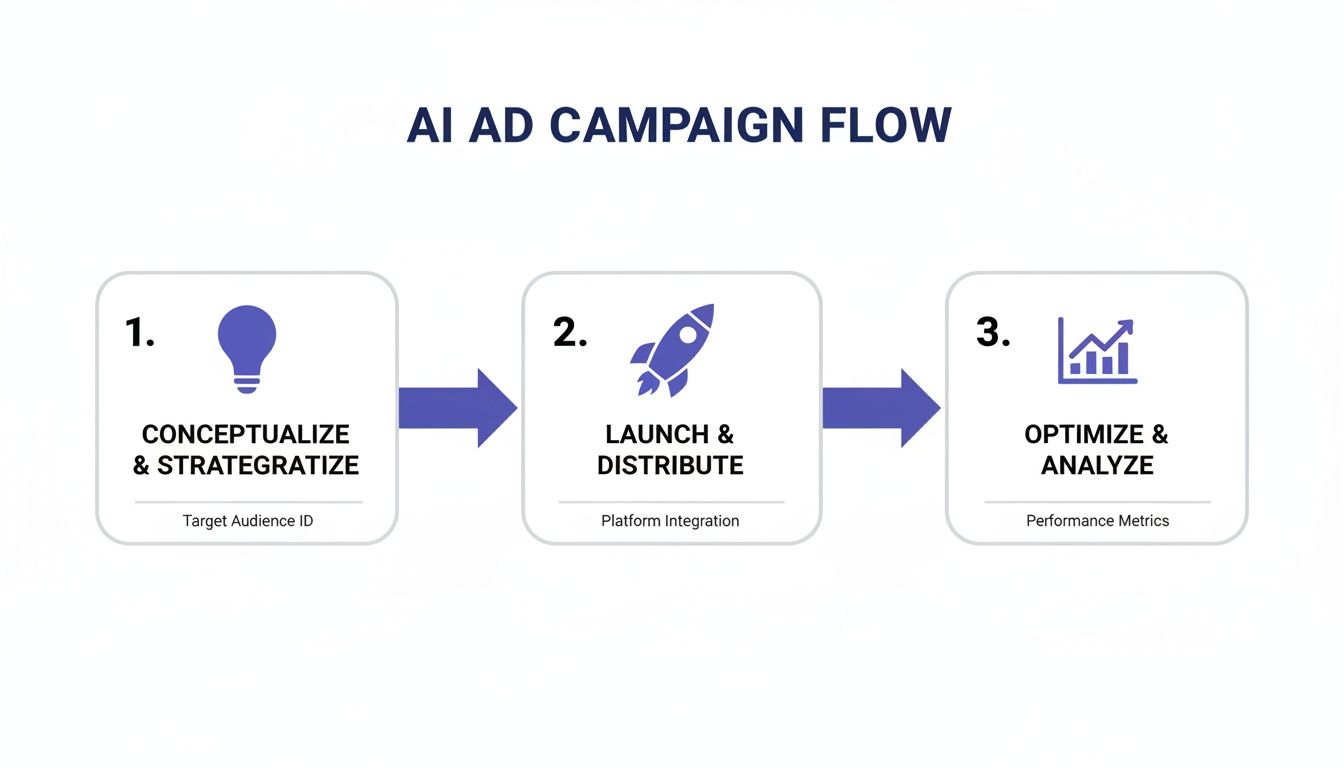
This updated flow helps you get from a basic concept to a fully optimized campaign much faster than you ever could before. To really see how powerful this is, it helps to understand where this fits within broader AI-powered performance marketing strategies.
Comparing Traditional vs AI-Powered Ad Workflows
To see the difference in black and white, let's compare the old way of doing things with the new AI-powered approach. The table below highlights just how much more efficient the workflow becomes when you let AI handle the heavy lifting.
| Campaign Stage | Traditional Workflow | AI-Powered Workflow |
|---|---|---|
| Audience Research | Manual research using Audience Insights, competitor analysis, and guesswork. | AI analyzes customer data and market trends to build high-value audiences instantly. |
| Creative Development | Brainstorming sessions, writing copy, hiring designers, and lengthy video edits. | AI generates dozens of ad copy variations, images, and video storyboards in minutes. |
| Ad Setup & Launch | Manually creating multiple ad sets and ads, A/B testing different elements one by one. | AI-driven campaign setup (like Advantage+) automates audience and placement testing. |
| Optimization | Daily manual check-ins, pausing poor-performing ads, and shifting budgets based on gut feel. | AI algorithms monitor performance 24/7, reallocating budgets and optimizing bids in real time. |
| Scaling | Slowly increasing budgets on winning ad sets, risking audience fatigue. | AI identifies scaling opportunities and finds new lookalike audiences automatically. |
The contrast is pretty stark. The traditional path is filled with time-consuming manual tasks, while the AI workflow is all about speed, data-driven decisions, and continuous improvement.
When you embrace AI, you're not just automating tasks. You're building a smarter, more resilient advertising system that learns and improves with every dollar you spend. It's about working with the algorithm, not against it.
This guide will give you a clear roadmap for using AI across this entire lifecycle. For more on how these ideas apply across different platforms, check out our guide on https://sprello.ai/blog/ai-for-social-media-marketing.
Find Ad Angles That Actually Resonate
The first three seconds of your ad are everything. If your hook is weak or your message is muddled, you’ve just paid for someone to scroll right past you. This is where AI completely flips the script on the creative process for Facebook ads.
Forget staring at a blank page. You can now spitball dozens of genuinely compelling ad angles in just a few minutes. The trick is to stop using generic, lazy prompts. You have to treat the AI like a creative partner who needs a solid brief to do its best work. Garbage in, garbage out.
So, start by giving your AI tool some real, specific information to work with. Don't just toss it your product name. Give it the full story on your ideal customer.
- Their Pain Points: What’s the real problem they're dealing with? What frustration are they trying to solve when they find you?
- Their Desired Outcome: What does their "after" picture look like? What's the transformation they’re hoping for?
- Your Unique Selling Proposition (USP): How are you different? Break down the specific features and, more importantly, the benefits those features deliver.
- Your Brand Voice: Are you fun and quirky? Professional and authoritative? Empathetic and understanding? Feed the AI some examples of your copy so it can get the vibe right.
Crafting a Prompt That Gets Results
A well-crafted prompt is your secret weapon. It’s what turns your raw customer insights into ad copy that actually performs. Your job is to give the AI enough ammo to hit both the emotional and logical triggers that make your audience stop and listen.
The biggest mistake I see advertisers make with AI is under-prompting. Asking for 'an ad for my coffee brand' will get you bland, forgettable copy. But when you feed it detailed customer personas and pain points? That's when you unlock its real power.
Let's see what this looks like in action.
For example, a tool like Sprello is built to walk you through this process, helping you generate those initial ideas and scripts based on the context you provide.
The whole point of an interface like this is to make sure you're giving the AI the right ingredients to cook up something good.
Real-World Prompt Examples
Let’s break down the difference between a generic prompt and a detailed one. Imagine we're a direct-to-consumer (DTC) coffee brand selling to busy professionals.
Generic Prompt:
"Write a Facebook ad for a subscription coffee service."
What you’ll get back is probably something painfully generic about "great coffee delivered to your door." It’s boring, and it won't connect with anyone.
Detailed Prompt:
"Act as a direct response copywriter. Our target audience is busy professionals, 30-45, working from home. Their biggest frustration is the morning chaos—they can't stand bitter instant coffee but have zero time to grind beans or run to a cafe. They want a delicious, barista-quality coffee experience in less than a minute that makes them feel sharp and ready to take on the day. Our product is a single-serve pour-over coffee bag with ethically sourced beans. Our brand voice is encouraging, a little witty. Generate 5 ad hooks and a short video script from this."
See the difference? This level of detail gives the AI everything it needs to shine. Suddenly, you’re getting hooks like "Ditch the burnt instant coffee" or "Your 60-second commute to a better morning." These are specific, they tap into a real feeling, and they’re far more likely to grab attention.
Put a little time into your prompts, and you’ll get ad angles that don't just get seen—they get results.
Create High-Converting Ad Visuals Without a Camera
Think you need a big budget and a full-day video shoot to create amazing Facebook ads? Not anymore. The biggest barrier to testing more creative ideas—the time and cost of production—is officially gone. With the right AI tools, you can crank out stunning, campaign-ready visuals right from your laptop.
This is where your AI-generated script becomes a real ad. The whole point is to get from text to a polished video as fast as possible, skipping all the traditional headaches of filming and editing.
From Script to Storyboard
First things first, you need to turn your winning script into a visual storyboard. A storyboard is just a fancy way of saying you’re planning the sequence of scenes for your video. But instead of sketching by hand, you'll use simple text prompts to describe what each scene should look like.
Let’s say the first line of your script is, "Tired of morning chaos before your first cup of coffee?" A prompt for that scene could be something like: "A cinematic shot of a messy kitchen counter at sunrise, coffee grounds spilled, a person looking stressed."
Doing this lets you map out the entire ad visually before you generate a single image or video clip. Some tools, like Sprello, actually have this workflow built right in, so you can map out scenes directly from the script you just created.
Creating Visually Consistent Assets
Okay, your storyboard is set. Now it's time to generate the visuals. The absolute key here is visual consistency. You don't want your ad to feel like a random slideshow of disconnected clips. To get that cohesive, professional look, you need to be smart with your prompts.
- Nail Down Your Style: Start by adding descriptive terms to your prompts. Think "cinematic, warm lighting, shallow depth of field" or maybe "bright and clean, minimalist aesthetic."
- Use Seed Images: A lot of AI tools let you upload a reference image or use a "seed" number. This is a game-changer. It tells the AI, "Hey, make all the other scenes look and feel like this one," which keeps everything looking connected.
- Tweak Your Prompts: If a scene comes out looking a little off, just refine the prompt. Get more specific. Add details about the camera angle ("wide shot," "close-up on the product") or the vibe you're going for ("energetic," "calm and serene").
Your prompt is your new camera and lighting kit. The more specific your instructions, the closer you'll get to your vision without needing a single piece of equipment.
This kind of control is what gives your final ad that polished, professional feel that used to cost a fortune.
Bringing Your Ad to Life with Avatars and Voiceovers
You've got your B-roll, product shots, and other clips ready to go. The last piece of the puzzle is adding that human touch. This is where AI avatars and voiceovers come into play. Instead of finding actors or booking a studio for a voiceover, you can generate both.
Just pick an avatar that fits your brand’s personality and feed it your script. It's wild how natural the speech sounds now, and you can even customize the tone and inflection. If you want to dive deeper, you can learn more about how to use realistic AI avatars to really connect with your viewers.
Finally, pull everything together in an editor. Slap on some dynamic captions—this is non-negotiable, since so many people watch videos on mute—and sync them up with the voiceover. What you're left with is a high-quality video ad, produced in a tiny fraction of the time and cost it used to take. This nimble process means you can create and test tons of ad variations, letting you quickly figure out what actually works.
Launch and Test Your AI Ads on Facebook
Alright, you’ve got a solid batch of AI-generated visuals and copy ready to go. Now for the fun part: getting them live and seeing what actually works. But launching an AI-powered campaign isn't just a matter of hitting "publish." You need to structure your tests to play with Meta's algorithm, not against it. This is where you really let the machine do the heavy lifting for you.
Your main goal here is to feed Meta's AI a bunch of different creative options and clear signals about what you want to achieve. The biggest mistake I see people make is trying to micromanage everything. You have to resist that urge. The system is built to find your customers way more efficiently than you ever could with manual targeting.
This whole approach is part of Meta's bigger push towards what they call a "goal-only" ad system. You give it the objective, the budget, and the creative, and you let the AI figure out the rest. And it works—Meta's own data shows that Advantage+ Shopping campaigns are already delivering a 22% higher return on ad spend (ROAS) than manual setups. You can read more about Meta's shift to AI ad automation on vxtx.co.uk to see where this is all headed.
Setting Up Your Advantage+ Campaign
Forget the old way of building out dozens of super-niche ad sets. To get the most out of AI, you want to consolidate your budget into a single Advantage+ campaign. This structure gives the algorithm the room it needs to test different audiences and pour your budget into the best-performing combinations of copy and creative.
Here’s a simple but powerful way to set it up:
- Campaign Objective: Pick the goal that actually matters to your business, like Sales or Leads.
- Budgeting: Always use Advantage Campaign Budget (what used to be called CBO). This lets Meta automatically shift spending across your ad sets.
- Audience: Go broad. Seriously. You can give it a nudge with customer lists or engagement data, but let the algorithm expand way beyond those suggestions.
My two cents: Trust the algorithm. The number one mistake advertisers make is choking the AI with tiny, restrictive audiences. Give it space to explore, and you'll be surprised when it uncovers pockets of customers you never would have thought of.
Structuring Your Creative Tests
This is where your AI-generated assets really get to prove their worth. Because you can pump out variations so quickly, you can run much smarter tests to see what your audience truly clicks with.
Inside that one Advantage+ campaign, create a single ad set. Then, load up that ad set with all of your creative variations—every hook, every visual, every call-to-action. I'd recommend starting with at least 4-6 unique ad creatives.
The ad manager is designed to make this easy, encouraging you to give the algorithm plenty of options to work with.
When you put all your creatives under one ad set like this, you’re basically forcing them into a head-to-head battle for performance. Meta’s AI will automatically start shifting the budget toward the ads that are getting you the best results for your objective. This finds your winners faster and stops you from wasting money on duds.
Analyze Performance and Scale Your Winning Ads
Once your AI-powered ads are live, your role changes. You switch from creator to detective, looking for clues in the data that tell you what's working and what isn't. The goal isn't just to look at surface-level numbers like clicks; it's about connecting the dots between your campaign performance and your actual bottom line.
This whole process is about creating a smart feedback loop. You spot the ads that are performing well, figure out why they're resonating, and then use those insights to tell your AI tools what to build next. It's this cycle of learning and improving that keeps campaigns profitable long after launch day.
Interpreting Your Key Performance Metrics
Meta’s algorithm is great at making small adjustments on its own, but you're the one who needs to keep an eye on the big picture. One of the most important things to get right is learning how to calculate Return on Ad Spend (ROAS). This shows you if your AI ad efforts are actually making you money.
Keep a close watch on these three key metrics:
- Cost Per Result (CPR): This is your most important number. Whether you're chasing sales, leads, or sign-ups, your CPR tells you exactly how much you're paying to get one.
- Click-Through Rate (CTR): Think of CTR as a measure of how good your ad is at stopping the scroll. A high CTR means your visuals and copy are grabbing attention. A low one tells you the creative is probably missing the mark.
- Conversion Rate (CVR): This shows you what happens after the click. If people are clicking your ad but not converting on your landing page, it often signals a disconnect between the promise of your ad and the reality of your offer.
When you look at these metrics together, they tell a complete story. For example, a high CTR with a poor CPR might mean your creative is great, but you're showing it to the wrong audience, or your landing page isn't sealing the deal.
Identifying Winners and Diagnosing Losers
Let your campaigns run for a few days, and the results will start to speak for themselves. You'll quickly see which ads are your winners—the ones bringing in results at a cost you're happy with.
But what about the losers? Don't just shut them off and forget about them. Dig into the data and figure out why they failed.
Don't just kill your losing ads—learn from them. A low-performing ad is just data telling you what your audience doesn't want to see. Feed those anti-insights back into your AI prompts to avoid making the same mistake twice.
This is how you get smarter with every dollar you spend. Every ad, good or bad, is a lesson.
Scaling Your Budget Without Breaking Your Campaign
So you've found a winning ad creative. Fantastic. The natural instinct is to pour more money into it, but hitting the "increase budget" button too aggressively can throw Meta's algorithm for a loop and force it back into the learning phase.
A much safer way to scale is to increase your Advantage+ campaign budget by 15-20% every 2-3 days. This slow-and-steady approach gives the AI enough time to explore new audience segments without tanking your performance.
If you really want to get this right, our complete guide on how to scale Facebook ads goes into much more detail. Following a measured scaling strategy like this is how you grow sustainably.
Common Questions About AI for Facebook Ads
Jumping into AI for Facebook ads can feel like a big leap. It’s a different way of working, and it's totally normal to have questions about how it all plays out in the real world. I've pulled together some of the most common questions I hear to give you straight-up, practical answers.

We'll tackle the big ones here—from budgets and creative quality to what this all means for the future of human marketers.
Can AI Completely Replace a Human Media Buyer?
Not completely, but it's definitely changing the job description. AI is a beast when it comes to crunching massive amounts of data, finding the right audiences, and testing creative variations at a scale no human could ever hope to match.
Think about it: Meta’s own Advantage+ systems now handle a ton of the technical bidding and targeting that used to eat up our days. The human role is shifting away from button-pushing and more towards high-level strategy, deep customer psychology, and providing killer creative direction. A smart marketer now uses AI for Facebook ads as a powerful co-pilot to get things done faster and better. It’s a partnership, not a replacement.
How Much Does It Cost to Start Using AI Ad Tools?
It’s way more affordable than you probably think. Many tools, including platforms like Sprello, run on subscription models with different pricing tiers. You pick a plan based on how much you'll use it and what features you need. Honestly, these plans often cost less than a single traditional video shoot or one month of an agency retainer.
The best platforms use flexible credit systems for generating new AI assets. This model is great because it lets small businesses get started without a huge upfront cost, but it also has the runway for agencies running tons of campaigns to scale up as needed.
What Is the Biggest Mistake When Using AI for Ads?
By far, the most common mistake is giving the AI lazy, generic prompts and then being disappointed with the results. An AI tool is a classic case of "garbage in, garbage out."
Simply asking for "an ad for my brand" will get you something bland and totally forgettable. The magic happens when you provide deep context: your audience’s exact pain points, what makes you different, and the specific voice of your brand. You have to treat the AI like a creative partner that needs a solid brief.
This is the real secret. It’s the difference between generating ads that actually convert and just making more noise in the news feed.
How Can I Make My AI Ads Not Look Robotic?
That's a real concern, but it's one you can solve with a mix of smart prompting and good old-fashioned human oversight.
First off, get super descriptive with your prompts. Specify the style, the mood, and the exact composition you're going for. Secondly, make sure you're using platforms that are built on top-tier AI models—they're just capable of producing higher quality, more natural-looking visuals.
Finally, remember that the human touch is still your most valuable asset. Use AI to generate the raw materials for your ad, but then bring your own creative judgment to the table to put it all together. Your expertise is what fine-tunes the timing, sharpens the message, and makes sure the final ad feels like it truly came from your brand.
Ready to produce high-converting ads and social content in minutes? With Sprello, you can streamline your entire workflow from script to final video without needing a camera or complex editing tools. Learn more and start creating with Sprello today!


