
So, you've got a Facebook campaign that's finally working. Sales are coming in, and things are looking good. The natural next step is to scale it up, right? But hold on a second. Scaling isn't just about cranking up the budget. It's about having a rock-solid, data-backed foundation first.
The real process is simple in theory: make sure your tracking is bulletproof, pinpoint the truly profitable parts of your campaigns, and then systematically pour gas on the fire using proven scaling methods.
Building a Solid Foundation Before You Scale
Trying to scale a campaign on a shaky foundation is like building a house of cards. The moment you add more budget—applying that pressure—the whole thing comes tumbling down. Before you even think about scaling, you have to run a thorough pre-flight check. Honestly, skipping this step is the single biggest reason I see promising campaigns crash and burn.
It's easy to get excited after a few good days. I've been there. The temptation is to just throw more money at what seems to be working. But this often leads to a nosedive in performance—skyrocketing costs and disappearing returns—because you're making decisions based on incomplete or just plain wrong data. Your first job is to put on your detective hat and audit your entire setup.
Verify Your Tracking and Attribution
The absolute bedrock of any scalable campaign is clean, accurate data. If your tracking is off, every single decision you make is nothing more than an educated guess. You could be scaling an ad set that's secretly losing you money or, even worse, turning off a hidden gem.
- Facebook Pixel Health: Is your Pixel actually firing correctly on all the important pages? Grab the Facebook Pixel Helper browser extension and double-check that events like PageView, AddToCart, and Purchase are all active and sending data back to Meta.
- Conversions API (CAPI): CAPI isn't a "nice-to-have" anymore; it's essential for getting the full picture in a world of ad blockers and privacy updates. Make sure it's set up correctly, either through an integration like Shopify or manually. This server-side tracking catches conversions that browser-based pixels will inevitably miss.
- Event Match Quality: Jump into your Events Manager and look at your event match quality score. You want to see "Great" or "Good." This tells you Facebook is successfully matching conversion events to user profiles, which is absolutely critical for good reporting and optimization.
A classic mistake is seeing purchases in Ads Manager and assuming everything is perfect. Even a small discrepancy, like under-reporting conversions by just 10%, can be the difference between scaling a winner and pouring cash down the drain.
Define Your Key Performance Indicators
Once you can trust your data, you need to know which numbers actually give you the green light to scale. Don't get distracted by vanity metrics like clicks or a low CPM. You need to be laser-focused on the metrics that directly impact your bottom line.
Your main goal here is to set a crystal-clear, non-negotiable benchmark for profitability. For example, if your product costs you $20 to make and you want a $20 profit on each sale, your absolute maximum Cost Per Acquisition (CPA) is $20. Any ad set that's consistently performing below that number is a potential candidate for scaling.
The same logic applies to your Return on Ad Spend (ROAS). If your breakeven ROAS is 2.0x, you should only be scaling ad sets that are consistently hitting 2.5x or higher. That extra buffer is crucial because you'll almost always see a slight performance dip when you increase spend and start reaching colder audiences. For a deeper dive, this comprehensive guide on Facebook Ads scaling strategies offers some fantastic insights.
Understand Your Unit Economics
Finally, you need to zoom out from the Ads Manager and look at the bigger picture of your business's unit economics. What's your Customer Lifetime Value (LTV)? Knowing that a new customer is actually worth $150 to you over the next six months might make it okay to pay a higher initial CPA of, say, $50—a number that would otherwise look completely unprofitable.
This is especially true for new businesses. Mastering the balance between upfront acquisition cost and long-term value is a core part of digital marketing for startups.
Meta's platform is always getting more efficient, which makes all this foundational work even more important. Recent data shows that Facebook ads can achieve an average 5.3x ROAS, and the Conversions API has been shown to boost retargeting accuracy by 14.6%. But those powerful tools only work if you're feeding them clean, accurate data from your end.
To make this easier, I've put together a quick checklist. Run through these points before you hit that budget increase button.
Pre-Scaling Readiness Checklist
This table breaks down the essential checks to confirm your campaigns are truly ready for more spend. Think of it as your final sign-off before launch.
| Checklist Item | What to Look For | Why It Matters for Scaling |
|---|---|---|
| Pixel & CAPI Health | All key events (Purchase, AddToCart, etc.) are firing correctly with no errors in Events Manager. | Inaccurate data leads to poor optimization. Scaling with bad tracking is just guesswork. |
| Event Match Quality | A score of "Good" or "Great" in Events Manager. | A high score means Meta can accurately attribute conversions, improving audience quality and ad delivery. |
| Stable Performance | At least 5-7 days of consistent performance at or above your target KPIs (ROAS/CPA). | Scaling based on one or two good days is a recipe for volatility. You need proof of stability. |
| Clear Profitability KPIs | You have a defined breakeven ROAS and a target ROAS/CPA. | Without a clear target, you don't know if you're scaling profit or just scaling revenue at a loss. |
| Sufficient Conversion Volume | The ad set has exited the "Learning Phase" with 50+ conversions in the last 7 days. | Scaling an ad set that's still in the learning phase will almost always reset it and hurt performance. |
| LTV vs. CPA Analysis | Your allowable CPA is informed by your customer's long-term value, not just their first purchase. | Understanding LTV allows you to acquire customers at a higher initial cost, outbidding competitors. |
Once you've ticked off every box on this list, you can be confident that you're not just guessing. You're making a strategic decision to scale based on solid data, which dramatically increases your chances of success.
Choosing Your Scaling Method: Vertical vs. Horizontal
Alright, you've done the hard work. Your campaigns are built on solid ground, tracking is dialed in, and the numbers look good. Now comes the exciting part: how do you actually scale this thing? It’s not as simple as just cranking up the spend. You need a strategy.
The two classic paths every media buyer needs to master are vertical scaling and horizontal scaling.
Think of it like this: Vertical scaling is when you've struck oil and decide to drill deeper in that exact spot. Horizontal scaling is taking the map from that successful well and looking for similar spots to drill nearby. Both work, but they solve different problems. Picking the wrong one can kill your momentum or, even worse, turn a profitable campaign into a money pit.
If your ads are profitable and your tracking is airtight, you're ready to make a move. The flowchart below lays out this fundamental decision point.
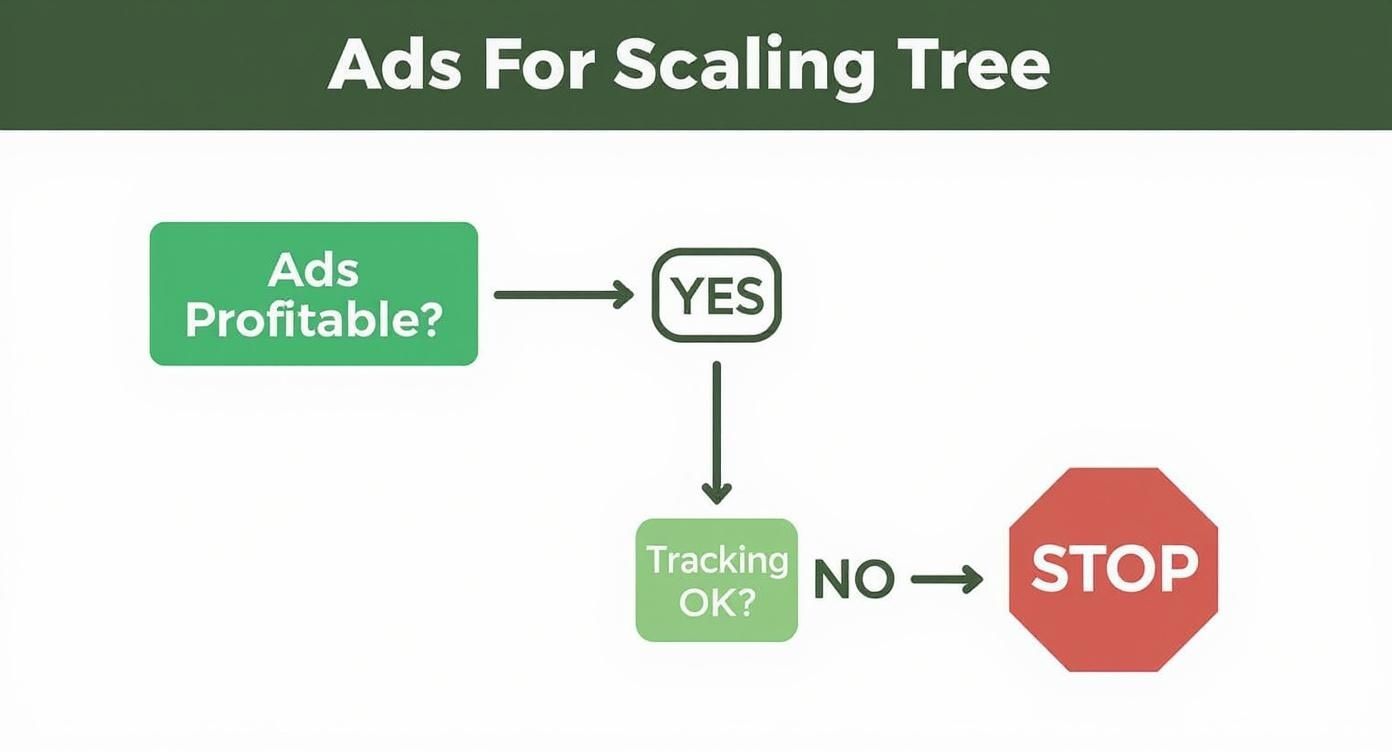
This really drives home the point: don't even think about scaling until profitability and accurate measurement are locked in. They are non-negotiable.
Master Vertical Scaling for Your Proven Winners
Vertical scaling is the most direct approach. You’ve got an ad set or campaign that’s consistently crushing your target CPA and ROAS, so you simply give it more money. You feed the winner.
This strategy shines when you have a large, broad audience that can handle a bigger budget without getting saturated right away. For instance, if your winning ad set is targeting a broad audience of 5 million people and you're only spending $100 a day, you have a ton of runway to increase the budget before people start seeing your ad over and over.
Vertical scaling is basically you telling the algorithm, "This creative, this audience, this offer—it’s working. Go find me more of these people, but faster."
A fantastic way to scale vertically these days is with Campaign Budget Optimization (CBO). By setting the budget at the campaign level, you let Meta’s algorithm do the heavy lifting, automatically shifting more of the budget to the top-performing ad sets inside that campaign. It's an efficient way to pump up your winners without being glued to your screen making manual tweaks.
Expand Your Reach with Horizontal Scaling
Horizontal scaling is all about expansion. Instead of just pouring more money into one ad set, you duplicate your proven winner and test it against entirely new audiences. This is your go-to move when you see performance starting to fade in your original ad set—like a climbing CPA or frequency—or when you simply want to tap into new customer segments.
The whole idea is to take what you know works (your creative and offer) and show it to fresh faces. This is absolutely critical for long-term growth because every audience, no matter how big, will eventually hit a point of saturation.
Here are some of the most effective ways to scale horizontally:
- Launch New Lookalike Audiences: Is your 1% Lookalike audience performing like a champ? Great. Duplicate that ad set and test a 1-3% or 3-5% Lookalike. These wider audiences let you reach more people who share traits with your best customers.
- Explore New Interest Groups: Take that winning ad and pit it against totally new interest-based audiences that make sense for your product. If you sell yoga mats and had success targeting "Yoga," it's time to try "Lululemon," "Mindfulness," or "Pilates."
- Go Broad: This one feels scary at first, but it works. Once you have a healthy amount of conversion data, you can test broad targeting—meaning no detailed targeting at all, just age, gender, and location. With enough data, Meta's algorithm is surprisingly good at finding the right people all on its own.
Ultimately, the best scaling strategies blend both vertical and horizontal methods. You might be vertically scaling a winning CBO campaign while, at the same time, launching new ad sets to test horizontally. A classic tactic is to prove out a 1% Lookalike, and once it's humming, you expand to 3-5% Lookalikes to broaden your reach without burning out that initial group.
This kind of systematic, data-led approach is how you maintain a healthy ROAS as you grow. If you want to dig deeper into the nitty-gritty, you can learn more about how to scale Facebook ads in 2025 on admetrics.io.
Smart Budget Management for Sustainable Growth
Jacking up your ad spend too aggressively is one of the fastest ways I've seen to kill a winning campaign. The real art of scaling isn't about massive, sudden budget hikes; it's a disciplined, patient process that gives Facebook's algorithm time to breathe and adapt. If you push the budget too fast, you can shock the system, sending your Cost Per Acquisition (CPA) sky-high and turning a profitable ad set into a money pit overnight.
The name of the game is sustainable growth. We want to maintain that hard-won profitability as we reach more people. This means thinking less like you're flipping a switch and more like you're carefully turning up a dial.

The Art of the Gradual Budget Increase
The most reliable way to scale vertically is what I call the '20% rule'. Once an ad set has been humming along nicely for a few days, I'll bump its daily budget by no more than 20%. Then I wait. I give it another day or two to see if performance holds. If it does, I'll increase it by another 20%. This slow-and-steady approach keeps you from kicking the ad set back into the learning phase and lets the algorithm find new customers without destabilizing your results.
But that rule isn't gospel for every situation. On smaller budgets, you can be a bit more aggressive. If you're only spending $50 a day, a 20% increase is a measly $10—hardly enough for the algorithm to gather meaningful new data. In these early stages, I’ve found that doubling your budget every few days (from $50 to $100, then to $200) often works just fine.
This rapid doubling strategy is usually safe up to around the $450-$500 daily spend mark. Once you cross that threshold, the audience dynamics start to change. A more conservative increase of around 25% daily becomes a much safer bet to avoid "blowing up" the ad set. Recognizing these spending tiers is absolutely crucial for adapting your strategy as you grow.
Key Takeaway: Your budget scaling strategy must evolve with your spend. What works at $100/day will break your campaign at $1,000/day. Respect the thresholds and adjust your approach from aggressive doubling to gradual, percentage-based increases.
Automating Your Defenses in Ads Manager
As you scale, manually watching every single ad set is a recipe for burnout. This is where Facebook's Automated Rules become your best friend. Think of them as a 24/7 safety net for your budget, running simple "if-then" commands to protect your profitability so you don't have to live inside Ads Manager.
Setting them up is surprisingly straightforward and can save you from huge losses. For instance, a simple rule can automatically pause any ad that spends more than your target CPA without getting a single conversion. Just like that, you've prevented a dud creative from draining your budget while you sleep.
Here are a few essential rules I always set up:
- Pause High-Cost Ads: Turn off any ad if its CPA is over your target benchmark for the last 3 days.
- Stop Ad Set Bleeding: Pause an entire ad set if its ROAS drops below your breakeven point for two consecutive days.
- Manage Frequency: Shut off an ad set if its frequency gets too high (say, above 3 for a prospecting audience), as that’s a clear sign of ad fatigue.
These automated guardrails give you the confidence to scale your spend, knowing you have systems in place to cut losses quickly. This frees you up to focus on the big picture: creative strategy and finding new audiences.
Adapting Your Creative for Higher Spend
When you ramp up your budget, you're not just reaching more people—you're reaching different people. The audiences you tap into at $5,000/day are much broader and less niche than those at $50/day. A common pitfall is assuming the same hyper-targeted offer that worked on a small scale will resonate with a wider audience. It almost never does.
Your messaging and creative have to evolve. As you scale, start shifting your ad copy from niche pain points to broader, more universally appealing benefits. High-quality visuals become even more critical to grab attention in a crowded feed. This is also the perfect time to experiment with different ad formats, especially video, to see what connects with this larger pool of people. For some practical ideas, check out our guide on how to reduce CPA with video variants.
Advanced Audience and Creative Scaling Strategies
Sooner or later, every advertiser hits a wall. Those "winning" audiences that worked so well at the start begin to fizzle out. Costs creep up, and performance takes a nosedive. This is a classic case of audience saturation, and it's a sign that you need to evolve your strategy.
To scale successfully, you need to fight a war on two fronts: finding new pools of customers while systematically churning out fresh creative to keep them engaged. It's about moving beyond what got you here and embracing a more sophisticated approach.
Evolving Your Audience Targeting
That 1% lookalike audience is a fantastic starting point for many, but it's just that—a start. Rely on it for too long, and you'll burn it out completely. The real secret to scaling is to methodically broaden your horizons without sacrificing quality.
A great first step is moving to value-based lookalike audiences. Instead of just feeding Meta a list of all your customers, you give it a list that includes what each customer is worth (their lifetime value). This tells the algorithm to find people who look like your best customers, not just the one-time buyers.
From there, it's all about strategic expansion.
- Stack Your Lookalikes: Don't just run one lookalike per ad set. Try combining several of your top performers into a single ad set—for example, your 1% Purchaser LTV, 1% Add to Cart, and 1% Top 25% Website Visitors. This gives the algorithm a bigger, high-quality pool to fish from.
- Expand Your Percentages: Once you've maxed out your 1% lookalikes, it's time to test 3%, 5%, and even 10% audiences. These bigger audiences are absolutely essential if you want to scale your spend in a meaningful way.
- Go Broad (When You're Ready): This one feels scary, but it works. Once you've generated a significant amount of conversion data (I'm talking 1,000+ purchases), it's time to take the training wheels off. Set up ad sets with just age, gender, and location—no detailed targeting. Meta's AI often knows who your customers are better than you do, but only after you've given it enough data to learn.
To get the most mileage out of these techniques, it pays to have a solid grasp of all the Facebook Ads targeting options at your disposal. This knowledge is what separates the pros from the amateurs.
Pro Tip: When you start testing broader lookalikes (like 3-10%), make sure to exclude your smaller, proven audiences (e.g., your 1% LTV lookalike). This prevents overlap and ensures you're actually reaching new people, which gives you a much cleaner read on performance.
Expanding your audience is a key part of the scaling equation. Below is a quick comparison of the primary methods to help you decide which path to take.
Audience Expansion Methods Compared
| Audience Type | Best For | Potential Reach | Key Consideration |
|---|---|---|---|
| Stacked Lookalikes | Increasing budget on high-quality audiences without creating new ad sets. | Medium | Performance depends on the quality of the individual lookalikes you combine. |
| Expanded Lookalikes (3-10%) | Significantly scaling spend when smaller audiences are saturated. | High | Tends to be less targeted, so a strong offer and creative are essential. |
| Value-Based Lookalikes | Finding new customers who mirror the spending habits of your most profitable ones. | Varies | Requires clean LTV data and a large enough seed audience to be effective. |
| Broad Targeting | Maximum scale once your pixel is highly seasoned with conversion data. | Very High | You're handing the keys to Meta's algorithm; requires trust and a solid data foundation. |
Ultimately, a mix of these strategies will give you the most robust and scalable audience framework.
Building a Creative Flywheel
At scale, your ads have the shelf life of a banana. What worked last week might be dead tomorrow. To combat this ad fatigue, you can't just make ads randomly; you need a system. I call it the "creative flywheel."
The idea is to create a continuous loop: test, learn, iterate, and repeat. You use data from what's working to inform what you build next. This way, you always have a backlog of high-potential creative ready to go.
Start by grabbing your best-performing ad and breaking it down.
- The Hook: What was the first sentence or the initial 3-second video clip that stopped the scroll?
- The Angle: Did it focus on a pain point? A specific benefit? A unique feature?
- The Format: Was it a static image? A raw, UGC-style video? A carousel ad?
- The Call to Action (CTA): What, exactly, did you ask the viewer to do?
Once you have these components, you can test variations methodically. If your winner used a "how-to" angle, build new ads testing a "testimonial" or a "problem-solution" angle. If the hook was a question, try making it a bold statement. Learning how to create video ads that convert is a massive advantage here, as video often provides more elements to test and iterate on.
This structured process turns creative development from a guessing game into a data-driven science. It gives you a predictable pipeline of ads, letting you stay ahead of creative fatigue and unlock that next level of growth.
Troubleshooting Common Scaling Issues
https://www.youtube.com/embed/GQQwddbXpAA
Scaling is never a smooth, straight line up. Just when you think you’ve got it all figured out, performance can suddenly tank. Your Cost Per Acquisition (CPA) spikes, your Return on Ad Spend (ROAS) plummets, and you're left scratching your head.
Don’t panic. This is a totally normal part of the game. Every seasoned media buyer has a mental checklist they run through when things go sideways. The real skill in scaling Facebook ads isn't just knowing what buttons to push when things are going well; it's knowing how to fix them when they break.
The key is to be methodical. You have to isolate the problem variable instead of making a bunch of knee-jerk changes that could make things even worse. Think of yourself as a campaign doctor—your job is to diagnose the symptom before you start writing prescriptions.
What to Do When Your CPA Skyrockets
A sudden jump in CPA is probably the most common (and alarming) issue you'll face. Yesterday you were getting customers for $20, and today it’s $50. This usually points to a breakdown in one of two places: your audience or your creative.
Your first stop should always be the frequency metric. If that number is creeping up past 3.0 in a prospecting campaign, you’re very likely dealing with audience saturation. People have seen your ad too many times, and they’re just scrolling right past it now. The fix here isn't to pump more money in; it's to scale horizontally. Launch that winning ad to new lookalike or interest-based audiences to find fresh pockets of customers.
But what if your frequency is still low and your CPA is through the roof? The culprit is almost certainly creative fatigue. Your ad has just run its course. The hook or the visual isn't stopping the scroll anymore, which means a lower click-through rate (CTR) and a higher cost to get that customer. This is your cue to fire up the creative engine and get new variations live.
When Your ROAS Takes a Nosedive
A falling ROAS is a bit trickier because the problem isn't always inside Ads Manager. Before you start tweaking your campaigns, you need to look at your business fundamentals.
First, pop over to your website analytics. Has your Average Order Value (AOV) dropped? A simple change in a website promotion or just a shift in buying habits can lower the average sale amount. If that happens, your ROAS will go down even if your CPA stays the same.
Next, double-check your tracking. Is your Facebook Pixel firing correctly? Are there any errors with your Conversions API setup? A technical glitch can cause sales to be under-reported, which makes ROAS look worse than it actually is. A quick check against the sales data in your e-commerce platform will tell you if the numbers aren't lining up.
Key Insight: A drop in ROAS is a lagging indicator. The problem often starts earlier in the funnel. Always check your leading metrics like CTR and Cost Per Click (CPC). A sudden drop in CTR is an early warning sign that your creative is burning out, and a ROAS decline will almost certainly follow.
Finally, take a look at the bigger picture. Did a major competitor just launch a massive sale? Are you running ads during a holiday weekend when costs are sky-high for everyone? Sometimes the problem isn’t your campaign at all—it's the competitive landscape you're in.
By working through this checklist, you can stop guessing and start diagnosing the real issue to get your campaigns back on track.
Your Top Questions About Scaling Facebook Ads, Answered
Once you start trying to scale your Facebook ads, you'll inevitably run into some tricky situations. It’s one thing to have a plan, but it’s another to know what to do when your cost per acquisition (CPA) suddenly skyrockets or your best ad set starts to die.
Here are the answers to the most common questions I get from advertisers who are deep in the trenches, trying to grow their ad spend without tanking their results.
How Fast Can I Really Increase My Ad Budget?
Everyone wants to scale yesterday, but the real answer is: it depends on where you're at. The most important rule is to avoid making sudden, drastic changes that send the algorithm into a tailspin and force it to restart its learning process.
If you’re spending less than $500 a day and your campaign is consistently hitting its profit goals, you have more leeway to be aggressive. In these early stages, I’ve often seen success doubling the budget every two or three days. The algorithm has plenty of room to find new customers without performance dropping off a cliff.
But once you cross that $500/day mark, you're playing a different game. At this point, slow and steady wins the race. A daily budget increase of 20-30% is the sweet spot. This lets the algorithm gradually expand its reach and find new pockets of your audience, helping you keep your CPA stable as you grow.
CBO vs. ABO Scaling: What’s the Actual Difference?
Knowing when to use Campaign Budget Optimization (CBO) versus Ad Set Budget Optimization (ABO) is crucial. They aren't interchangeable; they're tools for completely different jobs.
CBO for Vertical Scaling: Think of CBO as your go-to for pouring gasoline on what’s already on fire. When you have a campaign with winning ad sets, you use CBO to scale it vertically. You set the budget at the campaign level, and you let Meta’s algorithm do the heavy lifting of allocating more spend to the top-performing ad sets. It's the most efficient way to maximize what's already proven.
ABO for Horizontal Scaling: ABO, on the other hand, is all about control. It's perfect for testing new things and scaling horizontally. By setting a specific budget for each ad set, you ensure your new creative or audience test gets a fair chance to perform without having to fight for budget against your proven winners.
My rule of thumb: Use CBO to pump more money into your champions. Use ABO for your experiments and to expand into new audiences with a dedicated, controlled budget.
Why Did My Performance Tank When I Increased the Budget?
It’s one of the most frustrating things that can happen. You finally have a winner, you give it more money, and… it falls apart. This almost always comes down to one of three culprits.
First, you probably got too excited and increased the budget too fast. A huge jump in spend panics the algorithm, forcing it to find cheaper, lower-quality placements just to get rid of the cash. The fix? Pull back and stick to those gradual 20% daily increases.
Second, you might be burning out your audience. Is it too small? Check your frequency metric. If you see it creeping above 3 in a prospecting campaign, it’s a red flag that the same people are seeing your ad way too often. It’s time to scale horizontally by launching ads to new, bigger audiences.
And finally, maybe your creative just doesn't work for a broader market. An ad that resonates with a small, niche group might completely flop when shown to a wider audience. If your audience is large and your budget increases were slow, a performance drop is often a sign that you need to go back to the drawing board and test new creative angles.
How Do I Know When an Ad Set Has Hit Its Limit?
Knowing when to stop scaling is just as critical as knowing when to start. Pushing an ad set past its peak is just throwing money away. You need to learn to spot the warning signs that it’s time to back off.
Keep a close eye on these three metrics:
- Rising CPA: Your Cost Per Acquisition is inching up past your target and staying there for a few days. Efficiency is clearly dropping.
- Falling ROAS: You see a steady downward trend in your Return On Ad Spend. The ad set is becoming less profitable with every dollar you add.
- High Frequency: For cold audiences, a frequency above 3 is a clear sign of audience fatigue. You've saturated that pocket of users.
The moment you see these signs, stop increasing the budget for that ad set. The best move is to lock in its current spend and pivot. Duplicate the ad set, target a fresh new audience, and start your search for the next winner. This protects your current profits while you continue to expand.
Ready to create high-converting video ads without the hassle of filming or complex editing? Sprello is an all-in-one AI video marketing suite that helps you produce winning ads and social content in minutes. Generate scripts, build scenes, and use realistic AI avatars and voices to test more ideas and discover what truly converts. Start creating with Sprello today!


