
So, what exactly do we mean when we talk about "ad creatives AI"? Put simply, it’s using artificial intelligence to help generate, test, and fine-tune all the pieces of your digital ads—the images, the videos, the copy, you name it. This tech helps you create ads that actually work, but without the traditional time and expense.
How Ad Creatives AI Is Changing the Game
Let's be honest: the old way of making ad creatives is a grind. It’s slow, expensive, and often a shot in the dark. You’ve got endless brainstorming meetings, pricey photoshoots, and back-and-forth editing cycles, all before you have any clue if the ad will actually connect with your audience. That whole workflow has become a serious bottleneck.
But that's all being turned on its head. We're moving away from those manual design marathons and into an era of quick, data-driven creative production. And AI is what’s making it happen.
The New Workflow for Modern Advertisers
Tools like Sprello are giving everyone—from scrappy founders to full-blown agencies—the power to produce top-notch ads without needing a film studio. It completely levels the playing field, making effective advertising a reality for anyone with a solid idea.
Instead of pouring weeks into a single ad concept, you can now whip up and test dozens of variations in an afternoon. This new approach is all about speed, flexibility, and constant learning, which lets you react to what the market wants almost instantly. The upsides are pretty clear:
- Better Performance: We've seen that AI-optimized creatives can achieve up to two times higher CTR than their manually designed counterparts. That means more clicks and engagement without blowing up your ad budget. You can see more on how these performance gains impact campaigns.
- Reduced Costs: You can slash production expenses by cutting out the need for actors, location scouting, and big editing teams.
- Faster Turnaround: Go from a spark of an idea to a finished video ad in minutes, not weeks.
The real win with AI isn't just about speed. It's about being able to test ideas at a scale we couldn't even dream of before. This creates a powerful feedback loop where you learn exactly what converts and continuously make your marketing smarter.
This guide will walk you through building a practical workflow using an AI video ad generator to turn your concepts into ads that actually drive results.
Finding Your Winning Hook with AI
Every great ad starts with a killer hook. We all know this. But finding the right one often feels more like throwing spaghetti at the wall than a real strategy. You’ve got about three seconds to stop the scroll, and that tiny window makes or breaks your entire ad.
This is exactly where ad creatives AI can step in and shift your process from guesswork to a calculated attack.
Think of an AI tool like Sprello as your tireless brainstorming partner. Instead of you staring at a blank screen, it can churn out a massive volume of ideas in seconds, letting you explore angles you'd never have come up with on your own. The trick is knowing how to guide it with a solid understanding of who you're trying to reach.
How to Write Prompts That Actually Work
The hooks an AI gives you are only as good as the prompts you feed it. Vague inputs get you vague, useless outputs. To get gold, you need to get specific about your audience and the problem you solve for them. A hook for a B2B exec on LinkedIn needs a completely different vibe than one for a Gen Z student on TikTok.
Let’s get practical. Imagine you're selling a sustainable skincare line.
A lazy prompt would be: "Give me ad hooks for skincare."
A much, much better prompt would be:
Generate 5 video ad hooks for a sustainable skincare brand. The target audience is millennials on TikTok who have sensitive skin and care about eco-friendly products. Make the tone casual, a little bit funny, and direct.
See the difference? This prompt gives the AI the context it needs to deliver something useful:
- Product: Sustainable skincare
- Audience: Millennials
- Platform: TikTok
- Pain Point: Sensitive skin
- Key Value: Eco-friendly
- Tone: Casual & humorous
Sorting Through the Ideas to Find a Winner
The AI will spit back a list. Some suggestions will be duds, but there will be absolute gems hidden in there. Your expert eye is needed to spot the strongest concepts and polish them up. I always look for hooks that are surprising, hit on a raw pain point, or go against a common belief.
For example, the AI might suggest something like, "Is your 'natural' skincare actually lying to you?" That’s a fantastic starting point. It immediately sparks curiosity and frames your brand as the honest solution. From there, you can build out the rest of the ad.
Getting good at this takes a bit of practice. It helps to really get the fundamentals of what makes a hook work in the first place. If you want to go deeper, we've put together a guide on how to create attention-grabbing hooks with AI video tools that you'll find helpful.
Using AI for this initial stage saves a ton of time and opens up creative doors you didn't even know were there. It lets you skip the blank-page-dread and jump straight to refining the ideas with the most potential, setting you up with a strong, audience-focused foundation from the very beginning.
Building Your Visual Storyboard
Got your script locked in? Great. Now it's time to turn those words into a visual sequence that actually grabs people. This is where your storyboard comes into play. Think of it as the blueprint for your ad, mapping out every single shot before you even think about generating assets. A good storyboard is the difference between a random collection of clips and a story that converts.
Don't get bogged down thinking this is just a series of pictures. It’s all about the rhythm and flow. You're essentially directing the ad, deciding what your audience sees and feels from one second to the next.
For example, do you kick things off with a bunch of high-energy, fast cuts to jolt them into paying attention? Or maybe you build a little suspense with slower, more thoughtful shots. Planning this out ahead of time is what creates an emotional journey, not just an information dump.
Mapping Out Key Scenes and Composition
The easiest way to start is to go through your script line by line and sketch out the perfect visual for each part. Put on your director's hat. For your hook, you'll probably want a bold, pattern-interrupting visual that stops the scroll. When you get to the problem/solution section, a classic before-and-after sequence works wonders.
For every scene you map out, make sure you detail a few key things:
- Shot Composition: What's the main visual? A tight close-up on the product? A sweeping landscape shot? Maybe it’s an AI avatar looking directly at the viewer.
- On-Screen Text: Jot down any text overlays or captions you need.
- Pacing Notes: How long should the shot be? Be specific, like "quick 1-second cut" or "slow 3-second pan."
- B-Roll Needs: What extra footage will make the scene pop? Think lifestyle shots, clips of your product in use, or anything that adds context.
If you want to get the AI to create visuals that are truly compelling, you need to feed it good prompts. Checking out some of the best prompt ideas for AI image generators is a fantastic way to get your creative juices flowing and write prompts that deliver exactly what you've envisioned.
Storyboarding isn’t just about organization—it’s a creative exercise. It forces you to get real about how your visuals and words will work together to keep someone hooked from the first frame to the final CTA.
To help you organize your thoughts, here’s a breakdown of the essential components your storyboard should cover for a high-converting video ad.
Essential Scene Components for High-Converting Video Ads
| Scene Type | Objective | AI Generation Tip |
|---|---|---|
| The Hook | Grab attention in the first 3 seconds. | Use prompts for visually arresting, unexpected, or high-contrast imagery. Think "cinematic close-up" or "dramatic motion blur." |
| Problem/Pain Point | Make the viewer feel seen and understood. | Generate visuals that depict common frustrations. Prompt for "a person looking stressed at a computer screen" or "a messy room." |
| Solution Intro | Introduce your product as the hero. | Create clean, professional shots of your product or service logo. Prompt for "sleek product shot on a minimalist background." |
| Benefit Showcase | Show, don't just tell, the positive outcome. | Use B-roll and lifestyle shots. Prompt for "happy people enjoying a sunny day" or "a person easily using a futuristic interface." |
| Call to Action (CTA) | Tell the viewer exactly what to do next. | Generate a clear, simple visual with your product and a text overlay. Prompt for "A hand pointing to a 'Shop Now' button on a screen." |
Mapping these scenes out ensures you have a cohesive narrative that guides the viewer right where you want them to go.
Placing AI Avatars and B-Roll for Impact
Figuring out where your AI avatar fits in is a big decision. Your avatar can act as a guide, a product expert, or just a friendly face to build trust. A really effective approach I've used is the picture-in-picture (PIP) format—the avatar speaks from a corner of the screen while the main video shows off the product or concept.
B-roll is the secret sauce that stops your ad from feeling like a stiff PowerPoint presentation. It’s the dynamic footage that illustrates what you’re talking about. If your script mentions "saving time," show a quick montage of someone kicking back and enjoying their newfound freedom. The goal is simple: every visual should support the core message of your script.
This is especially critical if you’re advertising physical goods. For a deeper dive into making your products look irresistible on camera, check out our guide on how to create product videos.
Once your storyboard is complete, you'll be able to move into asset generation with total confidence.
Bringing Your Ad to Life with AI Assets
Okay, you’ve got your storyboard locked in. Now for the fun part: turning those concepts into actual, tangible assets. This is where we'll use AI to build out all the visual and audio pieces for your ad, letting you skip the expensive camera crews, studio rentals, and actors.
The whole game here comes down to writing good text prompts. Think of yourself as a director giving very specific instructions to your AI. With video generation tools like Flux or Veo, you can feed them detailed commands to create the exact B-roll, clips, and images you mapped out in your storyboard.
Generating Custom Visuals with Text Prompts
Being specific is your superpower. If you just ask for "a happy customer," you're going to get something bland and forgettable. You have to paint a picture with your words, describing the scene, the action, and the feeling you want to capture.
For example, instead of that weak prompt, try something with more meat on its bones:
Create a photorealistic, 5-second video clip of a person happily unboxing a package. They're in a brightly lit, modern apartment with soft, natural morning light. Frame it as a medium close-up, focusing on their smiling expression.
See the difference? That level of detail gives the AI clear direction to produce a clip that feels real and slots perfectly into your ad's story. An AI social media content generator can be a huge help here, automating the creation of these visuals and really making your ad pop.
Your storyboard—from the initial hook to the final call to action—is the blueprint for everything you're about to generate.
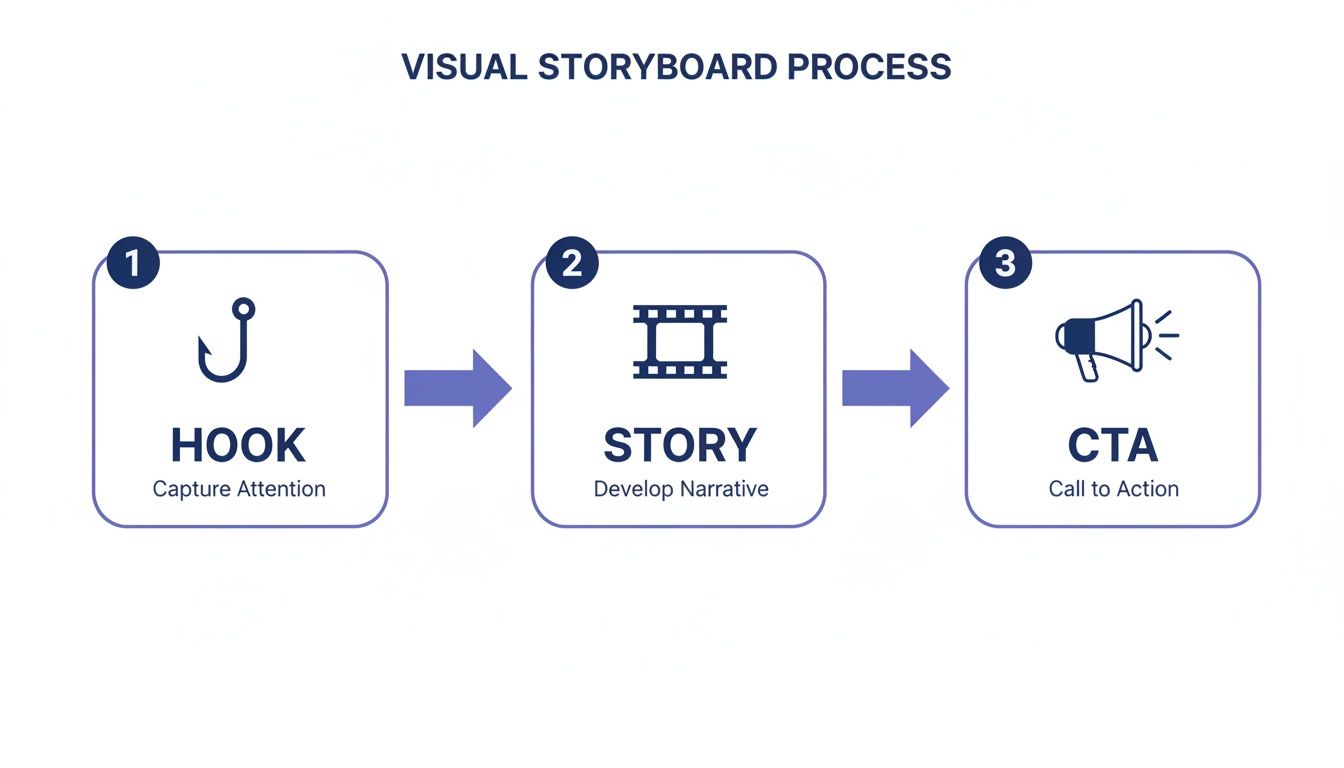
Stick to this simple three-part structure, and you'll make sure every single AI-generated asset has a clear job: to guide your viewer one step closer to converting.
Integrating AI Avatars and Voiceovers
Great visuals are just one piece of the puzzle. You need sound to truly bring your ad to life. Today's AI avatars are shockingly realistic and can act as your brand's narrator, a helpful guide, or just a friendly face. Think about your audience when you pick one. Would they connect more with a polished expert or someone who feels like a casual friend? Most platforms offer a ton of options to fit your brand’s personality.
After you have your avatar, they need a voice. I’m a big fan of services like ElevenLabs, which can turn your script into an incredibly natural-sounding voiceover. You can pick from different tones, accents, and even languages.
Here are a few tips I've learned for getting the audio just right:
- Match the Pace: The voiceover's speed needs to line up with the energy of your ad. If it’s an exciting, fast-moving ad, the voice needs to keep up.
- Audition a Few Voices: Don't just settle on the first one. Generate the script with two or three different voices to hear which one really nails the mood you're going for.
- Do a Pronunciation Check: Always, always listen back to make sure the AI is saying your brand name, product names, and any industry jargon correctly. Nothing kills credibility faster than a mispronounced name.
By pairing precisely prompted visuals with the right AI avatars and voices, you can put together a polished, professional ad from the ground up. This whole workflow takes a fraction of the time and money of old-school production, which means you can create, test, and tweak your ads faster than ever before.
Putting the Final Polish on Your Ad
Your AI-generated assets are the raw materials, but the real magic happens in the final edit. This is where you take those pieces and turn them into a polished, professional ad that actually converts. A few smart editing choices can make all the difference, boosting engagement and giving your creative that primetime-ready feel.
The best part? You don't need to be a video editing wizard anymore. Many of the top ad creative AI platforms have baked these powerful features right in. What used to take hours of painstaking work in complex software is now often just a click away, which is a lifesaver when you're trying to move fast and test new ideas.
For example, the classic picture-in-picture (PIP) effect is a go-to for a reason. You can instantly overlay your AI avatar on top of product footage or B-roll. This keeps a human face on screen, building connection, while you're showing your product in action. It's a simple, effective technique that just works.
One-Click Tricks for a High-End Look
Beyond just layering your shots, cleaning up the visuals is key. One-click background removal is another game-changer. Got a great shot of your product or avatar but the background is cluttered or just plain ugly? Zap it. This instantly gives your ad a cleaner, more focused, and premium feel.
This is also incredibly handy for maintaining brand consistency across different ad versions or dropping your subject into a whole new AI-generated scene without a green screen.
The point of these edits isn’t to add flashy, over-the-top effects. It’s to remove distractions and keep the viewer’s eyes laser-focused on your message and call to action.
And let's talk about captions. They are absolutely non-negotiable. A huge chunk of social media video is watched with the sound off, so if you don't have clear, readable captions, you're losing viewers before you even start.
- Auto-Synced Captions: AI tools can listen to your voiceover, transcribe it, and time the captions perfectly. This alone saves an incredible amount of tedious manual work.
- Dynamic Highlighting: To really grab attention, you can use dynamic highlighting where words change color as they're spoken. You've probably seen this—it's often called the "Alex Hormozi style"—and it's brilliant at keeping eyes glued to the screen.
- Boosted Engagement: This one simple addition is proven to increase watch time and message recall, which is a massive win on fast-scrolling platforms.
Bringing It All Together
Okay, this is the final assembly line. You're taking your AI-generated B-roll, the avatar's presentation, and the crisp voiceover and weaving them into a single, cohesive story. Now's the time to be ruthless—trim any dead air or awkward pauses, make sure the pacing feels snappy, and drop in your branding like a logo or a clear end card.
By using these smart, AI-powered editing features, you're not just stitching clips together. You're elevating a collection of assets into a polished piece of marketing that stops the scroll and gets results. These small touches are what make your campaign look like it was made by a pro, helping it stand out in a very crowded feed.
How to Test Your AI Creatives for Better Results
Getting your AI-generated ad live is just the first step. The real magic happens when you start testing. The biggest advantage of using AI for ad creative isn't just making the ads—it's the sheer speed at which you can create and test variations to see what actually connects with your audience.
Instead of relying on guesswork, you can systematically A/B test every part of your ad. Swap out the first three seconds with a completely different hook, try a new AI avatar, or tweak the call-to-action. Since generating these variations is so fast and cheap, there's really no excuse not to experiment constantly.
Key Metrics to Monitor
To figure out what’s actually working, you have to track the right numbers. It's easy to get distracted by vanity metrics, so focus on the data that directly affects your campaign's profitability.
Click-Through Rate (CTR): This is your first signal. It tells you if your creative is compelling enough to stop someone from scrolling. A low CTR is a huge red flag that your hook or visuals aren't grabbing attention.
Cost Per Click (CPC): This metric tells you how efficient your ads are. If your CPC is climbing, it could mean your creative isn't resonating with the audience you're paying to reach.
Return On Ad Spend (ROAS): This is the bottom line. ROAS answers one simple question: for every dollar you spend, how many are you getting back?
The goal is to build a continuous improvement loop. You launch variations, analyze the performance data, and feed those insights directly back into your next round of AI prompts.
Let's say you notice that ads featuring a certain visual style get a 25% higher CTR. That’s a crystal-clear signal. You can immediately go back to your AI tools and prompt them to generate more assets with that exact aesthetic. This data-driven approach takes the guesswork out of creative direction and builds smarter, more effective campaigns over time.
Common Questions About AI Ad Creatives
Diving into AI for ad creatives can feel a bit like exploring a new frontier. Naturally, you'll have some questions. Let's clear up a few of the most common ones I hear from people just getting started.
Is AI Going to Replace Human Creativity?
Think of AI as a turbo-charged creative partner, not a replacement. Its real strength is speed and scale. AI can spit out dozens of variations, analyze performance data, and handle the repetitive, time-sucking parts of production like a champ. It's the best assistant you've ever had.
But at the end of the day, your human insight is what makes it all work. You’re still the one setting the strategy, understanding the emotional triggers of your audience, and injecting that authentic brand voice that actually connects with people. The magic happens when you pair your intuition with AI’s raw power.
The biggest mistake I see people make? They generate one ad they love and just run it. The real power of AI is in rapid-fire testing. It lets you create tons of variations so you can let the data—not just your gut feeling—show you what really works.
How Can I Make Sure My AI Ads Actually Look and Sound Like My Brand?
Keeping your AI-generated ads on-brand is all about the quality of your instructions. You have to be specific. Don't be vague; treat the AI like a junior creative who needs a detailed brief to get it right.
Here's how to guide it:
- Be descriptive in your prompts. When generating visuals, use keywords that capture your brand's aesthetic. Are you ‘minimalist and clean,’ ‘bold and vibrant,’ or ‘warm and rustic’? Tell the AI exactly what you're after.
- Define the tone of voice. For scripts or voiceovers, specify the feeling you want to evoke. Is it supposed to be witty and clever? Authoritative and trustworthy? Or maybe empathetic and supportive?
- Bring your own assets. Most good tools let you upload your brand's logos, fonts, and color palettes. This allows you to blend your established brand identity with the new elements the AI creates, ensuring everything looks cohesive.
The trick is to see the AI not as a magic button, but as a tool that executes your creative vision. You're still the director.
Ready to stop guessing and start building ads that actually convert? Sprello gives you an all-in-one platform to generate hooks, scripts, visuals, and voiceovers in minutes. Start creating with Sprello today!


