
Let's be real for a moment: the old playbook for creating social media videos just doesn't work anymore. If you're still stuck in a cycle of long, expensive shoots and complicated editing, you're fighting an uphill battle. It’s time for a smarter, more sustainable workflow that actually gets results.
Why Your Old Video Strategy Is Failing
Ever poured your heart, soul, and a week of your time into a single video, only for it to get a dozen views? The frustration is real. The traditional approach—treating every video like a big-budget movie production—is a massive gamble. It's slow, it's costly, and it’s completely out of step with the breakneck speed of modern social feeds.
Trying to go viral with a single, perfectly polished video is like trying to catch lightning in a bottle. It's not a business strategy; it's a lottery ticket.
This old-school thinking overlooks the one thing that truly drives growth today: consistency. Short-form video platforms don't just prefer, they reward creators and brands who consistently show up with valuable, engaging content. When you bet the farm on one "perfect" video, you're missing out on hundreds of smaller opportunities to connect with your audience, test new angles, and learn what they actually care about.
The Shift to a Sustainable Content Engine
Today’s social media landscape requires a totally different mindset. Instead of one-off masterpieces, the most successful creators build content engines—repeatable systems that pump out a steady flow of high-quality videos without leading to burnout. This is where modern AI tools have completely changed the game, handling the tedious work so you can stay focused on the creative big picture.
Adopting a system-based approach lets you:
- Test Ideas Faster: You can quickly whip up different hooks, calls-to-action, and visual styles to find out what truly clicks with your audience.
- Stay Consistent: Publishing regularly keeps you top-of-mind and gives the platform algorithms exactly what they're looking for. You can dive deeper into this in our guide on how the social media algorithm works.
- Scale Without Overload: Produce more content in less time, letting you expand your reach across multiple platforms without needing a huge team.
The goal isn't to make one perfect video. It's to build a workflow that helps you make hundreds of effective videos. This is the fundamental shift you need to make to win on social media.
And the numbers don't lie. Short-form video isn't just a trend; it's a global phenomenon. YouTube Shorts, for instance, now pulls in over 70 billion daily views. For any brand serious about growth, this is where the attention is.
To get a clearer picture of where to focus your energy, let's look at how the major platforms stack up.
Key Social Video Platform Engagement at a Glance
This table breaks down the engagement rates and performance metrics across the top short-form video platforms. It's a quick cheat sheet to help you decide where your video creation efforts will pay off the most.
| Platform | Average Engagement Rate (Creators <100k) | Reported Return on Ad Spend (ROAS) | Best For |
|---|---|---|---|
| TikTok | 5.69% | 2.5x | Brand awareness, viral trends, community building |
| Instagram Reels | 1.95% | 3.09x | Aesthetically driven content, e-commerce, influencer marketing |
| YouTube Shorts | 0.81% | 2x | Educational content, long-term asset building, driving traffic |
| LinkedIn Video | 1.15% | Varies | B2B marketing, professional networking, thought leadership |
As you can see, each platform offers unique advantages. TikTok is king for raw engagement and community, while Instagram can deliver a stronger return for e-commerce brands. Understanding these differences is the first step toward building a truly effective multi-platform strategy.
Building Your Video Strategy Before You Press Record
A killer social media video isn’t born in the edit; it’s built on a rock-solid strategy. Before you even think about cameras or captions, having a clear plan is what separates content that actually converts from the stuff that just adds to the noise. Trust me, jumping straight into production is the fastest way to burn through your budget and time.
Every single video you create needs one primary goal. That’s it. Just one. When you try to do too much at once—drive sales, build brand awareness, and get shares—you dilute the message and confuse your audience. Your video ends up doing nothing well.
So, commit to a single objective. Are you trying to get clicks to a specific landing page? Is the whole point to generate qualified leads through a sign-up form? Or is this video purely about building community and getting people talking? Deciding this upfront makes every other choice, from the script to the call-to-action, fall right into place.
Define Your Core Video Objective
To get started, just pick one goal from this list for your next video. This focus is the first, most critical step.
- Awareness: Getting your brand in front of new eyeballs. The only thing that matters here is reach and impressions.
- Engagement: Sparking conversations and building that community vibe. You’ll be watching likes, comments, shares, and saves like a hawk.
- Traffic: Pushing viewers to your website, blog, or a product page. Your key metric is click-through rate (CTR).
- Conversion: Getting someone to take a specific action, like a purchase, sign-up, or download. This is all about conversion rates and cost per acquisition.
Once you’ve got your objective locked in, every single element of your video—every word, every visual—should serve that one purpose. This clarity makes the whole process so much simpler and, more importantly, way more effective.
Get Inside Your Audience’s Head
The best videos feel like they’re reading your mind. They speak directly to a very specific problem using the exact words your audience uses. To get there, you have to go deeper than generic demographics and really understand their day-to-day pain points and what they actually want.
Don’t guess what they care about. Go find out. Spend some real time where your audience hangs out online—think Reddit forums, Facebook groups, or the comment sections of your competitors' videos. Listen to their frustrations, the questions they keep asking, and the solutions they’re desperately looking for.
You're hunting for those "I thought I was the only one" moments. When you can articulate a problem better than your audience can themselves, you instantly build trust.
This isn't just for massive campaigns; do it for every video. A quick 15-minute scan of a relevant subreddit can easily give you a dozen powerful ideas for hooks and video topics that you know are going to hit home.
The old way of making videos often skipped this crucial strategic work. This flowchart shows that outdated model, which was based more on hope than a real plan.
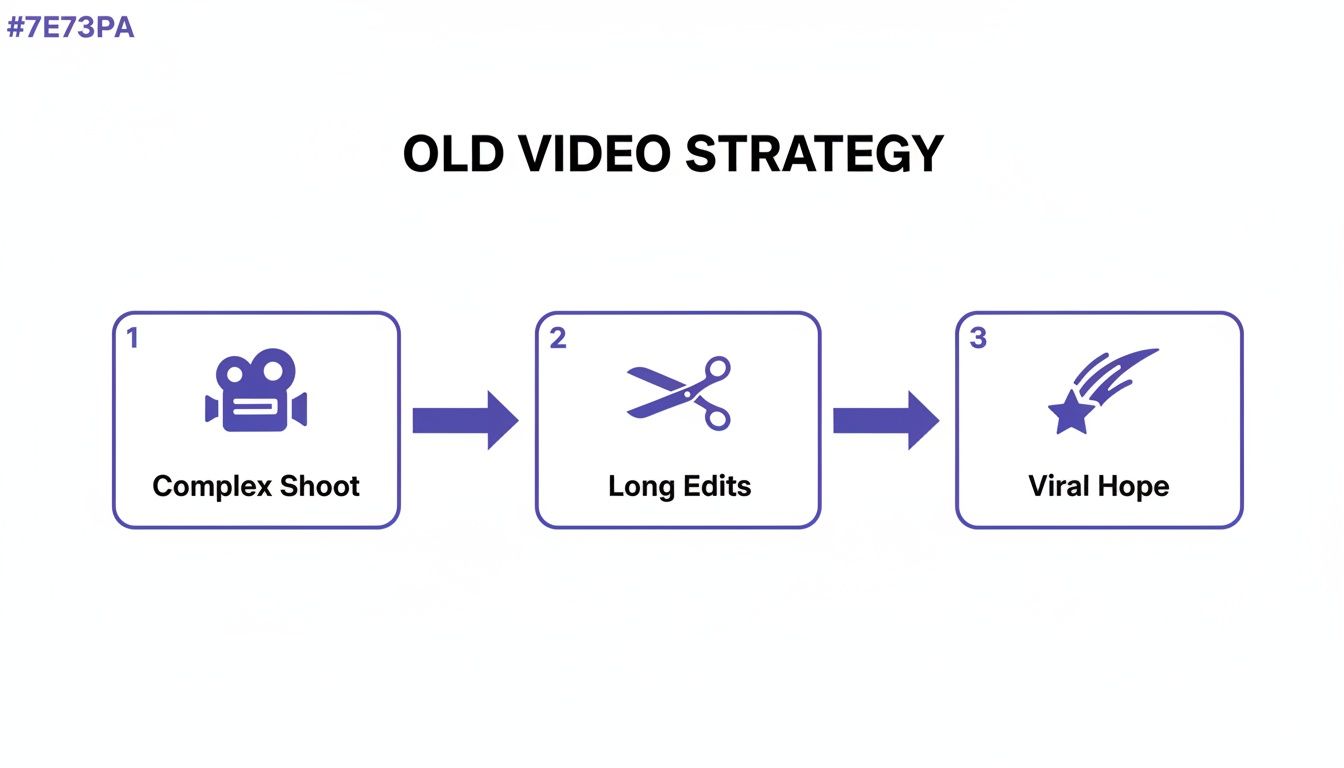
This cycle of complex shoots and long edits, all while crossing your fingers for virality, is just inefficient and unpredictable. A modern, smart strategy replaces that "viral hope" with data-driven decisions you make long before you press record.
Brainstorm Hooks That Stop the Scroll
Let’s be real: you have less than three seconds to grab someone's attention. A weak opening means your video is dead on arrival, no matter how amazing the rest of it is. Your hook is, without a doubt, the most important part of your video.
For every single video idea, you should brainstorm at least five to ten different hooks. Think of it like A/B testing headlines for an article. A great hook usually does one of these things:
- Asks a provocative question: "Are you still making this huge mistake with your marketing?"
- Makes a bold, counterintuitive claim: "Everything you think you know about productivity is wrong."
- Leads with a relatable problem: "I wasted $500 on ads so you don't have to."
- Promises a clear outcome: "Here's my formula for creating 10 video ideas in 5 minutes."
By putting your energy into a clear goal, understanding your audience, and crafting a hook they can't ignore, you're setting your video up for success from the start. This strategic groundwork ensures your efforts lead to real results, not just more content floating around in the void.
From Blank Page to Engaging Script with AI

Behind every great video is a story. But you don’t need to be a Hollywood screenwriter to craft a narrative that hooks viewers. With the right AI tools, scripting is no longer about staring at a blinking cursor, hoping for inspiration. It’s more like collaborating with a creative partner who never runs out of ideas.
This isn't just about saving time or busting through writer's block; it’s about creating a repeatable system for storytelling.
The real trick is knowing what to ask. Forget generic prompts. The magic happens when you feed an AI tool the specific audience pain points and the video objective you’ve already mapped out. Suddenly, the AI isn’t just a general writer—it’s a specialist laser-focused on your exact goals.
How to Prompt AI for Scripts That Actually Connect
Let’s walk through a real-world scenario. Imagine you run a small business selling eco-friendly cleaning supplies. From your audience research, you know your ideal customers are sick of "green" products that just don't cut it. They're frustrated by weak cleaners and complicated ingredient lists full of chemicals they can't pronounce. Your goal for this video is simple: get them to your new product page.
Armed with that info, you can craft a killer prompt.
Example AI Scripting Prompt:
"Write a 30-second video script for Instagram Reels. My audience is environmentally conscious parents who are skeptical of natural cleaners. The video needs to follow the Problem-Agitate-Solve framework.
- Problem: Most eco-cleaners are weak and leave messes behind.
- Agitate: Emphasize the frustration of wasting money on products that create more work.
- Solve: Introduce our new all-purpose cleaner. It has just three simple, plant-based ingredients and cuts through grease with zero effort.
- CTA: The script must end with, 'See the clean for yourself. Tap the link in bio to shop now.' The tone should be confident but relatable."
This kind of detailed prompt gives the AI guardrails, forcing it to produce a script that’s structured, relevant, and built for social media. It’s a core part of a smart social media video creation workflow. If you want to dive deeper into that first crucial moment of the video, our guide on how to create attention-grabbing hooks with AI video tools has some great pointers.
Turning Your Script into a Visual Storyboard
Okay, you’ve got a script that feels solid. Now what? It's time to see the story. A storyboard is just a simple, scene-by-scene plan that maps out what your audience will see and hear. Don't worry, you don't need to be an artist—this is a practical blueprint to make sure your video flows smoothly.
Think of it as a pre-flight check. A storyboard helps you spot problems before you’ve spent a second generating visuals. Is the pacing off? Does scene two look a bit boring? This is where you fix those things, saving you a ton of editing headaches down the road.
A simple table is all you need to get started.
| Scene # | Visual Description | Script / Voiceover | On-Screen Text / Captions |
|---|---|---|---|
| 1 | Close-up on a dirty kitchen counter. A hand listlessly wipes a coffee stain with a sponge, but the stain doesn't budge. | "Tired of 'natural' cleaners that just don't clean?" | "The Eco-Cleaner Lie" |
| 2 | Quick, frustrating cuts: a smudgy mirror, a sticky stovetop. | "You're trying to do the right thing, but you're just making more work for yourself." | "More Scrubbing, Less Shine" |
| 3 | A bright, clean shot of our product bottle. The camera focuses on the simple, clear ingredient list. | "Meet the solution. Three powerful, plant-based ingredients. That's it." | "Finally. Simple & Strong." |
| 4 | A super-satisfying shot of the cleaner wiping away a greasy mess on a pan in a single swipe. | "It's tough on grease, but safe for your family." | "See the clean for yourself!" |
| 5 | Final shot of a sparkling clean kitchen. The product sits proudly on the counter. | "Ready for a cleaner that actually works? Tap the link in our bio." | "Link in Bio to Shop" |
This quick plan makes sure your visuals, script, and text are all working together, second by second.
Your storyboard is your video's roadmap. It ensures that every visual element serves the story and pushes your audience toward the goal you set from the beginning.
By combining AI-powered scripting with this kind of deliberate visual planning, you take the guesswork out of video creation. Storytelling stops being a mysterious art and becomes a repeatable system—one that helps you create videos that not only look slick but also genuinely connect with your audience and deliver results.
So, You Want to Make Videos Without a Camera?
You've got a killer script and a solid storyboard. In the past, this is where things got expensive and complicated. Filming used to be the biggest bottleneck—requiring cameras, lights, and a proper set. That's just not the reality anymore.
The idea that you need a physical production setup to create a great social video is completely outdated. Today's AI tools let you generate every visual and audio asset you need, right from your computer.
This isn't about replacing human creativity. It’s about tearing down the technical and financial walls that used to stand in the way. Instead of messing with camera settings and lighting rigs, you can focus on what matters: directing the AI to bring your storyboard to life, scene by scene. This approach completely changes the game for social media video creation, letting you churn out more content and test ideas without needing a massive budget.
And this isn't some fringe trend—it's quickly becoming how things get done. A whopping 63% of video marketers are already using AI for creation or editing. Dig into the business world, and you'll find 41% are using AI for their videos, which is a staggering 128% jump from 2023. With nearly 57% of online ads now featuring AI-generated video, it’s safe to say this is the new normal. For more on this, check out the latest video marketing statistics on Wyzowl.com.
Turning Text Prompts into Visuals
The magic behind camera-free video production really comes down to text-to-image and text-to-video tools. Platforms like Sprello have these models built right in, so you can take the descriptions from your storyboard and turn them into stunning visuals. The trick is learning how to "talk" to the AI.
Vague prompts get you vague results. Instead of just saying "a person working," you need to paint a picture with your words.
Here’s a B-roll prompt that actually works:
"A cinematic, slightly blurry shot of a woman's hands typing quickly on a modern, backlit keyboard. The office in the background is warm and out of focus, with soft morning light coming through a window. The mood is productive and focused."
See the difference? This level of detail gives the AI specific instructions on the subject, style, lighting, and mood, leading to a much more professional-looking shot. You can use this method to generate all sorts of visuals:
- Custom B-Roll: Get the exact footage your script calls for, whether it’s an abstract background loop or a specific action shot.
- Unique Brand Images: Create one-of-a-kind illustrations or photos that perfectly match your brand—no more generic stock images.
- Quick Animations: Whip up simple animated sequences or data visualizations to break down complex topics.
Using AI Avatars and Voiceovers to Tell Your Story
But what about the human touch? For any video that needs a presenter, AI avatars are an incredible tool. We're not talking about the clunky, robotic figures of a few years ago. Today’s avatars are remarkably lifelike and can show genuine expression and natural gestures.
Best of all, you’re in the director's chair. You can have an avatar deliver your script with any tone you want, from high-energy and exciting to calm and reassuring. If you want to dive deeper, you can learn more about using realistic AI avatars to level up your video strategy.
Think of an AI avatar as a digital actor who is always on call, never messes up a line, and can speak any language you throw at them. It's a game-changer for creating content at scale for a global audience.
The audio is just as impressive. Modern text-to-speech tools can produce voiceovers that sound completely natural. You can pick from a huge library of voices, fine-tune the pacing, and even add inflections to match the emotion of your script. This completely removes the need for expensive mics and soundproof rooms, giving you a crystal-clear narration every single time.
Keeping It All Cohesive and Authentic
A common worry I hear about AI-generated content is that it can look a bit random or fake. The key to avoiding that is to maintain a consistent visual style from start to finish. This all goes back to the planning you did during storyboarding.
Here are a few practical things you can do to make your videos look polished and professional:
- Create a "Style Prompt." Come up with a short phrase that defines your visual style and add it to every prompt you write. Something like, "minimalist flat design, pastel color palette" or "hyperrealistic, cinematic lighting" works wonders.
- Stick to a Color Palette. Define your core brand colors and make sure you’re using them for on-screen text, graphics, and even in your AI prompts when it makes sense.
- Mix in Your Own Brand Assets. Most tools let you upload your own stuff. Combine the AI-generated visuals with your logo, custom fonts, and branded watermarks to create a look that is undeniably yours.
When you blend AI-generated elements with your established brand identity, the final video feels cohesive and authentic, not like a jumble of disconnected clips. This is how you produce camera-free videos that are not only fast and affordable but also look fantastic.
Polishing Your Final Cut for Maximum Reach
You’ve done the hard work of scripting and generating a visually compelling video. Huge win! But don't hit "publish" just yet. The final editing stage is where a good video becomes a great one, perfectly tuned for the platform it’s about to live on.
This is where you add the small tweaks that make a massive difference in engagement. Think of it as the final polish. Modern tools make this faster than ever, letting you add professional touches without getting bogged down. You can instantly create a picture-in-picture effect to show a product while an avatar explains it, or use one-click background removal to drop your presenter into a new scene. Adding a consistent brand watermark is another quick step that ensures your content is always recognizable.
The Unspoken Rule of Social Video: Add Captions
Let’s get one thing straight: captions are not optional. Not anymore. With up to 85% of social media videos being watched on mute, you’re throwing away most of your audience if you skip them. Your perfectly crafted message will never even be heard.
But just slapping on generic, auto-generated subtitles isn't enough. You need captions that are easy to read, perfectly synced, and, most importantly, engaging.
Dynamic, highlighted captions—the kind that change color as the words are spoken—do more than just convey information. They act as a visual anchor, holding the viewer's attention and guiding them through the narrative, even in a silent viewing environment.
This has become a non-negotiable part of modern social media video creation. Tools like Sprello can automate this, generating perfectly timed, highlighted captions with a single click. It not only makes your video more accessible but also gives your viewer retention a serious boost. For more ideas on getting your video seen, check out these social media video tips to boost reach.
Your Platform-Specific Checklist
Every social platform has its own quirks and technical specs. A one-size-fits-all video just won't cut it. Before you export, take a minute to run through this checklist to give your video the best shot at success on each platform.
For TikTok & Instagram Reels:
- Aspect Ratio: It has to be 9:16 vertical. Anything else gets awkwardly cropped and instantly screams "repost."
- Length: Short and sweet is the name of the game. Aim for 15-60 seconds. The algorithm loves shorter videos that get re-watched.
- Safe Zones: Remember the UI! Keep key text and visuals away from the bottom and right edges where captions and icons will cover them up.
- Hashtags: Use a smart mix of 3-5 hashtags—some broad and trending, others specific to your niche.
For YouTube Shorts:
- Aspect Ratio: Vertical 9:16 is best, but a square 1:1 format also works nicely in the Shorts feed.
- Length: There's a hard cap at 60 seconds. Stay under that to be eligible for the Shorts shelf, which is a massive source of discovery.
- Thumbnail: You can't pick a custom thumbnail for Shorts, so your first frame is everything. Make sure it’s a scroll-stopper.
- Keywords: Your title and description still matter here. Pack them with relevant keywords to help YouTube figure out who to show your video to.
This final optimization isn't just about aesthetics; it's a strategic move that directly impacts your video's performance. By tailoring your final cut, you ensure all your hard work translates into real reach and engagement.
Turning Video Analytics Into Actionable Insights
Hitting "publish" on your video isn't the finish line—it's the starting gun. Real growth begins when you stop chasing vanity metrics like views and likes and start digging into the data that tells you what actually works. The secret to a winning social media video strategy isn't about going viral once; it's about turning numbers into a repeatable system.
Think of your analytics dashboard as a direct line to your audience. It shows you exactly where you captured their attention and, just as importantly, where you lost it. The key is to focus on the metrics that tie directly back to your business goals.
Metrics That Truly Matter
Let's look past the surface-level numbers for a second. To build a process that actually improves over time, you need to track the metrics that reveal how people behave and how that behavior affects your bottom line.
- Audience Retention: This graph is your most honest critic. See a huge drop-off in the first three seconds? Your hook didn't land. While a gradual decline is normal, sudden dips can pinpoint exactly which parts of your video are boring or confusing your viewers.
- Click-Through Rate (CTR): If the whole point of your video is to get people to click a link, this is your north star. A low CTR is a clear sign that your call-to-action was weak, unclear, or just timed poorly.
- Conversion Rate: This is the big one. It tracks how many people who clicked your link actually followed through, whether that means making a purchase or signing up for a newsletter. This is the ultimate test of your video's persuasive power.
Figuring out what works on platforms like TikTok is a huge piece of the puzzle. Diving into techniques like using spytools on TikTok ads to find winning products) can give you some incredible clues about what kind of video content is currently crushing it.
Creating a Simple A/B Testing Feedback Loop
Once you have this data, you can finally stop guessing and start testing. The idea is to create a simple feedback loop where every video you post gives you clues for making the next one better. This is how you systematically improve your results instead of just hoping for a lucky break.
Start by changing just one thing at a time. For example, create two versions of your next video with two different opening hooks, but keep the rest of the video identical. Post them both and see which one has better audience retention in the first five seconds. The winner becomes your new control.
Your analytics aren't just a report card; they're a roadmap. Use them to build a feedback loop where every video provides the data needed to make the next one even better.
This methodical, iterative process is an absolute powerhouse for improvement. And the data shows just how powerful it can be. An incredible 93% of marketers report a strong ROI from their video efforts, and 84% have seen a direct lift in sales. Consumers love short videos for researching products, so leaning into a consistent, data-informed strategy is one of the clearest paths to growth you can find. For a deeper dive into these numbers, check out this helpful video marketing report.
Your Top Social Media Video Questions, Answered
If you're just dipping your toes into creating social media videos with AI, you've probably got some questions. That's a good thing. Let's walk through some of the most common ones I hear from brands and creators taking the leap.
Can AI-Generated Videos Actually Feel Like My Brand?
Yes, they absolutely can, but it won’t happen on its own. You have to be the director. The secret is feeding the AI a very clear and consistent set of brand guidelines.
This means you’re not just asking for "a picture of a person working." You’re giving it specific style prompts every single time, like "minimalist flat design, pastel color palette, brand color #E6F0F2." Then, you layer in your brand's exact fonts and logos during the editing phase. Think of the AI as a talented but new team member—you need to train it to stay within your established aesthetic.
What's the Ideal Length for a Social Media Video?
While there's no single perfect answer, the data is pretty clear: short and sweet wins the race. For platforms like TikTok and Instagram Reels, you're looking for that 15-60 second sweet spot. This length respects the lightning-fast attention spans on these apps and often leads to more re-watches, which the algorithms absolutely favor.
A good rule of thumb is this: make your video long enough to land your point, but not a single second longer. If you can deliver the value in 15 seconds, don't pad it out to 30.
How Often Do I Really Need to Post Videos?
This is a big one. My advice? Prioritize consistency over sheer frequency.
It’s far more effective to post 3 genuinely good videos a week that you can keep up for months than it is to post twice a day for a week and then vanish because you've completely burned out. Figure out a realistic schedule that lets you maintain high quality. That’s how you build real momentum and a loyal audience.
Ready to stop filming and start creating? Sprello is the all-in-one AI suite that lets you produce high-converting social videos in minutes. Generate scripts, build scenes with AI avatars and B-roll, and add one-click captions to scale your content production. Get started with Sprello today!


