
If you're trying to get noticed online, you know it's a battle. And let's be honest, if you're not ready to create video adverts, you're pretty much invisible. The problem has always been that traditional video production is slow, expensive, and a huge technical headache for most businesses. But there’s a much smarter way to do this now—using AI to create high-converting ads without ever touching a camera, hiring an actor, or blowing your budget.
Why Video Adverts Are a Non-Negotiable for Growth

The move to video isn't just some passing trend. It's a massive shift in how people consume content and decide what to buy. Simple images and text ads just don't cut it anymore. People expect dynamic, interesting content that tells a story and shows them what a product can do.
This is exactly where video shines. You can get your message across with real emotion and clarity in just a handful of seconds. The numbers back this up, too. According to research from Wyzowl, a staggering 91% of businesses now use video as a key marketing tool, and 93% of marketers say it's a critical part of their overall strategy.
The Old Way vs. The New Way
For years, making a video ad was a massive undertaking. You had to budget for expensive equipment, hire actors, scout locations, and then spend ages in post-production. This whole process made it nearly impossible for smaller companies or fast-moving marketing teams to keep up or even try out new ideas.
Now, that's all changed. AI-powered platforms like Sprello essentially hand you a full production studio.
- No More Creative Bottlenecks: You can generate scripts, storyboards, and incredible visuals instantly, without needing any special skills.
- Drastically Reduced Costs: Forget the huge overhead of a traditional shoot. You can create tons of ad variations for a tiny fraction of the cost.
- Unmatched Speed and Agility: Think about going from a rough idea to a finished, ready-to-launch video ad in minutes, not weeks. This speed is a game-changer because it lets you test more creatives and find what works, faster.
The real win with AI isn't just about saving money; it's about gaining the power to test, learn, and adapt at market speed. You can easily create video adverts fine-tuned for different audiences and platforms.
When you switch to this modern workflow, you're doing more than just making videos—you're building a scalable system for growth. For a deeper dive into strategy, check out our guide on video marketing best practices.
Laying the Groundwork: From a Simple Brief to a Solid Storyboard
A killer video ad isn’t born from a cool visual effect; it starts with a solid, focused plan. Before you even touch an AI generator, you need to lay the strategic groundwork. This simple step is what separates ads that convert from those that just burn through your budget.
First things first, you need a creative brief. Don't let the name intimidate you. This isn't some ten-page corporate document; it's a quick guide that answers three mission-critical questions:
- Who are we really talking to? Get specific. "Coffee drinkers" is too broad. Think more like, "Eco-conscious millennials, 25-35 years old, who care about convenience and where their products come from."
- What's the one thing they need to remember? If they walk away with a single thought, what is it? For a sustainable coffee brand, it might be: "Get delicious, ethically sourced coffee delivered right to your door."
- What do we want them to do? This is your call-to-action (CTA). Is it "Subscribe Now," "Learn More," or "Claim Your Free Sample"? Pick one and stick to it.
Once you’ve nailed these down, you have your North Star. Every single creative decision you make from here on out should point directly back to this brief.
Turning Your Brief into an Irresistible Hook
With your brief ready, it's time to start scripting. This is where a lot of people freeze up, but AI script generators are fantastic for getting the ball rolling and smashing through writer's block.
Let’s stick with our sustainable coffee subscription example. We can plug our audience and core message directly into the AI. The tool won’t just spit out a single script; it will give you a handful of different angles and hooks to play with. You might get a problem-focused hook ("Tired of that terrible office coffee?") or one that leads with value ("What if your morning coffee could actually help the planet?").
The whole point is to find an opener that grabs your specific audience by the collar in the first three seconds.
I've found that the best-performing video ads almost always follow a simple formula: a hook to get attention, a problem they can relate to, the solution your product offers, and a crystal-clear call-to-action that tells them exactly what to do next.
Mapping Out Your Ad with a Storyboard
Once you've polished your script, it's time to visualize it with a storyboard. This is basically a scene-by-scene roadmap for your ad. Inside a platform like Sprello, this isn’t about your drawing skills. It’s a simple drag-and-drop process where you map out the story.
For our coffee ad, the storyboard could look something like this:
- Scene 1 (Hook): An AI-generated shot of someone looking totally unimpressed with a generic office coffee machine. Text overlay: "Upgrade Your Morning Ritual."
- Scene 2 (Problem): A quick-cut montage showing wasteful plastic coffee pods and someone stuck in a long cafe line.
- Scene 3 (Solution): A bright, appealing shot of your beautiful subscription box arriving. We see the fresh beans and eco-friendly packaging.
- Scene 4 (Benefit): An AI avatar, genuinely smiling, enjoying a perfect cup of coffee at home. Text overlay: "Sustainable. Delicious. Delivered."
- Scene 5 (CTA): A clean shot of the product and the offer. Bold text: "Get 20% Off Your First Box. Subscribe Now!"
This storyboard is now your blueprint for production. It ensures the final video is tight, effective, and perfectly aligned with your brief before you spend a single second generating the actual assets.
To see exactly how a script like this comes to life, check out this helpful ad script sample.
Bringing Your Storyboard to Life with AI
With a solid storyboard in hand, it's time for the fun part: creating all the visuals for your ad without ever touching a camera. This is where we use AI to turn the scenes you’ve mapped out into actual, tangible assets. It’s a process of carefully translating your creative brief into polished, on-brand visuals that will make up your final video.
This all starts with a strong foundation. You take your brief, turn it into a script, and then map that script out into a storyboard. That storyboard is your blueprint.
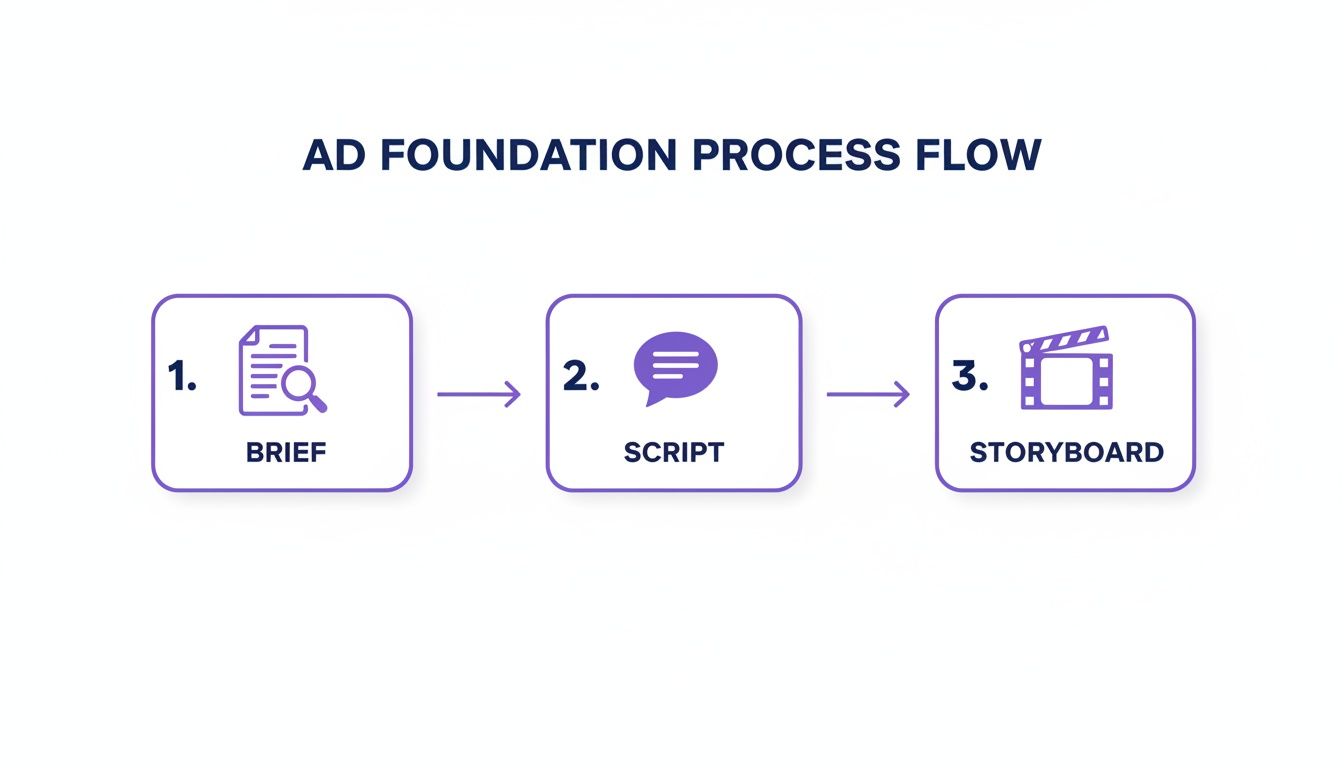
This simple flow is what keeps your creative on track, making sure every visual you generate serves the ad’s ultimate goal. Now, let's start building the pieces for each scene.
Crafting B-Roll That Doesn't Look AI-Generated
Your storyboard probably has shots listed like "frustrated coffee drinker" or "happy customer with a package." To get these from an AI tool, you need to write good prompts. The secret is to be descriptive and specific, almost like you’re a director giving instructions to a film crew.
A generic prompt like "person drinking coffee" will give you a generic, forgettable image.
Instead, try prompting with more detail and emotion:
- Prompt Idea: "A cinematic, eye-level shot of a young woman with curly hair, sitting in a modern, sunlit kitchen, smiling as she takes the first sip of coffee from a ceramic mug. The mood is warm and peaceful."
See the difference? That level of detail helps the AI understand the feeling you're going for, not just the action. The result is an image that fits your storyboard and connects emotionally. For a deeper dive into what's possible, it’s worth exploring what a modern AI video ad generator can do.
Choosing the Right AI Asset for Your Goal
Not all AI assets are created equal—some are better suited for specific advertising goals. An AI avatar can build trust for a testimonial-style ad, while dynamic B-roll might be better for showing a product in action.
Here’s a quick guide to help you match the right AI asset to your campaign objective.
| Ad Objective | Recommended AI Asset | Why It Works |
|---|---|---|
| Build Brand Trust | AI Avatar | A consistent, friendly face builds familiarity and a human connection with your audience. |
| Showcase Product Features | AI-Generated B-Roll | You can create hyper-specific, perfect shots of your product in any setting imaginable. |
| Explain a Complex Service | Animated Text & Graphics | Simplifies complicated ideas into easy-to-digest visuals that hold attention. |
| Drive Urgent Action (e.g., Sales) | AI Voiceover with Stock Video | A clear, direct voiceover combined with high-energy visuals can create a powerful call to action. |
Thinking about your goal first helps you choose tools that will actually deliver results, rather than just creating something that looks cool.
Keeping Your Visuals Consistent
One of the tell-tale signs of a poorly made AI ad is a jumble of mismatched visual styles. If your scenes look like they were pulled from completely different worlds, the whole ad feels cheap and unprofessional. Consistency is everything.
The easiest way to avoid this is to define a visual style guide before you start generating and then bake it into every single prompt.
- Color Palette: Add your brand colors to the prompt. For example, "...with pastel blue and soft yellow accents."
- Lighting: Be specific about the mood. Are you going for "bright, natural sunlight" or "dramatic, cinematic lighting"?
- Composition: Mention the camera shot. Is it a "close-up shot" or a "wide-angle view"?
By tacking these style keywords onto every prompt, you ensure all your images, clips, and avatars feel like they belong together. This creates a cohesive, professional video that people will actually want to watch.
Breathing Life Into Your Ad: Editing, Voice, and Sound
You've got a fantastic collection of AI-generated visuals, but right now, they're just a pile of silent clips. The magic happens in the editing room—this is where you stitch everything together, add a voice, and create an ad that truly connects with people.
Finding the Right Voice
Let's start with the voiceover. Gone are the days of robotic, monotone AI voices. Today's tools give you a massive library of options, and your job is to find the one that sounds like your brand feels.
If you’re a high-energy startup, you'll want a voice that's upbeat and confident. If you're a financial firm, you need a calm, steady tone that builds trust. My advice? Audition several voices. Read your script aloud along with them to see which one genuinely fits. This is just as crucial as your logo—it’s your brand's audible identity.
Simple Edits for a Professional Look
With the voiceover in place, it’s time to assemble the visuals. You don’t need to be a Hollywood editor to make your ad look sharp. Most modern platforms have incredibly useful one-click tools that solve common visual problems in a snap.
Here are a couple of my go-to features:
- Background Removal: This is a lifesaver. If your AI-generated image has a busy or distracting background, you can remove it instantly. This lets you isolate your product and place it on a clean, solid color or a more fitting scene.
- Picture-in-Picture: Perfect for tutorial or explainer ads. You can overlay your AI avatar onto your B-roll footage, creating a dynamic presentation where your "host" can walk viewers through the action on screen.
Think of editing as the final polish. It's not about adding flashy, over-the-top effects. It's about removing distractions and making sure the viewer’s attention is exactly where you want it.
Designing for a Silent World
Here's a hard truth: a huge chunk of your audience will watch your ad on social media with the sound off. If your entire message is in the voiceover, you're missing out. This is why auto-synced captions are an absolute must.
Don't just slap plain text on the screen. The best tools can highlight words as they’re spoken, almost like karaoke. This little trick keeps the viewer's eyes glued to the screen and makes your message stick, even in total silence.
Finally, don't forget the power of music. A simple, upbeat track can completely transform the energy and mood of your ad. Just be sure to use licensed tracks, like royalty-free music, to avoid any legal headaches down the road.
There's a reason everyone is focused on this. An incredible 89% of businesses now use video in their marketing, with ads being a top priority. Getting these final touches right is what will make you stand out. You can dig deeper into these numbers with the latest video marketing statistics.
Optimizing Your Ad for Different Platforms

Alright, you've created your video ad. That’s a huge step, but the work isn't over just yet. Now comes the part where we make sure it actually performs and doesn't just eat up your ad budget.
The biggest mistake I see people make is uploading the exact same video file to every platform. This is a surefire way to get poor results.
Each social media app has its own vibe, its own technical specs, and its own user expectations. Think about it: a widescreen ad that looks perfect on YouTube is going to be a disaster on a vertical feed like TikTok or Instagram Reels. It'll get awkwardly cropped, and your message will be lost. You have to adapt your ad to fit in.
Tailoring Your Video for Maximum Impact
Before you even think about hitting that export button, take a moment to consider where this ad is going to live. The most critical detail you need to get right is the aspect ratio—basically, the shape of your video.
- For YouTube: The gold standard is a horizontal 16:9 ratio. This is that classic widescreen format you're used to seeing on your TV or computer monitor.
- For TikTok, Reels, & Shorts: It has to be a vertical 9:16 ratio. This is non-negotiable. It fills the whole phone screen and is built for how people actually scroll through these feeds.
The good news is that most modern AI video tools make this incredibly easy. You can usually reformat your entire ad with just a click, which automatically reframes your visuals and captions so they look perfect on any device. If you're running ads on YouTube, it's also worth brushing up on YouTube advertising best practices to really dial in your strategy for that platform.
A Framework for Smart A/B Testing
Once your ad is formatted correctly, the real optimization work starts. You can't just assume you know what will work best—you have to test it. This is where an AI-powered workflow really shines, since you can whip up multiple variations of your ad without a ton of extra time or money.
Don't just guess. Set up simple A/B tests to get hard data on what resonates. The key is to test only one thing at a time.
Here are a few ideas to get you started:
- Test Different Hooks: Make two versions of your ad that are identical except for the first three seconds. Does starting with a question grab more attention than starting with a bold, surprising statement?
- Vary Your Call-to-Action (CTA): Pit "Shop Now" against "Learn More." You'd be surprised how much a small change in wording can affect your click-through rates.
- Experiment with Music: Try an upbeat, high-energy track versus a more relaxed, mellow one. The mood of the music can completely change how your audience perceives the ad.
The point of testing isn't to find a single "winning" ad and then stop. It's about creating a continuous feedback loop. Every test gives you new insights into your audience, which makes every campaign you run in the future that much smarter.
Make no mistake, the video advertising market is massive. In the US alone, spending hit $64 billion and is on track to blow past $72 billion, growing way faster than other media formats. You can see the full breakdown in this IAB report. Smart, consistent testing is how you carve out your piece of that pie.
Got Questions About Making Video Ads with AI?
As you start playing around with AI for video ads, some practical questions always pop up. Getting these sorted out is the key to moving from just messing around to actually launching campaigns that work. Let's tackle the big ones.
How Long Should My Video Ad Be?
There's no single right answer here—it all comes down to where you're running the ad.
If you're on a fast-scroll platform like TikTok or Instagram Reels, you have to be quick. Aim for 15-30 seconds, max. Honestly, you need to land your main point and call-to-action in the first 5-7 seconds, or you've already lost them to the next video.
YouTube is a different beast. You have a bit more breathing room, so you can test longer ads, maybe in the 60-90 second range, especially if you have a compelling story to tell. The beauty of an AI-first workflow is that you can take one core video and chop it into a bunch of different lengths. Test them all and see what sticks without having to start over each time.
Can I Use My Own Photos and Videos with AI?
Yes, and you absolutely should. Think of a great AI video tool less as a pure "generator" and more as a full-blown creative studio. You should be able to drag and drop your own product shots, branded clips, or even screen recordings right into your project.
This is how you get the best of both worlds: the insane speed of AI generation mixed with the authenticity of your own brand assets.
When you blend your own media with AI-generated scenes, voices, or avatars, the final product feels like yours. It grounds the futuristic AI stuff with something real and instantly recognizable to your customers.
What's the Secret to a High-Converting Video Ad?
From what I've seen, the ads that really crush it nail three things.
First, the hook. You have about 3 seconds to stop someone's thumb. That’s it. You need something that jolts them: a surprising question, a relatable pain point, or just a visually weird scene that makes them pause.
Second, the value. Don't just list features. Show them exactly how your product makes their life less annoying or more awesome. What problem are you solving for them right now?
And third, a crystal-clear call-to-action (CTA). Tell people what you want them to do. "Shop Now." "Learn More." "Grab Your Free Trial." Be direct. Of course, even the best ad will flop if you show it to the wrong people, so your audience targeting is just as important.
Is This AI Stuff Expensive?
Not when you compare it to the old way of doing things. A traditional video shoot can easily cost thousands of dollars for a single 30-second spot. AI tools completely flip that on its head.
Most platforms run on a subscription or a credit-based system. You might pay for the "heavy lifting," like generating a new AI scene or a voiceover, but things like editing and exporting are usually included.
This completely changes the game. You can now afford to create and test dozens of ad variations—different hooks, different visuals, different offers—for less than the cost of one traditional video. That's how you find the winners that actually drive sales.
Ready to make high-converting video ads in minutes? With Sprello, you can turn your ideas into polished, professional ads without any cameras or complex editing. Start creating today and see what your brand can do. Learn more at Sprello.


